Compare commits
3 Commits
| Author | SHA1 | Date | |
|---|---|---|---|
 Tobias Brenner Tobias Brenner
|
200850ac4f | ||
|
Tobias Brenner
|
068bb1470f | ||
|
renovate[bot]
|
be04af48da |
@@ -1,8 +0,0 @@
|
|||||||
---
|
|
||||||
version: 2
|
|
||||||
updates:
|
|
||||||
- package-ecosystem: "github-actions"
|
|
||||||
directory: "/"
|
|
||||||
schedule:
|
|
||||||
interval: daily
|
|
||||||
time: "06:00"
|
|
||||||
@@ -0,0 +1,6 @@
|
|||||||
|
{
|
||||||
|
"$schema": "https://docs.renovatebot.com/renovate-schema.json",
|
||||||
|
"extends": [
|
||||||
|
"config:base"
|
||||||
|
]
|
||||||
|
}
|
||||||
@@ -1,22 +1,21 @@
|
|||||||
|
# MIT License
|
||||||
MIT License
|
|
||||||
|
Copyright (c) 2023 Tobias Brenner
|
||||||
Copyright (c) 2022 Stephen Beechen
|
|
||||||
|
Permission is hereby granted, free of charge, to any person obtaining a copy
|
||||||
Permission is hereby granted, free of charge, to any person obtaining a copy
|
of this software and associated documentation files (the "Software"), to deal
|
||||||
of this software and associated documentation files (the "Software"), to deal
|
in the Software without restriction, including without limitation the rights
|
||||||
in the Software without restriction, including without limitation the rights
|
to use, copy, modify, merge, publish, distribute, sublicense, and/or sell
|
||||||
to use, copy, modify, merge, publish, distribute, sublicense, and/or sell
|
copies of the Software, and to permit persons to whom the Software is
|
||||||
copies of the Software, and to permit persons to whom the Software is
|
furnished to do so, subject to the following conditions:
|
||||||
furnished to do so, subject to the following conditions:
|
|
||||||
|
The above copyright notice and this permission notice shall be included in all
|
||||||
The above copyright notice and this permission notice shall be included in all
|
copies or substantial portions of the Software.
|
||||||
copies or substantial portions of the Software.
|
|
||||||
|
THE SOFTWARE IS PROVIDED "AS IS", WITHOUT WARRANTY OF ANY KIND, EXPRESS OR
|
||||||
THE SOFTWARE IS PROVIDED "AS IS", WITHOUT WARRANTY OF ANY KIND, EXPRESS OR
|
IMPLIED, INCLUDING BUT NOT LIMITED TO THE WARRANTIES OF MERCHANTABILITY,
|
||||||
IMPLIED, INCLUDING BUT NOT LIMITED TO THE WARRANTIES OF MERCHANTABILITY,
|
FITNESS FOR A PARTICULAR PURPOSE AND NONINFRINGEMENT. IN NO EVENT SHALL THE
|
||||||
FITNESS FOR A PARTICULAR PURPOSE AND NONINFRINGEMENT. IN NO EVENT SHALL THE
|
AUTHORS OR COPYRIGHT HOLDERS BE LIABLE FOR ANY CLAIM, DAMAGES OR OTHER
|
||||||
AUTHORS OR COPYRIGHT HOLDERS BE LIABLE FOR ANY CLAIM, DAMAGES OR OTHER
|
LIABILITY, WHETHER IN AN ACTION OF CONTRACT, TORT OR OTHERWISE, ARISING FROM,
|
||||||
LIABILITY, WHETHER IN AN ACTION OF CONTRACT, TORT OR OTHERWISE, ARISING FROM,
|
OUT OF OR IN CONNECTION WITH THE SOFTWARE OR THE USE OR OTHER DEALINGS IN THE
|
||||||
OUT OF OR IN CONNECTION WITH THE SOFTWARE OR THE USE OR OTHER DEALINGS IN THE
|
SOFTWARE.
|
||||||
SOFTWARE.
|
|
||||||
@@ -1,4 +1,8 @@
|
|||||||
# Smart Home Cambodia | Modern life with automation
|
# Home Assistant Add-on Repository for Cloudflared
|
||||||
|
|
||||||
|
![Project Stage][project-stage-shield]
|
||||||
|
![Maintenance][maintenance-shield]
|
||||||
|
[![License][license-shield]](LICENSE.md)
|
||||||
|
|
||||||
## About
|
## About
|
||||||
|
|
||||||
@@ -14,3 +18,87 @@ Additional add-ons might follow in the future.
|
|||||||
Adding this add-ons repository to your Home Assistant instance is
|
Adding this add-ons repository to your Home Assistant instance is
|
||||||
pretty straightforward. In the Home Assistant add-on store,
|
pretty straightforward. In the Home Assistant add-on store,
|
||||||
a possibility to add a repository is provided.
|
a possibility to add a repository is provided.
|
||||||
|
|
||||||
|
Use the following URL to add this repository:
|
||||||
|
|
||||||
|
```txt
|
||||||
|
https://github.com/brenner-tobias/ha-addons
|
||||||
|
```
|
||||||
|
|
||||||
|
## Add-ons provided by this repository
|
||||||
|
|
||||||
|
### ✓ [Cloudflared][addon-cloudflared]
|
||||||
|
|
||||||
|
![Latest Version][cloudflared-version-shield]
|
||||||
|
![Supports armhf Architecture][cloudflared-armhf-shield]
|
||||||
|
![Supports armv7 Architecture][cloudflared-armv7-shield]
|
||||||
|
![Supports aarch64 Architecture][cloudflared-aarch64-shield]
|
||||||
|
![Supports amd64 Architecture][cloudflared-amd64-shield]
|
||||||
|
![Supports i386 Architecture][cloudflared-i386-shield]
|
||||||
|
|
||||||
|
Use a Cloudflare Tunnel to remotely connect to Home Assistant without opening any ports
|
||||||
|
|
||||||
|
[:books: Cloudflared add-on documentation][addon-doc-cloudflared]
|
||||||
|
|
||||||
|
## Releases
|
||||||
|
|
||||||
|
Releases are based on [Semantic Versioning][semver], and use the format
|
||||||
|
of ``MAJOR.MINOR.PATCH``. In a nutshell, the version will be incremented
|
||||||
|
based on the following:
|
||||||
|
|
||||||
|
- ``MAJOR``: Incompatible or major changes.
|
||||||
|
- ``MINOR``: Backwards-compatible new features and enhancements.
|
||||||
|
- ``PATCH``: Backwards-compatible bugfixes and package updates.
|
||||||
|
|
||||||
|
## Support
|
||||||
|
|
||||||
|
Got questions?
|
||||||
|
|
||||||
|
Open an issue here on GitHub. Note, we use a separate
|
||||||
|
GitHub repository for each add-on. Please ensure you are creating the issue
|
||||||
|
on the correct GitHub repository matching the add-on.
|
||||||
|
|
||||||
|
- [Open an issue for the add-on: Cloudflared][cloudflared-issue]
|
||||||
|
|
||||||
|
For a general repository issue or add-on ideas [open an issue here][issue]
|
||||||
|
|
||||||
|
## License
|
||||||
|
|
||||||
|
MIT License
|
||||||
|
|
||||||
|
Copyright (c) 2023 Tobias Brenner
|
||||||
|
|
||||||
|
Permission is hereby granted, free of charge, to any person obtaining a copy
|
||||||
|
of this software and associated documentation files (the "Software"), to deal
|
||||||
|
in the Software without restriction, including without limitation the rights
|
||||||
|
to use, copy, modify, merge, publish, distribute, sublicense, and/or sell
|
||||||
|
copies of the Software, and to permit persons to whom the Software is
|
||||||
|
furnished to do so, subject to the following conditions:
|
||||||
|
|
||||||
|
The above copyright notice and this permission notice shall be included in all
|
||||||
|
copies or substantial portions of the Software.
|
||||||
|
|
||||||
|
THE SOFTWARE IS PROVIDED "AS IS", WITHOUT WARRANTY OF ANY KIND, EXPRESS OR
|
||||||
|
IMPLIED, INCLUDING BUT NOT LIMITED TO THE WARRANTIES OF MERCHANTABILITY,
|
||||||
|
FITNESS FOR A PARTICULAR PURPOSE AND NONINFRINGEMENT. IN NO EVENT SHALL THE
|
||||||
|
AUTHORS OR COPYRIGHT HOLDERS BE LIABLE FOR ANY CLAIM, DAMAGES OR OTHER
|
||||||
|
LIABILITY, WHETHER IN AN ACTION OF CONTRACT, TORT OR OTHERWISE, ARISING FROM,
|
||||||
|
OUT OF OR IN CONNECTION WITH THE SOFTWARE OR THE USE OR OTHER DEALINGS IN THE
|
||||||
|
SOFTWARE.
|
||||||
|
|
||||||
|
[addon-cloudflared]: https://github.com/brenner-tobias/addon-cloudflared/tree/v4.0.14
|
||||||
|
[addon-doc-cloudflared]: https://github.com/brenner-tobias/addon-cloudflared/blob/v4.0.14/README.md
|
||||||
|
[cloudflared-issue]: https://github.com/brenner-tobias/addon-cloudflared/issues
|
||||||
|
[cloudflared-version-shield]: https://img.shields.io/badge/version-v4.0.14-blue.svg
|
||||||
|
[cloudflared-aarch64-shield]: https://img.shields.io/badge/aarch64-yes-green.svg
|
||||||
|
[cloudflared-amd64-shield]: https://img.shields.io/badge/amd64-yes-green.svg
|
||||||
|
[cloudflared-armhf-shield]: https://img.shields.io/badge/armhf-yes-green.svg
|
||||||
|
[cloudflared-armv7-shield]: https://img.shields.io/badge/armv7-yes-green.svg
|
||||||
|
[cloudflared-i386-shield]: https://img.shields.io/badge/i386-yes-green.svg
|
||||||
|
[gitlabci-shield]: https://gitlab.com/brenner-tobias/ha-addons/badges/master/pipeline.svg
|
||||||
|
[gitlabci]: https://gitlab.com/brenner-tobias/ha-addons/pipelines
|
||||||
|
[issue]: https://github.com/brenner-tobias/ha-addons/issues
|
||||||
|
[license-shield]: https://img.shields.io/github/license/brenner-tobias/ha-addons.svg
|
||||||
|
[maintenance-shield]: https://img.shields.io/maintenance/yes/2023.svg
|
||||||
|
[project-stage-shield]: https://img.shields.io/badge/project%20stage-production%20ready-brightgreen.svg
|
||||||
|
[semver]: http://semver.org/spec/v2.0.0.html
|
||||||
@@ -1,21 +0,0 @@
|
|||||||
# Security Policy
|
|
||||||
|
|
||||||
## Supported Versions
|
|
||||||
|
|
||||||
Use this section to tell people about which versions of your project are
|
|
||||||
currently being supported with security updates.
|
|
||||||
|
|
||||||
| Version | Supported |
|
|
||||||
| ------- | ------------------ |
|
|
||||||
| 5.1.x | :white_check_mark: |
|
|
||||||
| 5.0.x | :x: |
|
|
||||||
| 4.0.x | :white_check_mark: |
|
|
||||||
| < 4.0 | :x: |
|
|
||||||
|
|
||||||
## Reporting a Vulnerability
|
|
||||||
|
|
||||||
Use this section to tell people how to report a vulnerability.
|
|
||||||
|
|
||||||
Tell them where to go, how often they can expect to get an update on a
|
|
||||||
reported vulnerability, what to expect if the vulnerability is accepted or
|
|
||||||
declined, etc.
|
|
||||||
@@ -1,118 +0,0 @@
|
|||||||
**Version 2.11**
|
|
||||||
- Fix "Allow non admin users to view panel" (#74)
|
|
||||||
|
|
||||||
**Version 2.1**
|
|
||||||
- Fix "Corrupted JSON files crash the addon" (#123)
|
|
||||||
- Fix "Setting hours to 24 crash the addon" (#124)
|
|
||||||
|
|
||||||
**Version 2.0.50 (beta)**
|
|
||||||
- Fix MQTT Switches unavailable on restart (#111)
|
|
||||||
- Fix error if entity is null (#110)
|
|
||||||
|
|
||||||
**Version 2.0.48 (beta)**
|
|
||||||
- create json folder if missing
|
|
||||||
- enable flask logs
|
|
||||||
|
|
||||||
**Version 2.0 (beta)**
|
|
||||||
- Rewritten from scratch in Python
|
|
||||||
- Complete reengineering of the docker structure
|
|
||||||
- New feature: Configuration moved to frontend (you need to set option again!)
|
|
||||||
- New feature: Recurring type scheduler (from - to - every)
|
|
||||||
- New feature: Added "Do not retry" flag
|
|
||||||
- New feature: Added "Clone" button
|
|
||||||
- New MQTT Engine
|
|
||||||
- Auto respawn processes (frontend and scheduler) in case of crash
|
|
||||||
- Full UTF-8 support in scheduler name (include regional, mathematical, symbols and emoji)
|
|
||||||
- Log moved to frontend
|
|
||||||
- Log improvement (more clear and more detalied)
|
|
||||||
- Improvement of "Max Retry" option behavior
|
|
||||||
- Avoid queuing of some domains (script, scene, ecc)
|
|
||||||
- Massive bugfix
|
|
||||||
|
|
||||||
**Version 0.64**
|
|
||||||
- Improvement: Set absolute value for light (#76)
|
|
||||||
- Improvement: MQTT Switches become unavailable if addon is not running
|
|
||||||
- Fix MQTT Switches duplicate with an ending 2 (#80)
|
|
||||||
|
|
||||||
**Version 0.62**
|
|
||||||
- Timezone issue (#75)
|
|
||||||
- Added some fixes to allow installation on not-supervised env (thanks to @micw)
|
|
||||||
|
|
||||||
**Version 0.61**
|
|
||||||
- Allow non admin users to view panel (#74)
|
|
||||||
- Fix "Missing translations" (#69)
|
|
||||||
|
|
||||||
**Version 0.60**
|
|
||||||
- Switch Docker image to HA Debian base
|
|
||||||
- Complete reengineering of the docker structure
|
|
||||||
- Fix "returned a non-zero code" issue in supervised installation (#65)
|
|
||||||
- Added support for VACUUM
|
|
||||||
|
|
||||||
**Version 0.50**
|
|
||||||
- New feature: Retry unavailable entities
|
|
||||||
- New feature: enable/disable schedulers in frontend (through MQTT)
|
|
||||||
- Improvement: Set fan percent speed
|
|
||||||
- Fixed bug in sorting (#61)
|
|
||||||
- Log improvement
|
|
||||||
- Several bugfixes
|
|
||||||
|
|
||||||
**Version 0.40**
|
|
||||||
- New feature: week-based scheduler
|
|
||||||
- Improvement: added dark theme
|
|
||||||
- Improvement: added Fan
|
|
||||||
- Updated UI
|
|
||||||
- Several bugfixes
|
|
||||||
|
|
||||||
**Version 0.35**
|
|
||||||
- Fix Temperature Only on multiple climate issue (#53)
|
|
||||||
|
|
||||||
**Version 0.34**
|
|
||||||
- Improvement: Change climate temperature without turning it on (#51)
|
|
||||||
- Update material icons to latest version
|
|
||||||
|
|
||||||
**Version 0.33**
|
|
||||||
- Improvement: manage commas as separator in time list (#46)
|
|
||||||
- Improvement: Added Cover (with position) (#49)
|
|
||||||
|
|
||||||
**Version 0.32**
|
|
||||||
- Fix "too many time" visualization issue (#48)
|
|
||||||
|
|
||||||
**Version 0.31**
|
|
||||||
- Fix single quote issue (#44)
|
|
||||||
- Javascript optimization
|
|
||||||
|
|
||||||
**Version 0.30**
|
|
||||||
- Can set brightness to Lights
|
|
||||||
- Can set temperature in Climates
|
|
||||||
- Can add positive/negative offset to sunset/sunrise
|
|
||||||
- Embed style and script to avoid cache issues
|
|
||||||
- Bugfix
|
|
||||||
|
|
||||||
**Version 0.22**
|
|
||||||
- Fixed a bug in scheduler
|
|
||||||
|
|
||||||
**Version 0.21**
|
|
||||||
- Fixed visualization of UTF-8 chars (issue #11)
|
|
||||||
|
|
||||||
**Version 0.20**
|
|
||||||
- Add Name to scheduling
|
|
||||||
- Can add more entities in one scheduler
|
|
||||||
- Can add multiple time in one scheduler
|
|
||||||
- Can drag rows to sort them
|
|
||||||
- Changed edit from row to sidebar
|
|
||||||
- Little graphic rewiew
|
|
||||||
- Code improvements
|
|
||||||
|
|
||||||
**Version 0.16**
|
|
||||||
- Fix option.json issue
|
|
||||||
- Removed table sorting
|
|
||||||
|
|
||||||
**Version 0.15**
|
|
||||||
- Fix Timezone Issue
|
|
||||||
|
|
||||||
**Version 0.14**
|
|
||||||
- Fix the “permission denied” issue
|
|
||||||
- Sortable Columns
|
|
||||||
- Added status bar with scheduler engine status
|
|
||||||
- Added “debug option” to see all the error messages
|
|
||||||
- various bugfixes/improvements
|
|
||||||
@@ -1,21 +0,0 @@
|
|||||||
ARG BUILD_FROM
|
|
||||||
FROM ${BUILD_FROM}
|
|
||||||
|
|
||||||
# Update Packages
|
|
||||||
RUN apt-get update -y && apt upgrade -y
|
|
||||||
|
|
||||||
# Setup base
|
|
||||||
RUN apt-get install -y \
|
|
||||||
coreutils \
|
|
||||||
wget \
|
|
||||||
curl \
|
|
||||||
python3 \
|
|
||||||
python3-dev \
|
|
||||||
python3-pip
|
|
||||||
|
|
||||||
# Install python modules
|
|
||||||
RUN pip3 install Flask requests paho-mqtt pytz psutil
|
|
||||||
|
|
||||||
# Copy root filesystem
|
|
||||||
COPY rootfs /
|
|
||||||
|
|
||||||
@@ -1,77 +0,0 @@
|
|||||||
# SimpleScheduler
|
|
||||||
|
|
||||||
A Home Assistant AddOn to schedule switches,lights and other entities on a weekly base in a visual way without coding.\
|
|
||||||
You can keep all the schedules in one place and add/change in a few clicks, even in your mobile app.
|
|
||||||
|
|
||||||
|
|
||||||
|
|
||||||
### Installation
|
|
||||||
Add the repository and then the addon by clickin on the badges:\
|
|
||||||
[<img src="https://my.home-assistant.io/badges/supervisor_add_addon_repository.svg">](https://my.home-assistant.io/redirect/supervisor_add_addon_repository/?repository_url=https%3A%2F%2Fgithub.com%2Farthurdent75%2FSimpleScheduler) \
|
|
||||||
[<img src="https://my.home-assistant.io/badges/supervisor_addon.svg">](https://my.home-assistant.io/redirect/supervisor_addon/?addon=00185a40_simplescheduler) \
|
|
||||||
If something goes wrong, you can install it manually.\
|
|
||||||
You can add the URL of this page in your "add-on store" as a new repository:\
|
|
||||||
*Settings > Add-ons > ADD-ON STORE button in bottom right corner > three dots in top right corner > Repositories*\
|
|
||||||
Click *Check for updates* and you will find the add-on "Simple Scheduler" listed.
|
|
||||||
|
|
||||||
If you are not using a supervised installation, you can run the addon as a standalone docker.
|
|
||||||
Take a look here: [docker_install.MD](https://github.com/arthurdent75/SimpleScheduler/blob/master/asset/docker_install.MD "docker_install.MD")
|
|
||||||
|
|
||||||
### Type of scheduler
|
|
||||||
|
|
||||||
There are three kind of scheduler:
|
|
||||||
- **Daily**: you can set a ON/OFF time (or a list of them) and than you choose on which weekdays you want to enable them.
|
|
||||||
- **Weekly**: you can set a different ON/OFF time (or list of them) for every single day of the week.
|
|
||||||
- **Recurring**: you can set a recurring ON/OFF (FROM hh:mm TO hh:mm EVERY n MINUTES) and choose on which weekdays you want to enable them.
|
|
||||||
|
|
||||||
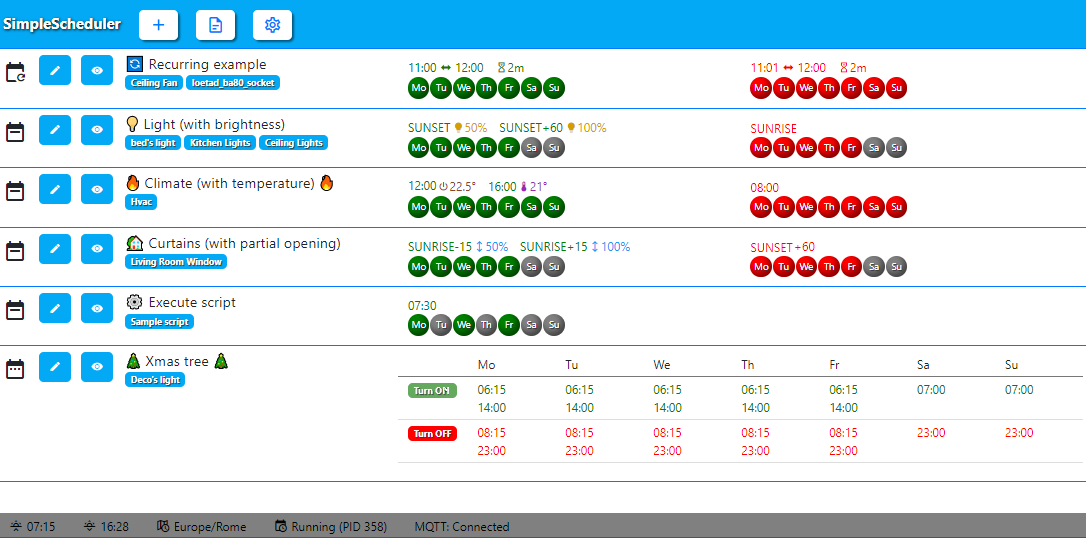
"*A picture is worth a thousand words*", so if you take a look at the screenshot it will be even more clear.
|
|
||||||
|
|
||||||
### How to use it
|
|
||||||
The add-on is very easy and intuitive (or, at least, that's what I hope)\
|
|
||||||
Once installed, open the GUI, click on the round plus button in the bottom right and choose your schedule type.\
|
|
||||||
Choose one or more entity from the dropdown, fill the ON time (in 24 hours format with leading zero, as suggested) and select the weekdays. Do the same for the OFF time and click "save".
|
|
||||||
That's it!
|
|
||||||
|
|
||||||
### Advanced Feature
|
|
||||||
If you need more advanced feature:
|
|
||||||
- You can set multiple time in the same scheduler: just write them in the field separated by spaces.
|
|
||||||
- You can use the words **sunrise** and **sunset** and also add an offset (in minutes) to it if you need (e.g: **sunrise+30** or **sunset-60** )
|
|
||||||
- You can set the percent brightness of a light. Write **16:30>B30** turn on the light at 30%
|
|
||||||
- You can set the absolute brightness of a light. Write **16:30>BA30** turn on the light at 30
|
|
||||||
- You can set the temperature of a climate. Write **16:30>T22.5** to turn on the climate and set the temperature to 22.5°
|
|
||||||
- You can set the temperature of a climate without turning it on. Write **16:30>TO22.5** to set the temperature to 22.5°
|
|
||||||
- You can set the position of a cover. Write **16:30>P25** will set the cover at 25%
|
|
||||||
- You can set the fan speed. Write **16:30>F25** will turn on the fan at 25%
|
|
||||||
- Brightess/Temperature/Position/Speed only work in the "TURN ON" section (obviously)!
|
|
||||||
- It's not mandatory to add both ON and OFF time. You can leave one of them empty if you don't need it. For example, you want to turn off a light every day at 22:00, but you don't need to turn it on.
|
|
||||||
- You can also choose to disable a schedule: the schedule will stay there, but it will not be executed until you will enable it back
|
|
||||||
- You can **drag the rows to sort them**, so you can keep them organized as you like!
|
|
||||||
|
|
||||||
Look at the picture above to see all this things in actions (and combined!).
|
|
||||||
|
|
||||||
### Frontend switch to enable/disable (with MQTT)
|
|
||||||
If you want to enable/disable schedulers in frontend and/or automation, you can achieve that through MQTT.
|
|
||||||
This feature is disabled by default, because it require a working MQTT server (broker) and Home Assistant MQTT integration.
|
|
||||||
Take a look at the [MQTT.MD](https://github.com/arthurdent75/SimpleScheduler/blob/master/asset/MQTT.MD "MQTT.MD") file to know more.
|
|
||||||
|
|
||||||
### Retry on unavailable
|
|
||||||
By default, SimpleScheduler will retry 3 times if an entity is unavailable. The first retry attempt happens after 5 second, than every minutes. You can change the numbers of retries in the addon options.
|
|
||||||
|
|
||||||
### Hidden scheduler details
|
|
||||||
When you have a lot of schedulers the view can become messy. As a default, all the scheduler details are hidden, so you can have a clear look.
|
|
||||||
You can toggle the visibility with the *eye* icon near the scheduler name.
|
|
||||||
If you prefer to have all the schedule always visible, you can easily achive that by setting **details_uncovered: true** in the addon configuration
|
|
||||||
|
|
||||||
### Dark theme
|
|
||||||
If you prefer a dark theme, you can activate it in the addon configuration by setting **dark_theme: true**
|
|
||||||
|
|
||||||
### Translation
|
|
||||||
The default text language is English. They are very few words.
|
|
||||||
If you want to translate them, you just need to take a look at the configuration section of the addon.
|
|
||||||
Rewrite the words you would like to have in your language and restart the addon.
|
|
||||||
For the weekdays, as you can easily understand, only the first two chars are used.
|
|
||||||
|
|
||||||
### Two words about the stored data
|
|
||||||
Every schedule (or row, if you prefer) is a JSON file stored in the [share/simplescheduler] folder under the SAMBA share.
|
|
||||||
This way the data can "survive" to an addon upgrade or reinstallation.
|
|
||||||
You can easily backup and restore them in case of failure. In the same way, you can (accidentally?) delete them. So be aware of that.
|
|
||||||
@@ -1,61 +0,0 @@
|
|||||||
# MQTT Configuration
|
|
||||||
To enble/disable schedulers in the frontend and/or in an automation, you can use this feature. This allow to create dynamic switches entities in Home Assistant for each scheduler.
|
|
||||||
The switch is in this form:
|
|
||||||
`switch.simplescheduler_id_scheduler_name`
|
|
||||||
Switch is created within a minute of the creation of a new scheduler, and removed as you delete a scheduler.
|
|
||||||
To use the feature you need three things:
|
|
||||||
1. a MQTT server (also named *broker*)
|
|
||||||
2. enable the MQTT integration in Home Assistant
|
|
||||||
3. activate the feature in Simplescheduler
|
|
||||||
|
|
||||||
It's less complicated than it seems!
|
|
||||||
|
|
||||||
## If you already have MQTT in Home Assistant
|
|
||||||
Set up Simplescheduler to point to your MQTT broker and set *Enabled* to *true*
|
|
||||||
|
|
||||||
MQTT:
|
|
||||||
enabled: true
|
|
||||||
server: your_mqtt_server_address
|
|
||||||
port: '1883'
|
|
||||||
username: your_mqtt_user
|
|
||||||
password: your_mqtt_password
|
|
||||||
|
|
||||||
If auth is not used, leave the *username* and *password* fields empty.
|
|
||||||
You also need the MQTT Integration in your Home Assistant with discovery enabled. If you use MQTT you should already have it but if you don't, take a look at step 2 in the next section.
|
|
||||||
|
|
||||||
## If you don't have MQTT configured
|
|
||||||
You have to follow three simple steps:
|
|
||||||
|
|
||||||
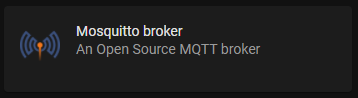
#### 1. Install the addon "Mosquitto broker"
|
|
||||||
Install the addon "Mosquitto broker", start it and enable "Start on boot".
|
|
||||||
No configuration needed.
|
|
||||||
|
|
||||||
|
|
||||||
#### 2. Install the MQTT integration
|
|
||||||
In ***Configuration > Device & Services*** add the MQTT integration.
|
|
||||||
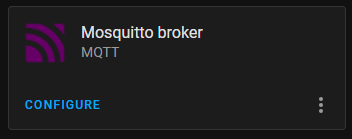
If you succesfully complete the prevous task, Home Assistant should automatically discover the integration and notify you to add it.
|
|
||||||
|
|
||||||
|
|
||||||
|
|
||||||
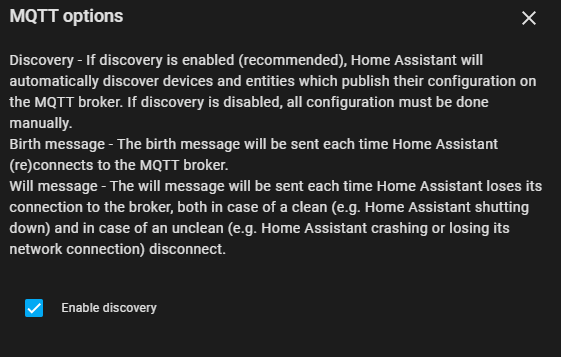
Click on CONFIGURE and leave all the default, but be sure to enable auto discovery
|
|
||||||
|
|
||||||
|
|
||||||
|
|
||||||
|
|
||||||
|
|
||||||
|
|
||||||
#### 3. Configure Simpleschedule
|
|
||||||
Simplescheduler is already pre-configured to use the Mosquitto Addon, so leave the *server* and the *port* parameter as default.
|
|
||||||
Set *enabled* to *true* and add the username and the password that you use to login in Home Assistant.
|
|
||||||
|
|
||||||
MQTT:
|
|
||||||
enabled: true
|
|
||||||
server: core-mosquitto
|
|
||||||
port: '1883'
|
|
||||||
username: your_homeassistant_user
|
|
||||||
password: your_homeassistant_password
|
|
||||||
|
|
||||||
After that, restart the addon.
|
|
||||||
|
|
||||||
If, for some reason, you don't want to write your HA credentials in the addon, you can use the credential that the MQTT integration use to talk to the MOSQUITTO addon.
|
|
||||||
The username is always *homeassistant* while the password is randomly generated during the addon installation. You can retrieve it in the MQTT integration by clicking on "RE-CONFIGURE MQTT", reveal the password with the eye icon and then copy the password.
|
|
||||||
@@ -1,31 +0,0 @@
|
|||||||
# Install this addon as a standalone docker
|
|
||||||
|
|
||||||
## Build the docker container
|
|
||||||
|
|
||||||
There is no ready-to-use docker image at the moment, so you have to build it. \
|
|
||||||
After you clone the repository, cd to the folder that contain the Dockerfile and run:
|
|
||||||
```
|
|
||||||
docker build . -t mysimplescheduler:latest --build-arg BUILD_FROM="ghcr.io/hassio-addons/debian-base/amd64:5.3.1"
|
|
||||||
```
|
|
||||||
For architectures other than amd64, just replace amd64 with one of the following: aarch64 , armhf , armv7 , i386.
|
|
||||||
|
|
||||||
|
|
||||||
## Create a token to access homeassistant
|
|
||||||
|
|
||||||
Log in to home assistant, go to your user profile, create a long running access token and copy it.
|
|
||||||
|
|
||||||
## Create a folder to store persistent data
|
|
||||||
|
|
||||||
You need to create a folder where the addon will save the data. You need to specify tha path in the docker run command
|
|
||||||
|
|
||||||
## Run the docker image
|
|
||||||
|
|
||||||
Run:
|
|
||||||
|
|
||||||
```
|
|
||||||
docker run -d -e SUPERVISOR_TOKEN=previously-created-token -e HASSIO_URL=http://your-hass-url:port/api -v /path/to/persistent/data:/share/simplescheduler -p 8099:8099 mysimplescheduler:latest
|
|
||||||
```
|
|
||||||
|
|
||||||
You can access the scheduler now at `http://localhost:8099`.
|
|
||||||
|
|
||||||
|
|
||||||

|
Before Width: | Height: | Size: 99 KiB |

|
Before Width: | Height: | Size: 7.7 KiB |

|
Before Width: | Height: | Size: 38 KiB |

|
Before Width: | Height: | Size: 7.1 KiB |
@@ -1,10 +0,0 @@
|
|||||||
---
|
|
||||||
build_from:
|
|
||||||
aarch64: ghcr.io/hassio-addons/debian-base/aarch64:5.3.1
|
|
||||||
amd64: ghcr.io/hassio-addons/debian-base/amd64:5.3.1
|
|
||||||
armhf: ghcr.io/hassio-addons/debian-base/armhf:5.3.1
|
|
||||||
armv7: ghcr.io/hassio-addons/debian-base/armv7:5.3.1
|
|
||||||
i386: ghcr.io/hassio-addons/debian-base/i386:5.3.1
|
|
||||||
codenotary:
|
|
||||||
base_image: notary@home-assistant.io
|
|
||||||
signer: notary@home-assistant.io
|
|
||||||
@@ -1,21 +0,0 @@
|
|||||||
---
|
|
||||||
version: "2.11"
|
|
||||||
name: Simple Scheduler
|
|
||||||
description: Simple timer on weekly base
|
|
||||||
slug: simplescheduler
|
|
||||||
url: https://github.com/arthurdent75/SimpleScheduler
|
|
||||||
codenotary: notary@home-assistant.io
|
|
||||||
arch:
|
|
||||||
- aarch64
|
|
||||||
- amd64
|
|
||||||
- armhf
|
|
||||||
- armv7
|
|
||||||
- i386
|
|
||||||
init: false
|
|
||||||
homeassistant_api: true
|
|
||||||
ingress: true
|
|
||||||
panel_admin: false
|
|
||||||
panel_title: Scheduler
|
|
||||||
panel_icon: mdi:calendar-clock
|
|
||||||
map:
|
|
||||||
- share:rw
|
|
||||||

|
Before Width: | Height: | Size: 4.7 KiB |
@@ -1,10 +0,0 @@
|
|||||||
#!/usr/bin/with-contenv bashio
|
|
||||||
# ==============================================================================
|
|
||||||
# Home Assistant Community Add-on: Example
|
|
||||||
# ==============================================================================
|
|
||||||
if [[ "${1}" -ne 0 ]] && [[ "${1}" -ne 256 ]]; then
|
|
||||||
bashio::log.warning "example 2 crashed, halting add-on"
|
|
||||||
/run/s6/basedir/bin/halt
|
|
||||||
fi
|
|
||||||
|
|
||||||
bashio::log.info "example 2 stoped, restarting..."
|
|
||||||
@@ -1,11 +0,0 @@
|
|||||||
#!/usr/bin/with-contenv bashio
|
|
||||||
# ==============================================================================
|
|
||||||
#
|
|
||||||
# Home Assistant Add-on: SimpleScheduler
|
|
||||||
#
|
|
||||||
# ==============================================================================
|
|
||||||
|
|
||||||
bashio::log.info "Starting service.d [Interface]"
|
|
||||||
|
|
||||||
exec /simplescheduler/interface.sh
|
|
||||||
|
|
||||||
@@ -1,10 +0,0 @@
|
|||||||
#!/usr/bin/with-contenv bashio
|
|
||||||
# ==============================================================================
|
|
||||||
# Home Assistant Community Add-on: Example
|
|
||||||
# ==============================================================================
|
|
||||||
if [[ "${1}" -ne 0 ]] && [[ "${1}" -ne 256 ]]; then
|
|
||||||
bashio::log.warning "example 2 crashed, halting add-on"
|
|
||||||
/run/s6/basedir/bin/halt
|
|
||||||
fi
|
|
||||||
|
|
||||||
bashio::log.info "example 2 stoped, restarting..."
|
|
||||||
@@ -1,11 +0,0 @@
|
|||||||
#!/usr/bin/with-contenv bashio
|
|
||||||
# ==============================================================================
|
|
||||||
#
|
|
||||||
# Home Assistant Add-on: SimpleScheduler
|
|
||||||
#
|
|
||||||
# ==============================================================================
|
|
||||||
|
|
||||||
bashio::log.info "Starting service.d [Scheduler]"
|
|
||||||
|
|
||||||
exec /simplescheduler/scheduler.sh
|
|
||||||
|
|
||||||
@@ -1,10 +0,0 @@
|
|||||||
#!/usr/bin/with-contenv bashio
|
|
||||||
# ==============================================================================
|
|
||||||
#
|
|
||||||
# Home Assistant Add-on: SimpleScheduler
|
|
||||||
#
|
|
||||||
# ==============================================================================
|
|
||||||
|
|
||||||
bashio::log.info "Running interface.sh"
|
|
||||||
|
|
||||||
python3 /simplescheduler/main.py
|
|
||||||
@@ -1,815 +0,0 @@
|
|||||||
from flask import Flask, render_template, request, redirect, make_response
|
|
||||||
import paho.mqtt.client as mqtt
|
|
||||||
import flask.cli
|
|
||||||
import logging
|
|
||||||
import glob
|
|
||||||
import os
|
|
||||||
import json
|
|
||||||
import uuid
|
|
||||||
from datetime import datetime, timedelta
|
|
||||||
import pytz
|
|
||||||
import requests
|
|
||||||
import re
|
|
||||||
import psutil
|
|
||||||
|
|
||||||
import simpleschedulerconf
|
|
||||||
|
|
||||||
lwt_topic = "homeassistant/switch/simplescheduler/availability"
|
|
||||||
sun_data = ""
|
|
||||||
schedulers_list = []
|
|
||||||
options = []
|
|
||||||
weekday = []
|
|
||||||
has_changed: bool = False
|
|
||||||
mqttclient = None
|
|
||||||
ha_timezone = "utc"
|
|
||||||
scheduler_pid = 0
|
|
||||||
request_timeout = 5 # seconds
|
|
||||||
|
|
||||||
app = Flask(__name__)
|
|
||||||
|
|
||||||
@app.route("/")
|
|
||||||
@app.route("/main")
|
|
||||||
def webserver_home():
|
|
||||||
return render_template('index.html',
|
|
||||||
data=load_json_schedulers(),
|
|
||||||
o=get_options(),
|
|
||||||
css=get_css(),
|
|
||||||
switchlist=get_switch_html_select_options(),
|
|
||||||
friendlynames=get_switch_friendly_names(),
|
|
||||||
sort=get_sort_list(),
|
|
||||||
weekday=weekday,
|
|
||||||
statusbarinfo=get_statusbar_info()
|
|
||||||
)
|
|
||||||
|
|
||||||
|
|
||||||
@app.route("/new")
|
|
||||||
def webserver_new():
|
|
||||||
return render_template('new.html')
|
|
||||||
|
|
||||||
|
|
||||||
@app.route('/delete', methods=['GET'])
|
|
||||||
def webserver_delete():
|
|
||||||
args = request.args
|
|
||||||
sid = args.get('id')
|
|
||||||
file = simpleschedulerconf.json_folder + sid + '.json'
|
|
||||||
if os.path.exists(file):
|
|
||||||
os.remove(file)
|
|
||||||
if options['MQTT']['enabled']:
|
|
||||||
mqttclient.publish('homeassistant/switch/simplescheduler/' + sid + '/config', "", qos=0, retain=1)
|
|
||||||
return redirect("main")
|
|
||||||
|
|
||||||
|
|
||||||
@app.route('/edit', methods=['GET'])
|
|
||||||
def webserver_edit():
|
|
||||||
is_new = False
|
|
||||||
args = request.args
|
|
||||||
sid = args.get('id')
|
|
||||||
stype: str = args.get('type')
|
|
||||||
file = simpleschedulerconf.json_folder + sid + '.json'
|
|
||||||
if sid != "0":
|
|
||||||
with open(file, "r") as read_file:
|
|
||||||
param = json.load(read_file)
|
|
||||||
else:
|
|
||||||
param = json.loads(get_json_template(stype))
|
|
||||||
param['id'] = uuid.uuid4().hex
|
|
||||||
is_new = True
|
|
||||||
|
|
||||||
return render_template('edit.html',
|
|
||||||
p=param,
|
|
||||||
o=get_options(),
|
|
||||||
weekday=weekday,
|
|
||||||
switchlist=get_switch_html_select_options(),
|
|
||||||
is_new=is_new
|
|
||||||
)
|
|
||||||
|
|
||||||
|
|
||||||
@app.route('/config', methods=['GET'])
|
|
||||||
def webserver_config():
|
|
||||||
return render_template('config.html',
|
|
||||||
o=get_options()
|
|
||||||
)
|
|
||||||
|
|
||||||
|
|
||||||
@app.route('/saveconfig', methods=['GET'])
|
|
||||||
def webserver_saveconfig():
|
|
||||||
jsondata = {}
|
|
||||||
translations = {}
|
|
||||||
components = {}
|
|
||||||
mqttconf = {}
|
|
||||||
content = request.args
|
|
||||||
for item in content:
|
|
||||||
if content[item] == '0' or content[item] == '1':
|
|
||||||
value = int(content[item])
|
|
||||||
else:
|
|
||||||
value = content[item]
|
|
||||||
if "." in item:
|
|
||||||
p = item.split(".")
|
|
||||||
cat = p[0].lower()
|
|
||||||
subcat = p[1]
|
|
||||||
if cat == "translations": translations[subcat] = value
|
|
||||||
if cat == "components": components[subcat] = value
|
|
||||||
if cat == "mqtt": mqttconf[subcat] = value
|
|
||||||
else:
|
|
||||||
jsondata[item] = value
|
|
||||||
|
|
||||||
jsondata["translations"] = translations
|
|
||||||
jsondata["components"] = components
|
|
||||||
jsondata["MQTT"] = mqttconf
|
|
||||||
|
|
||||||
option_file_path = os.path.join(simpleschedulerconf.json_folder, "options.dat")
|
|
||||||
with open(option_file_path, 'w') as option_file:
|
|
||||||
json_config = json.dump(jsondata, option_file)
|
|
||||||
|
|
||||||
init()
|
|
||||||
|
|
||||||
return redirect("main")
|
|
||||||
|
|
||||||
|
|
||||||
@app.route('/clone', methods=['GET'])
|
|
||||||
def webserver_clone():
|
|
||||||
args = request.args
|
|
||||||
sid = args.get('id')
|
|
||||||
file = simpleschedulerconf.json_folder + sid + '.json'
|
|
||||||
if os.path.exists(file) and sid != "0":
|
|
||||||
with open(file, "r") as read_file:
|
|
||||||
param = json.load(read_file)
|
|
||||||
newsid = uuid.uuid4().hex
|
|
||||||
newfile = simpleschedulerconf.json_folder + newsid + '.json'
|
|
||||||
param['id'] = newsid
|
|
||||||
param['name'] = param['name'] + " (2) "
|
|
||||||
with open(newfile, 'w') as jsonFile:
|
|
||||||
json.dump(param, jsonFile)
|
|
||||||
return redirect("main")
|
|
||||||
|
|
||||||
|
|
||||||
@app.route("/update", methods=['POST'])
|
|
||||||
def webserver_update():
|
|
||||||
sid = request.form.get('id')
|
|
||||||
enabled = request.form.get("enabled")
|
|
||||||
dontretry = request.form.get("dontretry")
|
|
||||||
name = request.form.get("name")
|
|
||||||
entity_id = request.form.getlist('entity_id[]')
|
|
||||||
type = request.form.get('type')
|
|
||||||
if type != 'weekly':
|
|
||||||
on_tod = request.form.get('on_tod')
|
|
||||||
off_tod = request.form.get('off_tod')
|
|
||||||
on_dow = ""
|
|
||||||
off_dow = ""
|
|
||||||
for o in request.form.getlist('on_dow[]'):
|
|
||||||
on_dow += o
|
|
||||||
for o in request.form.getlist('off_dow[]'):
|
|
||||||
off_dow += o
|
|
||||||
|
|
||||||
data = json.loads(get_json_template(type))
|
|
||||||
data['id'] = sid
|
|
||||||
data['name'] = name if name else sid
|
|
||||||
data['enabled'] = enabled if enabled else 0
|
|
||||||
data['dontretry'] = dontretry if dontretry else 0
|
|
||||||
data['entity_id'] = entity_id
|
|
||||||
if type == 'weekly':
|
|
||||||
data['weekly']['on_1'] = request.form.get('on_1')
|
|
||||||
data['weekly']['on_2'] = request.form.get('on_2')
|
|
||||||
data['weekly']['on_3'] = request.form.get('on_3')
|
|
||||||
data['weekly']['on_4'] = request.form.get('on_4')
|
|
||||||
data['weekly']['on_5'] = request.form.get('on_5')
|
|
||||||
data['weekly']['on_6'] = request.form.get('on_6')
|
|
||||||
data['weekly']['on_7'] = request.form.get('on_7')
|
|
||||||
data['weekly']['off_1'] = request.form.get('off_1')
|
|
||||||
data['weekly']['off_2'] = request.form.get('off_2')
|
|
||||||
data['weekly']['off_3'] = request.form.get('off_3')
|
|
||||||
data['weekly']['off_4'] = request.form.get('off_4')
|
|
||||||
data['weekly']['off_5'] = request.form.get('off_5')
|
|
||||||
data['weekly']['off_6'] = request.form.get('off_6')
|
|
||||||
data['weekly']['off_7'] = request.form.get('off_7')
|
|
||||||
elif type == 'recurring':
|
|
||||||
data['recurring']['on_start'] = request.form.get('on_start')
|
|
||||||
data['recurring']['on_end'] = request.form.get('on_end')
|
|
||||||
data['recurring']['on_interval'] = request.form.get('on_interval')
|
|
||||||
data['recurring']['off_start'] = request.form.get('off_start')
|
|
||||||
data['recurring']['off_end'] = request.form.get('off_end')
|
|
||||||
data['recurring']['off_interval'] = request.form.get('off_interval')
|
|
||||||
data['on_tod'] = on_tod
|
|
||||||
data['off_tod'] = off_tod
|
|
||||||
data['on_dow'] = on_dow
|
|
||||||
data['off_dow'] = off_dow
|
|
||||||
else:
|
|
||||||
data['on_tod'] = on_tod
|
|
||||||
data['off_tod'] = off_tod
|
|
||||||
data['on_dow'] = on_dow
|
|
||||||
data['off_dow'] = off_dow
|
|
||||||
file = simpleschedulerconf.json_folder + sid + '.json'
|
|
||||||
with open(file, 'w') as jsonFile:
|
|
||||||
json.dump(data, jsonFile)
|
|
||||||
if options['MQTT']['enabled']:
|
|
||||||
mqtt_send_config(mqttclient)
|
|
||||||
# mqtt_publish_state(mqttclient, id, enabled, True)
|
|
||||||
return redirect("main")
|
|
||||||
|
|
||||||
|
|
||||||
@app.route("/sort", methods=['GET'])
|
|
||||||
def webserver_sort():
|
|
||||||
data = request.args
|
|
||||||
save_sort_list(data)
|
|
||||||
return make_response("", 200)
|
|
||||||
|
|
||||||
|
|
||||||
@app.route("/log", methods=['GET'])
|
|
||||||
def webserver_log():
|
|
||||||
response = ""
|
|
||||||
logfilepath = os.path.join(simpleschedulerconf.json_folder, "simplescheduler.log")
|
|
||||||
with open(logfilepath, "r", encoding='utf-8') as logfile:
|
|
||||||
response += logfile.read()
|
|
||||||
return make_response(response, 200)
|
|
||||||
|
|
||||||
|
|
||||||
@app.route("/dirty")
|
|
||||||
def webserver_dirty():
|
|
||||||
global has_changed
|
|
||||||
if has_changed:
|
|
||||||
r = '1'
|
|
||||||
has_changed = False
|
|
||||||
else:
|
|
||||||
r = '0'
|
|
||||||
return make_response(r, 200)
|
|
||||||
|
|
||||||
|
|
||||||
@app.context_processor
|
|
||||||
def utility_processor():
|
|
||||||
def format_event(value: str, showvalue: bool):
|
|
||||||
if not value: return ''
|
|
||||||
result: str = ""
|
|
||||||
extra: str = ""
|
|
||||||
events = value.upper().replace(',', ' ').replace(';', ' ').split(' ')
|
|
||||||
|
|
||||||
for e in events:
|
|
||||||
p = e.split('>') # separate time from extra commands
|
|
||||||
t: str = p[0]
|
|
||||||
extra = ""
|
|
||||||
if len(p) > 1 and showvalue: # verify extra commands
|
|
||||||
prefix = p[1][0]
|
|
||||||
v: str = p[1][1:]
|
|
||||||
if prefix == 'F':
|
|
||||||
extra = '<span class="event-type-f"><i class="mdi mdi-fan" aria-hidden="true"></i>' + v + '%</span>'
|
|
||||||
if prefix == 'P':
|
|
||||||
extra = '<span class="event-type-p"><i class="mdi mdi-arrow-up-down" aria-hidden="true"></i>' + v + '%</span>'
|
|
||||||
if prefix == 'B':
|
|
||||||
if v[0] == 'A':
|
|
||||||
v = v[1:]
|
|
||||||
extra = '<span class="event-type-b"><i class="mdi mdi-lightbulb" aria-hidden="true"></i>' + v + '</span>'
|
|
||||||
else:
|
|
||||||
extra = '<span class="event-type-b"><i class="mdi mdi-lightbulb" aria-hidden="true"></i>' + v + '%</span>'
|
|
||||||
if prefix == 'T':
|
|
||||||
if v[0] == 'O':
|
|
||||||
v = v[1:]
|
|
||||||
extra = '<span class="event-type-to"><i class="mdi mdi-thermometer" aria-hidden="true"></i>' + v + '°</span>'
|
|
||||||
else:
|
|
||||||
extra = '<span class="event-type-t"><i class="mdi mdi-power" aria-hidden="true"></i>' + v + '°</span>'
|
|
||||||
result += '<span>' + t + extra + '</span >'
|
|
||||||
return result
|
|
||||||
|
|
||||||
return dict(format_event=format_event)
|
|
||||||
|
|
||||||
|
|
||||||
@app.context_processor
|
|
||||||
def utility_processor():
|
|
||||||
def get_friendly_html_dow(value: str, is_on: bool):
|
|
||||||
result: str = "<div>"
|
|
||||||
if len(value) > 0:
|
|
||||||
onOffClass = "dowHiglightG" if is_on else "dowHiglightR"
|
|
||||||
for wd in range(1, 8):
|
|
||||||
d = weekday[wd]
|
|
||||||
dclass = ""
|
|
||||||
if str(wd) in value:
|
|
||||||
dclass = onOffClass
|
|
||||||
result += '<div class="dowIcon ' + dclass + ' " >' + d + '</div>'
|
|
||||||
result += '</div>'
|
|
||||||
return result
|
|
||||||
|
|
||||||
return dict(get_friendly_html_dow=get_friendly_html_dow)
|
|
||||||
|
|
||||||
|
|
||||||
def on_connect(client, userdata, flags, rc):
|
|
||||||
if rc == 0:
|
|
||||||
printlog("STATUS: MQTT connected! ")
|
|
||||||
client.publish(lwt_topic, payload="online", qos=0, retain=True)
|
|
||||||
client.subscribe("homeassistant/switch/simplescheduler/#")
|
|
||||||
else:
|
|
||||||
printlog("ERROR: MQTT Error " + str(rc))
|
|
||||||
|
|
||||||
|
|
||||||
def on_message(client, userdata, msg):
|
|
||||||
global has_changed
|
|
||||||
payload = 0
|
|
||||||
pieces = msg.topic.split("/")
|
|
||||||
if len(pieces) > 4:
|
|
||||||
if pieces[4] == "set":
|
|
||||||
sid = pieces[3]
|
|
||||||
printlog('MQTT: RCV ' + msg.topic + " --> " + msg.payload.decode())
|
|
||||||
if msg.payload.decode() == 'ON':
|
|
||||||
payload = 1
|
|
||||||
update_json_file(sid, 'enabled', payload)
|
|
||||||
if options['MQTT']['enabled']:
|
|
||||||
mqtt_publish_state(client, sid, payload, True)
|
|
||||||
has_changed = "1"
|
|
||||||
|
|
||||||
|
|
||||||
def get_statusbar_info():
|
|
||||||
r = {
|
|
||||||
"sunrise": "N/A",
|
|
||||||
"sunset": "N/A",
|
|
||||||
"timezone": "N/A",
|
|
||||||
"scheduler": "Not running",
|
|
||||||
"mqtt": "Disabled"
|
|
||||||
}
|
|
||||||
tz = get_ha_timezone()
|
|
||||||
sunrise, sunset = get_sun(tz)
|
|
||||||
r['timezone'] = tz if tz else "N/A"
|
|
||||||
r['sunrise'] = sunrise.strftime("%H:%M") if sunrise else "N/A"
|
|
||||||
r['sunset'] = sunset.strftime("%H:%M") if sunset else "N/A"
|
|
||||||
pid = get_scheduler_pid()
|
|
||||||
if pid > 0:
|
|
||||||
r['scheduler'] = "Running (PID %s)" % pid
|
|
||||||
if options['MQTT']['enabled']:
|
|
||||||
r['mqtt'] = "Connected" if mqttclient.is_connected() else "Disconnected"
|
|
||||||
return r
|
|
||||||
|
|
||||||
|
|
||||||
def get_switch_list(domains):
|
|
||||||
full_switch_list = []
|
|
||||||
url = simpleschedulerconf.HASSIO_URL + "/states"
|
|
||||||
headers = {'content-type': 'application/json', 'Authorization': 'Bearer ' + simpleschedulerconf.SUPERVISOR_TOKEN}
|
|
||||||
try:
|
|
||||||
r = requests.get(url=url, headers=headers, timeout=request_timeout)
|
|
||||||
for block in r.json():
|
|
||||||
item = {
|
|
||||||
"id": block["entity_id"],
|
|
||||||
"state": block["state"],
|
|
||||||
"friendly_name": "",
|
|
||||||
"domain": "",
|
|
||||||
}
|
|
||||||
|
|
||||||
pieces = block["entity_id"].split(".")
|
|
||||||
item["domain"] = pieces[0]
|
|
||||||
|
|
||||||
attributes = block["attributes"]
|
|
||||||
if "friendly_name" in attributes:
|
|
||||||
item["friendly_name"] = attributes["friendly_name"]
|
|
||||||
|
|
||||||
if item["domain"] in domains:
|
|
||||||
full_switch_list.append(item)
|
|
||||||
|
|
||||||
full_switch_list.sort(key=lambda x: x["id"], reverse=False)
|
|
||||||
except:
|
|
||||||
printlog("ERROR: Unable to obtain entities info from Home Assistant")
|
|
||||||
return full_switch_list
|
|
||||||
|
|
||||||
|
|
||||||
def get_switch_friendly_names():
|
|
||||||
friendly_names = {}
|
|
||||||
url = simpleschedulerconf.HASSIO_URL + "/states"
|
|
||||||
headers = {'content-type': 'application/json', 'Authorization': 'Bearer ' + simpleschedulerconf.SUPERVISOR_TOKEN}
|
|
||||||
try:
|
|
||||||
r = requests.get(url=url, headers=headers, timeout=request_timeout)
|
|
||||||
for block in r.json():
|
|
||||||
key = block["entity_id"]
|
|
||||||
value = key
|
|
||||||
if "friendly_name" in block["attributes"]:
|
|
||||||
value = block["attributes"]["friendly_name"]
|
|
||||||
friendly_names[key] = value
|
|
||||||
except:
|
|
||||||
printlog("ERROR: Unable to obtain entities names from Home Assistant")
|
|
||||||
return friendly_names
|
|
||||||
|
|
||||||
|
|
||||||
def update_json_file(object_id, field_name, field_value):
|
|
||||||
file = simpleschedulerconf.json_folder + object_id + '.json'
|
|
||||||
try:
|
|
||||||
if os.path.exists(file):
|
|
||||||
with open(file, "r") as jsonFile:
|
|
||||||
data = json.load(jsonFile)
|
|
||||||
data[field_name] = field_value
|
|
||||||
with open(file, "w") as jsonFile:
|
|
||||||
json.dump(data, jsonFile)
|
|
||||||
except:
|
|
||||||
printlog("ERROR: Unable to update JSON file")
|
|
||||||
return True
|
|
||||||
|
|
||||||
|
|
||||||
def load_json_schedulers():
|
|
||||||
ss = []
|
|
||||||
os.chdir(simpleschedulerconf.json_folder)
|
|
||||||
for file in glob.glob("*.json"):
|
|
||||||
with open(file, "r") as read_file:
|
|
||||||
try:
|
|
||||||
ss.append(json.load(read_file))
|
|
||||||
except:
|
|
||||||
printlog("ERROR: scheduler file %s is corrupted" % file )
|
|
||||||
return ss
|
|
||||||
|
|
||||||
|
|
||||||
def mqtt_publish_state(client, object_id, pub_value, echo=False):
|
|
||||||
payload = 'OFF'
|
|
||||||
if pub_value:
|
|
||||||
payload = 'ON'
|
|
||||||
topic = 'homeassistant/switch/simplescheduler/' + object_id + '/state'
|
|
||||||
client.publish(topic, payload, qos=0, retain=1)
|
|
||||||
if echo:
|
|
||||||
printlog('MQTT: PUB ' + topic + ' --> ' + payload)
|
|
||||||
|
|
||||||
|
|
||||||
def mqtt_send_config(client):
|
|
||||||
schedulers = load_json_schedulers()
|
|
||||||
payload_template = '{"unique_id": "simplescheduler_###",' \
|
|
||||||
'"name": "SimpleScheduler: @@@" ,' \
|
|
||||||
'"icon":"mdi:calendar-clock" ,' \
|
|
||||||
'"cmd_t": "homeassistant/switch/simplescheduler/###/set",' \
|
|
||||||
'"stat_t": "homeassistant/switch/simplescheduler/###/state",' \
|
|
||||||
'"avty_t": "homeassistant/switch/simplescheduler/availability",' \
|
|
||||||
'"pl_avail":"online",' \
|
|
||||||
'"pl_not_avail":"offline"}'
|
|
||||||
config_topic_template = 'homeassistant/switch/simplescheduler/###/config'
|
|
||||||
for S in schedulers:
|
|
||||||
if S and 'name' in S:
|
|
||||||
topic = config_topic_template.replace('###', S['id'])
|
|
||||||
payload = payload_template.replace('###', S['id'])
|
|
||||||
payload = payload.replace('@@@', S['name'])
|
|
||||||
# slug = slugify(S['name'], separator="_")
|
|
||||||
# payload = payload.replace('&&&', slug)
|
|
||||||
client.publish(topic, payload, qos=0, retain=1)
|
|
||||||
# time.sleep(.1)
|
|
||||||
mqtt_publish_state(client, S['id'], S['enabled'], False)
|
|
||||||
# time.sleep(.1)
|
|
||||||
|
|
||||||
|
|
||||||
def get_options():
|
|
||||||
# path = "/data/options.json"
|
|
||||||
path = os.path.join(simpleschedulerconf.json_folder, "options.dat")
|
|
||||||
if not os.path.exists(path):
|
|
||||||
path = os.path.join(os.path.dirname(os.path.realpath(__file__)), "options.dat")
|
|
||||||
with open(path, "r", encoding='utf-8') as read_file:
|
|
||||||
opt = json.load(read_file)
|
|
||||||
return opt
|
|
||||||
|
|
||||||
|
|
||||||
def get_css():
|
|
||||||
global options
|
|
||||||
path_light = os.path.join(os.path.dirname(os.path.realpath(__file__)), "templates", "light.css")
|
|
||||||
path_dark = os.path.join(os.path.dirname(os.path.realpath(__file__)), "templates", "dark.css")
|
|
||||||
css = ""
|
|
||||||
# try:
|
|
||||||
with open(path_light, "r", encoding='utf-8') as css_file:
|
|
||||||
css += css_file.read()
|
|
||||||
if options['dark_theme']:
|
|
||||||
with open(path_dark, "r", encoding='utf-8') as css_file:
|
|
||||||
css += css_file.read()
|
|
||||||
# except:
|
|
||||||
# printlog("ERROR: Something went wrong while loading CSS")
|
|
||||||
return css
|
|
||||||
|
|
||||||
|
|
||||||
def get_enabled_domains():
|
|
||||||
enabled_domains = []
|
|
||||||
opt = get_options()
|
|
||||||
for d in opt['components']:
|
|
||||||
if opt['components'][d]:
|
|
||||||
enabled_domains.append(d)
|
|
||||||
return enabled_domains
|
|
||||||
|
|
||||||
|
|
||||||
def get_switch_html_select_options():
|
|
||||||
htmlstring: str = ''
|
|
||||||
switch_list = get_switch_list(get_enabled_domains())
|
|
||||||
comp = ""
|
|
||||||
for s in switch_list:
|
|
||||||
c = s['id'].split('.')
|
|
||||||
if comp != c[0]:
|
|
||||||
if comp != "":
|
|
||||||
htmlstring += '</optgroup>'
|
|
||||||
comp = c[0]
|
|
||||||
htmlstring += '<optgroup label="' + comp + '">'
|
|
||||||
name = s['id'] if s['friendly_name'] == "" else s['friendly_name'] + '(' + s['id'] + ')'
|
|
||||||
htmlstring += '<option value="' + s['id'] + '">' + name + '</option>'
|
|
||||||
htmlstring += '</optgroup>'
|
|
||||||
htmlstring = htmlstring.replace(chr(39), "'")
|
|
||||||
return htmlstring
|
|
||||||
|
|
||||||
|
|
||||||
def get_json_template(t: str):
|
|
||||||
t = t.lower()
|
|
||||||
json_template: str = ''
|
|
||||||
if t == 'w' or t == 'weekly':
|
|
||||||
json_template = '{"id":"","name":"","enabled":"1","entity_id":[""],"weekly":{"on_1":"","on_2":"","on_3":"",' \
|
|
||||||
'"on_4":"","on_5":"","on_6":"","on_7":"","off_1":"","off_2":"","off_3":"","off_4":"",' \
|
|
||||||
'"off_5":"","off_6":"","off_7":""}} '
|
|
||||||
if t == 'd' or t == 'daily' or t is None:
|
|
||||||
json_template = '{"id":"","name":"","enabled":"1","entity_id":[""],"on_tod":"","on_dow":"","off_tod":"",' \
|
|
||||||
'"off_dow":""} '
|
|
||||||
if t == 'r' or t == 'recurring':
|
|
||||||
json_template = '{"id":"","name":"","enabled":"1","entity_id":[""],"recurring":{"on_start":"","on_end":"",' \
|
|
||||||
'"on_interval":"","off_start":"","off_end":"","off_interval":""},"on_tod":"","on_dow":"",' \
|
|
||||||
'"off_tod":"","off_dow":""} '
|
|
||||||
|
|
||||||
return json_template
|
|
||||||
|
|
||||||
|
|
||||||
def get_sort_list():
|
|
||||||
sorting = {}
|
|
||||||
sort_file_path = simpleschedulerconf.json_folder + "sort.dat"
|
|
||||||
if os.path.exists(sort_file_path):
|
|
||||||
with open(sort_file_path, "r") as sort_file:
|
|
||||||
order = json.load(sort_file)
|
|
||||||
i = 0
|
|
||||||
for sid in order['id_order']:
|
|
||||||
sorting[sid] = i
|
|
||||||
i = i + 1
|
|
||||||
return sorting
|
|
||||||
|
|
||||||
|
|
||||||
def save_sort_list(data):
|
|
||||||
idlist = []
|
|
||||||
for el in data:
|
|
||||||
idlist.append(data[el])
|
|
||||||
jsonlist = json.loads('{"id_order":[]}')
|
|
||||||
jsonlist['id_order'] = idlist
|
|
||||||
with open(simpleschedulerconf.json_folder + "sort.dat", "w") as sort_file:
|
|
||||||
json.dump(jsonlist, sort_file)
|
|
||||||
return True
|
|
||||||
|
|
||||||
|
|
||||||
def get_events_in_html():
|
|
||||||
events_html = {"events_on": "events_on", "events_off": "events_off", "days_on": "days_on", "days_off": "days_off"}
|
|
||||||
return events_html
|
|
||||||
|
|
||||||
|
|
||||||
def get_entity_status(e, check):
|
|
||||||
response = ""
|
|
||||||
url = simpleschedulerconf.HASSIO_URL + "/states/" + e
|
|
||||||
headers = {'content-type': 'application/json', 'Authorization': 'Bearer ' + simpleschedulerconf.SUPERVISOR_TOKEN}
|
|
||||||
try:
|
|
||||||
r = requests.get(url=url, headers=headers, timeout=request_timeout)
|
|
||||||
result = r.json()
|
|
||||||
response = str(result['state']).lower()
|
|
||||||
if check:
|
|
||||||
altered_response = response
|
|
||||||
domain = e.lower().split(".")
|
|
||||||
if domain[0] == 'cover':
|
|
||||||
altered_response = 'on' if response == "open" else 'off'
|
|
||||||
if domain[0] == 'climate' and response != 'off':
|
|
||||||
altered_response = 'on'
|
|
||||||
|
|
||||||
response = altered_response
|
|
||||||
except:
|
|
||||||
printlog("ERROR: Unable to obtain entity status from Home Assistant")
|
|
||||||
return response
|
|
||||||
|
|
||||||
|
|
||||||
def call_ha_api(command_url: str, post_data: str):
|
|
||||||
opt = get_options()
|
|
||||||
headers = {'content-type': 'application/json', 'Authorization': 'Bearer ' + simpleschedulerconf.SUPERVISOR_TOKEN}
|
|
||||||
try:
|
|
||||||
r = requests.post(url=command_url, data=post_data, headers=headers, timeout=request_timeout)
|
|
||||||
command = command_url.replace(simpleschedulerconf.HASSIO_URL + "/services/", "")
|
|
||||||
if opt['debug']: printlog("DEBUG: %s %s" % (command, post_data))
|
|
||||||
if r.status_code != 200:
|
|
||||||
printlog("ERROR: Error calling HA API " + str(r.status_code))
|
|
||||||
except:
|
|
||||||
printlog("ERROR: Unable to call Home Assistant service")
|
|
||||||
return True
|
|
||||||
|
|
||||||
|
|
||||||
def call_ha(eid_list, action, passedvalue, friendly_name):
|
|
||||||
if not isinstance(eid_list, list):
|
|
||||||
eid_list = {eid_list}
|
|
||||||
for eid in eid_list:
|
|
||||||
command = "Turning " + action.upper()
|
|
||||||
extra = ""
|
|
||||||
v = ""
|
|
||||||
value = passedvalue.upper()
|
|
||||||
domain = eid.split(".")
|
|
||||||
command_url = simpleschedulerconf.HASSIO_URL + "/services/" + domain[0] + "/turn_" + action
|
|
||||||
postdata = '{"entity_id":"%s"}' % eid
|
|
||||||
|
|
||||||
if action == 'on':
|
|
||||||
if domain[0] == "light" and value != "":
|
|
||||||
if value[0] == "A":
|
|
||||||
v = int(value[1:])
|
|
||||||
extra = "to %d" % v
|
|
||||||
elif value.isdigit():
|
|
||||||
v = int(int(value) * 2.55)
|
|
||||||
extra = "to " + value + '%'
|
|
||||||
postdata = '{"entity_id":"%s","brightness":"%d"}' % (eid, v)
|
|
||||||
|
|
||||||
if domain[0] == "fan" and value != "":
|
|
||||||
v = value
|
|
||||||
extra = "to " + v + '%'
|
|
||||||
postdata = '{"entity_id":"%s","percentage":"%s"}' % (eid, v)
|
|
||||||
|
|
||||||
if domain[0] == "cover":
|
|
||||||
if value != "":
|
|
||||||
command_url = simpleschedulerconf.HASSIO_URL + "/services/cover/set_cover_position"
|
|
||||||
postdata = '{"entity_id":"%s","position":"%s"}' % (eid, value)
|
|
||||||
command = "Setting"
|
|
||||||
extra = "position to " + value + '%'
|
|
||||||
else:
|
|
||||||
if action == "on":
|
|
||||||
command_url = simpleschedulerconf.HASSIO_URL + "/services/cover/open_cover"
|
|
||||||
command = "Opening"
|
|
||||||
|
|
||||||
if domain[0] == "climate" and value != "":
|
|
||||||
if value[0] == "O":
|
|
||||||
v = value[1:]
|
|
||||||
command_url = simpleschedulerconf.HASSIO_URL + "/services/climate/set_temperature"
|
|
||||||
postdata = '{"entity_id":"%s","temperature":"%s"}' % (eid, v)
|
|
||||||
command = "Setting"
|
|
||||||
extra = "temperature to " + v + '°'
|
|
||||||
else:
|
|
||||||
if domain[0] == "cover":
|
|
||||||
command_url = simpleschedulerconf.HASSIO_URL + "/services/cover/close_cover"
|
|
||||||
command = "Closing"
|
|
||||||
|
|
||||||
printlog("SCHED: %s [%s] %s" % (command, friendly_name.get(eid, eid), extra))
|
|
||||||
call_ha_api(command_url, postdata)
|
|
||||||
|
|
||||||
if domain[0] == "climate" and value != "":
|
|
||||||
if value[0] != "O":
|
|
||||||
command_url = simpleschedulerconf.HASSIO_URL + "/services/climate/set_temperature"
|
|
||||||
postdata = '{"entity_id":"%s","temperature":"%s"}' % (eid, value)
|
|
||||||
call_ha_api(command_url, postdata)
|
|
||||||
command = "Setting"
|
|
||||||
extra = "temperature to " + value + '°'
|
|
||||||
printlog("SCHED: %s [%s] %s" % (command, friendly_name.get(eid, eid), extra))
|
|
||||||
|
|
||||||
return True
|
|
||||||
|
|
||||||
def is_a_retry_domain(entity):
|
|
||||||
response = True
|
|
||||||
if "scene." in entity : response = False
|
|
||||||
if "script." in entity: response = False
|
|
||||||
if "automation." in entity: response = False
|
|
||||||
if "media_player." in entity: response = False
|
|
||||||
if "camera." in entity: response = False
|
|
||||||
return response
|
|
||||||
|
|
||||||
def get_events_array(s):
|
|
||||||
s = s.upper().replace(',', ' ').replace(';', ' ').strip()
|
|
||||||
s = re.sub(' +', ' ', s)
|
|
||||||
events = s.split(' ')
|
|
||||||
return events
|
|
||||||
|
|
||||||
|
|
||||||
def evaluate_event_time(s, sunrise, sunset):
|
|
||||||
event = ""
|
|
||||||
sunrise_day = ""
|
|
||||||
sunset_day = ""
|
|
||||||
|
|
||||||
if sunrise:
|
|
||||||
sunrise_day = sunrise.strftime("%d")
|
|
||||||
if sunset:
|
|
||||||
sunset_day = sunset.strftime("%d")
|
|
||||||
today = datetime.now().strftime("%d")
|
|
||||||
if len(s) > 3:
|
|
||||||
p = s.upper().split('>')
|
|
||||||
event = p[0]
|
|
||||||
operator = "~"
|
|
||||||
if event[:3] == "SUN":
|
|
||||||
if event.find('+') != -1: operator = "+"
|
|
||||||
if event.find('-') != -1: operator = "-"
|
|
||||||
eventime = event.split(operator)
|
|
||||||
event = ""
|
|
||||||
if eventime[0] == "SUNRISE" and sunrise_day == today:
|
|
||||||
event = sunrise.strftime("%H:%M")
|
|
||||||
if eventime[0] == "SUNSET" and sunset_day == today:
|
|
||||||
event = sunset.strftime("%H:%M")
|
|
||||||
if event != "" and len(eventime) > 1:
|
|
||||||
hm = event.split(":")
|
|
||||||
if operator == '+':
|
|
||||||
event = (datetime(2022, 1, 1, int(hm[0]), int(hm[1])) + timedelta(
|
|
||||||
minutes=int(eventime[1]))).strftime("%H:%M")
|
|
||||||
else:
|
|
||||||
event = (datetime(2022, 1, 1, int(hm[0]), int(hm[1])) - timedelta(
|
|
||||||
minutes=int(eventime[1]))).strftime("%H:%M")
|
|
||||||
if event:
|
|
||||||
hm = event.split(":")
|
|
||||||
if 0 <= int(hm[0]) < 24 and 0 <= int(hm[1]) < 60:
|
|
||||||
event = datetime(2022, 1, 1, int(hm[0]), int(hm[1])).strftime("%H:%M") # fix missing leading zeroes
|
|
||||||
|
|
||||||
return event
|
|
||||||
|
|
||||||
|
|
||||||
def get_sun(tz, sunrise="", sunset=""):
|
|
||||||
if tz:
|
|
||||||
mytimezone = pytz.timezone(tz)
|
|
||||||
url = simpleschedulerconf.HASSIO_URL + "/states/sun.sun"
|
|
||||||
headers = {'content-type': 'application/json',
|
|
||||||
'Authorization': 'Bearer ' + simpleschedulerconf.SUPERVISOR_TOKEN}
|
|
||||||
try:
|
|
||||||
r = requests.get(url=url, headers=headers, timeout=request_timeout)
|
|
||||||
result = r.json()
|
|
||||||
response = result['attributes']
|
|
||||||
sunrise = datetime.fromisoformat(response['next_rising']).astimezone(mytimezone)
|
|
||||||
sunset = datetime.fromisoformat(response['next_setting']).astimezone(mytimezone)
|
|
||||||
except:
|
|
||||||
printlog("ERROR: Unable to obtain sun info from Home Assistant")
|
|
||||||
return sunrise, sunset
|
|
||||||
|
|
||||||
|
|
||||||
def get_ha_timezone():
|
|
||||||
response = ""
|
|
||||||
url = simpleschedulerconf.HASSIO_URL + "/config"
|
|
||||||
headers = {'content-type': 'application/json', 'Authorization': 'Bearer ' + simpleschedulerconf.SUPERVISOR_TOKEN}
|
|
||||||
try:
|
|
||||||
r = requests.get(url=url, headers=headers, timeout=request_timeout)
|
|
||||||
result = r.json()
|
|
||||||
response = result['time_zone']
|
|
||||||
except:
|
|
||||||
printlog("ERROR: Unable to obtain timezone from Home Assistant")
|
|
||||||
else:
|
|
||||||
try:
|
|
||||||
if not response:
|
|
||||||
response = os.environ["TZ"]
|
|
||||||
except:
|
|
||||||
printlog("ERROR: Unable to obtain timezone from OS")
|
|
||||||
return response
|
|
||||||
|
|
||||||
|
|
||||||
def get_scheduler_pid():
|
|
||||||
pid = 0
|
|
||||||
try:
|
|
||||||
for process in psutil.process_iter():
|
|
||||||
if "/simplescheduler/scheduler.py" in process.cmdline():
|
|
||||||
pid = process.pid
|
|
||||||
except:
|
|
||||||
printlog("ERROR: Unable to obtain scheduler PID")
|
|
||||||
return pid
|
|
||||||
|
|
||||||
|
|
||||||
def printlog(message):
|
|
||||||
t = datetime.now().strftime("%Y-%m-%d %H:%M:%S")
|
|
||||||
fullrow = "[%s] %s" % (t, message)
|
|
||||||
print(fullrow)
|
|
||||||
|
|
||||||
if not os.path.exists(simpleschedulerconf.json_folder):
|
|
||||||
os.makedirs(simpleschedulerconf.json_folder)
|
|
||||||
|
|
||||||
logfilepath = os.path.join(simpleschedulerconf.json_folder, "simplescheduler.log")
|
|
||||||
with open(logfilepath, "a", encoding='utf-8') as logfile:
|
|
||||||
logfile.write(fullrow + "\n")
|
|
||||||
|
|
||||||
|
|
||||||
def init():
|
|
||||||
global options
|
|
||||||
global weekday
|
|
||||||
global schedulers_list
|
|
||||||
global ha_timezone
|
|
||||||
|
|
||||||
options = get_options()
|
|
||||||
weekday = \
|
|
||||||
[
|
|
||||||
options['translations']['text_sunday'][:2],
|
|
||||||
options['translations']['text_monday'][:2],
|
|
||||||
options['translations']['text_tuesday'][:2],
|
|
||||||
options['translations']['text_wednesday'][:2],
|
|
||||||
options['translations']['text_thursday'][:2],
|
|
||||||
options['translations']['text_friday'][:2],
|
|
||||||
options['translations']['text_saturday'][:2],
|
|
||||||
options['translations']['text_sunday'][:2]
|
|
||||||
]
|
|
||||||
|
|
||||||
if options['debug']:
|
|
||||||
printlog(" QUESTION: What do you get if you multiply six by nine?")
|
|
||||||
printlog(" ANSWER: 42")
|
|
||||||
|
|
||||||
schedulers_list = load_json_schedulers()
|
|
||||||
|
|
||||||
ha_timezone = get_ha_timezone()
|
|
||||||
|
|
||||||
|
|
||||||
if __name__ == '__main__':
|
|
||||||
|
|
||||||
printlog('STATUS: Starting main program')
|
|
||||||
|
|
||||||
init()
|
|
||||||
|
|
||||||
if options['MQTT']['enabled']:
|
|
||||||
printlog('STATUS: Starting MQTT')
|
|
||||||
mqttclient = mqtt.Client(client_id="SimpleScheduler", clean_session=False)
|
|
||||||
mqttclient.on_connect = on_connect
|
|
||||||
mqttclient.on_message = on_message
|
|
||||||
mqttclient.will_set(lwt_topic, payload="offline", qos=0, retain=True)
|
|
||||||
mqttclient.username_pw_set(options['MQTT']['username'], options['MQTT']['password'])
|
|
||||||
try:
|
|
||||||
mqttclient.connect(options['MQTT']['server'], int(options['MQTT']['port']), 60)
|
|
||||||
except:
|
|
||||||
printlog("ERROR: MQTT Connection failed")
|
|
||||||
else:
|
|
||||||
mqttclient.loop_start()
|
|
||||||
mqtt_send_config(mqttclient)
|
|
||||||
|
|
||||||
# Disable Flask Messages
|
|
||||||
log = logging.getLogger('werkzeug')
|
|
||||||
log.disabled = True
|
|
||||||
flask.cli.show_server_banner = lambda *args: None
|
|
||||||
# app.logger.disabled = True
|
|
||||||
|
|
||||||
printlog('STATUS: Starting WebServer')
|
|
||||||
app.run(host='0.0.0.0', port=8099, debug=False)
|
|
||||||
@@ -1,42 +0,0 @@
|
|||||||
{
|
|
||||||
"translations": {
|
|
||||||
"text_monday": "Monday",
|
|
||||||
"text_tuesday": "Tuesday",
|
|
||||||
"text_wednesday": "Wednesday",
|
|
||||||
"text_thursday": "Thursday",
|
|
||||||
"text_friday": "Friday",
|
|
||||||
"text_saturday": "Saturday",
|
|
||||||
"text_sunday": "Sunday",
|
|
||||||
"text_ON": "ON",
|
|
||||||
"text_OFF": "OFF",
|
|
||||||
"text_save": "Save",
|
|
||||||
"text_enabled": "Enabled",
|
|
||||||
"text_device": "Device",
|
|
||||||
"text_name": "Name"
|
|
||||||
},
|
|
||||||
"components": {
|
|
||||||
"light": true,
|
|
||||||
"scene": true,
|
|
||||||
"switch": true,
|
|
||||||
"script": true,
|
|
||||||
"camera": true,
|
|
||||||
"climate": true,
|
|
||||||
"cover": true,
|
|
||||||
"vacuum": true,
|
|
||||||
"fan": true,
|
|
||||||
"automation": true,
|
|
||||||
"input_boolean": true,
|
|
||||||
"media_player": true
|
|
||||||
},
|
|
||||||
"MQTT": {
|
|
||||||
"enabled": false,
|
|
||||||
"server": "core-mosquitto",
|
|
||||||
"port": "1883",
|
|
||||||
"username": "",
|
|
||||||
"password": ""
|
|
||||||
},
|
|
||||||
"max_retry": "3",
|
|
||||||
"details_uncovered": true,
|
|
||||||
"dark_theme": false,
|
|
||||||
"debug": false
|
|
||||||
}
|
|
||||||
@@ -1,128 +0,0 @@
|
|||||||
import uuid
|
|
||||||
from datetime import datetime
|
|
||||||
from time import sleep
|
|
||||||
|
|
||||||
import main
|
|
||||||
|
|
||||||
command_queue = {}
|
|
||||||
sunrise = ""
|
|
||||||
sunset = ""
|
|
||||||
options = []
|
|
||||||
|
|
||||||
if __name__ == '__main__':
|
|
||||||
|
|
||||||
main.printlog('STATUS: Starting scheduler')
|
|
||||||
|
|
||||||
while True:
|
|
||||||
seconds = datetime.now().strftime("%S")
|
|
||||||
if seconds == '00':
|
|
||||||
options = main.get_options()
|
|
||||||
try:
|
|
||||||
max_retry = int(options['max_retry'])
|
|
||||||
except:
|
|
||||||
max_retry = 3
|
|
||||||
if max_retry < 0: max_retry = 3
|
|
||||||
if max_retry > 5: max_retry = 5
|
|
||||||
current_time = datetime.now().strftime("%H:%M")
|
|
||||||
current_dow = datetime.now().strftime("%w")
|
|
||||||
schedulers_list = main.load_json_schedulers()
|
|
||||||
friendly_name = main.get_switch_friendly_names()
|
|
||||||
if current_time == "00:01" or sunset == "" or sunrise == "":
|
|
||||||
if options['debug']:
|
|
||||||
main.printlog('DEBUG: Retrieving sunrise and sunset')
|
|
||||||
sunrise, sunset = main.get_sun(main.get_ha_timezone())
|
|
||||||
if current_dow == '0':
|
|
||||||
current_dow = '7'
|
|
||||||
for s in schedulers_list:
|
|
||||||
if s['enabled']:
|
|
||||||
dont_retry = s.get('dontretry',0)
|
|
||||||
if options['debug']: main.printlog("DEBUG: Parsing [%s]" % s['name'])
|
|
||||||
week_onoff = s.get('weekly')
|
|
||||||
|
|
||||||
if week_onoff:
|
|
||||||
s['weekly'] = ''
|
|
||||||
s['on_tod'] = week_onoff['on_' + current_dow]
|
|
||||||
s['off_tod'] = week_onoff['off_' + current_dow]
|
|
||||||
s['on_dow'] = current_dow
|
|
||||||
s['off_dow'] = current_dow
|
|
||||||
|
|
||||||
if current_dow in s['on_dow']:
|
|
||||||
elist = main.get_events_array(s['on_tod'])
|
|
||||||
for e in elist:
|
|
||||||
value = ""
|
|
||||||
p = e.upper().split('>')
|
|
||||||
t = p[0]
|
|
||||||
if len(p) > 1:
|
|
||||||
value = p[1][1:]
|
|
||||||
event_time = main.evaluate_event_time(t, sunrise, sunset)
|
|
||||||
if event_time == current_time:
|
|
||||||
main.printlog("SCHED: Executing ON actions for [%s]" % s['name'])
|
|
||||||
main.call_ha(s['entity_id'], "on", value, friendly_name )
|
|
||||||
for entity in s['entity_id']:
|
|
||||||
if (len(value) > 0 and value[0] != 'O') or not value : # if TemperatureOnly don't add to queue
|
|
||||||
if not dont_retry and max_retry > 0 :
|
|
||||||
if main.is_a_retry_domain(entity):
|
|
||||||
command_queue[uuid.uuid4().hex] = {"entity_id": entity, "sched_id": s['id'],
|
|
||||||
"state": "on", "value": value,
|
|
||||||
"countdown": max_retry,"max_retry": max_retry}
|
|
||||||
|
|
||||||
if current_dow in s['off_dow']:
|
|
||||||
elist = main.get_events_array(s['off_tod'])
|
|
||||||
for e in elist:
|
|
||||||
value = ""
|
|
||||||
p = e.upper().split('>')
|
|
||||||
t = p[0]
|
|
||||||
if len(p) > 1:
|
|
||||||
value = p[1][1:]
|
|
||||||
event_time = main.evaluate_event_time(t, sunrise, sunset)
|
|
||||||
if event_time == current_time:
|
|
||||||
main.printlog("SCHED: Executing OFF actions for [%s]" % s['name'])
|
|
||||||
main.call_ha(s['entity_id'], "off", value, friendly_name )
|
|
||||||
for entity in s['entity_id']:
|
|
||||||
if (len(value) > 0 and value[0] != 'O') or not value: # if TemperatureOnly don't add to queue
|
|
||||||
if not dont_retry and max_retry > 0 :
|
|
||||||
if main.is_a_retry_domain(entity):
|
|
||||||
command_queue[uuid.uuid4().hex] = {"entity_id": entity, "sched_id": s['id'],
|
|
||||||
"state": "off", "value": value,
|
|
||||||
"countdown": max_retry,"max_retry": max_retry}
|
|
||||||
|
|
||||||
sleep(5)
|
|
||||||
|
|
||||||
if options['debug']: main.printlog("DEBUG: Max Retry: %d" % max_retry)
|
|
||||||
if options['debug']: main.printlog("DEBUG: Starting Queue management - Queue length: %d" % len(command_queue))
|
|
||||||
|
|
||||||
for key in command_queue.copy():
|
|
||||||
|
|
||||||
value = command_queue[key]
|
|
||||||
entity_status = main.get_entity_status(value['entity_id'], True)
|
|
||||||
if options['debug']: main.printlog(
|
|
||||||
"DEBUG: ID:%s | Entity status:%s | Queue item:%s" % (key, entity_status.upper(), value))
|
|
||||||
|
|
||||||
if entity_status == 'unavailable':
|
|
||||||
attempt = 1 + int(value['max_retry']) - int(value['countdown'])
|
|
||||||
main.printlog("SCHED: [%s] is unavailable. Attempt %d of %d" % (
|
|
||||||
friendly_name.get(value['entity_id'], value['entity_id']), attempt, int(value['max_retry']) ))
|
|
||||||
command_queue[key]['countdown'] = int(value['countdown']) - 1
|
|
||||||
if command_queue[key]['countdown'] <= 0:
|
|
||||||
main.printlog(
|
|
||||||
"SCHED: Giving up on [%s]" % friendly_name.get(value['entity_id'], value['entity_id']))
|
|
||||||
command_queue.pop(key)
|
|
||||||
else:
|
|
||||||
if entity_status != value['state']:
|
|
||||||
attempt = 1 + int(value['max_retry']) - int(value['countdown'])
|
|
||||||
main.printlog("SCHED: Failed to set [%s]. Retry %d of %d " % (
|
|
||||||
friendly_name.get(value['entity_id'], value['entity_id']), attempt, int(value['max_retry'])))
|
|
||||||
main.call_ha(value['entity_id'], value['state'], value['value'], friendly_name )
|
|
||||||
command_queue[key]['countdown'] = int(value['countdown']) - 1
|
|
||||||
if command_queue[key]['countdown'] <= 0:
|
|
||||||
main.printlog(
|
|
||||||
"SCHED: Giving up on [%s]" % friendly_name.get(value['entity_id'], value['entity_id']))
|
|
||||||
command_queue.pop(key)
|
|
||||||
else:
|
|
||||||
main.printlog("SCHED: [%s] is %s as requested!" % (
|
|
||||||
friendly_name.get(value['entity_id'], value['entity_id']), entity_status.upper()))
|
|
||||||
command_queue.pop(key)
|
|
||||||
|
|
||||||
if options['debug']: main.printlog("DEBUG: Finished Queue management - Queue length: %d" % len(command_queue))
|
|
||||||
|
|
||||||
sleep(1)
|
|
||||||
@@ -1,10 +0,0 @@
|
|||||||
#!/usr/bin/with-contenv bashio
|
|
||||||
# ==============================================================================
|
|
||||||
#
|
|
||||||
# Home Assistant Add-on: SimpleScheduler
|
|
||||||
#
|
|
||||||
# ==============================================================================
|
|
||||||
|
|
||||||
bashio::log.info "Running scheduler.sh"
|
|
||||||
|
|
||||||
python3 /simplescheduler/scheduler.py
|
|
||||||
@@ -1,5 +0,0 @@
|
|||||||
import os
|
|
||||||
json_folder = "/share/simplescheduler/"
|
|
||||||
SUPERVISOR_TOKEN = os.environ["SUPERVISOR_TOKEN"]
|
|
||||||
HASSIO_URL = os.environ.get("HASSIO_URL","http://hassio/homeassistant/api")
|
|
||||||
|
|
||||||
@@ -1,60 +0,0 @@
|
|||||||
<tr class="config_section"><td colspan="4">MQTT</td></tr>
|
|
||||||
{% for t in o.MQTT %}
|
|
||||||
<tr class="config_item">
|
|
||||||
<td class="config_label">{{ t }}</td>
|
|
||||||
{% if t=="enabled": %}
|
|
||||||
<td class="config_input"><input type="checkbox" name="MQTT.{{ t }}" value="1" {{ 'checked ' if o.MQTT[t] else ' ' }} > <em>(need restart)</em></td>
|
|
||||||
{% else %}
|
|
||||||
<td class="config_input"><input type="text" value="{{ o.MQTT[t] }}" class="form-control input-sm" name="MQTT.{{ t }}" ></td>
|
|
||||||
{% endif %}
|
|
||||||
<td colspan="2">
|
|
||||||
</tr>
|
|
||||||
{% endfor %}
|
|
||||||
|
|
||||||
<tr class="config_section"><td colspan="4">DOMAINS</td></tr>
|
|
||||||
{% for t in o.components %}
|
|
||||||
<tr class="config_item">
|
|
||||||
<td class="config_label">{{ t }}</td>
|
|
||||||
<td class="config_input"><input type="checkbox" name="components.{{ t }}" value="1" {{ 'checked ' if o.components[t] else ' ' }} ></td>
|
|
||||||
<td colspan="2">
|
|
||||||
</tr>
|
|
||||||
{% endfor %}
|
|
||||||
|
|
||||||
<tr class="config_section"><td colspan="4">TRANSLATIONS</td></tr>
|
|
||||||
{% for t in o.translations %}
|
|
||||||
<tr class="config_item">
|
|
||||||
<td class="config_label">{{ t | replace("text_","") | upper }}</td>
|
|
||||||
<td class="config_input"><input type="text" value="{{ o.translations[t] }}" class="form-control input-sm" name="translations.{{ t }}" ></td>
|
|
||||||
<td colspan="2">
|
|
||||||
</tr>
|
|
||||||
{% endfor %}
|
|
||||||
|
|
||||||
<tr class="config_section"><td colspan="4">Misc</td></tr>
|
|
||||||
<tr class="config_item">
|
|
||||||
<td class="config_label">Max retry</td>
|
|
||||||
<td class="config_input"><input type="text" value="{{ o.max_retry }}" class="form-control input-sm" name="max_retry" ></td>
|
|
||||||
<td colspan="2">
|
|
||||||
</tr>
|
|
||||||
<tr class="config_item">
|
|
||||||
<td class="config_label">Details uncovered</td>
|
|
||||||
<td class="config_input"><input type="checkbox" name="details_uncovered" value="1" {{ 'checked ' if o.details_uncovered else ' ' }} ></td>
|
|
||||||
<td colspan="2">
|
|
||||||
</tr>
|
|
||||||
<tr class="config_item">
|
|
||||||
<td class="config_label">Dark theme</td>
|
|
||||||
<td class="config_input"><input type="checkbox" name="dark_theme" value="1" {{ 'checked ' if o.dark_theme else ' ' }} ></td>
|
|
||||||
<td colspan="2">
|
|
||||||
</tr>
|
|
||||||
<tr class="config_item">
|
|
||||||
<td class="config_label">Debug mode</td>
|
|
||||||
<td class="config_input"><input type="checkbox" name="debug" value="1" {{ 'checked ' if o.debug else ' ' }} ></td>
|
|
||||||
<td colspan="2">
|
|
||||||
</tr>
|
|
||||||
|
|
||||||
<tr>
|
|
||||||
<td colspan="4">
|
|
||||||
<button type="submit" class="btn btn-default bg-success" id="save-config"><span class="mdi mdi-content-save" ></span> {{ o.translations.text_save }} </button>
|
|
||||||
<button type="button" class="btn btn-secondary" id="close-config"><span class="mdi close-box-outline" ></span> Close </button>
|
|
||||||
</td>
|
|
||||||
</tr>
|
|
||||||
|
|
||||||
@@ -1,35 +0,0 @@
|
|||||||
BODY { background-color: #111111; color: white; }
|
|
||||||
|
|
||||||
.table td, .table th { border-top: 1px solid #333; color: white; }
|
|
||||||
|
|
||||||
.week_table_header { color: #e1e1e1; }
|
|
||||||
|
|
||||||
.badge {font-weight: 400; }
|
|
||||||
|
|
||||||
.btn-circle { box-shadow: none; }
|
|
||||||
|
|
||||||
.drag_icon { color: white; }
|
|
||||||
|
|
||||||
#sidebar {
|
|
||||||
background-color: #222;
|
|
||||||
box-shadow: 5px 5px 18px 0px #777;
|
|
||||||
}
|
|
||||||
|
|
||||||
.table-hover>tbody>tr:hover>* {
|
|
||||||
background-color: rgb(255 255 255 / 15%);
|
|
||||||
color: white; }
|
|
||||||
|
|
||||||
div.row-title P {color: white;}
|
|
||||||
|
|
||||||
.week_table_cell { border-bottom: 1px solid #777; }
|
|
||||||
|
|
||||||
.text-green { color: lightgreen; }
|
|
||||||
.text-red { color: #F66; }
|
|
||||||
|
|
||||||
#recurring_preview_on,
|
|
||||||
#recurring_preview_off
|
|
||||||
{
|
|
||||||
opacity: 1;
|
|
||||||
}
|
|
||||||
|
|
||||||
#logcontent {color: #000}
|
|
||||||
@@ -1,195 +0,0 @@
|
|||||||
<div>
|
|
||||||
<div>
|
|
||||||
<p class="scheduler_id">{{ p.id }}</p>
|
|
||||||
<form id="edit-form" class="edit-form" action="update" method="post" >
|
|
||||||
<input type="hidden" name="id" value="{{ p.id }}" >
|
|
||||||
|
|
||||||
<div class="edit-section-label"><label>{{ o.translations.text_name }}</label></div>
|
|
||||||
<div>
|
|
||||||
<input type="text" name="name" class="form-control input-sm" placeholder="{{ o.translations.text_name }}" value="{{ p.name }}">
|
|
||||||
</div>
|
|
||||||
<div>
|
|
||||||
<label class="checkbox-inline"><input type="checkbox" name="enabled" value="1" {{ 'checked ' if p.enabled else ' ' }} > {{ o.translations.text_enabled }}</label>
|
|
||||||
|
|
||||||
<label class="checkbox-inline"><input type="checkbox" name="dontretry" value="1" {{ 'checked ' if p.dontretry else ' ' }} > Do not retry</label>
|
|
||||||
</div>
|
|
||||||
|
|
||||||
<div class="edit-section-label"><label>{{ o.translations.text_device }}</label></div>
|
|
||||||
<div class="indexInput">
|
|
||||||
{% if p.entity_id %}
|
|
||||||
{% for e in p.entity_id %}
|
|
||||||
<div id="inputFormRow">
|
|
||||||
<div class="input-group mb-3">
|
|
||||||
<select name="entity_id[]" aria-data="{{ e }}" class="form-control entity-dropdown-fix">{{ switchlist|safe }}</select>
|
|
||||||
<div class="input-group-append"><button id="removeRow" type="button" class="btn btn-danger"><span class="mdi mdi-delete" ></span></button></div>
|
|
||||||
</div>
|
|
||||||
</div>
|
|
||||||
{% endfor %}
|
|
||||||
{% endif %}
|
|
||||||
</div>
|
|
||||||
|
|
||||||
<div>
|
|
||||||
<button id="addRow" type="button" class="btn btn-info bg-primary addRow">+</button>
|
|
||||||
</div>
|
|
||||||
|
|
||||||
{% if p.weekly: %}
|
|
||||||
<input type="hidden" name="type" value="weekly" >
|
|
||||||
<div class="edit-section-label"><label>{{ o.translations.text_ON }} / {{ o.translations.text_OFF }}</label></div>
|
|
||||||
<table>
|
|
||||||
<tr>
|
|
||||||
<td></td>
|
|
||||||
<td><span class="badge dowHiglightG ">{{ o.translations.text_ON }}</span></td>
|
|
||||||
<td><span class="badge dowHiglightR ">{{ o.translations.text_OFF }}</span></td>
|
|
||||||
</tr>
|
|
||||||
<tr>
|
|
||||||
<td>{{ o.translations.text_monday[:2] }}</td>
|
|
||||||
<td><input type="text" name="on_1" class="form-control input-sm" value="{{ p.weekly.on_1 }}"></td>
|
|
||||||
<td><input type="text" name="off_1" class="form-control input-sm" value="{{ p.weekly.off_1 }}"></td>
|
|
||||||
</tr>
|
|
||||||
<tr>
|
|
||||||
<td>{{ o.translations.text_tuesday[:2] }}</td>
|
|
||||||
<td><input type="text" name="on_2" class="form-control input-sm" value="{{ p.weekly.on_2 }}"></td>
|
|
||||||
<td><input type="text" name="off_2" class="form-control input-sm" value="{{ p.weekly.off_2 }}"></td>
|
|
||||||
</tr>
|
|
||||||
<tr>
|
|
||||||
<td>{{ o.translations.text_wednesday[:2] }}</td>
|
|
||||||
<td><input type="text" name="on_3" class="form-control input-sm" value="{{ p.weekly.on_3 }}"></td>
|
|
||||||
<td><input type="text" name="off_3" class="form-control input-sm" value="{{ p.weekly.off_3 }}"></td>
|
|
||||||
</tr>
|
|
||||||
<tr>
|
|
||||||
<td>{{ o.translations.text_thursday[:2] }}</td>
|
|
||||||
<td><input type="text" name="on_4" class="form-control input-sm" value="{{ p.weekly.on_4 }}"></td>
|
|
||||||
<td><input type="text" name="off_4" class="form-control input-sm" value="{{ p.weekly.off_4 }}"></td>
|
|
||||||
</tr>
|
|
||||||
<tr>
|
|
||||||
<td>{{ o.translations.text_friday[:2] }}</td>
|
|
||||||
<td><input type="text" name="on_5" class="form-control input-sm" value="{{ p.weekly.on_5 }}"></td>
|
|
||||||
<td><input type="text" name="off_5" class="form-control input-sm" value="{{ p.weekly.off_5 }}"></td>
|
|
||||||
</tr>
|
|
||||||
<tr>
|
|
||||||
<td>{{ o.translations.text_saturday[:2] }}</td>
|
|
||||||
<td><input type="text" name="on_6" class="form-control input-sm" value="{{ p.weekly.on_6 }}"></td>
|
|
||||||
<td><input type="text" name="off_6" class="form-control input-sm" value="{{ p.weekly.off_6 }}"></td>
|
|
||||||
</tr>
|
|
||||||
<tr>
|
|
||||||
<td>{{ o.translations.text_sunday[:2] }}</td>
|
|
||||||
<td><input type="text" name="on_7" class="form-control input-sm" value="{{ p.weekly.on_7 }}"></td>
|
|
||||||
<td><input type="text" name="off_7" class="form-control input-sm" value="{{ p.weekly.off_7 }}"></td>
|
|
||||||
</tr>
|
|
||||||
</table>
|
|
||||||
{% elif p.recurring: %}
|
|
||||||
<input type="hidden" name="type" value="recurring" >
|
|
||||||
<input type="hidden" name="on_tod" id="on_tod" value="{{ p.on_tod }}">
|
|
||||||
<input type="hidden" name="off_tod" id="off_tod" value="{{ p.off_tod }}">
|
|
||||||
|
|
||||||
<div class="edit-section-label"><label>{{ o.translations.text_ON }}</label></div>
|
|
||||||
|
|
||||||
<div>
|
|
||||||
{% for wd in range(1, 8): %}
|
|
||||||
<label class="checkbox-inline"><input type="checkbox" name="on_dow[]" value="{{ wd }}" {{ 'checked' if wd|string in p.on_dow else ' ' }} > {{ weekday[wd] }}</label>
|
|
||||||
{% endfor%}
|
|
||||||
</div>
|
|
||||||
|
|
||||||
<div class="form-row">
|
|
||||||
<div class="col-sm-3">
|
|
||||||
<div class="input-group mb-2">
|
|
||||||
<div class="input-group-prepend"><div class="input-group-text"><span class="mdi mdi-arrow-expand-right" ></span></div></div>
|
|
||||||
<input type="text" value="{{ p.recurring.on_start }}" class="form-control form-control-sm time_validate" name="on_start" id="on_start" placeholder="start">
|
|
||||||
</div>
|
|
||||||
</div>
|
|
||||||
<div class="col-sm-3">
|
|
||||||
<div class="input-group mb-2">
|
|
||||||
<div class="input-group-prepend"><div class="input-group-text"><span class="mdi mdi-arrow-expand-left" ></span></div></div>
|
|
||||||
<input type="text" value="{{ p.recurring.on_end }}" class="form-control form-control-sm time_validate" name="on_end" id="on_end" placeholder="end">
|
|
||||||
</div>
|
|
||||||
</div>
|
|
||||||
<div class="col-sm-3">
|
|
||||||
<div class="input-group mb-2">
|
|
||||||
<div class="input-group-prepend"><div class="input-group-text"><span class="mdi mdi-arrow-expand-horizontal" ></span></div></div>
|
|
||||||
<input type="text" value="{{ p.recurring.on_interval }}"class="form-control form-control-sm interval_validate" name="on_interval" id="on_interval" placeholder="interval">
|
|
||||||
</div>
|
|
||||||
</div>
|
|
||||||
<div class="col-auto">
|
|
||||||
<button type="button" class="btn btn-default bg-primary generate_button" aria-valuetext="on" ><span class="mdi mdi-eye" ></span></button>
|
|
||||||
</div>
|
|
||||||
</div>
|
|
||||||
|
|
||||||
<div id="recurring_preview_on" class="text-green" style="display:none;" ></div>
|
|
||||||
|
|
||||||
|
|
||||||
<div class="edit-section-label"><label>{{ o.translations.text_OFF }}</label></div>
|
|
||||||
<div>
|
|
||||||
{% for wd in range(1, 8): %}
|
|
||||||
<label class="checkbox-inline"><input type="checkbox" name="off_dow[]" value="{{ wd }}" {{ 'checked' if wd|string in p.off_dow else ' ' }} > {{ weekday[wd] }}</label>
|
|
||||||
{% endfor%}
|
|
||||||
</div>
|
|
||||||
|
|
||||||
<div class="form-row">
|
|
||||||
<div class="col-sm-3">
|
|
||||||
<div class="input-group mb-2">
|
|
||||||
<div class="input-group-prepend"><div class="input-group-text"><span class="mdi mdi-arrow-expand-right" ></span></div></div>
|
|
||||||
<input type="text" value="{{ p.recurring.off_start }}" class="form-control form-control-sm time_validate" name="off_start" id="off_start" placeholder="start">
|
|
||||||
</div>
|
|
||||||
</div>
|
|
||||||
<div class="col-sm-3">
|
|
||||||
<div class="input-group mb-2">
|
|
||||||
<div class="input-group-prepend"><div class="input-group-text"><span class="mdi mdi-arrow-expand-left" ></span></div></div>
|
|
||||||
<input type="text" value="{{ p.recurring.off_end }}" class="form-control form-control-sm time_validate" name="off_end" id="off_end" placeholder="end">
|
|
||||||
</div>
|
|
||||||
</div>
|
|
||||||
<div class="col-sm-3">
|
|
||||||
<div class="input-group mb-2">
|
|
||||||
<div class="input-group-prepend"><div class="input-group-text"><span class="mdi mdi-arrow-expand-horizontal" ></span></div></div>
|
|
||||||
<input type="text" value="{{ p.recurring.off_interval }}"class="form-control form-control-sm interval_validate" name="off_interval" id="off_interval" placeholder="interval">
|
|
||||||
</div>
|
|
||||||
</div>
|
|
||||||
<div class="col-auto">
|
|
||||||
<button type="button" class="btn btn-default bg-primary generate_button" aria-valuetext="off" ><span class="mdi mdi-eye" ></span></button>
|
|
||||||
</div>
|
|
||||||
</div>
|
|
||||||
|
|
||||||
|
|
||||||
|
|
||||||
<div id="recurring_preview_off" class="text-red" style="display:none;" ></div>
|
|
||||||
|
|
||||||
{% else %}
|
|
||||||
<input type="hidden" name="type" value="daily" >
|
|
||||||
<div class="edit-section-label"><label>{{ o.translations.text_ON }}</label></div>
|
|
||||||
<div>
|
|
||||||
<input type="text" name="on_tod" class="form-control input-sm" value="{{ p.on_tod }}">
|
|
||||||
</div>
|
|
||||||
|
|
||||||
<div>
|
|
||||||
{% for wd in range(1, 8): %}
|
|
||||||
<label class="checkbox-inline"><input type="checkbox" name="on_dow[]" value="{{ wd }}" {{ 'checked' if wd|string in p.on_dow else ' ' }} > {{ weekday[wd] }}</label>
|
|
||||||
{% endfor%}
|
|
||||||
</div>
|
|
||||||
|
|
||||||
<div class="edit-section-label"><label>{{ o.translations.text_OFF }}</label></div>
|
|
||||||
<div>
|
|
||||||
<input type="text" name="off_tod" class="form-control input-sm" value="{{ p.off_tod }}">
|
|
||||||
</div>
|
|
||||||
|
|
||||||
<div>
|
|
||||||
{% for wd in range(1, 8): %}
|
|
||||||
<label class="checkbox-inline"><input type="checkbox" name="off_dow[]" value="{{ wd }}" {{ 'checked' if wd|string in p.off_dow else ' ' }} > {{ weekday[wd] }}</label>
|
|
||||||
{% endfor%}
|
|
||||||
</div>
|
|
||||||
{% endif %}
|
|
||||||
<div style="clear:both;"></div>
|
|
||||||
<br/>
|
|
||||||
|
|
||||||
<div id="edit_buttons">
|
|
||||||
<button type="submit" class="btn btn-default bg-success float-left" id="save-button"><span class="mdi mdi-content-save" ></span> {{ o.translations.text_save }} </button>
|
|
||||||
{% if is_new==False: %}
|
|
||||||
<button type="button" class="btn btn-default bg-warning float-left" id="clone-button" aria-id="{{ p.id }}" ><span class="mdi mdi-content-copy" ></span> {{ o.translations.text_clone }} </button>
|
|
||||||
<button type="button" class="btn btn-default bg-danger float-right delete-button" aria-id="{{ p.id }}" ><span class="mdi mdi-delete" ></span> </button>
|
|
||||||
{% endif %}
|
|
||||||
</div>
|
|
||||||
|
|
||||||
</form>
|
|
||||||
</div>
|
|
||||||
</div>
|
|
||||||
<div style="clear:both;"></div>
|
|
||||||
<br/>
|
|
||||||
|
|
||||||
@@ -1,407 +0,0 @@
|
|||||||
<!doctype html>
|
|
||||||
<html>
|
|
||||||
<head>
|
|
||||||
<meta charset="utf-8">
|
|
||||||
<title>Simple Scheduler for HA</title>
|
|
||||||
<meta name="viewport" content="width=device-width, initial-scale=1, shrink-to-fit=no">
|
|
||||||
|
|
||||||
<link rel="stylesheet" href="https://cdn.jsdelivr.net/npm/@mdi/font@6.9.96/css/materialdesignicons.min.css" >
|
|
||||||
<link rel="stylesheet" href="https://cdn.jsdelivr.net/npm/bootstrap@5.2.2/dist/css/bootstrap.min.css" integrity="sha384-Zenh87qX5JnK2Jl0vWa8Ck2rdkQ2Bzep5IDxbcnCeuOxjzrPF/et3URy9Bv1WTRi" crossorigin="anonymous">
|
|
||||||
<script src="https://code.jquery.com/jquery-3.6.1.min.js" integrity="sha256-o88AwQnZB+VDvE9tvIXrMQaPlFFSUTR+nldQm1LuPXQ=" crossorigin="anonymous"></script>
|
|
||||||
<script src="https://cdn.jsdelivr.net/npm/bootstrap@5.2.2/dist/js/bootstrap.min.js" integrity="sha384-IDwe1+LCz02ROU9k972gdyvl+AESN10+x7tBKgc9I5HFtuNz0wWnPclzo6p9vxnk" crossorigin="anonymous"></script>
|
|
||||||
<script src="https://code.jquery.com/ui/1.13.2/jquery-ui.min.js" integrity="sha256-lSjKY0/srUM9BE3dPm+c4fBo1dky2v27Gdjm2uoZaL0=" crossorigin="anonymous"></script>
|
|
||||||
|
|
||||||
|
|
||||||
<style>
|
|
||||||
{{ css|safe }}
|
|
||||||
|
|
||||||
{% if o.details_uncovered==1 %}
|
|
||||||
.week_table{ display: table;}
|
|
||||||
{% endif %}
|
|
||||||
|
|
||||||
</style>
|
|
||||||
|
|
||||||
</head>
|
|
||||||
<body>
|
|
||||||
|
|
||||||
<div class="wrapper">
|
|
||||||
<nav id="sidebar">
|
|
||||||
<button type="button" aria-label="Close" class="btn btn-outline-secondary btn-sm" onclick="toggle_sidebar();">>>></button>
|
|
||||||
|
|
||||||
<div id="sidebar-wrapper">
|
|
||||||
...
|
|
||||||
</div>
|
|
||||||
</nav>
|
|
||||||
|
|
||||||
<form action="saveconfig" method="get" id="config-form" >
|
|
||||||
|
|
||||||
<div class="content" >
|
|
||||||
<div>
|
|
||||||
<table class="table table-hover" id="dtable">
|
|
||||||
<thead class="bg-primary">
|
|
||||||
<tr>
|
|
||||||
<th scope="col" colspan="4" >
|
|
||||||
<span class="titlebar_span" id="title">SimpleScheduler</span>
|
|
||||||
<span class="titlebar_span" id="show-add"><button type="button" class="btn btn-default bg-white main-color" ><span class="mdi mdi-plus"></span></button></span>
|
|
||||||
<span class="titlebar_span" id="show-log"><button type="button" class="btn btn-default bg-white main-color" ><span class="mdi mdi-file-document-outline" ></span></button></span>
|
|
||||||
<span class="titlebar_span" id="show-config"><button type="button" class="btn btn-default bg-white main-color" ><span class="mdi mdi-cog-outline"></span></button></span>
|
|
||||||
</th>
|
|
||||||
</tr>
|
|
||||||
</thead>
|
|
||||||
<tbody>
|
|
||||||
|
|
||||||
{% for s in data %}
|
|
||||||
|
|
||||||
<tr data-value="{{ s.id }}" data-order="{{ sort[s.id] }}" style="opacity: {{ '1' if s.enabled else '0.3' }}">
|
|
||||||
{% if s.weekly %}
|
|
||||||
<td class="text-center drag_icon fit"> <span class="mdi mdi-calendar-range mdi-24px" ></span> </td>
|
|
||||||
{% elif s.recurring %}
|
|
||||||
<td class="text-center drag_icon fit"><span class="mdi mdi-calendar-refresh mdi-24px" ></span></td>
|
|
||||||
{% else %}
|
|
||||||
<td class="text-center drag_icon fit"><span class="mdi mdi-calendar-week mdi-24px" ></span></td>
|
|
||||||
{% endif %}
|
|
||||||
<td class="text-center fit" >
|
|
||||||
<button type="button" class="btn btn-default bg-primary edit-button" aria-id="{{ s.id }}" ><span class="mdi mdi-pencil" ></span></button>
|
|
||||||
|
|
||||||
<button type="button" class="btn btn-default bg-primary view-button" aria-id="{{ s.id }}" ><span class="mdi mdi-eye" ></span></button>
|
|
||||||
</td>
|
|
||||||
<td class="name_col" >
|
|
||||||
<div class="row-title"><p data-bs-toggle="tooltip" data-bs-html="true" title="{{ s.id }}" >{{ s.name }}</p></div>
|
|
||||||
<div class="entities_list">
|
|
||||||
{% if s.entity_id %}
|
|
||||||
{% for e in s.entity_id %}
|
|
||||||
<span class="badge bg-primary" data-bs-toggle="tooltip" data-bs-html="true" title="{{ e }}" >{{ friendlynames[e] }}</span>
|
|
||||||
{% endfor %}
|
|
||||||
{% endif %}
|
|
||||||
</div>
|
|
||||||
</td>
|
|
||||||
{% if s.weekly %}
|
|
||||||
<td>
|
|
||||||
<div class="week_table w_mode" id="detail_{{ s.id }}">
|
|
||||||
<div class="week_table_row week_table_header">
|
|
||||||
<div class="week_table_cell"></div>
|
|
||||||
{% for wd in range(1, 8): %}
|
|
||||||
<div class="week_table_cell" style="width: 13.5%;" >
|
|
||||||
{{ weekday[wd] }}
|
|
||||||
</div>
|
|
||||||
{% endfor%}
|
|
||||||
</div>
|
|
||||||
<div class="week_table_row text-green week_table_row_bottom_line">
|
|
||||||
<div class="week_table_cell "><span class="badge dowHiglightG ">{{ o.translations.text_ON }}</span></div>
|
|
||||||
{% for wd in range(1, 8): %}
|
|
||||||
<div class="week_table_cell">
|
|
||||||
{{ format_event(s.weekly['on_'+wd|string], True)|safe }}
|
|
||||||
</div>
|
|
||||||
{% endfor%}
|
|
||||||
</div>
|
|
||||||
<div class="week_table_row text-red week_table_row_bottom_line">
|
|
||||||
<div class="week_table_cell "><span class="badge dowHiglightR ">{{ o.translations.text_OFF }}</span></div>
|
|
||||||
{% for wd in range(1, 8): %}
|
|
||||||
<div class="week_table_cell">
|
|
||||||
{{ format_event(s.weekly['off_'+wd|string], False)|safe }}
|
|
||||||
</div>
|
|
||||||
{% endfor%}
|
|
||||||
</div>
|
|
||||||
</div>
|
|
||||||
</td>
|
|
||||||
{% elif s.recurring %}
|
|
||||||
<td class="event-cell">
|
|
||||||
<div class="week_table d_mode" id="detail_{{ s.id }}">
|
|
||||||
<div class="week_table_row ">
|
|
||||||
<div class="week_table_cell ">
|
|
||||||
{% if s.on_tod %}
|
|
||||||
<div class="event-list text-green">
|
|
||||||
<span> {{ s.recurring.on_start }} <i class="mdi mdi-arrow-left-right-bold" ></i> {{ s.recurring.on_end }} </span>
|
|
||||||
<span class="mdi mdi-timer-sand" >{{ s.recurring.on_interval }}m</span>
|
|
||||||
</div>
|
|
||||||
<!-- <div style="clear:both;" class="event-list text-green">{{ format_event(s.on_tod, True)|safe }}</div> -->
|
|
||||||
<div style="clear:both;">{{ get_friendly_html_dow(s.on_dow,True)|safe }}</div>
|
|
||||||
{% endif %}
|
|
||||||
</div>
|
|
||||||
<div class="week_table_cell ">
|
|
||||||
{% if s.off_tod %}
|
|
||||||
<div class="event-list text-red">
|
|
||||||
<span> {{ s.recurring.off_start }} <i class="mdi mdi-arrow-left-right-bold" ></i> {{ s.recurring.off_end }} </span>
|
|
||||||
<span class="mdi mdi-timer-sand" >{{ s.recurring.off_interval }}m</span>
|
|
||||||
</div>
|
|
||||||
<!-- <div style="clear:both;" class="event-list text-red">{{ format_event(s.off_tod, False)|safe }}</div> -->
|
|
||||||
<div style="clear:both;">{{ get_friendly_html_dow(s.off_dow,False)|safe }}</div>
|
|
||||||
{% endif %}
|
|
||||||
</div>
|
|
||||||
</div>
|
|
||||||
</div>
|
|
||||||
</td>
|
|
||||||
{% else %}
|
|
||||||
<td class="event-cell">
|
|
||||||
<div class="week_table d_mode" id="detail_{{ s.id }}">
|
|
||||||
<div class="week_table_row ">
|
|
||||||
<div class="week_table_cell ">
|
|
||||||
{% if s.on_tod %}
|
|
||||||
<div class="event-list text-green">{{ format_event(s.on_tod, True)|safe }}</div>
|
|
||||||
<div style="clear:both;">{{ get_friendly_html_dow(s.on_dow,True)|safe }}</div>
|
|
||||||
{% endif %}
|
|
||||||
</div>
|
|
||||||
<div class="week_table_cell ">
|
|
||||||
{% if s.off_tod %}
|
|
||||||
<div class="event-list text-red">{{ format_event(s.off_tod, False)|safe }}</div>
|
|
||||||
<div style="clear:both;">{{ get_friendly_html_dow(s.off_dow,False)|safe }}</div>
|
|
||||||
{% endif %}
|
|
||||||
</div>
|
|
||||||
</div>
|
|
||||||
</div>
|
|
||||||
</td>
|
|
||||||
{% endif %}
|
|
||||||
</tr>
|
|
||||||
|
|
||||||
{% endfor %}
|
|
||||||
|
|
||||||
</tbody>
|
|
||||||
</table>
|
|
||||||
</div>
|
|
||||||
|
|
||||||
</div>
|
|
||||||
|
|
||||||
</form>
|
|
||||||
|
|
||||||
<div class="overlay"></div>
|
|
||||||
|
|
||||||
<footer class="footer">
|
|
||||||
<div class="statusbar">
|
|
||||||
<p>
|
|
||||||
<span class="statusbar_span"><span class="mdi mdi-weather-sunset-up" ></span> {{ statusbarinfo.sunrise }}</span>
|
|
||||||
<span class="statusbar_span"><span class="mdi mdi-weather-sunset-down" ></span> {{ statusbarinfo.sunset }}</span>
|
|
||||||
<span class="statusbar_span"><span class="mdi mdi-map-clock-outline" ></span> {{ statusbarinfo.timezone }}</span>
|
|
||||||
<span class="statusbar_span"><span class="mdi mdi-calendar-clock" ></span> {{ statusbarinfo.scheduler }}</span>
|
|
||||||
<span class="statusbar_span">MQTT: {{ statusbarinfo.mqtt }}</span>
|
|
||||||
<span class="statusbar_span"><a href="http://www.smarthomecambodia.com" title="www.smarthomecambodia.com" target="new">www.smarthomecambodia.com</a></span>
|
|
||||||
|
|
||||||
</p>
|
|
||||||
</div>
|
|
||||||
</footer>
|
|
||||||
</div>
|
|
||||||
|
|
||||||
<div id="log_wrapper" >
|
|
||||||
<div>
|
|
||||||
<pre id="logcontent"></pre>
|
|
||||||
<button type="button" class="btn btn-secondary" id="closelog"><span class="mdi close-box-outline" ></span> Close </button>
|
|
||||||
</div>
|
|
||||||
</div>
|
|
||||||
<div id="block_background" ></div>
|
|
||||||
|
|
||||||
<script>
|
|
||||||
|
|
||||||
$( document ).ready(function() {
|
|
||||||
|
|
||||||
var $tbody = $("#dtable tbody");
|
|
||||||
|
|
||||||
$tbody.sortable({
|
|
||||||
distance: 5,
|
|
||||||
delay: 100,
|
|
||||||
opacity: 0.6,
|
|
||||||
cursor: 'move',
|
|
||||||
update: function(e, tr) {
|
|
||||||
var orderlist = '';
|
|
||||||
$('tr.ui-sortable-handle').each(function (i) {
|
|
||||||
$(this).attr('data-order',i);
|
|
||||||
orderlist=orderlist+'&list['+i+']='+$(this).attr('data-value');
|
|
||||||
});
|
|
||||||
$("#sidebar-wrapper").load("sort?"+orderlist);
|
|
||||||
}
|
|
||||||
}).disableSelection();
|
|
||||||
|
|
||||||
|
|
||||||
$tbody.find('tr.ui-sortable-handle').sort(function (a, b) {
|
|
||||||
var tda = parseInt($(a).attr('data-order'));
|
|
||||||
var tdb = parseInt($(b).attr('data-order'));
|
|
||||||
return tda > tdb ? 1
|
|
||||||
: tda < tdb ? -1
|
|
||||||
: 0;
|
|
||||||
}).appendTo($tbody);
|
|
||||||
});
|
|
||||||
|
|
||||||
|
|
||||||
function toggle_sidebar(){
|
|
||||||
$("#sidebar").hide();
|
|
||||||
$("body").css('overflow','auto');
|
|
||||||
}
|
|
||||||
|
|
||||||
$(document).on('click', '.edit-button', function () {
|
|
||||||
v=$(this).attr('aria-id');
|
|
||||||
$("#sidebar-wrapper").html('');
|
|
||||||
$("#sidebar").show();
|
|
||||||
$("body").css('overflow','hidden');
|
|
||||||
$("#sidebar-wrapper").load("edit?id="+v, function() {
|
|
||||||
$(".entity-dropdown-fix").each(function( t ) {
|
|
||||||
this.value = $(this).attr('aria-data');
|
|
||||||
});
|
|
||||||
});
|
|
||||||
});
|
|
||||||
|
|
||||||
$(document).on('click', '.view-button', function () {
|
|
||||||
var v=$(this).attr('aria-id');
|
|
||||||
var t="#detail_"+v;
|
|
||||||
if ($(t).css('display')=="table") {
|
|
||||||
$(t).css('display','none');
|
|
||||||
}else{
|
|
||||||
$(t).css('display','table');
|
|
||||||
}
|
|
||||||
});
|
|
||||||
|
|
||||||
$(document).on('click', '#show-add', function () {
|
|
||||||
$("#sidebar-wrapper").html('');
|
|
||||||
$("#sidebar").show();
|
|
||||||
$("#sidebar-wrapper").load("new");
|
|
||||||
});
|
|
||||||
|
|
||||||
$(document).on('click', '#show-config', function () {
|
|
||||||
$("#dtable tbody").load("config");
|
|
||||||
});
|
|
||||||
|
|
||||||
$(document).on('click', '#close-config', function () {
|
|
||||||
window.location.href="main";
|
|
||||||
});
|
|
||||||
|
|
||||||
$(document).on('click', '#save-config', function () {
|
|
||||||
var f = document.getElementById("config-form");
|
|
||||||
$("input:checkbox:not(:checked)").each( function () {
|
|
||||||
$(this).prop('checked',true);
|
|
||||||
$(this).attr('value','0');
|
|
||||||
})
|
|
||||||
f.submit();
|
|
||||||
});
|
|
||||||
|
|
||||||
$(document).on('click', '#clone-button', function () {
|
|
||||||
var id=$(this).attr('aria-id');
|
|
||||||
window.location.href ='clone?id='+id;
|
|
||||||
});
|
|
||||||
|
|
||||||
$(document).on('click', '.delete-button', function () {
|
|
||||||
var id=$(this).attr('aria-id');
|
|
||||||
if (window.confirm("Are you sure?")) {
|
|
||||||
window.location.href ='delete?id='+id;
|
|
||||||
}
|
|
||||||
});
|
|
||||||
|
|
||||||
$(document).on('click', '.img-add-new', function () {
|
|
||||||
v=$(this).attr('aria-id');
|
|
||||||
$("#sidebar-wrapper").html('');
|
|
||||||
$("#sidebar").show();
|
|
||||||
$("#sidebar-wrapper").load("edit?id="+0+"&type="+v);
|
|
||||||
});
|
|
||||||
|
|
||||||
$(document).on('click', '.generate_button', function () {
|
|
||||||
action=$(this).attr('aria-valuetext');
|
|
||||||
r = document.getElementById('recurring_preview_'+action);
|
|
||||||
generate_recurrent(action);
|
|
||||||
if ($(r).css('display')=="none") {
|
|
||||||
$(r).css('display','block');
|
|
||||||
}else{
|
|
||||||
$(r).css('display','none');
|
|
||||||
}
|
|
||||||
});
|
|
||||||
|
|
||||||
$(document).on('submit', '.edit-form', function () {
|
|
||||||
var f = document.getElementById("edit-form");
|
|
||||||
var t = f.type.value;
|
|
||||||
if (t=="recurring") {
|
|
||||||
generate_recurrent("on");
|
|
||||||
generate_recurrent("off");
|
|
||||||
}
|
|
||||||
});
|
|
||||||
|
|
||||||
$(document).on('keyup', '.time_validate', function () {
|
|
||||||
obj=$(this);
|
|
||||||
field=obj[0];
|
|
||||||
var timeREGEX = /^[0-9]{2}:[0-9]{2}$/;
|
|
||||||
if (timeREGEX.test(field.value) || field.value=="") {
|
|
||||||
field.classList.remove("is-invalid");
|
|
||||||
document.getElementById("save-button").disabled=false;
|
|
||||||
} else {
|
|
||||||
field.classList.add("is-invalid");
|
|
||||||
document.getElementById("save-button").disabled=true;
|
|
||||||
}
|
|
||||||
});
|
|
||||||
|
|
||||||
$(document).on('keyup', '.interval_validate', function () {
|
|
||||||
obj=$(this);
|
|
||||||
field=obj[0];
|
|
||||||
var intervalREGEX = /^[0-9]{1,3}$/;
|
|
||||||
if (intervalREGEX.test(field.value) || field.value=="") {
|
|
||||||
document.getElementById("save-button").disabled=false;
|
|
||||||
field.classList.remove("is-invalid");
|
|
||||||
} else {
|
|
||||||
document.getElementById("save-button").disabled=true;
|
|
||||||
field.classList.add("is-invalid");
|
|
||||||
}
|
|
||||||
});
|
|
||||||
|
|
||||||
$(document).on('click', '#removeRow', function () {
|
|
||||||
$(this).closest('#inputFormRow').remove();
|
|
||||||
});
|
|
||||||
|
|
||||||
$(document).on('click', '#show-log', function () {
|
|
||||||
$("#logcontent").load("log" , function() {
|
|
||||||
$('#logcontent').scrollTop( $('#logcontent')[0].scrollHeight );
|
|
||||||
});
|
|
||||||
$("#log_wrapper").css('display','block');
|
|
||||||
$("#block_background").css('width','100%');
|
|
||||||
$("#block_background").css('height','100%');
|
|
||||||
$("#block_background").css('background-color','#777777e6');
|
|
||||||
});
|
|
||||||
|
|
||||||
$(document).on('click', '#closelog', function () {
|
|
||||||
$("#log_wrapper").css('display','none');
|
|
||||||
$("#block_background").css('width','0%');
|
|
||||||
$("#block_background").css('height','0%');
|
|
||||||
$("#block_background").css('background-color','#77777700');
|
|
||||||
});
|
|
||||||
|
|
||||||
function generate_recurrent(action) {
|
|
||||||
r = document.getElementById('recurring_preview_'+action);
|
|
||||||
r.innerHTML = "";
|
|
||||||
|
|
||||||
start=document.getElementById(action+'_start').value;
|
|
||||||
end=document.getElementById(action+'_end').value;
|
|
||||||
interval=document.getElementById(action+'_interval').value;
|
|
||||||
|
|
||||||
var startDate= new Date("2022-01-01T" + start +":00Z");
|
|
||||||
var endDate = new Date("2022-01-01T" + end +":00Z");
|
|
||||||
s = startDate.getTime();
|
|
||||||
e = endDate.getTime();
|
|
||||||
|
|
||||||
if (s<e) {
|
|
||||||
while ( s<=e ) {
|
|
||||||
out = new Date(s)
|
|
||||||
t = out.toUTCString().substring(17, 22)
|
|
||||||
if (t.length>0) r.innerHTML += t + " ";
|
|
||||||
s = s + (interval * 60000);
|
|
||||||
}
|
|
||||||
} else {
|
|
||||||
r.innerHTML = ""
|
|
||||||
}
|
|
||||||
document.getElementById(action+'_tod').value=r.innerText;
|
|
||||||
}
|
|
||||||
|
|
||||||
var intervalcheck = window.setInterval(function(){
|
|
||||||
$.get("dirty", function( r ) {
|
|
||||||
if (r=="1") location.reload();
|
|
||||||
});
|
|
||||||
}, 3000);
|
|
||||||
|
|
||||||
$(document).on('click', '#addRow', function () {
|
|
||||||
var html = '';
|
|
||||||
html += '<div id="inputFormRow">';
|
|
||||||
html += '<div class="input-group mb-3">';
|
|
||||||
html += '<select name="entity_id[]" class="form-control">{{ switchlist|safe }}</select>';
|
|
||||||
html += '<div class="input-group-append"><button id="removeRow" type="button" class="btn btn-danger"><span class="mdi mdi-delete" ></span></button></div>';
|
|
||||||
html += '</div>';
|
|
||||||
html += '</div>';
|
|
||||||
$("#info").html('Clic ADD');
|
|
||||||
$('.indexInput').append(html);
|
|
||||||
});
|
|
||||||
|
|
||||||
</script>
|
|
||||||
|
|
||||||
|
|
||||||
</body>
|
|
||||||
</html>
|
|
||||||
@@ -1,418 +0,0 @@
|
|||||||
:root {
|
|
||||||
--maincolor: #007bff;
|
|
||||||
}
|
|
||||||
|
|
||||||
H5 {margin-bottom: 0 ; line-height: 14px; }
|
|
||||||
|
|
||||||
.main-color { color: var(--maincolor)!important; }
|
|
||||||
|
|
||||||
div.content { margin-bottom: 2em; }
|
|
||||||
|
|
||||||
|
|
||||||
.table td, .table th {
|
|
||||||
vertical-align: top;
|
|
||||||
border-bottom: 1px solid var(--maincolor);
|
|
||||||
border-top: none;
|
|
||||||
|
|
||||||
}
|
|
||||||
|
|
||||||
THEAD {
|
|
||||||
line-height: 3em;
|
|
||||||
}
|
|
||||||
|
|
||||||
#sidebar {
|
|
||||||
display:none;
|
|
||||||
min-width: 250px;
|
|
||||||
max-width: 30%;
|
|
||||||
height: 100%;
|
|
||||||
position: fixed;
|
|
||||||
top: 0;
|
|
||||||
right: 0;
|
|
||||||
padding: 1em;
|
|
||||||
z-index: 9999;
|
|
||||||
background-color: rgba(255,255,255,0.98);
|
|
||||||
box-shadow: 5px 5px 18px 0px #000;
|
|
||||||
overflow-y: auto;
|
|
||||||
}
|
|
||||||
|
|
||||||
.edit-form > div {
|
|
||||||
margin: 1em 0;
|
|
||||||
}
|
|
||||||
|
|
||||||
.form-row span.mdi { font-size: 14px; }
|
|
||||||
|
|
||||||
.btn-default { color: white;}
|
|
||||||
|
|
||||||
.dowIcon {
|
|
||||||
border: 0px solid ;
|
|
||||||
border-radius: 20px;
|
|
||||||
background: grey;
|
|
||||||
color: white;
|
|
||||||
font-size: 0.8rem;
|
|
||||||
width: 1.8rem;
|
|
||||||
height: 1.8rem;
|
|
||||||
line-height: 1.8rem;
|
|
||||||
text-align: center;
|
|
||||||
margin-right: 0.1em;
|
|
||||||
display: inline-block;
|
|
||||||
text-shadow: 1px 1px 1px #333;
|
|
||||||
box-shadow: inset -3px -4px 6px #00000077;
|
|
||||||
}
|
|
||||||
|
|
||||||
.dowHiglightR { background: red ; }
|
|
||||||
.dowHiglightG { background: green ; }
|
|
||||||
|
|
||||||
.icon-space {width: 32px;}
|
|
||||||
|
|
||||||
.text-green {color:green;}
|
|
||||||
.text-red {color:red;}
|
|
||||||
.text-white {color:white;}
|
|
||||||
|
|
||||||
.bg-primary {
|
|
||||||
color:white;
|
|
||||||
background-color: #03a9f4!important;
|
|
||||||
}
|
|
||||||
|
|
||||||
.titlebar_span {
|
|
||||||
font-size: 1.25em;
|
|
||||||
margin-right: 1em;
|
|
||||||
text-shadow: 1px 1px 3px #000;
|
|
||||||
}
|
|
||||||
|
|
||||||
.titlebar_span button {
|
|
||||||
box-shadow: 2px 2px 2px 0px #00000077;
|
|
||||||
font-size: 1.25em;
|
|
||||||
line-height: 1em;
|
|
||||||
}
|
|
||||||
|
|
||||||
div.row-title P {
|
|
||||||
font-size: 1.2em;
|
|
||||||
line-height: 1.2em;
|
|
||||||
margin-bottom: 0;
|
|
||||||
}
|
|
||||||
div.edit-section-label {
|
|
||||||
width: 100%;
|
|
||||||
border-bottom: 1px solid #777;
|
|
||||||
margin-top: 1em;
|
|
||||||
}
|
|
||||||
div.edit-section-label label{
|
|
||||||
line-height: 1em;
|
|
||||||
font-weight: bold;
|
|
||||||
}
|
|
||||||
|
|
||||||
.btn-circle.btn-xl {
|
|
||||||
width: 70px;
|
|
||||||
height: 70px;
|
|
||||||
padding: 10px 16px;
|
|
||||||
border-radius: 35px;
|
|
||||||
font-size: 24px;
|
|
||||||
line-height: 1.33;
|
|
||||||
opacity: 0.9;
|
|
||||||
}
|
|
||||||
|
|
||||||
.btn-circle {
|
|
||||||
width: 30px;
|
|
||||||
height: 30px;
|
|
||||||
padding: 6px 0px;
|
|
||||||
border-radius: 15px;
|
|
||||||
text-align: center;
|
|
||||||
font-size: 12px;
|
|
||||||
line-height: 1.42857;
|
|
||||||
background: navy;
|
|
||||||
color: white;
|
|
||||||
box-shadow: 2px 2px 10px 0px #777;
|
|
||||||
}
|
|
||||||
|
|
||||||
.floating-bottom-right {
|
|
||||||
position: fixed;
|
|
||||||
bottom: 5%;
|
|
||||||
right: 5%;
|
|
||||||
}
|
|
||||||
|
|
||||||
|
|
||||||
|
|
||||||
td.name_col{
|
|
||||||
width: 25%;
|
|
||||||
max-width: 400px;
|
|
||||||
}
|
|
||||||
|
|
||||||
.event-list > span {
|
|
||||||
font-size: 1rem;
|
|
||||||
margin-right: 1rem;
|
|
||||||
line-height: 1.6 rem;
|
|
||||||
float:left;
|
|
||||||
}
|
|
||||||
|
|
||||||
span.event-type-b {
|
|
||||||
font-size: 1rem;
|
|
||||||
color: #d39e00;
|
|
||||||
margin-left: 0.2rem;
|
|
||||||
}
|
|
||||||
|
|
||||||
span.event-type-t {
|
|
||||||
font-size: 1rem;
|
|
||||||
color: #8b442b;
|
|
||||||
margin-left: 0.1rem;
|
|
||||||
}
|
|
||||||
|
|
||||||
span.event-type-to {
|
|
||||||
font-size: 1rem;
|
|
||||||
color: #9c27b0;
|
|
||||||
margin-left: 0.1rem;
|
|
||||||
}
|
|
||||||
|
|
||||||
span.event-type-p {
|
|
||||||
font-size: 1rem;
|
|
||||||
color: #2196f3;
|
|
||||||
margin-left: 0.1rem;
|
|
||||||
}
|
|
||||||
|
|
||||||
footer {
|
|
||||||
position: fixed;
|
|
||||||
bottom: 0;
|
|
||||||
right: 0;
|
|
||||||
margin:0;
|
|
||||||
padding: 0;
|
|
||||||
width: 100%;
|
|
||||||
height: 2em;
|
|
||||||
line-height: 2em;
|
|
||||||
font-size: 1em;
|
|
||||||
background-color: grey;
|
|
||||||
color: black
|
|
||||||
}
|
|
||||||
|
|
||||||
footer .statusbar {
|
|
||||||
margin-left: 1em;
|
|
||||||
}
|
|
||||||
|
|
||||||
.statusbar_span {margin-right: 2em; }
|
|
||||||
.statusbar_span .mdi {font-size:1.2em; }
|
|
||||||
|
|
||||||
#showlog {cursor:pointer;}
|
|
||||||
|
|
||||||
#log_wrapper {
|
|
||||||
z-index: 9999;
|
|
||||||
display: none;
|
|
||||||
position: fixed;
|
|
||||||
top: 10%;
|
|
||||||
left: 10%;
|
|
||||||
width: 80%;
|
|
||||||
height: 80%;
|
|
||||||
background-color: white;
|
|
||||||
padding: 0;
|
|
||||||
margin: 0;
|
|
||||||
border: 1px solid #ccc;
|
|
||||||
overflow: hidden;
|
|
||||||
box-shadow: 5px 5px 15px 0px #777;
|
|
||||||
}
|
|
||||||
|
|
||||||
#log_wrapper > div {
|
|
||||||
position: relative;
|
|
||||||
width: 98%;
|
|
||||||
height: 96%;
|
|
||||||
margin: 1%;
|
|
||||||
padding: 0;
|
|
||||||
overflow: hidden;
|
|
||||||
}
|
|
||||||
|
|
||||||
#logcontent {
|
|
||||||
font-size: 1em;
|
|
||||||
overflow: scroll;
|
|
||||||
width: 100%;
|
|
||||||
height: 100%;
|
|
||||||
margin: 0;
|
|
||||||
padding: 0;
|
|
||||||
}
|
|
||||||
|
|
||||||
#closelog {
|
|
||||||
position: absolute;
|
|
||||||
top: 1em;
|
|
||||||
right: 3em;
|
|
||||||
}
|
|
||||||
|
|
||||||
#block_background {
|
|
||||||
position: fixed;
|
|
||||||
top: 0;
|
|
||||||
bottom: 0;
|
|
||||||
height: 0;
|
|
||||||
width: 0;
|
|
||||||
background-color: #77777700;
|
|
||||||
z-index: 9998;
|
|
||||||
transition: background-color 0.25s;
|
|
||||||
}
|
|
||||||
|
|
||||||
.week_table {
|
|
||||||
display: none;
|
|
||||||
width: 100%;
|
|
||||||
margin: 0px 0px 1em;
|
|
||||||
}
|
|
||||||
|
|
||||||
.week_table_row {
|
|
||||||
display: table-row;
|
|
||||||
}
|
|
||||||
|
|
||||||
.week_table_header .week_table_cell {
|
|
||||||
border-bottom: 1px solid #777 !important;
|
|
||||||
}
|
|
||||||
|
|
||||||
.week_table_cell {
|
|
||||||
display: table-cell;
|
|
||||||
padding: 3px 10px;
|
|
||||||
border: none;
|
|
||||||
text-align: left;
|
|
||||||
border-bottom: 1px solid #ddd;
|
|
||||||
}
|
|
||||||
|
|
||||||
.week_table_cell > span {
|
|
||||||
display: block;
|
|
||||||
}
|
|
||||||
|
|
||||||
.d_mode .week_table_cell {
|
|
||||||
border-bottom: none;
|
|
||||||
width: 50%;
|
|
||||||
}
|
|
||||||
|
|
||||||
.week_table.d_mode {
|
|
||||||
margin: 0px 0px;
|
|
||||||
}
|
|
||||||
|
|
||||||
.img-add-new {
|
|
||||||
display: block;
|
|
||||||
width: 90%;
|
|
||||||
margin: 1em auto;
|
|
||||||
height: auto;
|
|
||||||
min-height: 3em;
|
|
||||||
box-shadow: 2px 2px 5px -2px #777;
|
|
||||||
cursor: pointer;
|
|
||||||
line-height: 3em;
|
|
||||||
padding: 0em 1em;
|
|
||||||
}
|
|
||||||
|
|
||||||
.img-add-new > SPAN {
|
|
||||||
vertical-align: middle;
|
|
||||||
}
|
|
||||||
|
|
||||||
.badge{
|
|
||||||
color: white;
|
|
||||||
text-shadow: 1px 1px 1px #333;
|
|
||||||
}
|
|
||||||
|
|
||||||
.hidden_cell {display: none; }
|
|
||||||
|
|
||||||
.drag_icon {cursor: move;}
|
|
||||||
|
|
||||||
.fit {
|
|
||||||
white-space: nowrap;
|
|
||||||
width: 1%;
|
|
||||||
}
|
|
||||||
|
|
||||||
p.scheduler_id {
|
|
||||||
position: absolute;
|
|
||||||
top: 1.5em;
|
|
||||||
right: 2em;
|
|
||||||
margin: 0;
|
|
||||||
padding: 0;
|
|
||||||
opacity: .5;
|
|
||||||
}
|
|
||||||
.col-sm-3 {margin-right: 0.5em; }
|
|
||||||
.col-sm-3:last-child {margin-right: 0; }
|
|
||||||
|
|
||||||
.form-row {
|
|
||||||
display: flex;
|
|
||||||
flex-wrap: nowrap;
|
|
||||||
}
|
|
||||||
|
|
||||||
#recurring_preview_on,
|
|
||||||
#recurring_preview_off {
|
|
||||||
opacity: 0.75;
|
|
||||||
}
|
|
||||||
|
|
||||||
|
|
||||||
#edit_buttons > button:first-child {
|
|
||||||
margin-right: 1em;
|
|
||||||
}
|
|
||||||
|
|
||||||
.float-left { float:left}
|
|
||||||
.float-right { float:right}
|
|
||||||
|
|
||||||
tr.config_section {
|
|
||||||
background: #777;
|
|
||||||
font-weight: bold;
|
|
||||||
color: white;
|
|
||||||
}
|
|
||||||
|
|
||||||
tr.config_section td {
|
|
||||||
border: none;
|
|
||||||
}
|
|
||||||
|
|
||||||
tr.config_item td {
|
|
||||||
border: none;
|
|
||||||
}
|
|
||||||
|
|
||||||
#config-form .form-control {
|
|
||||||
padding: 0.1rem 0.75rem;
|
|
||||||
}
|
|
||||||
|
|
||||||
tr.config_item td.config_input,
|
|
||||||
tr.config_item td.config_label {
|
|
||||||
width: 10%;
|
|
||||||
min-width: 150px;
|
|
||||||
padding: 0.25em 1em;
|
|
||||||
vertical-align: middle;
|
|
||||||
}
|
|
||||||
|
|
||||||
@media screen and (min-width: 1281px) {
|
|
||||||
html { font-size: 10pt; }
|
|
||||||
|
|
||||||
}
|
|
||||||
|
|
||||||
@media screen and (max-width: 1280px) {
|
|
||||||
html { font-size: 9pt; }
|
|
||||||
.form-row span.mdi { font-size: 10px; }
|
|
||||||
#sidebar { max-width: 50%; }
|
|
||||||
}
|
|
||||||
|
|
||||||
@media screen and (max-width: 800px) {
|
|
||||||
|
|
||||||
html { font-size: 8pt; }
|
|
||||||
|
|
||||||
#dtable TD {
|
|
||||||
display: block;
|
|
||||||
text-align: center;
|
|
||||||
border: none !important;
|
|
||||||
}
|
|
||||||
|
|
||||||
#dtable TD:nth-child(2) { }
|
|
||||||
|
|
||||||
#dtable TR {
|
|
||||||
border-bottom: 1px solid var(--maincolor);
|
|
||||||
}
|
|
||||||
|
|
||||||
#config-form .input-sm {text-align:center;}
|
|
||||||
|
|
||||||
td.name_col {width: 100%; max-width: none;}
|
|
||||||
|
|
||||||
.event-list > span { float: none; display: inline-block; }
|
|
||||||
|
|
||||||
#sidebar { max-width: 90%; }
|
|
||||||
|
|
||||||
tr.config_item td.config_input,
|
|
||||||
tr.config_item td.config_label {
|
|
||||||
width: 100%;
|
|
||||||
}
|
|
||||||
|
|
||||||
.fit {
|
|
||||||
white-space: normal;
|
|
||||||
width: auto;
|
|
||||||
}
|
|
||||||
.week_table { margin-bottom: 1em; }
|
|
||||||
|
|
||||||
.d_mode .week_table_cell { display: block; text-align: center; width: 100%; }
|
|
||||||
|
|
||||||
.week_table.d_mode {margin-bottom: 0em; }
|
|
||||||
|
|
||||||
.event-list {
|
|
||||||
width: 80%;
|
|
||||||
margin: auto;
|
|
||||||
}
|
|
||||||
}
|
|
||||||
@@ -1,4 +0,0 @@
|
|||||||
<div class="edit-section-label"><label>Select type:</label></div>
|
|
||||||
<div id="add-d" class="img-add-new bg-primary" aria-id="D" ><span class="mdi mdi-calendar-week mdi-24px" ></span> Daily</div>
|
|
||||||
<div id="add-w" class="img-add-new bg-primary" aria-id="W" ><span class="mdi mdi-calendar-range mdi-24px" ></span> Weekly</div>
|
|
||||||
<div id="add-r" class="img-add-new bg-primary" aria-id="R" ><span class="mdi mdi-calendar-refresh mdi-24px" ></span> Recurring</div>
|
|
||||||
@@ -1,8 +1,4 @@
|
|||||||
## What’s changed
|
## What’s changed
|
||||||
## ⬆️ Dependency updates
|
## 🚀 Enhancements
|
||||||
|
|
||||||
- ⬆️ Update docker/build-push-action action to v6.8.0 @renovate (#707)
|
- Remove uppercase chars from valid hostnames @brenner-tobias (#346)
|
||||||
- ⬆️ Update frenck/action-addon-linter action to v2.17 @renovate (#708)
|
|
||||||
- ⬆️ Update docker/build-push-action action to v6.9.0 @renovate (#709)
|
|
||||||
- ⬆️ Update Add-on base image to v16.3.2 @renovate (#710)
|
|
||||||
- ⬆️ Update docker/setup-buildx-action action to v3.7.0 @renovate (#711)
|
|
||||||
|
|||||||
@@ -10,16 +10,15 @@ connection.
|
|||||||
|
|
||||||
Please make sure you comply with the
|
Please make sure you comply with the
|
||||||
[Cloudflare Self-Serve Subscription Agreement][cloudflare-sssa] when using this
|
[Cloudflare Self-Serve Subscription Agreement][cloudflare-sssa] when using this
|
||||||
add-on.
|
add-on. For example [section 2.8][cloudflare-sssa-28] could be breached when
|
||||||
|
streaming videos (e.g. Plex) or other non-HTML content.
|
||||||
|
|
||||||
## Initial setup
|
## Initial setup
|
||||||
|
|
||||||
### Prerequisites
|
### Prerequisites
|
||||||
|
|
||||||
1. A domain name (e.g. example.com) using Cloudflare for DNS. If you don't have
|
1. A domain name (e.g. example.com) using Cloudflare for DNS. If you don't have
|
||||||
one see [Domain name and Cloudflare set up][how-tos].
|
one see [Domain name and Cloudflare set up](#domain-name-and-cloudflare-set-up).
|
||||||
Please be aware that domains from **Freenom** do not work anymore, so you
|
|
||||||
have to chose / migrate to another registrar.
|
|
||||||
1. Decide between a local tunnel (managed by the add-on) or a remote tunnel
|
1. Decide between a local tunnel (managed by the add-on) or a remote tunnel
|
||||||
(managed in Cloudflare's interface). [Learn more][addon-remote-or-local].
|
(managed in Cloudflare's interface). [Learn more][addon-remote-or-local].
|
||||||
1. This add-on should be [installed][addon-installation] but not started yet.
|
1. This add-on should be [installed][addon-installation] but not started yet.
|
||||||
@@ -77,8 +76,6 @@ advanced config can be achieved using the remote tunnel setup.
|
|||||||
- [`tunnel_name`](#option-tunnel_name)
|
- [`tunnel_name`](#option-tunnel_name)
|
||||||
- [`catch_all_service`](#option-catch_all_service)
|
- [`catch_all_service`](#option-catch_all_service)
|
||||||
- [`nginx_proxy_manager`](#option-nginx_proxy_manager)
|
- [`nginx_proxy_manager`](#option-nginx_proxy_manager)
|
||||||
- [`post_quantum`](#option-post_quantum)
|
|
||||||
- [`run_parameters`](#option-run_parameters)
|
|
||||||
- [`log_level`](#option-log_level)
|
- [`log_level`](#option-log_level)
|
||||||
|
|
||||||
### Overview: Add-on configuration
|
### Overview: Add-on configuration
|
||||||
@@ -88,12 +85,12 @@ advanced config can be achieved using the remote tunnel setup.
|
|||||||
Example add-on configuration:
|
Example add-on configuration:
|
||||||
|
|
||||||
```yaml
|
```yaml
|
||||||
external_hostname: ha.example.com
|
external_hostname: "ha.example.com"
|
||||||
additional_hosts:
|
additional_hosts:
|
||||||
- hostname: router.example.com
|
- hostname: "router.example.com"
|
||||||
service: http://192.168.1.1
|
service: "http://192.168.1.1"
|
||||||
- hostname: website.example.com
|
- hostname: "website.example.com"
|
||||||
service: http://192.168.1.3:8080
|
service: "http://192.168.1.3:8080"
|
||||||
```
|
```
|
||||||
|
|
||||||
**Note**: _This is just an example, don't copy and paste it! Create your own!_
|
**Note**: _This is just an example, don't copy and paste it! Create your own!_
|
||||||
@@ -109,7 +106,7 @@ services.
|
|||||||
**Note**: _The tunnel name needs to be unique in your Cloudflare account._
|
**Note**: _The tunnel name needs to be unique in your Cloudflare account._
|
||||||
|
|
||||||
```yaml
|
```yaml
|
||||||
external_hostname: ha.example.com
|
external_hostname: "ha.example.com"
|
||||||
```
|
```
|
||||||
|
|
||||||
### Option: `additional_hosts`
|
### Option: `additional_hosts`
|
||||||
@@ -130,12 +127,12 @@ Please find below an example entry for three additional hosts:
|
|||||||
|
|
||||||
```yaml
|
```yaml
|
||||||
additional_hosts:
|
additional_hosts:
|
||||||
- hostname: router.example.com
|
- hostname: "router.example.com"
|
||||||
service: http://192.168.1.1
|
service: "http://192.168.1.1"
|
||||||
- hostname: diskstation.example.com
|
- hostname: "diskstation.example.com"
|
||||||
service: https://192.168.1.2:5001
|
service: "https://192.168.1.2:5001"
|
||||||
- hostname: website.example.com
|
- hostname: "website.example.com"
|
||||||
service: http://192.168.1.3:8080
|
service: "http://192.168.1.3:8080"
|
||||||
disableChunkedEncoding: true
|
disableChunkedEncoding: true
|
||||||
```
|
```
|
||||||
|
|
||||||
@@ -151,7 +148,7 @@ than the default of `homeassistant`.
|
|||||||
**Note**: _The tunnel name needs to be unique in your Cloudflare account._
|
**Note**: _The tunnel name needs to be unique in your Cloudflare account._
|
||||||
|
|
||||||
```yaml
|
```yaml
|
||||||
tunnel_name: myHomeAssistant
|
tunnel_name: "myHomeAssistant"
|
||||||
```
|
```
|
||||||
|
|
||||||
### Option: `catch_all_service`
|
### Option: `catch_all_service`
|
||||||
@@ -165,7 +162,7 @@ as reverse proxy, you should set the flag `nginx_proxy_manager` ([see
|
|||||||
below](#option-nginx_proxy_manager)) and not use this option._
|
below](#option-nginx_proxy_manager)) and not use this option._
|
||||||
|
|
||||||
```yaml
|
```yaml
|
||||||
catch_all_service: http://192.168.1.100
|
catch_all_service: "http://192.168.1.100"
|
||||||
```
|
```
|
||||||
|
|
||||||
**Note**: _This will still route your defined `external_hostname`to Home Assistant
|
**Note**: _This will still route your defined `external_hostname`to Home Assistant
|
||||||
@@ -177,9 +174,6 @@ CNAME records in Cloudflare for all of them, pointing to your `external_hostname
|
|||||||
or directly to the tunnel URL that you can get from the CNAME entry of
|
or directly to the tunnel URL that you can get from the CNAME entry of
|
||||||
`external_hostname`.
|
`external_hostname`.
|
||||||
|
|
||||||
Alternatively you can add a [wildcard DNS record](https://blog.cloudflare.com/wildcard-proxy-for-everyone/)
|
|
||||||
in Cloudflare by adding a CNAME record with `*` as name.
|
|
||||||
|
|
||||||
### Option: `nginx_proxy_manager`
|
### Option: `nginx_proxy_manager`
|
||||||
|
|
||||||
If you want to use Cloudflare Tunnel with the add-on
|
If you want to use Cloudflare Tunnel with the add-on
|
||||||
@@ -202,72 +196,15 @@ CNAME records in Cloudflare for all of them, pointing to your `external_hostname
|
|||||||
or directly to the tunnel URL that you can get from the CNAME entry of
|
or directly to the tunnel URL that you can get from the CNAME entry of
|
||||||
`external_hostname`.
|
`external_hostname`.
|
||||||
|
|
||||||
Alternatively you can add a [wildcard DNS record](https://blog.cloudflare.com/wildcard-proxy-for-everyone/)
|
|
||||||
in Cloudflare by adding a CNAME record with `*` as name.
|
|
||||||
|
|
||||||
Finally, you have to set-up your proxy hosts in Nginx Proxy Manager and forward
|
Finally, you have to set-up your proxy hosts in Nginx Proxy Manager and forward
|
||||||
them to wherever you like.
|
them to wherever you like.
|
||||||
|
|
||||||
### Option: `post_quantum`
|
|
||||||
|
|
||||||
If you want Cloudflared to use post-quantum cryptography for the tunnel,
|
|
||||||
set this flag.
|
|
||||||
|
|
||||||
**Note**: _When `post_quantum` is set, cloudflared restricts itself to QUIC
|
|
||||||
transport for the tunnel connection. This might lead to problems for some users.
|
|
||||||
Also, it will only allow post-quantum hybrid key exchanges and not fall back to
|
|
||||||
a non post-quantum connection._
|
|
||||||
|
|
||||||
```yaml
|
|
||||||
post_quantum: true
|
|
||||||
```
|
|
||||||
|
|
||||||
### Option: `run_parameters`
|
|
||||||
|
|
||||||
You can add additional run parameters to the cloudflared demon using this
|
|
||||||
parameter. Check the [Cloudflare documentation][cloudflare-run_parameter]
|
|
||||||
for all available parameters and their explanation.
|
|
||||||
|
|
||||||
Valid parameters to add are:
|
|
||||||
|
|
||||||
- --edge-bind-address
|
|
||||||
- --edge-ip-version
|
|
||||||
- --grace-period
|
|
||||||
- --logfile
|
|
||||||
- --loglevel
|
|
||||||
- --pidfile
|
|
||||||
- --protocol
|
|
||||||
- --region
|
|
||||||
- --retries
|
|
||||||
- --tag
|
|
||||||
- --ha-connections
|
|
||||||
|
|
||||||
**Note**: _These parameters are added to the by default present parameters
|
|
||||||
"no-autoupdate", "metrics" and "loglevel". Additionally, for a locally managed
|
|
||||||
tunnel "origincert" and "config" are added while "token" is added
|
|
||||||
for remote managed tunnels. You cannot override these parameters with this
|
|
||||||
option._
|
|
||||||
|
|
||||||
**Note**: _If you are using an option that requires a path, you can use /config
|
|
||||||
as root. This path can be accessed, for example, via the VS-code add-on via
|
|
||||||
/addon_configs._
|
|
||||||
|
|
||||||
```yaml
|
|
||||||
run_parameters:
|
|
||||||
- "--region=us"
|
|
||||||
- "--protocol=http2"
|
|
||||||
- "--loglevel=debug"
|
|
||||||
```
|
|
||||||
|
|
||||||
### Option: `log_level`
|
### Option: `log_level`
|
||||||
|
|
||||||
The `log_level` option controls the level of log output by the addon and can
|
The `log_level` option controls the level of log output by the addon and can
|
||||||
be changed to be more or less verbose, which might be useful when you are
|
be changed to be more or less verbose, which might be useful when you are
|
||||||
dealing with an unknown issue.
|
dealing with an unknown issue.
|
||||||
|
|
||||||
**Note**: _If you want to change the log level of the tunnel itself you can
|
|
||||||
use the `run_parameters` `--loglevel` option._
|
|
||||||
|
|
||||||
```yaml
|
```yaml
|
||||||
log_level: debug
|
log_level: debug
|
||||||
```
|
```
|
||||||
@@ -312,21 +249,18 @@ If you need assistance changing the config, please follow the
|
|||||||
|
|
||||||
## Add-On Wiki
|
## Add-On Wiki
|
||||||
|
|
||||||
For more advance [How-Tos][how-tos] and a [Troubleshooting Section][troubleshooting],
|
For more advance [How-Tos][how-tos] and a [Troubleshooting Section](troubleshooting),
|
||||||
please visit the [Add-On Wiki on GitHub][addon-wiki].
|
please visit the [Add-On Wiki on GitHub][addon-wiki].
|
||||||
|
|
||||||
## Authors & contributors
|
## Authors & contributors
|
||||||
|
|
||||||
The original setup of this repository is by [Tobias Brenner][tobias].
|
The original setup of this repository is by [Tobias Brenner][tobias].
|
||||||
|
|
||||||
For a full list of all authors and contributors,
|
|
||||||
check [the contributor's page][contributors].
|
|
||||||
|
|
||||||
## License
|
## License
|
||||||
|
|
||||||
MIT License
|
MIT License
|
||||||
|
|
||||||
Copyright (c) 2024 Tobias Brenner
|
Copyright (c) 2023 Tobias Brenner
|
||||||
|
|
||||||
Permission is hereby granted, free of charge, to any person obtaining a copy
|
Permission is hereby granted, free of charge, to any person obtaining a copy
|
||||||
of this software and associated documentation files (the "Software"), to deal
|
of this software and associated documentation files (the "Software"), to deal
|
||||||
@@ -344,4 +278,18 @@ FITNESS FOR A PARTICULAR PURPOSE AND NONINFRINGEMENT. IN NO EVENT SHALL THE
|
|||||||
AUTHORS OR COPYRIGHT HOLDERS BE LIABLE FOR ANY CLAIM, DAMAGES OR OTHER
|
AUTHORS OR COPYRIGHT HOLDERS BE LIABLE FOR ANY CLAIM, DAMAGES OR OTHER
|
||||||
LIABILITY, WHETHER IN AN ACTION OF CONTRACT, TORT OR OTHERWISE, ARISING FROM,
|
LIABILITY, WHETHER IN AN ACTION OF CONTRACT, TORT OR OTHERWISE, ARISING FROM,
|
||||||
OUT OF OR IN CONNECTION WITH THE SOFTWARE OR THE USE OR OTHER DEALINGS IN THE
|
OUT OF OR IN CONNECTION WITH THE SOFTWARE OR THE USE OR OTHER DEALINGS IN THE
|
||||||
SOFTWARE.
|
SOFTWARE.
|
||||||
|
|
||||||
|
[addon-installation]: https://github.com/brenner-tobias/addon-cloudflared#installation
|
||||||
|
[addon-wiki]: https://github.com/brenner-tobias/addon-cloudflared/wiki
|
||||||
|
[advancedconfiguration]: https://www.home-assistant.io/getting-started/configuration/
|
||||||
|
[cloudflare-sssa]: https://www.cloudflare.com/en-gb/terms/
|
||||||
|
[cloudflare-sssa-28]: https://www.cloudflare.com/en-gb/terms/#:~:text=2.8%20Limitation%20on%20Serving%20Non%2DHTML%20Content
|
||||||
|
[how-tos]: https://github.com/brenner-tobias/addon-cloudflared/wiki/How-tos
|
||||||
|
[nginx_proxy_manager]: https://github.com/hassio-addons/addon-nginx-proxy-manager
|
||||||
|
[tobias]: https://github.com/brenner-tobias
|
||||||
|
[troubleshooting]: https://github.com/brenner-tobias/addon-cloudflared/wiki/Troubleshooting
|
||||||
|
[disablechunkedencoding]: https://developers.cloudflare.com/cloudflare-one/connections/connect-apps/configuration/configuration-file/ingress#disablechunkedencoding
|
||||||
|
[create-remote-managed-tunnel]: https://developers.cloudflare.com/cloudflare-one/connections/connect-apps/install-and-setup/tunnel-guide/#1-create-a-tunnel
|
||||||
|
[addon-remote-tunnel]: https://github.com/brenner-tobias/addon-cloudflared/wiki/How-tos#how-to-configure-remote-tunnels
|
||||||
|
[addon-remote-or-local]: https://github.com/brenner-tobias/addon-cloudflared/wiki/How-tos#local-vs-remote-managed-tunnels
|
||||||
|
|||||||
@@ -3,7 +3,6 @@
|
|||||||
[![GitHub Release][releases-shield]][releases]
|
[![GitHub Release][releases-shield]][releases]
|
||||||
![Project Stage][project-stage-shield]
|
![Project Stage][project-stage-shield]
|
||||||
![Project Maintenance][maintenance-shield]
|
![Project Maintenance][maintenance-shield]
|
||||||
![Reported Installations][installations-shield-stable]
|
|
||||||
|
|
||||||
Connect remotely to your Home Assistant instance without opening any ports using
|
Connect remotely to your Home Assistant instance without opening any ports using
|
||||||
Cloudflared.
|
Cloudflared.
|
||||||
@@ -18,9 +17,20 @@ connection.
|
|||||||
|
|
||||||
**To use this add-on, you have to own a domain name (e.g. example.com) that is
|
**To use this add-on, you have to own a domain name (e.g. example.com) that is
|
||||||
using Cloudflare for its DNS entries. You can find more information about that
|
using Cloudflare for its DNS entries. You can find more information about that
|
||||||
in our [Wiki][wiki]**.
|
in our [Wiki][wiki]**
|
||||||
|
|
||||||
## Disclaimer
|
## Disclaimer
|
||||||
|
|
||||||
Please make sure to be compliant with the
|
Please make sure to be compliant with the
|
||||||
[Cloudflare Self-Serve Subscription Agreement][cloudflare-sssa] when using this
|
[Cloudflare Self-Serve Subscription Agreement][cloudflare-sssa] when using this
|
||||||
|
add-on. Especially [section 2.8][cloudflare-sssa-28] could be breached when
|
||||||
|
mainly streaming videos or other Non-HTML content.
|
||||||
|
|
||||||
|
[cloudflare-sssa]: https://www.cloudflare.com/terms/
|
||||||
|
[cloudflare-sssa-28]: https://www.cloudflare.com/terms/#:~:text=2.8%20Limitation%20on%20Serving%20Non%2DHTML%20Content
|
||||||
|
[domainarticle]: https://www.linkedin.com/pulse/what-do-domain-name-how-get-one-free-tobias-brenner?trk=public_post-content_share-article
|
||||||
|
[maintenance-shield]: https://img.shields.io/maintenance/yes/2023.svg
|
||||||
|
[project-stage-shield]: https://img.shields.io/badge/project%20stage-production%20ready-brightgreen.svg
|
||||||
|
[releases-shield]: https://img.shields.io/github/v/release/brenner-tobias/addon-cloudflared?include_prereleases
|
||||||
|
[releases]: https://github.com/brenner-tobias/addon-cloudflared/releases
|
||||||
|
[wiki]: https://github.com/brenner-tobias/addon-cloudflared/wiki/How-tos
|
||||||
@@ -1,19 +1,23 @@
|
|||||||
name: Cloudflared
|
name: Cloudflared
|
||||||
version: 5.1.21
|
version: 4.0.14
|
||||||
slug: cloudflared
|
slug: cloudflared
|
||||||
description: Use a Cloudflare Tunnel to remotely connect to Home Assistant without
|
description: Use a Cloudflare Tunnel to remotely connect to Home Assistant without
|
||||||
opening any ports
|
opening any ports
|
||||||
url: https://github.com/smarthomecomkh/hasaddon/cloudflared/
|
url: https://github.com/brenner-tobias/addon-cloudflared/
|
||||||
codenotary: info@smarthomecambodia.com
|
codenotary: dev@brenner.tech
|
||||||
init: false
|
init: false
|
||||||
hassio_api: true
|
hassio_api: true
|
||||||
hassio_role: homeassistant
|
hassio_role: homeassistant
|
||||||
arch:
|
arch:
|
||||||
- aarch64
|
- aarch64
|
||||||
- amd64
|
- amd64
|
||||||
|
- armhf
|
||||||
- armv7
|
- armv7
|
||||||
|
- i386
|
||||||
map:
|
map:
|
||||||
- addon_config:rw
|
- ssl:rw
|
||||||
|
- share:rw
|
||||||
|
- config:rw
|
||||||
options:
|
options:
|
||||||
external_hostname: ''
|
external_hostname: ''
|
||||||
additional_hosts: []
|
additional_hosts: []
|
||||||
@@ -24,11 +28,8 @@ schema:
|
|||||||
service: str
|
service: str
|
||||||
disableChunkedEncoding: bool?
|
disableChunkedEncoding: bool?
|
||||||
tunnel_name: str?
|
tunnel_name: str?
|
||||||
|
tunnel_token: str?
|
||||||
catch_all_service: str?
|
catch_all_service: str?
|
||||||
nginx_proxy_manager: bool?
|
nginx_proxy_manager: bool?
|
||||||
tunnel_token: str?
|
|
||||||
post_quantum: bool?
|
|
||||||
run_parameters:
|
|
||||||
- match(^(--edge-bind-address|--edge-ip-version|--grace-period|--ha-connections|--logfile|--loglevel|--pidfile|--protocol|--region|--retries|--tag)=.*$)?
|
|
||||||
log_level: list(trace|debug|info|notice|warning|error|fatal)?
|
log_level: list(trace|debug|info|notice|warning|error|fatal)?
|
||||||
image: ghcr.io/brenner-tobias/cloudflared/{arch}
|
image: ghcr.io/brenner-tobias/cloudflared/{arch}
|
||||||
|
|||||||
@@ -3,7 +3,7 @@ configuration:
|
|||||||
log_level:
|
log_level:
|
||||||
name: Log Level
|
name: Log Level
|
||||||
description: >-
|
description: >-
|
||||||
Defines the log level for the add-on.
|
Defines the log level for add-on and the Cloudflare service.
|
||||||
external_hostname:
|
external_hostname:
|
||||||
name: External Home Assistant Hostname
|
name: External Home Assistant Hostname
|
||||||
description: >-
|
description: >-
|
||||||
@@ -19,16 +19,6 @@ configuration:
|
|||||||
name: Additional Hosts
|
name: Additional Hosts
|
||||||
description: >-
|
description: >-
|
||||||
Define a list of additional hosts to be routed by the Cloudflare Tunnel.
|
Define a list of additional hosts to be routed by the Cloudflare Tunnel.
|
||||||
post_quantum:
|
|
||||||
name: Use Post-Quantum Cryptography
|
|
||||||
description: >-
|
|
||||||
Check to make the tunnel use Post-Quantum Cryptography. Warning: This
|
|
||||||
also restricts the tunnel to QUIC, which might lead to problems
|
|
||||||
for some users.
|
|
||||||
run_parameters:
|
|
||||||
name: Add run parameters
|
|
||||||
description: >-
|
|
||||||
Possibility to add run parameters to Cloudflared
|
|
||||||
catch_all_service:
|
catch_all_service:
|
||||||
name: Catch-All Service
|
name: Catch-All Service
|
||||||
description: >-
|
description: >-
|
||||||
|
|||||||
@@ -1,5 +0,0 @@
|
|||||||
################################################################################
|
|
||||||
# This .gitignore file was automatically created by Microsoft(R) Visual Studio.
|
|
||||||
################################################################################
|
|
||||||
|
|
||||||
/.vs
|
|
||||||
@@ -1,120 +0,0 @@
|
|||||||
# Changelog
|
|
||||||
All notable changes to this project will be documented in this file.
|
|
||||||
|
|
||||||
## [v2023.7.0] - 2023-07-12
|
|
||||||
|
|
||||||
### Changed
|
|
||||||
|
|
||||||
- Updated to Portainer CE v2.18.4.
|
|
||||||
|
|
||||||
## [v2023.4.0] - 2023-04-05
|
|
||||||
|
|
||||||
### Changed
|
|
||||||
|
|
||||||
- Updated to Portainer CE v2.17.1.
|
|
||||||
|
|
||||||
## [v2022.11.1] - 2022-11-24
|
|
||||||
|
|
||||||
### Changed
|
|
||||||
|
|
||||||
- Updated to Portainer CE v2.16.2.
|
|
||||||
|
|
||||||
## [v2022.11.0] - 2022-11-10
|
|
||||||
|
|
||||||
### Changed
|
|
||||||
|
|
||||||
- Updated to Portainer CE v2.16.1.
|
|
||||||
|
|
||||||
## [v2022.9.0] - 2022-09-21
|
|
||||||
|
|
||||||
### Changed
|
|
||||||
|
|
||||||
- Updated to Portainer CE v2.15.1.
|
|
||||||
|
|
||||||
## [v2022.8.0] - 2022-08-10
|
|
||||||
|
|
||||||
### Changed
|
|
||||||
|
|
||||||
- Updated to Portainer CE v2.14.2.
|
|
||||||
|
|
||||||
## [v2022.7.0] - 2022-07-18
|
|
||||||
|
|
||||||
### Changed
|
|
||||||
|
|
||||||
- Updated to Portainer CE v2.14.1.
|
|
||||||
|
|
||||||
## [v2022.5.0] - 2022-05-15
|
|
||||||
|
|
||||||
### Changed
|
|
||||||
- Updated to Portainer CE v2.13.1.
|
|
||||||
|
|
||||||
## [v2022.2.0] - 2022-02-08
|
|
||||||
|
|
||||||
### Changed
|
|
||||||
- Updated to Portainer CE v2.11.1.
|
|
||||||
|
|
||||||
## [v2021.12.1] - 2021-12-10
|
|
||||||
|
|
||||||
### Changed
|
|
||||||
- Updated to Portainer CE v2.11.0.
|
|
||||||
|
|
||||||
## [v2021.12.0] - 2021-12-04
|
|
||||||
|
|
||||||
### Changed
|
|
||||||
- Updated to Portainer CE v2.9.3.
|
|
||||||
|
|
||||||
## [v2021.10.1] - 2021-10-29
|
|
||||||
|
|
||||||
### Changed
|
|
||||||
- Updated to Portainer CE v2.9.2.
|
|
||||||
|
|
||||||
## [v2021.10.0] - 2021-10-12
|
|
||||||
|
|
||||||
### Changed
|
|
||||||
- Updated to Portainer CE v2.9.1.
|
|
||||||
- Updated version number scheme.
|
|
||||||
|
|
||||||
## [v0.9] - 2021-09-29
|
|
||||||
|
|
||||||
### Changed
|
|
||||||
- Updated to Portainer CE v2.9.0.
|
|
||||||
|
|
||||||
## [v0.8] - 2021-08-30
|
|
||||||
|
|
||||||
### Changed
|
|
||||||
- Updated to Portainer CE v2.6.3.
|
|
||||||
|
|
||||||
## [v0.7] - 2021-08-02
|
|
||||||
|
|
||||||
### Changed
|
|
||||||
- Updated to Portainer CE v2.6.2.
|
|
||||||
|
|
||||||
## [v0.6] - 2021-07-16
|
|
||||||
|
|
||||||
### Changed
|
|
||||||
- Updated to Portainer CE v2.6.1.
|
|
||||||
|
|
||||||
## [v0.5] - 2021-07-02
|
|
||||||
|
|
||||||
### Changed
|
|
||||||
- Updated to Portainer CE v2.6.0.
|
|
||||||
|
|
||||||
## [v0.4] - 2021-05-28
|
|
||||||
|
|
||||||
### Changed
|
|
||||||
- Updated to Portainer CE v2.5.1.
|
|
||||||
|
|
||||||
## [v0.3] - 2021-05-26
|
|
||||||
|
|
||||||
### Changed
|
|
||||||
- Updated to Portainer CE v2.5.0.
|
|
||||||
|
|
||||||
## [v0.2] - 2021-02-19
|
|
||||||
|
|
||||||
### Added
|
|
||||||
- Port options for exposing port 8000 and 9000 directly.
|
|
||||||
|
|
||||||
## [v0.1] - 2021-02-17
|
|
||||||
|
|
||||||
### Added
|
|
||||||
- Initial version based on Portainer-CE v2.1.1.
|
|
||||||
@@ -1,17 +0,0 @@
|
|||||||
ARG BUILD_FROM
|
|
||||||
FROM ${BUILD_FROM}
|
|
||||||
|
|
||||||
RUN apk add --no-cache curl
|
|
||||||
|
|
||||||
ARG BUILD_ARCH
|
|
||||||
RUN if [ "${BUILD_ARCH}" = "aarch64" ]; then ARCH="arm64"; fi && \
|
|
||||||
if [ "${BUILD_ARCH}" = "armhf" ]; then ARCH="arm"; fi && \
|
|
||||||
if [ "${BUILD_ARCH}" = "armv7" ]; then ARCH="arm"; fi && \
|
|
||||||
if [ "${BUILD_ARCH}" = "amd64" ]; then ARCH="amd64"; fi && \
|
|
||||||
curl -L -s "https://github.com/portainer/portainer/releases/download/2.18.4/portainer-2.18.4-linux-${ARCH}.tar.gz" | tar zxvf - -C /opt/
|
|
||||||
|
|
||||||
COPY /init.sh /
|
|
||||||
|
|
||||||
RUN chmod +x /init.sh
|
|
||||||
|
|
||||||
ENTRYPOINT ["sh", "/init.sh"]
|
|
||||||
@@ -1,674 +0,0 @@
|
|||||||
GNU GENERAL PUBLIC LICENSE
|
|
||||||
Version 3, 29 June 2007
|
|
||||||
|
|
||||||
Copyright (C) 2007 Free Software Foundation, Inc. <https://fsf.org/>
|
|
||||||
Everyone is permitted to copy and distribute verbatim copies
|
|
||||||
of this license document, but changing it is not allowed.
|
|
||||||
|
|
||||||
Preamble
|
|
||||||
|
|
||||||
The GNU General Public License is a free, copyleft license for
|
|
||||||
software and other kinds of works.
|
|
||||||
|
|
||||||
The licenses for most software and other practical works are designed
|
|
||||||
to take away your freedom to share and change the works. By contrast,
|
|
||||||
the GNU General Public License is intended to guarantee your freedom to
|
|
||||||
share and change all versions of a program--to make sure it remains free
|
|
||||||
software for all its users. We, the Free Software Foundation, use the
|
|
||||||
GNU General Public License for most of our software; it applies also to
|
|
||||||
any other work released this way by its authors. You can apply it to
|
|
||||||
your programs, too.
|
|
||||||
|
|
||||||
When we speak of free software, we are referring to freedom, not
|
|
||||||
price. Our General Public Licenses are designed to make sure that you
|
|
||||||
have the freedom to distribute copies of free software (and charge for
|
|
||||||
them if you wish), that you receive source code or can get it if you
|
|
||||||
want it, that you can change the software or use pieces of it in new
|
|
||||||
free programs, and that you know you can do these things.
|
|
||||||
|
|
||||||
To protect your rights, we need to prevent others from denying you
|
|
||||||
these rights or asking you to surrender the rights. Therefore, you have
|
|
||||||
certain responsibilities if you distribute copies of the software, or if
|
|
||||||
you modify it: responsibilities to respect the freedom of others.
|
|
||||||
|
|
||||||
For example, if you distribute copies of such a program, whether
|
|
||||||
gratis or for a fee, you must pass on to the recipients the same
|
|
||||||
freedoms that you received. You must make sure that they, too, receive
|
|
||||||
or can get the source code. And you must show them these terms so they
|
|
||||||
know their rights.
|
|
||||||
|
|
||||||
Developers that use the GNU GPL protect your rights with two steps:
|
|
||||||
(1) assert copyright on the software, and (2) offer you this License
|
|
||||||
giving you legal permission to copy, distribute and/or modify it.
|
|
||||||
|
|
||||||
For the developers' and authors' protection, the GPL clearly explains
|
|
||||||
that there is no warranty for this free software. For both users' and
|
|
||||||
authors' sake, the GPL requires that modified versions be marked as
|
|
||||||
changed, so that their problems will not be attributed erroneously to
|
|
||||||
authors of previous versions.
|
|
||||||
|
|
||||||
Some devices are designed to deny users access to install or run
|
|
||||||
modified versions of the software inside them, although the manufacturer
|
|
||||||
can do so. This is fundamentally incompatible with the aim of
|
|
||||||
protecting users' freedom to change the software. The systematic
|
|
||||||
pattern of such abuse occurs in the area of products for individuals to
|
|
||||||
use, which is precisely where it is most unacceptable. Therefore, we
|
|
||||||
have designed this version of the GPL to prohibit the practice for those
|
|
||||||
products. If such problems arise substantially in other domains, we
|
|
||||||
stand ready to extend this provision to those domains in future versions
|
|
||||||
of the GPL, as needed to protect the freedom of users.
|
|
||||||
|
|
||||||
Finally, every program is threatened constantly by software patents.
|
|
||||||
States should not allow patents to restrict development and use of
|
|
||||||
software on general-purpose computers, but in those that do, we wish to
|
|
||||||
avoid the special danger that patents applied to a free program could
|
|
||||||
make it effectively proprietary. To prevent this, the GPL assures that
|
|
||||||
patents cannot be used to render the program non-free.
|
|
||||||
|
|
||||||
The precise terms and conditions for copying, distribution and
|
|
||||||
modification follow.
|
|
||||||
|
|
||||||
TERMS AND CONDITIONS
|
|
||||||
|
|
||||||
0. Definitions.
|
|
||||||
|
|
||||||
"This License" refers to version 3 of the GNU General Public License.
|
|
||||||
|
|
||||||
"Copyright" also means copyright-like laws that apply to other kinds of
|
|
||||||
works, such as semiconductor masks.
|
|
||||||
|
|
||||||
"The Program" refers to any copyrightable work licensed under this
|
|
||||||
License. Each licensee is addressed as "you". "Licensees" and
|
|
||||||
"recipients" may be individuals or organizations.
|
|
||||||
|
|
||||||
To "modify" a work means to copy from or adapt all or part of the work
|
|
||||||
in a fashion requiring copyright permission, other than the making of an
|
|
||||||
exact copy. The resulting work is called a "modified version" of the
|
|
||||||
earlier work or a work "based on" the earlier work.
|
|
||||||
|
|
||||||
A "covered work" means either the unmodified Program or a work based
|
|
||||||
on the Program.
|
|
||||||
|
|
||||||
To "propagate" a work means to do anything with it that, without
|
|
||||||
permission, would make you directly or secondarily liable for
|
|
||||||
infringement under applicable copyright law, except executing it on a
|
|
||||||
computer or modifying a private copy. Propagation includes copying,
|
|
||||||
distribution (with or without modification), making available to the
|
|
||||||
public, and in some countries other activities as well.
|
|
||||||
|
|
||||||
To "convey" a work means any kind of propagation that enables other
|
|
||||||
parties to make or receive copies. Mere interaction with a user through
|
|
||||||
a computer network, with no transfer of a copy, is not conveying.
|
|
||||||
|
|
||||||
An interactive user interface displays "Appropriate Legal Notices"
|
|
||||||
to the extent that it includes a convenient and prominently visible
|
|
||||||
feature that (1) displays an appropriate copyright notice, and (2)
|
|
||||||
tells the user that there is no warranty for the work (except to the
|
|
||||||
extent that warranties are provided), that licensees may convey the
|
|
||||||
work under this License, and how to view a copy of this License. If
|
|
||||||
the interface presents a list of user commands or options, such as a
|
|
||||||
menu, a prominent item in the list meets this criterion.
|
|
||||||
|
|
||||||
1. Source Code.
|
|
||||||
|
|
||||||
The "source code" for a work means the preferred form of the work
|
|
||||||
for making modifications to it. "Object code" means any non-source
|
|
||||||
form of a work.
|
|
||||||
|
|
||||||
A "Standard Interface" means an interface that either is an official
|
|
||||||
standard defined by a recognized standards body, or, in the case of
|
|
||||||
interfaces specified for a particular programming language, one that
|
|
||||||
is widely used among developers working in that language.
|
|
||||||
|
|
||||||
The "System Libraries" of an executable work include anything, other
|
|
||||||
than the work as a whole, that (a) is included in the normal form of
|
|
||||||
packaging a Major Component, but which is not part of that Major
|
|
||||||
Component, and (b) serves only to enable use of the work with that
|
|
||||||
Major Component, or to implement a Standard Interface for which an
|
|
||||||
implementation is available to the public in source code form. A
|
|
||||||
"Major Component", in this context, means a major essential component
|
|
||||||
(kernel, window system, and so on) of the specific operating system
|
|
||||||
(if any) on which the executable work runs, or a compiler used to
|
|
||||||
produce the work, or an object code interpreter used to run it.
|
|
||||||
|
|
||||||
The "Corresponding Source" for a work in object code form means all
|
|
||||||
the source code needed to generate, install, and (for an executable
|
|
||||||
work) run the object code and to modify the work, including scripts to
|
|
||||||
control those activities. However, it does not include the work's
|
|
||||||
System Libraries, or general-purpose tools or generally available free
|
|
||||||
programs which are used unmodified in performing those activities but
|
|
||||||
which are not part of the work. For example, Corresponding Source
|
|
||||||
includes interface definition files associated with source files for
|
|
||||||
the work, and the source code for shared libraries and dynamically
|
|
||||||
linked subprograms that the work is specifically designed to require,
|
|
||||||
such as by intimate data communication or control flow between those
|
|
||||||
subprograms and other parts of the work.
|
|
||||||
|
|
||||||
The Corresponding Source need not include anything that users
|
|
||||||
can regenerate automatically from other parts of the Corresponding
|
|
||||||
Source.
|
|
||||||
|
|
||||||
The Corresponding Source for a work in source code form is that
|
|
||||||
same work.
|
|
||||||
|
|
||||||
2. Basic Permissions.
|
|
||||||
|
|
||||||
All rights granted under this License are granted for the term of
|
|
||||||
copyright on the Program, and are irrevocable provided the stated
|
|
||||||
conditions are met. This License explicitly affirms your unlimited
|
|
||||||
permission to run the unmodified Program. The output from running a
|
|
||||||
covered work is covered by this License only if the output, given its
|
|
||||||
content, constitutes a covered work. This License acknowledges your
|
|
||||||
rights of fair use or other equivalent, as provided by copyright law.
|
|
||||||
|
|
||||||
You may make, run and propagate covered works that you do not
|
|
||||||
convey, without conditions so long as your license otherwise remains
|
|
||||||
in force. You may convey covered works to others for the sole purpose
|
|
||||||
of having them make modifications exclusively for you, or provide you
|
|
||||||
with facilities for running those works, provided that you comply with
|
|
||||||
the terms of this License in conveying all material for which you do
|
|
||||||
not control copyright. Those thus making or running the covered works
|
|
||||||
for you must do so exclusively on your behalf, under your direction
|
|
||||||
and control, on terms that prohibit them from making any copies of
|
|
||||||
your copyrighted material outside their relationship with you.
|
|
||||||
|
|
||||||
Conveying under any other circumstances is permitted solely under
|
|
||||||
the conditions stated below. Sublicensing is not allowed; section 10
|
|
||||||
makes it unnecessary.
|
|
||||||
|
|
||||||
3. Protecting Users' Legal Rights From Anti-Circumvention Law.
|
|
||||||
|
|
||||||
No covered work shall be deemed part of an effective technological
|
|
||||||
measure under any applicable law fulfilling obligations under article
|
|
||||||
11 of the WIPO copyright treaty adopted on 20 December 1996, or
|
|
||||||
similar laws prohibiting or restricting circumvention of such
|
|
||||||
measures.
|
|
||||||
|
|
||||||
When you convey a covered work, you waive any legal power to forbid
|
|
||||||
circumvention of technological measures to the extent such circumvention
|
|
||||||
is effected by exercising rights under this License with respect to
|
|
||||||
the covered work, and you disclaim any intention to limit operation or
|
|
||||||
modification of the work as a means of enforcing, against the work's
|
|
||||||
users, your or third parties' legal rights to forbid circumvention of
|
|
||||||
technological measures.
|
|
||||||
|
|
||||||
4. Conveying Verbatim Copies.
|
|
||||||
|
|
||||||
You may convey verbatim copies of the Program's source code as you
|
|
||||||
receive it, in any medium, provided that you conspicuously and
|
|
||||||
appropriately publish on each copy an appropriate copyright notice;
|
|
||||||
keep intact all notices stating that this License and any
|
|
||||||
non-permissive terms added in accord with section 7 apply to the code;
|
|
||||||
keep intact all notices of the absence of any warranty; and give all
|
|
||||||
recipients a copy of this License along with the Program.
|
|
||||||
|
|
||||||
You may charge any price or no price for each copy that you convey,
|
|
||||||
and you may offer support or warranty protection for a fee.
|
|
||||||
|
|
||||||
5. Conveying Modified Source Versions.
|
|
||||||
|
|
||||||
You may convey a work based on the Program, or the modifications to
|
|
||||||
produce it from the Program, in the form of source code under the
|
|
||||||
terms of section 4, provided that you also meet all of these conditions:
|
|
||||||
|
|
||||||
a) The work must carry prominent notices stating that you modified
|
|
||||||
it, and giving a relevant date.
|
|
||||||
|
|
||||||
b) The work must carry prominent notices stating that it is
|
|
||||||
released under this License and any conditions added under section
|
|
||||||
7. This requirement modifies the requirement in section 4 to
|
|
||||||
"keep intact all notices".
|
|
||||||
|
|
||||||
c) You must license the entire work, as a whole, under this
|
|
||||||
License to anyone who comes into possession of a copy. This
|
|
||||||
License will therefore apply, along with any applicable section 7
|
|
||||||
additional terms, to the whole of the work, and all its parts,
|
|
||||||
regardless of how they are packaged. This License gives no
|
|
||||||
permission to license the work in any other way, but it does not
|
|
||||||
invalidate such permission if you have separately received it.
|
|
||||||
|
|
||||||
d) If the work has interactive user interfaces, each must display
|
|
||||||
Appropriate Legal Notices; however, if the Program has interactive
|
|
||||||
interfaces that do not display Appropriate Legal Notices, your
|
|
||||||
work need not make them do so.
|
|
||||||
|
|
||||||
A compilation of a covered work with other separate and independent
|
|
||||||
works, which are not by their nature extensions of the covered work,
|
|
||||||
and which are not combined with it such as to form a larger program,
|
|
||||||
in or on a volume of a storage or distribution medium, is called an
|
|
||||||
"aggregate" if the compilation and its resulting copyright are not
|
|
||||||
used to limit the access or legal rights of the compilation's users
|
|
||||||
beyond what the individual works permit. Inclusion of a covered work
|
|
||||||
in an aggregate does not cause this License to apply to the other
|
|
||||||
parts of the aggregate.
|
|
||||||
|
|
||||||
6. Conveying Non-Source Forms.
|
|
||||||
|
|
||||||
You may convey a covered work in object code form under the terms
|
|
||||||
of sections 4 and 5, provided that you also convey the
|
|
||||||
machine-readable Corresponding Source under the terms of this License,
|
|
||||||
in one of these ways:
|
|
||||||
|
|
||||||
a) Convey the object code in, or embodied in, a physical product
|
|
||||||
(including a physical distribution medium), accompanied by the
|
|
||||||
Corresponding Source fixed on a durable physical medium
|
|
||||||
customarily used for software interchange.
|
|
||||||
|
|
||||||
b) Convey the object code in, or embodied in, a physical product
|
|
||||||
(including a physical distribution medium), accompanied by a
|
|
||||||
written offer, valid for at least three years and valid for as
|
|
||||||
long as you offer spare parts or customer support for that product
|
|
||||||
model, to give anyone who possesses the object code either (1) a
|
|
||||||
copy of the Corresponding Source for all the software in the
|
|
||||||
product that is covered by this License, on a durable physical
|
|
||||||
medium customarily used for software interchange, for a price no
|
|
||||||
more than your reasonable cost of physically performing this
|
|
||||||
conveying of source, or (2) access to copy the
|
|
||||||
Corresponding Source from a network server at no charge.
|
|
||||||
|
|
||||||
c) Convey individual copies of the object code with a copy of the
|
|
||||||
written offer to provide the Corresponding Source. This
|
|
||||||
alternative is allowed only occasionally and noncommercially, and
|
|
||||||
only if you received the object code with such an offer, in accord
|
|
||||||
with subsection 6b.
|
|
||||||
|
|
||||||
d) Convey the object code by offering access from a designated
|
|
||||||
place (gratis or for a charge), and offer equivalent access to the
|
|
||||||
Corresponding Source in the same way through the same place at no
|
|
||||||
further charge. You need not require recipients to copy the
|
|
||||||
Corresponding Source along with the object code. If the place to
|
|
||||||
copy the object code is a network server, the Corresponding Source
|
|
||||||
may be on a different server (operated by you or a third party)
|
|
||||||
that supports equivalent copying facilities, provided you maintain
|
|
||||||
clear directions next to the object code saying where to find the
|
|
||||||
Corresponding Source. Regardless of what server hosts the
|
|
||||||
Corresponding Source, you remain obligated to ensure that it is
|
|
||||||
available for as long as needed to satisfy these requirements.
|
|
||||||
|
|
||||||
e) Convey the object code using peer-to-peer transmission, provided
|
|
||||||
you inform other peers where the object code and Corresponding
|
|
||||||
Source of the work are being offered to the general public at no
|
|
||||||
charge under subsection 6d.
|
|
||||||
|
|
||||||
A separable portion of the object code, whose source code is excluded
|
|
||||||
from the Corresponding Source as a System Library, need not be
|
|
||||||
included in conveying the object code work.
|
|
||||||
|
|
||||||
A "User Product" is either (1) a "consumer product", which means any
|
|
||||||
tangible personal property which is normally used for personal, family,
|
|
||||||
or household purposes, or (2) anything designed or sold for incorporation
|
|
||||||
into a dwelling. In determining whether a product is a consumer product,
|
|
||||||
doubtful cases shall be resolved in favor of coverage. For a particular
|
|
||||||
product received by a particular user, "normally used" refers to a
|
|
||||||
typical or common use of that class of product, regardless of the status
|
|
||||||
of the particular user or of the way in which the particular user
|
|
||||||
actually uses, or expects or is expected to use, the product. A product
|
|
||||||
is a consumer product regardless of whether the product has substantial
|
|
||||||
commercial, industrial or non-consumer uses, unless such uses represent
|
|
||||||
the only significant mode of use of the product.
|
|
||||||
|
|
||||||
"Installation Information" for a User Product means any methods,
|
|
||||||
procedures, authorization keys, or other information required to install
|
|
||||||
and execute modified versions of a covered work in that User Product from
|
|
||||||
a modified version of its Corresponding Source. The information must
|
|
||||||
suffice to ensure that the continued functioning of the modified object
|
|
||||||
code is in no case prevented or interfered with solely because
|
|
||||||
modification has been made.
|
|
||||||
|
|
||||||
If you convey an object code work under this section in, or with, or
|
|
||||||
specifically for use in, a User Product, and the conveying occurs as
|
|
||||||
part of a transaction in which the right of possession and use of the
|
|
||||||
User Product is transferred to the recipient in perpetuity or for a
|
|
||||||
fixed term (regardless of how the transaction is characterized), the
|
|
||||||
Corresponding Source conveyed under this section must be accompanied
|
|
||||||
by the Installation Information. But this requirement does not apply
|
|
||||||
if neither you nor any third party retains the ability to install
|
|
||||||
modified object code on the User Product (for example, the work has
|
|
||||||
been installed in ROM).
|
|
||||||
|
|
||||||
The requirement to provide Installation Information does not include a
|
|
||||||
requirement to continue to provide support service, warranty, or updates
|
|
||||||
for a work that has been modified or installed by the recipient, or for
|
|
||||||
the User Product in which it has been modified or installed. Access to a
|
|
||||||
network may be denied when the modification itself materially and
|
|
||||||
adversely affects the operation of the network or violates the rules and
|
|
||||||
protocols for communication across the network.
|
|
||||||
|
|
||||||
Corresponding Source conveyed, and Installation Information provided,
|
|
||||||
in accord with this section must be in a format that is publicly
|
|
||||||
documented (and with an implementation available to the public in
|
|
||||||
source code form), and must require no special password or key for
|
|
||||||
unpacking, reading or copying.
|
|
||||||
|
|
||||||
7. Additional Terms.
|
|
||||||
|
|
||||||
"Additional permissions" are terms that supplement the terms of this
|
|
||||||
License by making exceptions from one or more of its conditions.
|
|
||||||
Additional permissions that are applicable to the entire Program shall
|
|
||||||
be treated as though they were included in this License, to the extent
|
|
||||||
that they are valid under applicable law. If additional permissions
|
|
||||||
apply only to part of the Program, that part may be used separately
|
|
||||||
under those permissions, but the entire Program remains governed by
|
|
||||||
this License without regard to the additional permissions.
|
|
||||||
|
|
||||||
When you convey a copy of a covered work, you may at your option
|
|
||||||
remove any additional permissions from that copy, or from any part of
|
|
||||||
it. (Additional permissions may be written to require their own
|
|
||||||
removal in certain cases when you modify the work.) You may place
|
|
||||||
additional permissions on material, added by you to a covered work,
|
|
||||||
for which you have or can give appropriate copyright permission.
|
|
||||||
|
|
||||||
Notwithstanding any other provision of this License, for material you
|
|
||||||
add to a covered work, you may (if authorized by the copyright holders of
|
|
||||||
that material) supplement the terms of this License with terms:
|
|
||||||
|
|
||||||
a) Disclaiming warranty or limiting liability differently from the
|
|
||||||
terms of sections 15 and 16 of this License; or
|
|
||||||
|
|
||||||
b) Requiring preservation of specified reasonable legal notices or
|
|
||||||
author attributions in that material or in the Appropriate Legal
|
|
||||||
Notices displayed by works containing it; or
|
|
||||||
|
|
||||||
c) Prohibiting misrepresentation of the origin of that material, or
|
|
||||||
requiring that modified versions of such material be marked in
|
|
||||||
reasonable ways as different from the original version; or
|
|
||||||
|
|
||||||
d) Limiting the use for publicity purposes of names of licensors or
|
|
||||||
authors of the material; or
|
|
||||||
|
|
||||||
e) Declining to grant rights under trademark law for use of some
|
|
||||||
trade names, trademarks, or service marks; or
|
|
||||||
|
|
||||||
f) Requiring indemnification of licensors and authors of that
|
|
||||||
material by anyone who conveys the material (or modified versions of
|
|
||||||
it) with contractual assumptions of liability to the recipient, for
|
|
||||||
any liability that these contractual assumptions directly impose on
|
|
||||||
those licensors and authors.
|
|
||||||
|
|
||||||
All other non-permissive additional terms are considered "further
|
|
||||||
restrictions" within the meaning of section 10. If the Program as you
|
|
||||||
received it, or any part of it, contains a notice stating that it is
|
|
||||||
governed by this License along with a term that is a further
|
|
||||||
restriction, you may remove that term. If a license document contains
|
|
||||||
a further restriction but permits relicensing or conveying under this
|
|
||||||
License, you may add to a covered work material governed by the terms
|
|
||||||
of that license document, provided that the further restriction does
|
|
||||||
not survive such relicensing or conveying.
|
|
||||||
|
|
||||||
If you add terms to a covered work in accord with this section, you
|
|
||||||
must place, in the relevant source files, a statement of the
|
|
||||||
additional terms that apply to those files, or a notice indicating
|
|
||||||
where to find the applicable terms.
|
|
||||||
|
|
||||||
Additional terms, permissive or non-permissive, may be stated in the
|
|
||||||
form of a separately written license, or stated as exceptions;
|
|
||||||
the above requirements apply either way.
|
|
||||||
|
|
||||||
8. Termination.
|
|
||||||
|
|
||||||
You may not propagate or modify a covered work except as expressly
|
|
||||||
provided under this License. Any attempt otherwise to propagate or
|
|
||||||
modify it is void, and will automatically terminate your rights under
|
|
||||||
this License (including any patent licenses granted under the third
|
|
||||||
paragraph of section 11).
|
|
||||||
|
|
||||||
However, if you cease all violation of this License, then your
|
|
||||||
license from a particular copyright holder is reinstated (a)
|
|
||||||
provisionally, unless and until the copyright holder explicitly and
|
|
||||||
finally terminates your license, and (b) permanently, if the copyright
|
|
||||||
holder fails to notify you of the violation by some reasonable means
|
|
||||||
prior to 60 days after the cessation.
|
|
||||||
|
|
||||||
Moreover, your license from a particular copyright holder is
|
|
||||||
reinstated permanently if the copyright holder notifies you of the
|
|
||||||
violation by some reasonable means, this is the first time you have
|
|
||||||
received notice of violation of this License (for any work) from that
|
|
||||||
copyright holder, and you cure the violation prior to 30 days after
|
|
||||||
your receipt of the notice.
|
|
||||||
|
|
||||||
Termination of your rights under this section does not terminate the
|
|
||||||
licenses of parties who have received copies or rights from you under
|
|
||||||
this License. If your rights have been terminated and not permanently
|
|
||||||
reinstated, you do not qualify to receive new licenses for the same
|
|
||||||
material under section 10.
|
|
||||||
|
|
||||||
9. Acceptance Not Required for Having Copies.
|
|
||||||
|
|
||||||
You are not required to accept this License in order to receive or
|
|
||||||
run a copy of the Program. Ancillary propagation of a covered work
|
|
||||||
occurring solely as a consequence of using peer-to-peer transmission
|
|
||||||
to receive a copy likewise does not require acceptance. However,
|
|
||||||
nothing other than this License grants you permission to propagate or
|
|
||||||
modify any covered work. These actions infringe copyright if you do
|
|
||||||
not accept this License. Therefore, by modifying or propagating a
|
|
||||||
covered work, you indicate your acceptance of this License to do so.
|
|
||||||
|
|
||||||
10. Automatic Licensing of Downstream Recipients.
|
|
||||||
|
|
||||||
Each time you convey a covered work, the recipient automatically
|
|
||||||
receives a license from the original licensors, to run, modify and
|
|
||||||
propagate that work, subject to this License. You are not responsible
|
|
||||||
for enforcing compliance by third parties with this License.
|
|
||||||
|
|
||||||
An "entity transaction" is a transaction transferring control of an
|
|
||||||
organization, or substantially all assets of one, or subdividing an
|
|
||||||
organization, or merging organizations. If propagation of a covered
|
|
||||||
work results from an entity transaction, each party to that
|
|
||||||
transaction who receives a copy of the work also receives whatever
|
|
||||||
licenses to the work the party's predecessor in interest had or could
|
|
||||||
give under the previous paragraph, plus a right to possession of the
|
|
||||||
Corresponding Source of the work from the predecessor in interest, if
|
|
||||||
the predecessor has it or can get it with reasonable efforts.
|
|
||||||
|
|
||||||
You may not impose any further restrictions on the exercise of the
|
|
||||||
rights granted or affirmed under this License. For example, you may
|
|
||||||
not impose a license fee, royalty, or other charge for exercise of
|
|
||||||
rights granted under this License, and you may not initiate litigation
|
|
||||||
(including a cross-claim or counterclaim in a lawsuit) alleging that
|
|
||||||
any patent claim is infringed by making, using, selling, offering for
|
|
||||||
sale, or importing the Program or any portion of it.
|
|
||||||
|
|
||||||
11. Patents.
|
|
||||||
|
|
||||||
A "contributor" is a copyright holder who authorizes use under this
|
|
||||||
License of the Program or a work on which the Program is based. The
|
|
||||||
work thus licensed is called the contributor's "contributor version".
|
|
||||||
|
|
||||||
A contributor's "essential patent claims" are all patent claims
|
|
||||||
owned or controlled by the contributor, whether already acquired or
|
|
||||||
hereafter acquired, that would be infringed by some manner, permitted
|
|
||||||
by this License, of making, using, or selling its contributor version,
|
|
||||||
but do not include claims that would be infringed only as a
|
|
||||||
consequence of further modification of the contributor version. For
|
|
||||||
purposes of this definition, "control" includes the right to grant
|
|
||||||
patent sublicenses in a manner consistent with the requirements of
|
|
||||||
this License.
|
|
||||||
|
|
||||||
Each contributor grants you a non-exclusive, worldwide, royalty-free
|
|
||||||
patent license under the contributor's essential patent claims, to
|
|
||||||
make, use, sell, offer for sale, import and otherwise run, modify and
|
|
||||||
propagate the contents of its contributor version.
|
|
||||||
|
|
||||||
In the following three paragraphs, a "patent license" is any express
|
|
||||||
agreement or commitment, however denominated, not to enforce a patent
|
|
||||||
(such as an express permission to practice a patent or covenant not to
|
|
||||||
sue for patent infringement). To "grant" such a patent license to a
|
|
||||||
party means to make such an agreement or commitment not to enforce a
|
|
||||||
patent against the party.
|
|
||||||
|
|
||||||
If you convey a covered work, knowingly relying on a patent license,
|
|
||||||
and the Corresponding Source of the work is not available for anyone
|
|
||||||
to copy, free of charge and under the terms of this License, through a
|
|
||||||
publicly available network server or other readily accessible means,
|
|
||||||
then you must either (1) cause the Corresponding Source to be so
|
|
||||||
available, or (2) arrange to deprive yourself of the benefit of the
|
|
||||||
patent license for this particular work, or (3) arrange, in a manner
|
|
||||||
consistent with the requirements of this License, to extend the patent
|
|
||||||
license to downstream recipients. "Knowingly relying" means you have
|
|
||||||
actual knowledge that, but for the patent license, your conveying the
|
|
||||||
covered work in a country, or your recipient's use of the covered work
|
|
||||||
in a country, would infringe one or more identifiable patents in that
|
|
||||||
country that you have reason to believe are valid.
|
|
||||||
|
|
||||||
If, pursuant to or in connection with a single transaction or
|
|
||||||
arrangement, you convey, or propagate by procuring conveyance of, a
|
|
||||||
covered work, and grant a patent license to some of the parties
|
|
||||||
receiving the covered work authorizing them to use, propagate, modify
|
|
||||||
or convey a specific copy of the covered work, then the patent license
|
|
||||||
you grant is automatically extended to all recipients of the covered
|
|
||||||
work and works based on it.
|
|
||||||
|
|
||||||
A patent license is "discriminatory" if it does not include within
|
|
||||||
the scope of its coverage, prohibits the exercise of, or is
|
|
||||||
conditioned on the non-exercise of one or more of the rights that are
|
|
||||||
specifically granted under this License. You may not convey a covered
|
|
||||||
work if you are a party to an arrangement with a third party that is
|
|
||||||
in the business of distributing software, under which you make payment
|
|
||||||
to the third party based on the extent of your activity of conveying
|
|
||||||
the work, and under which the third party grants, to any of the
|
|
||||||
parties who would receive the covered work from you, a discriminatory
|
|
||||||
patent license (a) in connection with copies of the covered work
|
|
||||||
conveyed by you (or copies made from those copies), or (b) primarily
|
|
||||||
for and in connection with specific products or compilations that
|
|
||||||
contain the covered work, unless you entered into that arrangement,
|
|
||||||
or that patent license was granted, prior to 28 March 2007.
|
|
||||||
|
|
||||||
Nothing in this License shall be construed as excluding or limiting
|
|
||||||
any implied license or other defenses to infringement that may
|
|
||||||
otherwise be available to you under applicable patent law.
|
|
||||||
|
|
||||||
12. No Surrender of Others' Freedom.
|
|
||||||
|
|
||||||
If conditions are imposed on you (whether by court order, agreement or
|
|
||||||
otherwise) that contradict the conditions of this License, they do not
|
|
||||||
excuse you from the conditions of this License. If you cannot convey a
|
|
||||||
covered work so as to satisfy simultaneously your obligations under this
|
|
||||||
License and any other pertinent obligations, then as a consequence you may
|
|
||||||
not convey it at all. For example, if you agree to terms that obligate you
|
|
||||||
to collect a royalty for further conveying from those to whom you convey
|
|
||||||
the Program, the only way you could satisfy both those terms and this
|
|
||||||
License would be to refrain entirely from conveying the Program.
|
|
||||||
|
|
||||||
13. Use with the GNU Affero General Public License.
|
|
||||||
|
|
||||||
Notwithstanding any other provision of this License, you have
|
|
||||||
permission to link or combine any covered work with a work licensed
|
|
||||||
under version 3 of the GNU Affero General Public License into a single
|
|
||||||
combined work, and to convey the resulting work. The terms of this
|
|
||||||
License will continue to apply to the part which is the covered work,
|
|
||||||
but the special requirements of the GNU Affero General Public License,
|
|
||||||
section 13, concerning interaction through a network will apply to the
|
|
||||||
combination as such.
|
|
||||||
|
|
||||||
14. Revised Versions of this License.
|
|
||||||
|
|
||||||
The Free Software Foundation may publish revised and/or new versions of
|
|
||||||
the GNU General Public License from time to time. Such new versions will
|
|
||||||
be similar in spirit to the present version, but may differ in detail to
|
|
||||||
address new problems or concerns.
|
|
||||||
|
|
||||||
Each version is given a distinguishing version number. If the
|
|
||||||
Program specifies that a certain numbered version of the GNU General
|
|
||||||
Public License "or any later version" applies to it, you have the
|
|
||||||
option of following the terms and conditions either of that numbered
|
|
||||||
version or of any later version published by the Free Software
|
|
||||||
Foundation. If the Program does not specify a version number of the
|
|
||||||
GNU General Public License, you may choose any version ever published
|
|
||||||
by the Free Software Foundation.
|
|
||||||
|
|
||||||
If the Program specifies that a proxy can decide which future
|
|
||||||
versions of the GNU General Public License can be used, that proxy's
|
|
||||||
public statement of acceptance of a version permanently authorizes you
|
|
||||||
to choose that version for the Program.
|
|
||||||
|
|
||||||
Later license versions may give you additional or different
|
|
||||||
permissions. However, no additional obligations are imposed on any
|
|
||||||
author or copyright holder as a result of your choosing to follow a
|
|
||||||
later version.
|
|
||||||
|
|
||||||
15. Disclaimer of Warranty.
|
|
||||||
|
|
||||||
THERE IS NO WARRANTY FOR THE PROGRAM, TO THE EXTENT PERMITTED BY
|
|
||||||
APPLICABLE LAW. EXCEPT WHEN OTHERWISE STATED IN WRITING THE COPYRIGHT
|
|
||||||
HOLDERS AND/OR OTHER PARTIES PROVIDE THE PROGRAM "AS IS" WITHOUT WARRANTY
|
|
||||||
OF ANY KIND, EITHER EXPRESSED OR IMPLIED, INCLUDING, BUT NOT LIMITED TO,
|
|
||||||
THE IMPLIED WARRANTIES OF MERCHANTABILITY AND FITNESS FOR A PARTICULAR
|
|
||||||
PURPOSE. THE ENTIRE RISK AS TO THE QUALITY AND PERFORMANCE OF THE PROGRAM
|
|
||||||
IS WITH YOU. SHOULD THE PROGRAM PROVE DEFECTIVE, YOU ASSUME THE COST OF
|
|
||||||
ALL NECESSARY SERVICING, REPAIR OR CORRECTION.
|
|
||||||
|
|
||||||
16. Limitation of Liability.
|
|
||||||
|
|
||||||
IN NO EVENT UNLESS REQUIRED BY APPLICABLE LAW OR AGREED TO IN WRITING
|
|
||||||
WILL ANY COPYRIGHT HOLDER, OR ANY OTHER PARTY WHO MODIFIES AND/OR CONVEYS
|
|
||||||
THE PROGRAM AS PERMITTED ABOVE, BE LIABLE TO YOU FOR DAMAGES, INCLUDING ANY
|
|
||||||
GENERAL, SPECIAL, INCIDENTAL OR CONSEQUENTIAL DAMAGES ARISING OUT OF THE
|
|
||||||
USE OR INABILITY TO USE THE PROGRAM (INCLUDING BUT NOT LIMITED TO LOSS OF
|
|
||||||
DATA OR DATA BEING RENDERED INACCURATE OR LOSSES SUSTAINED BY YOU OR THIRD
|
|
||||||
PARTIES OR A FAILURE OF THE PROGRAM TO OPERATE WITH ANY OTHER PROGRAMS),
|
|
||||||
EVEN IF SUCH HOLDER OR OTHER PARTY HAS BEEN ADVISED OF THE POSSIBILITY OF
|
|
||||||
SUCH DAMAGES.
|
|
||||||
|
|
||||||
17. Interpretation of Sections 15 and 16.
|
|
||||||
|
|
||||||
If the disclaimer of warranty and limitation of liability provided
|
|
||||||
above cannot be given local legal effect according to their terms,
|
|
||||||
reviewing courts shall apply local law that most closely approximates
|
|
||||||
an absolute waiver of all civil liability in connection with the
|
|
||||||
Program, unless a warranty or assumption of liability accompanies a
|
|
||||||
copy of the Program in return for a fee.
|
|
||||||
|
|
||||||
END OF TERMS AND CONDITIONS
|
|
||||||
|
|
||||||
How to Apply These Terms to Your New Programs
|
|
||||||
|
|
||||||
If you develop a new program, and you want it to be of the greatest
|
|
||||||
possible use to the public, the best way to achieve this is to make it
|
|
||||||
free software which everyone can redistribute and change under these terms.
|
|
||||||
|
|
||||||
To do so, attach the following notices to the program. It is safest
|
|
||||||
to attach them to the start of each source file to most effectively
|
|
||||||
state the exclusion of warranty; and each file should have at least
|
|
||||||
the "copyright" line and a pointer to where the full notice is found.
|
|
||||||
|
|
||||||
<one line to give the program's name and a brief idea of what it does.>
|
|
||||||
Copyright (C) <year> <name of author>
|
|
||||||
|
|
||||||
This program is free software: you can redistribute it and/or modify
|
|
||||||
it under the terms of the GNU General Public License as published by
|
|
||||||
the Free Software Foundation, either version 3 of the License, or
|
|
||||||
(at your option) any later version.
|
|
||||||
|
|
||||||
This program is distributed in the hope that it will be useful,
|
|
||||||
but WITHOUT ANY WARRANTY; without even the implied warranty of
|
|
||||||
MERCHANTABILITY or FITNESS FOR A PARTICULAR PURPOSE. See the
|
|
||||||
GNU General Public License for more details.
|
|
||||||
|
|
||||||
You should have received a copy of the GNU General Public License
|
|
||||||
along with this program. If not, see <https://www.gnu.org/licenses/>.
|
|
||||||
|
|
||||||
Also add information on how to contact you by electronic and paper mail.
|
|
||||||
|
|
||||||
If the program does terminal interaction, make it output a short
|
|
||||||
notice like this when it starts in an interactive mode:
|
|
||||||
|
|
||||||
<program> Copyright (C) <year> <name of author>
|
|
||||||
This program comes with ABSOLUTELY NO WARRANTY; for details type `show w'.
|
|
||||||
This is free software, and you are welcome to redistribute it
|
|
||||||
under certain conditions; type `show c' for details.
|
|
||||||
|
|
||||||
The hypothetical commands `show w' and `show c' should show the appropriate
|
|
||||||
parts of the General Public License. Of course, your program's commands
|
|
||||||
might be different; for a GUI interface, you would use an "about box".
|
|
||||||
|
|
||||||
You should also get your employer (if you work as a programmer) or school,
|
|
||||||
if any, to sign a "copyright disclaimer" for the program, if necessary.
|
|
||||||
For more information on this, and how to apply and follow the GNU GPL, see
|
|
||||||
<https://www.gnu.org/licenses/>.
|
|
||||||
|
|
||||||
The GNU General Public License does not permit incorporating your program
|
|
||||||
into proprietary programs. If your program is a subroutine library, you
|
|
||||||
may consider it more useful to permit linking proprietary applications with
|
|
||||||
the library. If this is what you want to do, use the GNU Lesser General
|
|
||||||
Public License instead of this License. But first, please read
|
|
||||||
<https://www.gnu.org/licenses/why-not-lgpl.html>.
|
|
||||||
@@ -1,12 +0,0 @@
|
|||||||
# hass-portainer
|
|
||||||
Portainer CE v2.x Add-On for Home Assistant (https://smarthomecambodia.com)
|
|
||||||
|
|
||||||
This add-on provides a 2.x version of Portainer-CE, as the standard add-on is based on Portainer 1.x.
|
|
||||||
|
|
||||||
The initial credentials for the add-on are admins/******* - strongly suggest changing the password upon first login.
|
|
||||||
|
|
||||||
Port options are available for exposing ports 8000 and 9000 as required.
|
|
||||||
|
|
||||||
Portainer requires Home Assistant protection mode to be disabled, as it requires administrative access to the docker platform. As a result, care must be taken when using the portainer tool.
|
|
||||||
|
|
||||||
Home Assistant AddOn Repository: https://github.com/smarthomecomkh/hasaddon
|
|
||||||
@@ -1,31 +0,0 @@
|
|||||||
{
|
|
||||||
"arch": [
|
|
||||||
"amd64",
|
|
||||||
"armv7",
|
|
||||||
"armhf",
|
|
||||||
"aarch64"
|
|
||||||
],
|
|
||||||
"description": "Container management made easy",
|
|
||||||
"docker_api": true,
|
|
||||||
"image": "mikejmcguire/hass-portainer-{arch}",
|
|
||||||
"ingress": true,
|
|
||||||
"ingress_port": 9000,
|
|
||||||
"init": false,
|
|
||||||
"map": [
|
|
||||||
"ssl"
|
|
||||||
],
|
|
||||||
"ports": {
|
|
||||||
"8000/tcp": null,
|
|
||||||
"9000/tcp": null
|
|
||||||
},
|
|
||||||
"ports_description": {
|
|
||||||
"8000/tcp": "Port for exposing Portainer to edge agents",
|
|
||||||
"9000/tcp": "Port for exposing Portainer UI directly"
|
|
||||||
},
|
|
||||||
"name": "Portainer",
|
|
||||||
"panel_icon": "mdi:docker",
|
|
||||||
"slug": "portainer",
|
|
||||||
"startup": "services",
|
|
||||||
"url": "https://github.com/smarthomekh/hasaddon/hass-portainer",
|
|
||||||
"version": "2023.7.0"
|
|
||||||
}
|
|
||||||

|
Before Width: | Height: | Size: 4.7 KiB |
@@ -1,3 +0,0 @@
|
|||||||
#/bin/sh
|
|
||||||
|
|
||||||
/opt/portainer/portainer --admins-password='$2y$05$pdJ.0776Nsf1Q3sqCRXW3uDiMgBkHShRzlqqxFJxxKFt8Ee72DZQm' --host=unix:///run/docker.sock
|
|
||||||

|
Before Width: | Height: | Size: 30 KiB |
@@ -1,7 +0,0 @@
|
|||||||
[run]
|
|
||||||
omit =
|
|
||||||
hassio-google-drive-backup/backup/logger.py
|
|
||||||
hassio-google-drive-backup/backup/tracing_session.py
|
|
||||||
hassio-google-drive-backup/backup/ui/debug.py
|
|
||||||
hassio-google-drive-backup/backup/server/cloudlogger.py
|
|
||||||
hassio-google-drive-backup/backup/debug/*
|
|
||||||
@@ -1,22 +0,0 @@
|
|||||||
*.pyc
|
|
||||||
*.dat
|
|
||||||
*.id
|
|
||||||
*pycache*
|
|
||||||
.pytest_cache/*
|
|
||||||
htmlcov/*
|
|
||||||
.mypy_cache/*
|
|
||||||
*drive_creds*
|
|
||||||
dev/backup/*.tar
|
|
||||||
hassio-google-drive-backup/backup/__pycache__/server.cpython-37.pyc.16291344
|
|
||||||
.vscode/tags
|
|
||||||
dev/error.py
|
|
||||||
dev/data/retained.json
|
|
||||||
*.egg-info
|
|
||||||
hassio-google-drive-backup/dev/data/id.json
|
|
||||||
hassio-google-drive-backup/dev/data/stop_addon_state.json
|
|
||||||
hassio-google-drive-backup/dev/data/retained.json
|
|
||||||
junit/test-results.xml
|
|
||||||
.coverage
|
|
||||||
coverage.xml
|
|
||||||
hassio-google-drive-backup/dev/data/data_cache.json
|
|
||||||
hassio-google-drive-backup/dev/data/*.backup
|
|
||||||
@@ -1,14 +0,0 @@
|
|||||||
{
|
|
||||||
"printWidth": 120,
|
|
||||||
"trailingComma": "all",
|
|
||||||
"quoteProps": "preserve",
|
|
||||||
"singleQuote": false,
|
|
||||||
"overrides": [
|
|
||||||
{
|
|
||||||
"files": "*.jinja2",
|
|
||||||
"options": {
|
|
||||||
"printWidth": 180
|
|
||||||
}
|
|
||||||
}
|
|
||||||
]
|
|
||||||
}
|
|
||||||
@@ -1,44 +0,0 @@
|
|||||||
# Authentication with Google Drive
|
|
||||||
This document describes how the addon (Home Assistant Google Drive Backup) authenticates with Google Drive and stores your credentials. It's geared toward those who wish to know more detail and is not necessary to take advantage of the full features of the addon. The document is provided in the interest of providing full transparency into how the add-on works. I've tried to describe this as plainly as possible, but it is technical and therefore may not be understandable to everyone. Feedback on its clarity is appreciated.
|
|
||||||
|
|
||||||
> This document describes how authentication works if you use the big blue "AUTHENTICATE WITH GOOGLE DRIVE" button in the addon. If you're using [your own Google Drive credentials](https://github.com/sabeechen/hassio-google-drive-backup/blob/master/LOCAL_AUTH.md), then none of this applies.
|
|
||||||
|
|
||||||
## Your Credentials and the Needed Permission
|
|
||||||
To have access to any information in Google Drive, Google's authentication servers must be told that the add-on has the permission. The add-on uses [Google Drive's Rest API (v3)](https://developers.google.com/drive/api/v3/about-sdk) for communication and requests the [drive.file](https://developers.google.com/drive/api/v3/about-auth) permission *scope*. This *scope* means the add-on has access to files and folders that the add-on created, but nothing else. It can't see files you've added to Google Drive through their web interface or anywhere else. Google Drive's Rest API allows the addon to periodically check what backups are uploaded and upload new ones if necessary by making requests over the internet.
|
|
||||||
|
|
||||||
## Authentication with Google Services
|
|
||||||
For reference, Google's documentation for how to authenticate users with the Google Drive REST API is [here](https://developers.google.com/drive/api/v3/about-auth). Authentication is handled through [OAuth 2.0](https://developers.google.com/identity/protocols/OAuth2), which means that the add-on never actually sees your Google username and password, only an opaque [security token](https://en.wikipedia.org/wiki/Access_token) used to verify that the addon has been given permission. More detail is provided about what that token is and where it is stored later in this document.
|
|
||||||
|
|
||||||
The way a web-based application would normally authenticate with a Google service (eg Google Drive) looks something like this:
|
|
||||||
1. User navigates to the app's webpage, eg http://examplegoogleapp.com
|
|
||||||
2. The app generates a URL to Google's servers (https://accounts.google.com) used to grant the app permission.
|
|
||||||
3. User navigates there, enters their Google username and password, and confirms the intention to give the app some permission (eg one or more *scopes*).
|
|
||||||
4. Google redirects the user back to the app's webpage with an access token appended to the URL (eg http://examplegoogleapp.com/authenticate?token=0x12345678)
|
|
||||||
5. The app stores the access token (0x12345678 in this example), and then passes it back to Google whenever it wishes to make access the API on behalf of the user who logged in.
|
|
||||||
|
|
||||||
This access token allows the app to act as if it is the user who created it. In the case of this add-on, the permission granted by the drive.file scope allows it to create folders, upload backups, and retrieve the previously created folders. Because the add-on only ever sees the access token (not the username/password), and the access token only grants limited permissions, the add-on doesn't have a way to elevate its permission further to access other information in Google Drive or your Google account.
|
|
||||||
|
|
||||||
## Authentication for the Add-on
|
|
||||||
|
|
||||||
Google puts some limitations on how the access token must be generated that will be important for understanding how the add-on authenticates in reality:
|
|
||||||
* When the user is redirected to https://accounts.google.com (step 2), the redirect must be from a known public website associated with the app.
|
|
||||||
* When the user is redirected back to the app after authorization (step 4), the redirect must be a statically addressed and publicly accessible website.
|
|
||||||
|
|
||||||
These limitations make a technical problem for the addon because most people's Home Assistant instances aren't publicly accessible and the address is different for each one. Performing the authentication workflow exactly as described above won't work. To get around this, I (the developer of this addon) set up a website, https://habackup.io, which serves as the known public and statically addressable website that Google redirects from/to. The source code for this server is available within the add-on's GitHub repository.
|
|
||||||
|
|
||||||
So when you authenticate the add-on, the workflow looks like this:
|
|
||||||
1. You start at the add-on's web interface, something like https://homeassistant.local:8123/ingress/hassio_google_drive_backup
|
|
||||||
2. You click the "Authenticate With Google Drive" button, which takes note of the address of your Home Assistant installation (https://homeassistant.local:8123 in this case) and sends you to https://habackup.io/drive/authorize
|
|
||||||
3. https://habackup.io immediately generates the Google login URL for you and redirects you to https://accounts.google.com
|
|
||||||
4. You log in with your Google credentials on Google's domain, and confirm you want to give the add-on permission to see files and folders it creates (the drive.file scope)
|
|
||||||
5. Google redirects you back to https://habackup.io, along with the access token that will be used for future authentication.
|
|
||||||
6. https://habackup.io redirects you back to your add-on web-UI (which is kept track of in step 2) along with the access token.
|
|
||||||
7. The addon (on your local Home Assistant installation) persists the access token and uses it in the future any time it needs to talk to Google Drive.
|
|
||||||
|
|
||||||
Notably, your access token isn't persisted at https://habackup.io, it is only passed through back to your local add-on installation. I do this because:
|
|
||||||
- It ensures your information is only ever stored on your machine, which is reassuring from the user's perspective (eg you).
|
|
||||||
- If my server (https://habackup.io) ever gets compromised, there isn't any valuable information stored there that compromises you as well.
|
|
||||||
- This is practicing a form of [defense-in-depth](https://en.wikipedia.org/wiki/Defense_in_depth_%28computing%29) security, where-in [personal data](https://en.wikipedia.org/wiki/Personal_data) is only stored in the places where it is strictly critical.
|
|
||||||
- It makes the server more simple since it is a stateless machine that doesn't require a database (eg to store your token).
|
|
||||||
|
|
||||||
After your token is generated and stored on your machine, it needs to be *refreshed* periodically with Google Drive. To do this, the addon will again ask https://habackup.io who will relay the request with Google Drive.
|
|
||||||
@@ -1,123 +0,0 @@
|
|||||||
# 'Snapshot' vs 'Backup'
|
|
||||||
In August 2021 [the Home Assistant team announced](https://www.home-assistant.io/blog/2021/08/24/supervisor-update/) that 'snapshots' will be called 'backups' moving forward. This addon exposes a binary sensor to indicate if snapshots are stale and a another sensor that publishes details about backups. Both of the sensors used 'snapshot' in their names and values, so they had to be changed to match the new language. To prevent breaking any existing automations you might have, the addon will only start using the new names and values when you upgrade if you tell it to.
|
|
||||||
|
|
||||||
This can be controlled by using the configuration option ```call_backup_snapshot```, which will use the old names and values for sensors when it is true. If you updated the addon from a version that used to use 'snapshot' in it names, this option will be automatically added when you update to make sure it doesn't break any existing automations.
|
|
||||||
|
|
||||||
Here is a breakdown of what the new and old sensor values mean:
|
|
||||||
|
|
||||||
## Old sensor name/values
|
|
||||||
These will be the sensor values used when ```call_backup_snapshot: True``` or if the addon is below version 0.105.1. The addon sets ```call_backup_snapshot: True``` automatically if you upgrade the addon from an older version.
|
|
||||||
### Backup Stale Binary Sensor
|
|
||||||
#### Entity Id:
|
|
||||||
```yaml
|
|
||||||
binary_sensor.snapshots_stale
|
|
||||||
```
|
|
||||||
#### Possible states:
|
|
||||||
```yaml
|
|
||||||
on
|
|
||||||
off
|
|
||||||
```
|
|
||||||
#### Example Attributes:
|
|
||||||
```yaml
|
|
||||||
friendly_name: Snapshots Stale
|
|
||||||
device_class: problem
|
|
||||||
```
|
|
||||||
### Backup State Sensor
|
|
||||||
#### Entity Id:
|
|
||||||
```yaml
|
|
||||||
sensor.snapshot_backup
|
|
||||||
```
|
|
||||||
#### Possible States:
|
|
||||||
```yaml
|
|
||||||
error
|
|
||||||
waiting
|
|
||||||
backed_up
|
|
||||||
```
|
|
||||||
#### Example Attributes:
|
|
||||||
```yaml
|
|
||||||
friendly_name: Snapshots State
|
|
||||||
last_snapshot: 2021-09-01T20:26:49.100376+00:00
|
|
||||||
snapshots_in_google_drive: 2
|
|
||||||
snapshots_in_hassio: 2
|
|
||||||
snapshots_in_home_assistant: 2
|
|
||||||
size_in_google_drive: 2.5 GB
|
|
||||||
size_in_home_assistant: 2.5 GB
|
|
||||||
snapshots:
|
|
||||||
- name: Full Snapshot 2021-02-06 11:37:00
|
|
||||||
date: '2021-02-06T18:37:00.916510+00:00'
|
|
||||||
state: Backed Up
|
|
||||||
slug: DFG123
|
|
||||||
- name: Full Snapshot 2021-02-07 11:00:00
|
|
||||||
date: '2021-02-07T18:00:00.916510+00:00'
|
|
||||||
state: Backed Up
|
|
||||||
slug: DFG124
|
|
||||||
```
|
|
||||||
|
|
||||||
## New Sensor Names/Values
|
|
||||||
These will be the sensor values used when ```call_backup_snapshot: False``` or if the configuration option is un-set. New installations of the addon will default to this.
|
|
||||||
### Backup Stale Binary Sensor
|
|
||||||
#### Entity Id
|
|
||||||
```yaml
|
|
||||||
binary_sensor.backups_stale
|
|
||||||
```
|
|
||||||
#### Possible States
|
|
||||||
```yaml
|
|
||||||
on
|
|
||||||
off
|
|
||||||
```
|
|
||||||
#### Example Attributes:
|
|
||||||
```yaml
|
|
||||||
friendly_name: Backups Stale
|
|
||||||
device_class: problem
|
|
||||||
```
|
|
||||||
### Backup State Sensor
|
|
||||||
#### Entity Id
|
|
||||||
```yaml
|
|
||||||
sensor.backup_state
|
|
||||||
```
|
|
||||||
#### Possible States
|
|
||||||
```yaml
|
|
||||||
error
|
|
||||||
waiting
|
|
||||||
backed_up
|
|
||||||
```
|
|
||||||
#### Example Attributes:
|
|
||||||
```yaml
|
|
||||||
friendly_name: Backup State
|
|
||||||
last_backup: 2021-09-01T20:26:49.100376+00:00
|
|
||||||
last_upload: 2021-09-01T20:26:49.100376+00:00
|
|
||||||
backups_in_google_drive: 2
|
|
||||||
backups_in_home_assistant: 2
|
|
||||||
size_in_google_drive: 2.5 GB
|
|
||||||
size_in_home_assistant: 2.5 GB
|
|
||||||
backups:
|
|
||||||
- name: Full Snapshot 2021-02-06 11:37:00
|
|
||||||
date: '2021-02-06T18:37:00.916510+00:00
|
|
||||||
state: Backed Up
|
|
||||||
slug: DFG123
|
|
||||||
- name: Full Snapshot 2021-02-07 11:00:00
|
|
||||||
date: '2021-02-07T18:00:00.916510+00:00'
|
|
||||||
state: Backed Up
|
|
||||||
slug: DFG124
|
|
||||||
```
|
|
||||||
|
|
||||||
### What do the values mean?
|
|
||||||
```binary_sensor.backups_stale``` is "on" when backups are stale and "off"" otherwise. Backups are stale when the addon is 6 hours past a scheduled backup and no new backup has been made. This delay is in place to avoid triggerring on transient errors (eg internet connectivity problems or one-off problems in Home Assistant).
|
|
||||||
|
|
||||||
```sensor.backup_state``` is:
|
|
||||||
- ```waiting``` when the addon is first booted up or hasn't been connected to Google Drive yet.
|
|
||||||
- ```error``` immediately after any error is encountered, even transient ones.
|
|
||||||
- ```backed_up``` when everything is running fine without errors.
|
|
||||||
|
|
||||||
It's attributes are:
|
|
||||||
- ```last_backup``` The UTC ISO-8601 date of the most recent backup in Home Assistant or Google Drive.
|
|
||||||
- ```last_upload``` The UTC ISO-8601 date of the most recent backup uploaded to Google Drive.
|
|
||||||
- ```backups_in_google_drive``` The number of backups in Google Drive.
|
|
||||||
- ```backups_in_home_assistant``` The number of backups in Home Assistant.
|
|
||||||
- ```size_in_google_drive``` A string representation of the space used by backups in Google Drive.
|
|
||||||
- ```size_in_home_assistant``` A string representation of the space used by backups in Home Assistant.
|
|
||||||
- ```backups``` The list of each snapshot in decending order of date. Each snapshot includes its ```name```, ```date```, ```slug```, and ```state```. ```state``` can be one of:
|
|
||||||
- ```Backed Up``` if its in Home Assistant and Google Drive.
|
|
||||||
- ```HA Only``` if its only in Home Assistant.
|
|
||||||
- ```Drive Only``` if its only in Google Drive.
|
|
||||||
- ```Pending``` if the snapshot was requested but not yet complete.
|
|
||||||
@@ -1,36 +0,0 @@
|
|||||||
## v0.110.4 [2023-04-28]
|
|
||||||
- Fix a whitespace error causing authorization to fail.
|
|
||||||
|
|
||||||
## v0.110.3 [2023-03-24]
|
|
||||||
- Fix an error causing "Days Between Backups" to be ignored when "Time of Day" for a backup is set.
|
|
||||||
- Fix a bug causing some timezones to make the addon to fail to start.
|
|
||||||
|
|
||||||
## v0.110.2 [2023-03-24]
|
|
||||||
- Fix a potential cause of SSL errors when communicating with Google Drive
|
|
||||||
- Fix a bug causing backups to be requested indefinitely if scheduled during DST transitions.
|
|
||||||
|
|
||||||
## v0.110.1 [2023-01-09]
|
|
||||||
- Adds some additional options for donating
|
|
||||||
- Mitgigates SD card corruption by redundantly storing config files needed for addon startup.
|
|
||||||
- Avoid global throttling of Google Drive API calls by:
|
|
||||||
- Making sync intervals more spread out and a little random.
|
|
||||||
- Syncing more selectively when there are modifications to the /backup directory.
|
|
||||||
- Caching data from Google Drive for short periods during periodic syncing.
|
|
||||||
- Backing off for a longer time (2 hours) when the addon hits permanent errors.
|
|
||||||
- Fixes CSS issues that made the logs page hard to use.
|
|
||||||
|
|
||||||
## v0.109.2 [2022-11-15]
|
|
||||||
* Fixed a bug where disabling deletion from Google Drive and enabling deltes after upload could cause backups in Google Drive to be deleted.
|
|
||||||
|
|
||||||
## v0.109.1 [2022-11-07]
|
|
||||||
* If configured from the browser, defaults to a "dark" theme if haven't already configured custom colors
|
|
||||||
* Makes the interval at which the addon publishes sensors to Home Assistant configurable (see the "Uncommon Options" settings)
|
|
||||||
* "Free space in Google Drive" is now published as an attribute of the "sensor.backup_state" sensor.
|
|
||||||
* The "binary_sensor.backups_stale" sensor will now report a problem if creating a backup hangs for more than a day.
|
|
||||||
* Fixes potential whitespace errors when copy-pasting Google Drive credentials.
|
|
||||||
* Fixes an exception when using generational backup and no backups are present.
|
|
||||||
|
|
||||||
## v0.108.4 [2022-08-22]
|
|
||||||
* Fixed an error causing "Undefined" to show up for addon descriptions.
|
|
||||||
* Fixed an error preventing addon thumbnails from showing up.
|
|
||||||
* Fixed an error causing username/password authentication to fail.
|
|
||||||
@@ -1,107 +0,0 @@
|
|||||||
# Contributing
|
|
||||||
|
|
||||||
## About the project
|
|
||||||
|
|
||||||
The project is mostly maintained by Stephen Beechen (stephen@beechens.com) whom you can reach out to for guidance. Before digging in to this, you might be helpful to familiarize yourself with some of the technologies used in the project.
|
|
||||||
|
|
||||||
- [Developing Addons for Home Assistant](https://developers.home-assistant.io/docs/add-ons) - Useful to understand how addons work.
|
|
||||||
- [Python](https://www.python.org/) - The addon is written in Python 3.8 and makes heavy use of the asyncio framework.
|
|
||||||
- [AIOHTTP](https://docs.aiohttp.org/en/stable/) - The addon serves its web interface through an AIOHTTP server, and uses the AIOHTTP client library for all web requests.
|
|
||||||
- [pytest](https://docs.pytest.org/en/latest/) - The addon uses pytest for all of its test.
|
|
||||||
- [Visual Studio Code](https://code.visualstudio.com/) - The addon codebase is designed to work with Visual Studio code, but in practice you could use any editor (it would be harder). These instructions assume you're using VSCode, it’s a free cross-platform download.
|
|
||||||
- [Docker](https://www.docker.com/) - All Home Assistant addons run in their own Docker container, and while you could certainly contribute without knowing much about it, knowledge of the basic commands will help.
|
|
||||||
|
|
||||||
## Approval Process
|
|
||||||
- Please only make PR's against the [dev branch](https://github.com/sabeechen/hassio-google-drive-backup/tree/dev). Making a PR against master/main will result in an embarrassing song-and-dance where I ignore your PR for a little while, then ask you to remake it against dev, then ignore it again for a little while out of spite. Neither of us wants this, and you can avoid it by making it against dev in the first place.
|
|
||||||
- If you're making a small change that fixes a bug I'm going to approve your PR quickly and heap you with praise. If you make a huge change without talking to me first I'm going to review your PR slowly and move through it with suspicion. A spectrum exists between those two extremes. Please try to understand that I'm the one ultimately on the line for the addon's reputation.
|
|
||||||
- Breaking up a large change into smaller manageable pieces make things easier.
|
|
||||||
- You can reach out to me in any of these ways to talk about a change you're considering:
|
|
||||||
- Preferred: [File an issue on github](https://github.com/sabeechen/hassio-google-drive-backup/issues) proposing your changes.
|
|
||||||
- Next best: Email: stephen@beechens.com
|
|
||||||
- Acceptable but worst: Home Assistant Forums: [@sabeechen](https://community.home-assistant.io/u/sabeechen/summary)
|
|
||||||
- Any submissions to the dev branch get automatically built and pushed to a staging version of the addon that you can install using [this repository](https://github.com/sabeechen/hgdb-dev-staging). Its identical to the "Production" addon but talks to [https://dev.habackup.io](https://dev.habackup.io) instead of [https://habackup.io](https://habackup.io).
|
|
||||||
- Releases of the addon are made as-needed for bug fixes and new features. If you've made a signifigant change to the addon, you can expect me to communicate to you when you can expect to see it released. Important fixes will often demand an out-of-schedule rushed release.
|
|
||||||
## Setting up a Development Environment
|
|
||||||
|
|
||||||
### Easy: Using the Dev Container
|
|
||||||
If the you open the repository folder in Visual Studio code with docker installed, it will notice that it provides a devcontainer configuration and ask you to open it. This is the easiest method to use, sets up all the necessary plugins and dependencies, and its how I (the primary maintainer of the project) develop the addon.
|
|
||||||
|
|
||||||
### Harder but also works: Manual Setup
|
|
||||||
1. Install [Visual Studio Code](https://code.visualstudio.com/)
|
|
||||||
2. Install [Python 3.8](https://www.python.org/downloads/) for your platform.
|
|
||||||
3. Install a git client. I like [GitHub Desktop](https://desktop.github.com/)
|
|
||||||
4. Clone the project repository
|
|
||||||
```
|
|
||||||
https://github.com/sabeechen/hassio-google-drive-backup.git
|
|
||||||
```
|
|
||||||
5. Open Visual studio Code, go to the extension menu, and install the Desktop] (Python extension from Microsoft. It may prompt you to choose a Python interpreter (you want Python 3.8) and select a test framework (you want pytest).
|
|
||||||
6. <kbd>File</kbd> > <kbd>Open Folder</kbd> to open the cloned repository folder.
|
|
||||||
7. Open the terminal (`Ctrl` + `Shift` + <code>`</code>) and install the Python packages required for development:
|
|
||||||
```
|
|
||||||
> python3.8 -m pip install -r .devcontainer/requirements-dev.txt
|
|
||||||
```
|
|
||||||
That should set you up!
|
|
||||||
|
|
||||||
## Helpful Pointers
|
|
||||||
|
|
||||||
Here are some pointers about how things work that might get you to where you want to get faster:
|
|
||||||
|
|
||||||
- Constructor dependencies are handled through dependency injection. You can look at the attributes defined on most any class or constructor to see how they should be defined.
|
|
||||||
- The project has almost **100% test coverage** and the expectation for all submissions (including my own) is that they will not lower that number. If you change something, your PR **must** include tests that cover it. The only exception is all the javascript, which has no unit tests.
|
|
||||||
- The web server for the addon is in `uiserver.py`.
|
|
||||||
- You'll want to make your changes to the `dev` branch, since the `master` branch is where new releases are made.
|
|
||||||
|
|
||||||
## Trying Out Changes
|
|
||||||
|
|
||||||
To try out changes locally during development, I've written a server that simulates Home Assistant, Supervisor, habackup.io, and Google Drive HTTP endpoints that the addon expects in [simulationserver.py](https://github.com/sabeechen/hassio-google-drive-backup/blob/master/hassio-google-drive-backup/dev/simulationserver.py). It’s a beast of a class and does a lot. It simulates the services for development and is also used to make unit tests work.
|
|
||||||
|
|
||||||
To give it a shot, open up Visual Studio's "Run" Dialog and start up `Run Mock Backend Server`. Then also run one of these options:
|
|
||||||
|
|
||||||
- `Run Addons (Dev Backends)` - This starts up the addon web server and connects it to the simulated Home Assistant, Supervisor, and Google Drive. All of the functionality of the addon is supported (creating/deleting backups, authenticating with Google drive, etc.).
|
|
||||||
- `Run Addons (Dev Drive)` - This should be unused by contributors, as its only used for testing prior to a release by @sabeechen.
|
|
||||||
- `Run Addons (Real Drive)` - This uses a simulated Home Assistant and Supervisor, but connects to the real Google Drive. You'll have to use a real Google account to work with this configuration.
|
|
||||||
|
|
||||||
## The Staging Addon
|
|
||||||
Any submissions made to the dev branch (including PR's) get automatically built and deployed to a staging version of the addon. You can install this by adding the repository [https://github.com/sabeechen/hgdb-dev-staging](https://github.com/sabeechen/hgdb-dev-staging) to your home assistant machine. This addon is identical to what will be released with the next version of the addon but:
|
|
||||||
- It is a separate "App" in Google's perspective, so it can't see any backups created by the "Production" addon.
|
|
||||||
- Its not reocmmended to run it along side the "Production" addon on the same machine (it see's the same backups).
|
|
||||||
- It talks to [https://dev.habackup.io](https://dev.habackup.io) instead of [https://habackup.io](https://habackup.io) to authenticate with Google Drive.
|
|
||||||
- If you submit code to the dev branch, you should see an update to the addon show up in Home Assistant ~25 minutes later.
|
|
||||||
- It is the "bleeding edge" of changes, so it might have bugs. Be warned!
|
|
||||||
|
|
||||||
For some changes, just testing locally might not be enough, you may want to run it as a real addon. You can do this roughly following the instruction for [Add-on Testing](https://developers.home-assistant.io/docs/add-ons/testing#local-build). Here are the two methods I've found work best:
|
|
||||||
|
|
||||||
- ### Building a Local Addon Container in Home Assistant
|
|
||||||
Copy the folder `hassio-google-drive-backup` (the one with `config.json` inside it) into the local addon folder (you'll need the samba addon or something similar to do so). Modify the uploaded `config.json` to remove the `"image"` line near the bottom. Then in Home Assistant Web-UI go to <kbd>Supervisor</kbd> -> <kbd>Addon-Store</kbd>, <kbd>Reload</kbd>, and the addon should show up under "Local Addons". It should include buttons for building the container, starting/stopping etc.
|
|
||||||
- ### Building a container
|
|
||||||
You could also build the container as a docker container locally, upload it to Docker Hub, and then have Home Assistant download the image. First install docker desktop, then:
|
|
||||||
```bash
|
|
||||||
> cd hassio-google-drive-backup
|
|
||||||
> docker login
|
|
||||||
> docker build -f Dockerfile-addon -t YOUR_DOCKER_USERNAME/hassio-google-drive-backup-amd64:dev_testing --build-arg BUILD_FROM=homeassistant/amd64-base .
|
|
||||||
> docker push YOUR_DOCKER_USERNAME/hassio-google-drive-backup-amd64:dev-testing
|
|
||||||
```
|
|
||||||
Then make a folder in the local addon directory like before, but only copy in config.json. change these two keys in config.json to match what you uploaded:
|
|
||||||
```json
|
|
||||||
{
|
|
||||||
"image": "YOUR_DOCKER_USERNAME/hassio-google-drive-backup-{arch}",
|
|
||||||
"version": "dev-testing"
|
|
||||||
}
|
|
||||||
```
|
|
||||||
From there you should be able to see the addon in local addons, and installing will download the container from Docker Hub. To make it see changes, you'll need to rebuild and reupload the container, then uninstall and reinstall the addon in Home Assistant. I've found this to be faster than rebuilding the image from scratch within Home Assistant.
|
|
||||||
> Note: Make sure you stop any other versions of the installed addon in Home Assistant before starting it as a local addon.
|
|
||||||
|
|
||||||
I haven't tried using the Supervisor's new devcontainers for development yet (the addon predates this), let me know if you can get that working well.
|
|
||||||
|
|
||||||
## Running Tests
|
|
||||||
|
|
||||||
You should be able to run tests from within the Visual Studio tests tab. Make sure all the tests pass before you to make a PR. You can also run them from the command line with:
|
|
||||||
|
|
||||||
```bash
|
|
||||||
> python3.8 -m pytest hassio-google-drive-backup
|
|
||||||
```
|
|
||||||
|
|
||||||
## Writing Tests
|
|
||||||
|
|
||||||
Test dependencies get injected by `pytest`, which are defined in the [conftest.py](https://github.com/sabeechen/hassio-google-drive-backup/blob/master/hassio-google-drive-backup/tests/conftest.py) file. This is responsible for starting the simulation server, mocking necessary classes, etc.
|
|
||||||
Most classes have their own test file in the [tests](https://github.com/sabeechen/hassio-google-drive-backup/tree/master/hassio-google-drive-backup/tests) directory. If you change anything in the code, you must also submit tests with your PR that verify that change. The only exception is that all the addon's JavaScript, I've never found a good way to do JavaScript tests.
|
|
||||||
@@ -1,198 +0,0 @@
|
|||||||
# Home Assistant Add-on: Google Assistant SDK
|
|
||||||
|
|
||||||
## Installation
|
|
||||||
|
|
||||||
To install the add-on, first follow the installation steps from the [README on GitHub](https://github.com/sabeechen/hassio-google-drive-backup#installation).
|
|
||||||
|
|
||||||
## Configuration
|
|
||||||
|
|
||||||
_Note_: The configuration can be changed easily by starting the add-on and clicking `Settings` in the web UI.
|
|
||||||
The UI explains what each setting is and you don't need to modify anything before clicking `Start`.
|
|
||||||
If you would still prefer to modify the settings in yaml, the options are detailed below.
|
|
||||||
|
|
||||||
Add-on configuration example. Don't use this directly, the addon has a lot of configuration options that most users don't need or want:
|
|
||||||
|
|
||||||
```yaml
|
|
||||||
# Keep 10 backups in Home Assistant
|
|
||||||
max_backups_in_ha: 10
|
|
||||||
|
|
||||||
# Keep 10 backups in Google Drive
|
|
||||||
max_backups_in_google_drive: 10
|
|
||||||
|
|
||||||
# Ignore backups the add-on hasn't created
|
|
||||||
ignore_other_backups: True
|
|
||||||
|
|
||||||
# Ignore backups that look like they were created by Home Assistant automatic backup option during upgrades
|
|
||||||
ignore_upgrade_backups: True
|
|
||||||
|
|
||||||
# Automatically delete "ignored" snapshots after this many days
|
|
||||||
delete_ignored_after_days: 7
|
|
||||||
|
|
||||||
# Take a backup every 3 days
|
|
||||||
days_between_backups: 3
|
|
||||||
|
|
||||||
# Create backups at 1:30pm exactly
|
|
||||||
backup_time_of_day: "13:30"
|
|
||||||
|
|
||||||
# Delete backups from Home Assistant immediately after uploading them to Google Drive
|
|
||||||
delete_after_upload: True
|
|
||||||
|
|
||||||
# Manually specify the backup folder used in Google Drive
|
|
||||||
specify_backup_folder: true
|
|
||||||
|
|
||||||
# Use a dark and red theme
|
|
||||||
background_color: "#242424"
|
|
||||||
accent_color: "#7D0034"
|
|
||||||
|
|
||||||
# Use a password for backup archives. Use "!secret secret_name" to use a password form your secrets file
|
|
||||||
backup_password: "super_secret"
|
|
||||||
|
|
||||||
# Create backup names like 'Full Backup HA 0.92.0'
|
|
||||||
backup_name: "{type} Backup HA {version_ha}"
|
|
||||||
|
|
||||||
# Keep a backup once every day for 3 days and once a week for 4 weeks
|
|
||||||
generational_days: 3
|
|
||||||
generational_weeks: 4
|
|
||||||
|
|
||||||
# Create partial backups with no folders and no configurator add-on
|
|
||||||
exclude_folders: "homeassistant,ssl,share,addons/local,media"
|
|
||||||
exclude_addons: "core_configurator"
|
|
||||||
|
|
||||||
# Turn off notifications and staleness sensor
|
|
||||||
enable_backup_stale_sensor: false
|
|
||||||
notify_for_stale_backups: false
|
|
||||||
|
|
||||||
# Enable server directly on port 1627
|
|
||||||
expose_extra_server: true
|
|
||||||
|
|
||||||
# Allow sending error reports
|
|
||||||
send_error_reports: true
|
|
||||||
|
|
||||||
# Delete backups after they're uploaded to Google Drive
|
|
||||||
delete_after_upload: true
|
|
||||||
```
|
|
||||||
|
|
||||||
### Option: `max_backups_in_ha` (default: 4)
|
|
||||||
|
|
||||||
The number of backups the add-on will allow Home Assistant to store locally before old ones are deleted.
|
|
||||||
|
|
||||||
### Option: `max_backups_in_google_drive` (default: 4)
|
|
||||||
|
|
||||||
The number of backups the add-on will keep in Google Drive before old ones are deleted. Google Drive gives you 15GB of free storage (at the time of writing) so plan accordingly if you know how big your backups are.
|
|
||||||
|
|
||||||
### Option: `ignore_other_backups` (default: False)
|
|
||||||
Make the addon ignore any backups it didn't directly create. Any backup already uploaded to Google Drive will not be ignored until you delete it from Google Drive.
|
|
||||||
|
|
||||||
### Option: `ignore_upgrade_backups` (default: False)
|
|
||||||
Ignores backups that look like they were automatically created from updating an add-on or Home Assistant itself. This will make the add-on ignore any partial backup that has only one add-on or folder in it.
|
|
||||||
|
|
||||||
### Option: `days_between_backups` (default: 3)
|
|
||||||
|
|
||||||
How often a new backup should be scheduled, eg `1` for daily and `7` for weekly.
|
|
||||||
|
|
||||||
### Option: `backup_time_of_day`
|
|
||||||
|
|
||||||
The time of day (local time) that new backups should be created in 24-hour ("HH:MM") format. When not specified backups are created at (roughly) the same time of day as the most recent backup.
|
|
||||||
|
|
||||||
|
|
||||||
### Options: `delete_after_upload` (default: False)
|
|
||||||
|
|
||||||
Deletes backups from Home Assistant immediately after uploading them to Google Drive. This is useful if you have very limited space inside Home Assistant since you only need to have available space for a single backup locally.
|
|
||||||
|
|
||||||
### Option: `specify_backup_folder` (default: False)
|
|
||||||
|
|
||||||
When true, you must select the folder in Google Drive where backups are stored. Once you turn this on, restart the add-on and visit the Web-UI to be prompted to select the backup folder.
|
|
||||||
|
|
||||||
### Option: `background_color` and `accent_color`
|
|
||||||
|
|
||||||
The background and accent colors for the web UI. You can use this to make the UI fit in with whatever color scheme you use in Home Assistant. When unset, the interface matches Home Assistant's default blue/white style.
|
|
||||||
|
|
||||||
### Option: `backup_password`
|
|
||||||
|
|
||||||
When set, backups are created with a password. You can use a value from your secrets.yaml by prefixing the password with "!secret". You'll need to remember this password when restoring a backup.
|
|
||||||
|
|
||||||
> Example: Use a password for backup archives
|
|
||||||
>
|
|
||||||
> ```yaml
|
|
||||||
> backup_password: "super_secret"
|
|
||||||
> ```
|
|
||||||
>
|
|
||||||
> Example: Use a password from secrets.yaml
|
|
||||||
>
|
|
||||||
> ```yaml
|
|
||||||
> backup_password: "!secret backup_password"
|
|
||||||
> ```
|
|
||||||
|
|
||||||
### Option: `backup_name` (default: "{type} Backup {year}-{month}-{day} {hr24}:{min}:{sec}")
|
|
||||||
|
|
||||||
Sets the name for new backups. Variable parameters of the form `{variable_name}` can be used to modify the name to your liking. A list of available variables is available [here](https://github.com/sabeechen/hassio-google-drive-backup#can-i-give-backups-a-different-name).
|
|
||||||
|
|
||||||
### Option: `generational_*`
|
|
||||||
|
|
||||||
When set, older backups will be kept longer using a [generational backup scheme](https://en.wikipedia.org/wiki/Backup_rotation_scheme). See the [question here](https://github.com/sabeechen/hassio-google-drive-backup#can-i-keep-older-backups-for-longer) for configuration options.
|
|
||||||
|
|
||||||
### Option: `exclude_folders`
|
|
||||||
|
|
||||||
When set, excludes the comma-separated list of folders by creating a partial backup.
|
|
||||||
|
|
||||||
### Option: `exclude_addons`
|
|
||||||
|
|
||||||
When set, excludes the comma-separated list of addons by creating a partial backup.
|
|
||||||
|
|
||||||
_Note_: Folders and add-ons must be identified by their "slug" name. It is recommended to use the `Settings` dialog within the add-on web UI to configure partial backups since these names are esoteric and hard to find.
|
|
||||||
|
|
||||||
### Option: `enable_backup_stale_sensor` (default: True)
|
|
||||||
|
|
||||||
When false, the add-on will not publish the [binary_sensor.backups_stale](https://github.com/sabeechen/hassio-google-drive-backup#how-will-i-know-this-will-be-there-when-i-need-it) stale sensor.
|
|
||||||
|
|
||||||
### Option: `enable_backup_state_sensor` (default: True)
|
|
||||||
|
|
||||||
When false, the add-on will not publish the [sensor.backup_state](https://github.com/sabeechen/hassio-google-drive-backup#how-will-i-know-this-will-be-there-when-i-need-it) sensor.
|
|
||||||
|
|
||||||
### Option: `notify_for_stale_backups` (default: True)
|
|
||||||
|
|
||||||
When false, the add-on will send a [persistent notification](https://github.com/sabeechen/hassio-google-drive-backup#how-will-i-know-this-will-be-there-when-i-need-it) in Home Assistant when backups are stale.
|
|
||||||
|
|
||||||
---
|
|
||||||
|
|
||||||
### UI Server Options
|
|
||||||
|
|
||||||
The UI is available through Home Assistant [ingress](https://www.home-assistant.io/blog/2019/04/15/hassio-ingress/).
|
|
||||||
|
|
||||||
It can also be exposed through a web server on port `1627`, which you can map to an externally visible port from the add-on `Network` panel. You can configure a few more options to add SSL or require your Home Assistant username/password.
|
|
||||||
|
|
||||||
#### Option: `expose_extra_server` (default: False)
|
|
||||||
|
|
||||||
Expose the webserver on port `1627`. This is optional, as the add-on is already available with Home Assistant ingress.
|
|
||||||
|
|
||||||
#### Option: `require_login` (default: False)
|
|
||||||
|
|
||||||
When true, requires your home assistant username and password to access the Web UI.
|
|
||||||
|
|
||||||
#### Option: `use_ssl` (default: False)
|
|
||||||
|
|
||||||
When true, requires your home assistant username and password to access the Web UI.
|
|
||||||
|
|
||||||
#### Option: `certfile` (default: `/ssl/certfile.pem`)
|
|
||||||
|
|
||||||
Required when `use_ssl: True`. The path to your SSL key file
|
|
||||||
|
|
||||||
#### Option: `keyfile` (default: `/ssl/keyfile.pem`)
|
|
||||||
|
|
||||||
Required when `use_ssl: True`. The path to your SSL cert file.
|
|
||||||
|
|
||||||
#### Option: `verbose` (default: False)
|
|
||||||
|
|
||||||
If true, enable additional debug logging. Useful if you start seeing errors and need to file a bug with me.
|
|
||||||
|
|
||||||
#### Option: `send_error_reports` (default: False)
|
|
||||||
|
|
||||||
When true, the text of unexpected errors will be sent to a database maintained by the developer. This helps identify problems with new releases and provide better context messages when errors come up.
|
|
||||||
|
|
||||||
#### Option: `delete_after_upload` (default: False)
|
|
||||||
|
|
||||||
When true, backups are always deleted after they've been uploaded to Google Drive. 'max_backups_in_ha' is ignored when this option is True, since a backup is always deleted from Home Assistant after it gets uploaded to Google Drive. Some find this useful if they only have enough space on their Home Assistant machine for one backup.
|
|
||||||
|
|
||||||
## FAQ
|
|
||||||
|
|
||||||
Read the [FAQ on GitHub](https://github.com/sabeechen/hassio-google-drive-backup#faq).
|
|
||||||
@@ -1,12 +0,0 @@
|
|||||||
ARG BUILD_FROM
|
|
||||||
FROM $BUILD_FROM
|
|
||||||
WORKDIR /app
|
|
||||||
COPY . /app
|
|
||||||
RUN chmod +x addon_deps.sh
|
|
||||||
RUN ./addon_deps.sh
|
|
||||||
RUN pip3 install .
|
|
||||||
COPY config.json /usr/local/lib/python3.8/site-packages/config.json
|
|
||||||
|
|
||||||
EXPOSE 1627
|
|
||||||
EXPOSE 8099
|
|
||||||
ENTRYPOINT ["python3", "-m", "backup"]
|
|
||||||
@@ -1,16 +0,0 @@
|
|||||||
# Use the official lightweight Python image.
|
|
||||||
# https://hub.docker.com/_/python
|
|
||||||
FROM python:3.9-buster
|
|
||||||
|
|
||||||
# Copy local code to the container image.
|
|
||||||
ENV APP_HOME /server
|
|
||||||
WORKDIR $APP_HOME
|
|
||||||
COPY . ./
|
|
||||||
COPY config.json /usr/local/lib/python3.9/site-packages/config.json
|
|
||||||
|
|
||||||
# Install server python requirements
|
|
||||||
RUN pip3 install --trusted-host pypi.python.org -r requirements-server.txt
|
|
||||||
RUN pip3 install .
|
|
||||||
|
|
||||||
WORKDIR /
|
|
||||||
ENTRYPOINT ["python3", "-m", "backup.server"]
|
|
||||||
@@ -1,41 +0,0 @@
|
|||||||
# Generational Backup
|
|
||||||
Generational backup lets you keep a longer history of backups on daily, weekly, monthly, and yearly cycles. This is in contrast to the "regular" scheme for keeping history backups, which will always just delete the oldest backup when needed. This has the effect of keeping older backups around for a longer time, which is particularly useful if you've made a bad configuration change but didn't notice until several days later.
|
|
||||||
|
|
||||||
## Configuration
|
|
||||||
The generational backup will be used when any one of `generational_days`, `generational_weeks`, `generational_months`, or `generational_years` is greater than zero. All of the available configuration options are given below, but utes much easier to configure from the Settings dialog accessible from the "Settings" menu at the top of the web UI.
|
|
||||||
* `generational_days` (int): The number of days to keep
|
|
||||||
* `generational_weeks` (int): The number of weeks to keep
|
|
||||||
* `generational_months` (int): The number of months to keep
|
|
||||||
* `generational_years` (int): The number of years to keep
|
|
||||||
* `generational_day_of_week` (str): The day of the week when weekly backups will be kept. It can be one of 'mon', 'tue', 'wed', 'thu', 'fri', 'sat' or 'sun'. The default is 'mon'.
|
|
||||||
* `generational_day_of_month` (int): The day of the month when monthly backups will be kept, from 1 to 31. If a month has less than the configured number of days, the latest day of that month is used.
|
|
||||||
* `generational_day_of_year` (int): The day of the year that yearly backups are kept, from 1 to 365.
|
|
||||||
|
|
||||||
## Some Details to Consider
|
|
||||||
* Generational backup assumes that a backup is available for every day to work properly, so it's recommended that you set `days_between_backups`=1 if you're using the feature. Otherwise, a backup may not be available to be saved for a given day.
|
|
||||||
* The backups maintained by generational backup will still never exceed the number you permit to be maintained in Google Drive or Home Assistant. For example, if `max_backups_in_google_drive`=3 and `generational_weeks`=4, then only 3 weeks of backups will be kept in Google Drive.
|
|
||||||
* Generational backup will only delete older backups when it has to. For example, if you've configured it to keep 5 weekly backups on Monday, you've been running it for a week (so you have 7 backups), and `max_backups_in_google_drive`=7, then your backups on Tuesday, Wednesday, etc won't get deleted yet. They won't get deleted until doing so is necessary to keep older backups around without violating the maximum allowed in Google Drive.
|
|
||||||
>Note: You can configure the addon to delete backups more aggressively by setting `generational_delete_early`=true. With this, the addon will delete old backups that don't match a daily, weekly, monthly, or yearly configured cycle even if you aren't yet at risk of exceeding `max_backups_in_ha` or `max_backups_in_google_drive`. Careful though! You can accidentally delete all your backups this way if you don't have all your settings configured just the way you want them.
|
|
||||||
* If more than one backup is created for a day (for example if you create one manually) then only the latest backup from that day will be kept.
|
|
||||||
|
|
||||||
## Schedule
|
|
||||||
Figuring out date math in your head is hard, so it's useful to see a concrete example. Consider you have the following configuration. Two backups for each day, week, month, and year along with a limit in Google drive large enough to accommodate them all:
|
|
||||||
```json
|
|
||||||
"days_between_backups": 1,
|
|
||||||
"generational_days": 2,
|
|
||||||
"generational_weeks": 2,
|
|
||||||
"generational_months": 2
|
|
||||||
"generational_years": 2
|
|
||||||
"max_backups_in_google_drive": 8
|
|
||||||
```
|
|
||||||
Imagine you've been running the add-on for 2 years now, diligently making a backup every day with no interruptions. On 19 May 2021, you could expect your list of backups in Google Drive to look like this:
|
|
||||||
- May 19, 2021 <-- 1st Daily backup
|
|
||||||
- May 18, 2021 <-- 2nd Daily backup
|
|
||||||
- May 13, 2021 <-- 1st Weekly backup
|
|
||||||
- May 06, 2021 <-- 2nd Weekly backup
|
|
||||||
- May 01, 2021 <-- 1st Monthly backup
|
|
||||||
- April 01, 2021 <-- 2nd Monthly backup
|
|
||||||
- January 01, 2021 <-- 1st Yearly backup
|
|
||||||
- January 01, 2020 <-- 2nd Yearly backup
|
|
||||||
|
|
||||||
Note that sometimes a day might overlap more than one schedule. For example, a backup on January 1st could satisfy the constraints for both a yearly and monthly backup. In this case, the add-on will only delete older backups when it *must* to keep from exceeding `max_backups_in_ha` or `max_backups_in_google_drive`. Thus, the most recent backup that would otherwise be deleted will be kept until space is needed somewhere else in the schedule.
|
|
||||||
@@ -1,55 +0,0 @@
|
|||||||
# Using Custom/Personal Google Credentials
|
|
||||||
You've arrived here because you'd like to use your own client ID and client secret to authenticate the add-on with Google Drive. I'll caution that this is a very detailed and complicated process geared more toward developers than end users, so if you'd like to do it the easy way, go back to your add-on (typically http://homeassistant.local:8123/hassio/ingress/hassio_google_drive_backup) and click the "Authenticate with Google Drive" button. These instructions will have you create a project on Google's Developer Cloud console, generate your own credentials, and use them to authenticate with Google Drive. You can expect this to take about 15 minutes. Typically this is what would be done by a developer when releasing a project that several users would use, but in this case you will be the only user. This workflow is for you if:
|
|
||||||
* You'd like to avoid having your account's credentials go through a server maintained by the developer of this addon. The typical authentication workflow never sees your Google account password, but it does receive a token from Google that, if I were malicious, I could use to see the backups you've uploaded to Google Drive. I don't store this token anywhere and instead just pass it back to you, but because of how Google OAuth tokens are generated there is no way you could verify that. I tip my tinfoil hat to yours and respect your desire to protect your personal information :)
|
|
||||||
* The typical authentication flow didn't work. This may be because of a bug, or because the server I set up to handle it is down or broken. Its just me back here providing this as a free service to the community, so apologies if things fall into disrepair.
|
|
||||||
|
|
||||||
These instructions are current as of June 2022. If you do this and notice they're out of date, Please file an issue on this project's issue page so I can be made aware of it and make the changes necessary. Thanks!
|
|
||||||
|
|
||||||
## Step 0 - Check addon version
|
|
||||||
You must be running version 0.106.1 or greater of the add-on for this to work. In Feb 2022 Google changed how some of their authentication APIs work which broke the way the addon did it before that version
|
|
||||||
## Step 1 - Create a Google Cloud Project
|
|
||||||
>**NOTE:** If you already followed these steps in the past, you do not need to create a new project. Just use the one you used before.
|
|
||||||
* Go to http://console.developers.google.com and log in with your Google account.
|
|
||||||
* Click "Select Project" on the top left.
|
|
||||||
* Click "New Project" to create a project.
|
|
||||||
* Give the project any name you like, and click "Create Project". Don't worry about billing or location information, you won't be charged for anything we're doing here.
|
|
||||||

|
|
||||||
|
|
||||||
## Step 2 - Enable the Drive API
|
|
||||||
|
|
||||||
>**NOTE:** If you already followed these steps in the past, the API shoudl already be enabled
|
|
||||||
|
|
||||||
With your project now created:
|
|
||||||
* Go to https://console.developers.google.com/apis/library
|
|
||||||
* Search for "Google Drive API", and click "Enable". This is necessary because the "Project" you're creating will use the [Google Drive API](https://developers.google.com/drive/api/v3/reference).
|
|
||||||
|
|
||||||
## Step 3 - Create a Consent Screen
|
|
||||||
>**NOTE:** If you already followed these steps in the past, you probably already have a consent screen. Reuse your existing one and just make sure it matches the information described below. In particular ensure the consent screen in "Publishing status" is "In production"
|
|
||||||
|
|
||||||
Before creating credentials, you'll need to create a consent screen. Normally this is what people would see when they request to allow your new application to access their Google Drive, but because you're creating it just for yourself this is basically just a necessary formality.
|
|
||||||
* Go back to http://console.developers.google.com and ensure the project name you created earlier is displayed in the upper left.
|
|
||||||
* In the menu on the upper left, click **Enabled APIs & Services** then *OAuth Consent Screen*.
|
|
||||||
* Select *External* for the user type and then click "Create". Even though you're probably making these credentials with the same account you'll be using to authenticate the addon, you'll still be considered an *External* user.
|
|
||||||
* On the next screen "App Information", fill in all the required fields, *App Name*, *Support Email*, and *Developer Email*. Then click "Save & Continue". What you enter here doesn't really matter, but a good App Name is something that will make you laugh if you ever have to see this again, like "Buy the name-brand SD Card this time, maybe?"
|
|
||||||
* On the next screen, click **Add OR Remove Scopes**. In the dialog that pops up check the box for "../auth/drive.file" and then click "Update". You might have to search for "drive.file" to make it show up. This part is very important since it gives the credentials we're about to create permission to see files in Google Drive. If you don't see this in the dialog that comes up, make sure you did step 2.
|
|
||||||
* You can leave the rest of this form blank, just click **Save** or **Continue** for any other screens.
|
|
||||||
* Once its created, either click **Go Back to Dashboard** or click **OAuth Consent Screen** on the left. Under **Publishing status** click **Publish App** and then **Confirm**. This dialog will warn that the app will be available to all users, but in our case it will still only be you if you keep the credentials you create later just to yourself. This step is necessary because "Testing" credentials would require you to manually re-authorize the addon ever 7 days, which is a pain.
|
|
||||||
|
|
||||||
## Step 4 - Create Credentials
|
|
||||||
>**NOTE:** If you already followed these steps in the past, you probably already have credentials. If they don't whats described below, you'll need to create a new ones. In particular ensure the credential type is "TVs and Limited Input Devices". So long as you use the same consent screen, you can create any number of credentials you want.
|
|
||||||
|
|
||||||
Now you've set up everything necessary to actually create credentials.
|
|
||||||
* From http://console.developers.google.com, click **Enabled APIs & Services** then **Credentials** on the left.
|
|
||||||
* Click **+ Create Credentials** at the top of the page.
|
|
||||||
* Select "OAuth client ID" form the drop down.
|
|
||||||
This should have opened a dialog titled "Create OAuth client ID".
|
|
||||||
* Select **TVs and Limited Input Devices** for **Application Type**. Home Assistant might not seem like a "Limited Input Device" but is is necessary because its the only OAuth authentication method Google provides that doesn't require you to maintain a public SSL encrypted web service.
|
|
||||||
* Give the credentials a **Name**, anything will do and it doesn't matter.
|
|
||||||

|
|
||||||
* Click "Create"
|
|
||||||
|
|
||||||
|
|
||||||
## Step 5 - Copy your credentials
|
|
||||||
This should have opened a new dialog with your generated client ID and client secret. Take these back to the Add-on, and paste them into the appropriate fields of the add-on web-UI, and follow the instructions from there.
|
|
||||||
|
|
||||||

|
|
||||||
@@ -1,279 +0,0 @@
|
|||||||
# Home Assistant Google Drive Backup
|
|
||||||
|
|
||||||

|
|
||||||
|
|
||||||
## About
|
|
||||||
|
|
||||||
A complete and easy way to back up Home Assistant to Google Drive.
|
|
||||||
|
|
||||||
This is for you if you want to quickly set up a backup strategy without much fuss. It doesn't require much familiarity with Home Assistant, its architecture, or Google Drive. Detailed install instructions are provided below but you can just add this repo, click install and open the Web UI. It will tell you what to do and only takes a few simple clicks. [Detailed install instructions are below](#detailed-install-instructions) if that doesn't seem clear.
|
|
||||||
|
|
||||||
### Features Overview
|
|
||||||
|
|
||||||
- Creates backups on a configurable schedule.
|
|
||||||
- Uploads backups to Drive, even the ones it didn't create.
|
|
||||||
- Clean up old backups in Home Assistant and Google Drive, so you don't run out of space.
|
|
||||||
- Lots of options for customization, but never requires you to write a yaml file.
|
|
||||||
- Restore from a fresh install or recover quickly from disaster by uploading your backups directly from Google Drive.
|
|
||||||
- Integrates with Home Assistant Notifications and provides sensors you can trigger off of.
|
|
||||||
- Notifies you when something goes wrong with your backups.
|
|
||||||
- Super easy installation and configuration.
|
|
||||||
- Privacy-centric design philosophy.
|
|
||||||
- Comprehensive documentation.
|
|
||||||
- _Most certainly_ doesn't mine bitcoin on your home automation server. Definitely no. Or does it?
|
|
||||||
|
|
||||||
### The Upsell
|
|
||||||
This addon has been featured by %YOUR_FAVORITE_HA_YOUTUBER% and is often listed as an _essential_ addon when starting with Home Assistant. Here are some videos about it from others if you'd like to get an idea of what using it looks like or what the community thinks:
|
|
||||||
|
|
||||||
[<img src="http://img.youtube.com/vi/GwmPPtBRdjQ/0.jpg" width="300"/>](http://www.youtube.com/watch?v=GwmPPtBRdjQ "Everything Smart Home")
|
|
||||||
[<img src="http://img.youtube.com/vi/WcErD5PvIYw/0.jpg" width="300"/>](http://www.youtube.com/watch?v=WcErD5PvIYw "DrZzs")
|
|
||||||
|
|
||||||
>This project requires financial support to make the Google Drive integration work, but it is free for you to use. You can join those helping to keep the lights on at:
|
|
||||||
>
|
|
||||||
>[<img src="images/bmc-button.svg" width=150 height=40 style="margin: 5px"/>](https://www.buymeacoffee.com/sabeechen)
|
|
||||||
>[<img src="images/paypal-button.svg" width=150 height=40 style="margin: 5px"/>](https://www.paypal.com/paypalme/stephenbeechen)
|
|
||||||
>[<img src="images/patreon-button.svg" width=150 height=40 style="margin: 5px"/>](https://www.patreon.com/bePatron?u=4064183)
|
|
||||||
>[<img src="images/github-sponsors-button.svg" width=150 height=40 style="margin: 5px"/>](https://github.com/sponsors/sabeechen)
|
|
||||||
>[<img src="images/monero-button.svg" width=150 height=40 style="margin: 5px"/>](donate-crypto.md)
|
|
||||||
>[<img src="images/bitcoin-button.svg" width=150 height=40 style="margin: 5px"/>](donate-crypto.md)
|
|
||||||
>[<img src="images/ethereum-button.svg" width=150 height=40 style="margin: 5px"/>](donate-crypto.md)
|
|
||||||
|
|
||||||
|
|
||||||
|
|
||||||
### Detailed Install Instructions
|
|
||||||
1. Navigate in your Home Assistant frontend to <kbd>Settings</kbd> -> <kbd>Add-ons</kbd> -> <kbd>Add-on Store (Bottom Right)</kbd>.
|
|
||||||
|
|
||||||
2. Click the 3-dots menu at upper right <kbd>...</kbd> > <kbd>Repositories</kbd> and add this repository's URL: [https://github.com/sabeechen/hassio-google-drive-backup](https://github.com/sabeechen/hassio-google-drive-backup)
|
|
||||||
|
|
||||||
<img src="images/add_ss.png" width="300"/>
|
|
||||||
|
|
||||||
3. Reload the page , scroll to the bottom to find the new repository, and click the new add-on named "Home Assistant Google Drive Backup":
|
|
||||||
|
|
||||||
<img src="images/repo_ss.png" width="429"/>
|
|
||||||
|
|
||||||
Note: Home Assistant loads the repository in the background and the new item won't always show up automatically. You might need to wait a few seconds and then "hard refesh" the page for it to show up. On most browser the keyboard shortcut for this is CTRL+F5. If it still doesn't show up, clear your browser's cache and it should then.
|
|
||||||
4. Click <kbd>Install</kbd> and give it a few minutes to finish downloading.
|
|
||||||
|
|
||||||
5. Click <kbd>Start</kbd>, give it a few seconds to spin up, and then click the `Open Web UI` button that appears.
|
|
||||||
|
|
||||||
6. The "Getting Started" page will tell you how many backups you have and what it will do with them once you connect it to Google Drive. You can click `Settings` to change those options through the add-on (which is the recommended way, they take effect immediately), or update them from the page where you installed the add-on as described below (also works, restart for them to take effect).
|
|
||||||
|
|
||||||
7. Click the `Authenticate with Drive` button to link the add-on with your Google Drive account. Alternatively, you can generate your [own Google API credentials](#can-i-use-my-own-google-api-information-to-authenticate-instead-of-yours), though the process is not simple.
|
|
||||||
|
|
||||||
8. You should be redirected automatically to the backup status page. Here you can make a new backups, see the progress of uploading to Google Drive, etc. You're done!
|
|
||||||
|
|
||||||
## Configuration
|
|
||||||
|
|
||||||
After you start the addon you have an opportunity to review your settings within the addon's Web-UI before you connect it to Google Drive. It is recommended to modify the setting this way because the UI makes it easy and explains what each option does.
|
|
||||||
|
|
||||||
If you'd still prefer use edit your setting in yaml or through the supervisor, the list of configurable options with explanations is available [here](./hassio-google-drive-backup/DOCS.md#configuration).
|
|
||||||
|
|
||||||
## FAQ
|
|
||||||
### Is this for me?
|
|
||||||
Most likely, yes. This addon is focused on making backup simple, reliable, easy to understand, and well supported. It provides clear error messages when things go wrong and explains how you fix it. It has a fancy-pants web interface you can look at to see how things are going. To do that it sacrafices customizability. It can't:
|
|
||||||
- Create backups more than once a day.
|
|
||||||
- Create backups only when your configuration changes.
|
|
||||||
- Upload somewhere other than Google Drive.
|
|
||||||
- Be customized outside of what the settings allow.
|
|
||||||
|
|
||||||
If you want a backup strategy _highly_ customized to your needs, you might be better off hacking something together with automations and the samba addon, for example. This project started out as me doing exactly that for myself, and now its grown into a mature project with ~100k people using it all over the world. Weird. I never thought I'd be getting community pressure to translate the UI into portugese, but here I am dealing with those kinds of problems now.
|
|
||||||
|
|
||||||
|
|
||||||
### How will I know this will be there when I need it?
|
|
||||||
|
|
||||||
Home Assistant is notorious for failing silently, and your backups aren't something you want to find is broken after an erroneous comma makes you unable to turn on any of the lights in your house. That's why I've added some functionality to keep you informed if things start to break. If the add-on runs into trouble and gets more than 12 hours behind its schedule, you'll know in two ways:
|
|
||||||
|
|
||||||
- Notifications in Home Assistant UI
|
|
||||||
|
|
||||||
<img src="images/notification_error.png" width="300"/>
|
|
||||||
|
|
||||||
- A [binary_sensor](#lovelace-card) you can use to trigger additional actions.
|
|
||||||
|
|
||||||
<img src="images/binary_sensor.png" width="600"/>
|
|
||||||
|
|
||||||
Redundancy is the foundation of reliability. With local backups, Google Drive's backups, and two flavors of notification I think you're covered.
|
|
||||||
|
|
||||||
### How do I restore a backup?
|
|
||||||
The backups this addon creates are the same backups that Home Assistant makes by itself and can be restored using any of the methods documented elsewhere. Here are few pointers to get you started.
|
|
||||||
- If you can still get to the addon's web-UI then select the backup and click "Load into Home Assistant" have it copied back into Home Assistant.
|
|
||||||
- If not (eg, maybe your hard drive died and you're starting over):
|
|
||||||
- Download one of the backups you've previously created from [Google Drive](https://drive.google.com).
|
|
||||||
- On whatever hardware you're using to run Home Assistant now, follow the [normal instructions](https://www.home-assistant.io/getting-started/) to install Home Assistant.
|
|
||||||
- Once it's running (but before you create a user), click the link on the Home Assistant setup page that says "Alternatively you can restore from a previous backup" and upload the backup you downloaded from Google Drive.
|
|
||||||
- If you've got a backup that you'd like to restore to an already set up Home Assistant instance that doesn't already have this addon installed, you'll need to use something like the [Samba Addon](https://www.home-assistant.io/hassio/haos_common_tasks/#installing-and-using-the-samba-add-on) to copy a backup downloaded from Google Drive into the /backup folder.
|
|
||||||
|
|
||||||
### I never look at HA notifications. Can I show information about backups in my Home Assistant Interface?
|
|
||||||
|
|
||||||
The add-on creates a few sensors that show the status of backups that you could trigger automations off of. `binary_sensor.backups_stale` becomes true when the add-on has trouble backing up or creating backups. For example, the Lovelace card below only shows up in the UI when backups go stale:
|
|
||||||
|
|
||||||
#### Lovelace Card
|
|
||||||
|
|
||||||
```yaml
|
|
||||||
type: conditional
|
|
||||||
conditions:
|
|
||||||
- entity: binary_sensor.backups_stale
|
|
||||||
state_not: "off"
|
|
||||||
card:
|
|
||||||
type: markdown
|
|
||||||
content: >-
|
|
||||||
Backups are stale! Please visit the "Home Assistant Google Drive Backup" add-on
|
|
||||||
status page for details.
|
|
||||||
title: Stale Backups!`
|
|
||||||
```
|
|
||||||
|
|
||||||
#### Mobile Notifications
|
|
||||||
|
|
||||||
If you have [android](https://github.com/Crewski/HANotify) or [iOS](https://www.home-assistant.io/docs/ecosystem/ios/), [other notifications](https://www.home-assistant.io/components/notify/) set up, this automation would let you know if things go stale:
|
|
||||||
|
|
||||||
```yaml
|
|
||||||
- alias: Backups went stale
|
|
||||||
id: 'backups_went_stale'
|
|
||||||
trigger:
|
|
||||||
- platform: state
|
|
||||||
entity_id: binary_sensor.backups_stale
|
|
||||||
from: 'off'
|
|
||||||
to: 'on'
|
|
||||||
condition: []
|
|
||||||
action:
|
|
||||||
- service: notify.android
|
|
||||||
data:
|
|
||||||
title: Backups are Stale
|
|
||||||
message: Please visit the 'Home Assistant Google Drive Backup ' add-on status page
|
|
||||||
for details.
|
|
||||||
```
|
|
||||||
|
|
||||||
You could automate anything off of this binary sensor. The add-on also exposes a sensor `sensor.backup_state` that exposes the details of each backup. I'm working on a custom Lovelace component to expose that information.
|
|
||||||
|
|
||||||
### Can I specify what time of day backups should be created?
|
|
||||||
|
|
||||||
You can add `"backup_time_of_day": "13:00"` to your add-on configuration to make backups always happen at 1 pm. Specify the time in the 24-hour format of `"HH:MM"`. When unspecified, the next backup will be created (roughly) at the same time of day as the last one.
|
|
||||||
|
|
||||||
### Can I keep older backups for longer?
|
|
||||||
|
|
||||||
> This is just an overview of how to keep older backups longer. [See here](https://github.com/sabeechen/hassio-google-drive-backup/blob/master/hassio-google-drive-backup/GENERATIONAL_BACKUP.md) for a more in-depth explanation.
|
|
||||||
|
|
||||||
The add-on can be configured to keep [generational backups](https://en.wikipedia.org/wiki/Backup_rotation_scheme) on daily, weekly, monthly, and yearly intervals instead of just deleting the oldest backup. This can be useful if, for example, you've made an erroneous change but haven't noticed for several days and all the backups before the change are gone. With a configuration setting like this...
|
|
||||||
|
|
||||||
```yaml
|
|
||||||
generational_days: 3
|
|
||||||
generational_weeks: 4
|
|
||||||
generational_months: 12
|
|
||||||
generational_years: 5
|
|
||||||
```
|
|
||||||
|
|
||||||
... a backup will be kept for the last 3 days, the last 4 weeks, the last 12 months, and the last 5 years. Additionally, you may configure the day of the week, day of the month, and day of the year that weekly, monthly, and yearly backups are maintained.
|
|
||||||
|
|
||||||
```yaml
|
|
||||||
generational_days: 3
|
|
||||||
|
|
||||||
generational_weeks: 4
|
|
||||||
generational_day_of_week: "mon" # Can be 'mon', 'tue', 'wed', 'thu', 'fri', 'sat' or 'sun' (defaults to 'mon')
|
|
||||||
|
|
||||||
generational_months: 12
|
|
||||||
generational_day_of_month: 1 # Can be 1 through 31 (defaults to 1)
|
|
||||||
|
|
||||||
generational_years: 5
|
|
||||||
generational_day_of_year: 1 # can be 1 through 365 (defaults to 1)
|
|
||||||
```
|
|
||||||
|
|
||||||
- Any combination of days, weeks, months, and years can be used. They all default to 0.
|
|
||||||
- It's highly recommended to set '`days_between_backups: 1`' to ensure a backup is available for each day.
|
|
||||||
- Ensure you've set `max_backups_in_drive` appropriately high to keep enough backups (24 in the example above).
|
|
||||||
- Once this option is enabled, it may take several days or weeks to see older backups get cleaned up. Old backups will only get deleted when the number present exceeds `max_backups_in_drive` or `max_backups_in_ha`
|
|
||||||
|
|
||||||
### I already have something that creates backups on a schedule. Can I use this just to backup to Google Drive?
|
|
||||||
|
|
||||||
If you set '`days_between_backups: 0`', then the add-on won't try to create new backups but will still upload up any it finds to Google Drive and clean up old backups in both Home Assistant and Google Drive. This can be useful if you already have for example an automation that creates backups on a schedule.
|
|
||||||
|
|
||||||
### Can I give backups a different name?
|
|
||||||
|
|
||||||
The config option `backup_name` can be changed to give backups a different name or with a date format of your choosing. The default is `{type} Backup {year}-{month}-{day} {hr24}:{min}:{sec}`, which makes backups with a name like `Full Backup 2021-10-31 14:00:00`. Using the settings menu in the Web UI, you can see a preview of what a backup name will look like but you can also set it in the add-on's options. Below is the list of variables you can add to modify the name to your liking.
|
|
||||||
|
|
||||||
- `{type}`: The type of backup, either 'Full' or 'Partial'
|
|
||||||
- `{year}`: Year in 4 digit format (eg 2)
|
|
||||||
- `{year_short}`: Year in 2 digit format (eg 19)
|
|
||||||
- `{weekday}`: Long day of the week (eg Monday, ..., Sunday)
|
|
||||||
- `{weekday_short}`: Short day of week (eg Mon, ... Sun)
|
|
||||||
- `{month}`: 2 digit month (eg 01, ... 12)
|
|
||||||
- `{month_long}`: Month long name (January, ... , December)
|
|
||||||
- `{month_short}`: Month long name (Jan, ... , Dec)
|
|
||||||
- `{ms}`: Milliseconds (001, ..., 999)
|
|
||||||
- `{day}`: Day of the month (01, ..., 31)
|
|
||||||
- `{hr24}`: 2 digit hour of the day (0, ..., 24)
|
|
||||||
- `{hr12}`: 2 digit hour of the day (0, ..., 12)
|
|
||||||
- `{min}`: 2 digit minute of the hour (0, ..., 59)
|
|
||||||
- `{sec}`: 2 digit second of the minute (0, ..., 59)
|
|
||||||
- `{ampm}`: am or pm, depending on the time of day
|
|
||||||
- `{version_ha}`, Home Assistant version string (eg 0.91.3)
|
|
||||||
- `{version_hassos}`: HassOS version string (eg 0.2.15)
|
|
||||||
- `{version_super}`: , Supervisor version string (eg 1.2.19)
|
|
||||||
- `{date}`: Locale aware date (eg 2022/01/01).
|
|
||||||
- `{time}`: Locale aware time (eg 02:03:04 am)
|
|
||||||
- `{datetime}`: Locale-aware datetime string
|
|
||||||
- `{isotime}`: Date and time in ISO format
|
|
||||||
- `{hostname}`: The Home Assistant machine's hostname
|
|
||||||
|
|
||||||
### Will this ever upload to Dropbox/OnDrive/FTP/SMB/MyFavoriteProtocol?
|
|
||||||
|
|
||||||
Most likely no. I started this project to solve a specific problem I had, storing backups in a redundant cloud provider without having to write a bunch of buggy logic and automations. It might seem like a small change to make this work with another cloud provider, but trust me. I wrote this version of it, and it's not a simple change. I don't have the time to do it.
|
|
||||||
|
|
||||||
### But Google reads my emails!
|
|
||||||
|
|
||||||
Maybe. You can encrypt your backups by giving a password in the add-on's options.
|
|
||||||
|
|
||||||
### Does this store any personal information?
|
|
||||||
|
|
||||||
On a matter of principle, I only keep track of and store information necessary for the add-on to function. To the best of my knowledge the scope of this is:
|
|
||||||
|
|
||||||
- You can opt-in to sending error reports from the add-on sent to a database maintained by me. This includes the full text of the error's stack trace, the error message, and the version of the add-on you're running. This helps notice problems with new releases but leaving it off (the default unless you turn it on) doesn't affect the functionality of the add-on in any way.
|
|
||||||
- Once authenticated with Google, your Google credentials are only stored locally on your Home Assistant instance. This isn't your actual username and password, only an opaque token returned from Google used to verify that you previously gave the Add-on permission to access your Google Drive. Your password is never seen by me or the add-on. You can read more about how authentication with Google is accomplished [here](https://github.com/sabeechen/hassio-google-drive-backup/blob/master/hassio-google-drive-backup/AUTHENTICATION.md).
|
|
||||||
- The add-on has access to the files in Google Drive it created, which is the 'Home Assistant Backups' folder and any backups it uploads. See the https://www.googleapis.com/auth/drive.file scope in the [Drive REST API v3 Documentation](https://developers.google.com/drive/api/v3/about-auth) for details, this is the only scope the add-on requests for your account.
|
|
||||||
- Google stores a history of information about the number of requests, number of errors, and latency of requests made by this Add-on and makes a graph of that visible to me. This is needed because Google only gives me a certain quota for requests shared between all users of the add-on, so I need to be aware if someone is abusing it.
|
|
||||||
- The Add-on is distributed as a Docker container hosted on Docker Hub, which is how almost all add-ons work. Docker keeps track of how many people have requested an image and makes that information publicly visible.
|
|
||||||
|
|
||||||
This invariably means that I have a very limited ability to see how many people are using the add-on or if it is functioning well. If you do like it, feel free to shoot me an email at [stephen@beechens.com](mailto:stephen@beechens.com) or star this repo on GitHub, it helps keep me motivated. If you run into problems or think a new feature would be nice, file an issue on GitHub.
|
|
||||||
|
|
||||||
### Can I use my own Google API information to authenticate instead of yours?
|
|
||||||
|
|
||||||
On the first "Getting Started" page of the add-on underneath the "Authenticate with Google Drive" button is a link that lets you enter your own `Client Id` and `Client Sercet` to authenticate with Google Drive. You can get back to that page by going to "Actions" -> "Reauthorize Google Drive" from the add-on's web UI if you've already connected it previously. Instructions are also provided for those who are unfamiliar with the process, it's tedious to complete but ensures the add-on's communication is only between you and Google Drive.
|
|
||||||
|
|
||||||
### Can I permanently save a backup so it doesn't get cleaned up?
|
|
||||||
|
|
||||||
Select "Never Delete" from the menu next to a backup in the add-on's Web UI. You can choose to keep it from being deleted in Home Assistant or Google Drive. When you do this, the backups will no longer count against the maximum number of backups allowed in Google Drive or Home Assistant.
|
|
||||||
Alternatively, you can move a backup in Google Drive out of the backup folder. the add-on will ignore any files that aren't in the backup folder. Just don't move them back in accidentally since they'll get "cleaned up" like any old backup after a while :)
|
|
||||||
|
|
||||||
### What do I do if I've found an error?
|
|
||||||
|
|
||||||
If the add-on runs into trouble and can't back up, you should see a big red box with the text of the error on the status webpage. This should include a link to pre-populate a new issue in GitHub, which I'd encourage you to do. Additionally, you can set the add-on config option `"verbose": true` to get information from the add-on's logs to help me with debugging.
|
|
||||||
|
|
||||||
### Will this fill up my Google Drive? Why are my backups so big?
|
|
||||||
|
|
||||||
You'll need to take care to ensure you don't configure this to blow up your Google Drive. You might want to consider:
|
|
||||||
|
|
||||||
- If your backups are HUGE, it's probably because Home Assistant by default keeps a long sensor history. Consider setting `purge_keep_days: N` in your [recorder configuration](https://www.home-assistant.io/components/recorder/) to trim it down to something more manageable, like 1 day of history.
|
|
||||||
- Some other add-ons are designed to manage large amounts of media. For example, add-ons like the Plex Media Server are designed to store media in the /share folder, and Mobile Upload folders default to a sub-folder in the addons folder. If you migrate all of your media to the Home Assistant folder structure and you don't exclude it from the backup, you _could easily chew up your entire Google Drive space in a single backup_.
|
|
||||||
- If you use the Google Drive Desktop sync client, you'll probably want to tell it not to sync this folder (it's available in the options).
|
|
||||||
|
|
||||||
### I want my backups to sync to my Desktop computer too
|
|
||||||
|
|
||||||
That's not a question but you can use [Google Drive Backup & Sync]([https://www.google.com/drive/download/) to download anything in your Google Drive to your desktop/laptop automatically.
|
|
||||||
|
|
||||||
### I configured this to only keep 4 backups in Drive and Home Assistant, but sometimes I can see there are 5?
|
|
||||||
|
|
||||||
The add-on will only delete an old backup if a new one exists to replace it, so it will create a 5th one before deleting the first. This is a reliability/disk usage compromise that favors reliability because otherwise, it would have to delete an old backup (leaving only 3) before it could guarantee the 4th one exists.
|
|
||||||
|
|
||||||
### Can I exclude specific sub-folders from my backup?
|
|
||||||
|
|
||||||
The add-on uses the supervisor to create backups, and the supervisor only permits you to include or exclude the 5 main folders (home assistant configuration, share, SSL, media, and local add-ons). Excluding specific subfolders, or only including specific subfolders from a backup isn't possible today.
|
|
||||||
|
|
||||||
### <a name="supervisor_logs"></a>I'm getting weird errors. Where do I look for more detils about an error (Supervisor logs).
|
|
||||||
|
|
||||||
The addon uses Home Assistant's "supervisor" to create and delete backups on Home Asisstant's side. In case you don't know, the supervisor is something that runs in the background on Home Assistant and manages stuff like backups, connections to hardware, and setting up the environment that Home Assistant Core (eg the UI) and addons run in. Because of this a lot of errors you run into (problems with the NAS, HD corruption, etc) only show up in the supervisor's logs. The supervisor's logs are kind of hidden by default, to view them:
|
|
||||||
|
|
||||||
- Go to your Home Assistant user profile by clicking the user icon in the bottom left of Home Assistant's main UI.
|
|
||||||
- Enable "Advanced Mode" in your profile.
|
|
||||||
- Navigate to Settings > System > Logs
|
|
||||||
- Select "Supervisor" from the drop down at the top right of the page.
|
|
||||||
|
|
||||||
The logs there keep a pretty short history, so if you ahve a lot of other errors/warnings happening (which is common) you mgiht need to go check the logs right after you see errors in the addon.
|
|
||||||
|
|
||||||
@@ -1,7 +0,0 @@
|
|||||||
#!/bin/bash
|
|
||||||
|
|
||||||
apk add python3 fping linux-headers libc-dev libffi-dev python3-dev gcc py3-pip
|
|
||||||
pip3 install --upgrade pip wheel setuptools
|
|
||||||
pip3 install --trusted-host pypi.python.org -r requirements-addon.txt
|
|
||||||
# Remove packages we only needed for installation
|
|
||||||
apk del linux-headers libc-dev libffi-dev python3-dev gcc
|
|
||||||
@@ -1,22 +0,0 @@
|
|||||||
import platform
|
|
||||||
import asyncio
|
|
||||||
from aiorun import run
|
|
||||||
from injector import Injector
|
|
||||||
|
|
||||||
from backup.module import MainModule, BaseModule
|
|
||||||
from backup.starter import Starter
|
|
||||||
|
|
||||||
|
|
||||||
async def main():
|
|
||||||
await Injector([BaseModule(), MainModule()]).get(Starter).start()
|
|
||||||
while True:
|
|
||||||
await asyncio.sleep(1)
|
|
||||||
|
|
||||||
|
|
||||||
if __name__ == '__main__':
|
|
||||||
if platform.system() == "Windows":
|
|
||||||
# Needed for dev on windows machines
|
|
||||||
asyncio.set_event_loop_policy(asyncio.WindowsSelectorEventLoopPolicy())
|
|
||||||
asyncio.run(main())
|
|
||||||
else:
|
|
||||||
run(main())
|
|
||||||
@@ -1,11 +0,0 @@
|
|||||||
# flake8: noqa
|
|
||||||
from .config import Config, GenConfig, UPGRADE_OPTIONS
|
|
||||||
from .settings import Setting, _DEFAULTS, _VALIDATORS, _LOOKUP, VERSION, PRIVATE, isStaging, addon_config, _CONFIG
|
|
||||||
from .createoptions import CreateOptions
|
|
||||||
from .boolvalidator import BoolValidator
|
|
||||||
from .startable import Startable
|
|
||||||
from .listvalidator import ListValidator
|
|
||||||
from .durationasstringvalidator import DurationAsStringValidator
|
|
||||||
from .bytesizeasstringvalidator import BytesizeAsStringValidator
|
|
||||||
from .version import Version
|
|
||||||
from .durationparser import DurationParser
|
|
||||||
@@ -1,18 +0,0 @@
|
|||||||
from .validator import Validator
|
|
||||||
from ..logger import getLogger
|
|
||||||
|
|
||||||
logger = getLogger(__name__)
|
|
||||||
|
|
||||||
|
|
||||||
class BoolValidator(Validator):
|
|
||||||
def __init__(self, name):
|
|
||||||
super().__init__(name)
|
|
||||||
|
|
||||||
def validate(self, value):
|
|
||||||
if value is None or (type(value) == str and len(value) == 0):
|
|
||||||
return None
|
|
||||||
return BoolValidator.strToBool(value)
|
|
||||||
|
|
||||||
@classmethod
|
|
||||||
def strToBool(cls, value) -> bool:
|
|
||||||
return str(value).lower() in ['true', 't', 'on', 'yes', 'y', '1', 'hai', 'si', 'omgyesplease']
|
|
||||||
@@ -1,56 +0,0 @@
|
|||||||
import re
|
|
||||||
from injector import inject, singleton
|
|
||||||
|
|
||||||
SECOND_IDENTIFIERS = ["s", "sec", "secs", "second", "seconds"]
|
|
||||||
MINUTE_IDENTIFIERS = ["m", "min", "mins", "minute", "minutes"]
|
|
||||||
HOUR_IDENTIFIERS = ["h", "hr", "hour", "hours"]
|
|
||||||
DAY_IDENTIFIERS = ["d", "day", "days"]
|
|
||||||
NUMBER_REGEX = "^([0-9]*[.])?[0-9]+"
|
|
||||||
VALID_REGEX = "^[ ]*([0-9,]*\\.?[0-9]*)[ ]*(b|B|k|K|m|M|g|G|t|T|p|P|e|E|z|Z|y|Y)[a-zA-Z ]*[ ]*$"
|
|
||||||
BYTES_BASE = 1024
|
|
||||||
PREFIX_VALUES = {
|
|
||||||
"b": 1,
|
|
||||||
"k": BYTES_BASE,
|
|
||||||
"m": pow(BYTES_BASE, 2),
|
|
||||||
"g": pow(BYTES_BASE, 3),
|
|
||||||
"t": pow(BYTES_BASE, 4),
|
|
||||||
"p": pow(BYTES_BASE, 5),
|
|
||||||
"e": pow(BYTES_BASE, 6),
|
|
||||||
"z": pow(BYTES_BASE, 7),
|
|
||||||
"y": pow(BYTES_BASE, 8)
|
|
||||||
}
|
|
||||||
|
|
||||||
PREFIX_CANONICAL = ["", "K", "M", "G", "T", "P", "E", "Z", "Y"]
|
|
||||||
|
|
||||||
|
|
||||||
@singleton
|
|
||||||
class ByteFormatter():
|
|
||||||
@inject
|
|
||||||
def __init__(self):
|
|
||||||
pass
|
|
||||||
|
|
||||||
def parse(self, source: str):
|
|
||||||
source = source.lower()
|
|
||||||
match = re.match(VALID_REGEX, source.lower())
|
|
||||||
if not match:
|
|
||||||
raise ValueError()
|
|
||||||
number, prefix = match.group(1, 2)
|
|
||||||
if prefix not in PREFIX_VALUES:
|
|
||||||
raise ValueError()
|
|
||||||
|
|
||||||
return float(number) * PREFIX_VALUES[prefix]
|
|
||||||
|
|
||||||
def format(self, bytes):
|
|
||||||
for prefix in PREFIX_CANONICAL:
|
|
||||||
if bytes < BYTES_BASE:
|
|
||||||
if int(bytes) == bytes:
|
|
||||||
return f"{int(bytes)} {prefix}B"
|
|
||||||
else:
|
|
||||||
return f"{bytes} {prefix}B"
|
|
||||||
bytes /= BYTES_BASE
|
|
||||||
|
|
||||||
bytes *= BYTES_BASE
|
|
||||||
if int(bytes) == bytes:
|
|
||||||
return f"{int(bytes)} YB"
|
|
||||||
else:
|
|
||||||
return f"{bytes} YB"
|
|
||||||
@@ -1,30 +0,0 @@
|
|||||||
from .byteformatter import ByteFormatter
|
|
||||||
from .validator import Validator
|
|
||||||
|
|
||||||
|
|
||||||
class BytesizeAsStringValidator(Validator):
|
|
||||||
def __init__(self, name, minimum=None, maximum=None):
|
|
||||||
super().__init__(name)
|
|
||||||
self.min = minimum
|
|
||||||
self.max = maximum
|
|
||||||
|
|
||||||
def validate(self, value):
|
|
||||||
if type(value) is str:
|
|
||||||
value = value.strip()
|
|
||||||
if value is None or (type(value) == str and len(value) == 0):
|
|
||||||
return None
|
|
||||||
try:
|
|
||||||
if type(value) == str:
|
|
||||||
value = ByteFormatter().parse(value)
|
|
||||||
value = float(value)
|
|
||||||
except ValueError:
|
|
||||||
self.raiseForValue(value)
|
|
||||||
|
|
||||||
if self.max is not None and value > self.max:
|
|
||||||
self.raiseForValue(value)
|
|
||||||
if self.min is not None and value < self.min:
|
|
||||||
self.raiseForValue(value)
|
|
||||||
return value
|
|
||||||
|
|
||||||
def formatForUi(self, value):
|
|
||||||
return ByteFormatter().format(value)
|
|
||||||
@@ -1,307 +0,0 @@
|
|||||||
import json
|
|
||||||
import os
|
|
||||||
import os.path
|
|
||||||
import uuid
|
|
||||||
from typing import Any, Dict, List, Optional
|
|
||||||
from yarl import URL
|
|
||||||
|
|
||||||
from .settings import _LOOKUP, Setting, _VALIDATORS
|
|
||||||
from ..logger import getLogger
|
|
||||||
from backup.file import JsonFileSaver
|
|
||||||
|
|
||||||
logger = getLogger(__name__)
|
|
||||||
|
|
||||||
ALWAYS_KEEP = {
|
|
||||||
Setting.DAYS_BETWEEN_BACKUPS,
|
|
||||||
Setting.MAX_BACKUPS_IN_HA,
|
|
||||||
Setting.MAX_BACKUPS_IN_GOOGLE_DRIVE,
|
|
||||||
}
|
|
||||||
|
|
||||||
KEEP_DEFAULT = {
|
|
||||||
Setting.SEND_ERROR_REPORTS,
|
|
||||||
Setting.IGNORE_UPGRADE_BACKUPS
|
|
||||||
}
|
|
||||||
|
|
||||||
# these are the options that should trigger a restart of the server
|
|
||||||
SERVER_OPTIONS = {
|
|
||||||
Setting.USE_SSL,
|
|
||||||
Setting.REQUIRE_LOGIN,
|
|
||||||
Setting.CERTFILE,
|
|
||||||
Setting.KEYFILE,
|
|
||||||
Setting.EXPOSE_EXTRA_SERVER
|
|
||||||
}
|
|
||||||
|
|
||||||
NON_UI_SETTING = {
|
|
||||||
Setting.SUPERVISOR_URL,
|
|
||||||
Setting.TOKEN_SERVER_HOSTS,
|
|
||||||
Setting.DRIVE_AUTHORIZE_URL,
|
|
||||||
Setting.DRIVE_DEVICE_CODE_URL,
|
|
||||||
Setting.DEFAULT_DRIVE_CLIENT_ID,
|
|
||||||
Setting.NEW_BACKUP_TIMEOUT_SECONDS,
|
|
||||||
Setting.LOG_LEVEL,
|
|
||||||
Setting.CONSOLE_LOG_LEVEL,
|
|
||||||
Setting.DEFAULT_SYNC_INTERVAL_VARIATION,
|
|
||||||
Setting.CACHE_WARMUP_MAX_SECONDS,
|
|
||||||
Setting.CACHE_WARMUP_ERROR_TIMEOUT_SECONDS,
|
|
||||||
Setting.WATCH_BACKUP_DIRECTORY,
|
|
||||||
Setting.TRACE_REQUESTS,
|
|
||||||
Setting.MAX_BACKOFF_SECONDS
|
|
||||||
}
|
|
||||||
|
|
||||||
UPGRADE_OPTIONS = {
|
|
||||||
Setting.DEPRECTAED_MAX_BACKUPS_IN_HA: Setting.MAX_BACKUPS_IN_HA,
|
|
||||||
Setting.DEPRECTAED_MAX_BACKUPS_IN_GOOGLE_DRIVE: Setting.MAX_BACKUPS_IN_GOOGLE_DRIVE,
|
|
||||||
Setting.DEPRECATED_DAYS_BETWEEN_BACKUPS: Setting.DAYS_BETWEEN_BACKUPS,
|
|
||||||
Setting.DEPRECTAED_IGNORE_OTHER_BACKUPS: Setting.IGNORE_OTHER_BACKUPS,
|
|
||||||
Setting.DEPRECTAED_IGNORE_UPGRADE_BACKUPS: Setting.IGNORE_UPGRADE_BACKUPS,
|
|
||||||
Setting.DEPRECTAED_DELETE_BEFORE_NEW_BACKUP: Setting.DELETE_BEFORE_NEW_BACKUP,
|
|
||||||
Setting.DEPRECTAED_BACKUP_NAME: Setting.BACKUP_NAME,
|
|
||||||
Setting.DEPRECTAED_BACKUP_TIME_OF_DAY: Setting.BACKUP_TIME_OF_DAY,
|
|
||||||
Setting.DEPRECTAED_SPECIFY_BACKUP_FOLDER: Setting.SPECIFY_BACKUP_FOLDER,
|
|
||||||
Setting.DEPRECTAED_NOTIFY_FOR_STALE_BACKUPS: Setting.NOTIFY_FOR_STALE_BACKUPS,
|
|
||||||
Setting.DEPRECTAED_ENABLE_BACKUP_STALE_SENSOR: Setting.ENABLE_BACKUP_STALE_SENSOR,
|
|
||||||
Setting.DEPRECTAED_ENABLE_BACKUP_STATE_SENSOR: Setting.ENABLE_BACKUP_STATE_SENSOR,
|
|
||||||
Setting.DEPRECATED_BACKUP_PASSWORD: Setting.BACKUP_PASSWORD
|
|
||||||
}
|
|
||||||
|
|
||||||
EMPTY_IS_DEFAULT = {
|
|
||||||
Setting.ACCENT_COLOR,
|
|
||||||
Setting.BACKGROUND_COLOR,
|
|
||||||
}
|
|
||||||
|
|
||||||
|
|
||||||
class GenConfig():
|
|
||||||
def __init__(self, days=0, weeks=0, months=0, years=0, day_of_week='mon', day_of_month=1, day_of_year=1, aggressive=False):
|
|
||||||
self.days = days
|
|
||||||
self.weeks = weeks
|
|
||||||
self.months = months
|
|
||||||
self.years = years
|
|
||||||
self.day_of_week = day_of_week
|
|
||||||
self.day_of_month = day_of_month
|
|
||||||
self.day_of_year = day_of_year
|
|
||||||
self.aggressive = aggressive
|
|
||||||
self._config_was_upgraded = False
|
|
||||||
|
|
||||||
def __eq__(self, other):
|
|
||||||
"""Overrides the default implementation"""
|
|
||||||
if isinstance(other, GenConfig):
|
|
||||||
return self.__dict__ == other.__dict__
|
|
||||||
return NotImplemented
|
|
||||||
|
|
||||||
def __hash__(self):
|
|
||||||
"""Overrides the default implementation"""
|
|
||||||
return hash(tuple(sorted(self.__dict__.items())))
|
|
||||||
|
|
||||||
|
|
||||||
class Config():
|
|
||||||
@classmethod
|
|
||||||
def fromFile(cls, config_path):
|
|
||||||
return Config(JsonFileSaver.read(config_path))
|
|
||||||
|
|
||||||
@classmethod
|
|
||||||
def withOverrides(cls, overrides):
|
|
||||||
config = Config()
|
|
||||||
for key in overrides.keys():
|
|
||||||
config.override(key, overrides[key])
|
|
||||||
return config
|
|
||||||
|
|
||||||
@classmethod
|
|
||||||
def withFileOverrides(cls, override_path):
|
|
||||||
data = JsonFileSaver.read(override_path)
|
|
||||||
overrides = {}
|
|
||||||
for key in data.keys():
|
|
||||||
overrides[_LOOKUP[key]] = data[key]
|
|
||||||
return Config.withOverrides(overrides)
|
|
||||||
|
|
||||||
@classmethod
|
|
||||||
def fromEnvironment(cls):
|
|
||||||
config = {}
|
|
||||||
for key in os.environ:
|
|
||||||
if key in _LOOKUP:
|
|
||||||
config[_LOOKUP[key]] = _VALIDATORS[_LOOKUP[key]].validate(os.environ[key])
|
|
||||||
elif str.lower(key) in _LOOKUP:
|
|
||||||
config[_LOOKUP[str.lower(key)]] = _VALIDATORS[_LOOKUP[str.lower(key)]].validate(os.environ[key])
|
|
||||||
return Config(config)
|
|
||||||
|
|
||||||
def __init__(self, data=None):
|
|
||||||
self.overrides = {}
|
|
||||||
if data is None:
|
|
||||||
self.config = {}
|
|
||||||
else:
|
|
||||||
self.config = data
|
|
||||||
self._legacy_ignored_behavior = False
|
|
||||||
self._subscriptions = []
|
|
||||||
self._clientIdentifier = None
|
|
||||||
self.retained = self._loadRetained()
|
|
||||||
self._gen_config_cache = self.getGenerationalConfig()
|
|
||||||
|
|
||||||
# Tracks when hosts have been seen to be offline to retry on different hosts.
|
|
||||||
self._commFailure = {}
|
|
||||||
|
|
||||||
def getConfigFor(self, options):
|
|
||||||
new_config = Config()
|
|
||||||
new_config.overrides = self.overrides.copy()
|
|
||||||
new_config.update(options)
|
|
||||||
return new_config
|
|
||||||
|
|
||||||
def validateUpdate(self, additions):
|
|
||||||
new_config = self.config.copy()
|
|
||||||
new_config.update(additions)
|
|
||||||
validated, upgraded = self.validate(new_config)
|
|
||||||
return validated
|
|
||||||
|
|
||||||
def validate(self, new_config) -> Dict[str, Any]:
|
|
||||||
final_config = {}
|
|
||||||
|
|
||||||
upgraded = False
|
|
||||||
# validate each item
|
|
||||||
for key in new_config:
|
|
||||||
if type(key) == str:
|
|
||||||
if key not in _LOOKUP:
|
|
||||||
# its not in the schema, just ignore it
|
|
||||||
continue
|
|
||||||
setting = _LOOKUP[key]
|
|
||||||
else:
|
|
||||||
setting = key
|
|
||||||
|
|
||||||
value = setting.validator().validate(new_config[key])
|
|
||||||
if setting in UPGRADE_OPTIONS:
|
|
||||||
upgraded = True
|
|
||||||
if isinstance(value, str) and len(value) == 0 and setting in EMPTY_IS_DEFAULT:
|
|
||||||
value = setting.default()
|
|
||||||
if value is not None and (setting in KEEP_DEFAULT or value != setting.default()):
|
|
||||||
if setting in UPGRADE_OPTIONS and (UPGRADE_OPTIONS[setting] not in new_config or new_config[UPGRADE_OPTIONS[setting]] == UPGRADE_OPTIONS[setting].default()):
|
|
||||||
upgraded = True
|
|
||||||
final_config[UPGRADE_OPTIONS[setting]] = value
|
|
||||||
elif setting not in UPGRADE_OPTIONS:
|
|
||||||
final_config[setting] = value
|
|
||||||
|
|
||||||
if upgraded:
|
|
||||||
final_config[Setting.CALL_BACKUP_SNAPSHOT] = True
|
|
||||||
|
|
||||||
# add in non-ui settings
|
|
||||||
for setting in NON_UI_SETTING:
|
|
||||||
if self.get(setting) != setting.default() and not (setting in new_config or setting.key in new_config) and setting not in self.overrides:
|
|
||||||
final_config[setting] = self.get(setting)
|
|
||||||
|
|
||||||
# add defaults
|
|
||||||
for key in ALWAYS_KEEP:
|
|
||||||
if key not in final_config:
|
|
||||||
final_config[key] = key.default()
|
|
||||||
|
|
||||||
if not final_config.get(Setting.USE_SSL, False):
|
|
||||||
for key in [Setting.CERTFILE, Setting.KEYFILE]:
|
|
||||||
if key in final_config:
|
|
||||||
del final_config[key]
|
|
||||||
|
|
||||||
return final_config, upgraded
|
|
||||||
|
|
||||||
def update(self, new_config):
|
|
||||||
validated, upgraded = self.validate(new_config)
|
|
||||||
self._config_was_upgraded = upgraded
|
|
||||||
self.config = validated
|
|
||||||
self._gen_config_cache = self.getGenerationalConfig()
|
|
||||||
for sub in self._subscriptions:
|
|
||||||
sub()
|
|
||||||
|
|
||||||
def getServerOptions(self):
|
|
||||||
ret = {}
|
|
||||||
for setting in SERVER_OPTIONS:
|
|
||||||
ret[setting] = self.get(setting)
|
|
||||||
return ret
|
|
||||||
|
|
||||||
def subscribe(self, func):
|
|
||||||
self._subscriptions.append(func)
|
|
||||||
|
|
||||||
def clientIdentifier(self) -> str:
|
|
||||||
if self._clientIdentifier is None:
|
|
||||||
try:
|
|
||||||
if JsonFileSaver.exists(self.get(Setting.ID_FILE_PATH)):
|
|
||||||
self._clientIdentifier = JsonFileSaver.read(self.get(Setting.ID_FILE_PATH))['id']
|
|
||||||
else:
|
|
||||||
self._clientIdentifier = str(uuid.uuid4())
|
|
||||||
JsonFileSaver.write(self.get(Setting.ID_FILE_PATH), {'id': self._clientIdentifier})
|
|
||||||
except Exception:
|
|
||||||
self._clientIdentifier = str(uuid.uuid4())
|
|
||||||
return self._clientIdentifier
|
|
||||||
|
|
||||||
def getGenerationalConfig(self) -> Optional[Dict[str, Any]]:
|
|
||||||
days = self.get(Setting.GENERATIONAL_DAYS)
|
|
||||||
weeks = self.get(Setting.GENERATIONAL_WEEKS)
|
|
||||||
months = self.get(Setting.GENERATIONAL_MONTHS)
|
|
||||||
years = self.get(Setting.GENERATIONAL_YEARS)
|
|
||||||
if days + weeks + months + years == 0:
|
|
||||||
return None
|
|
||||||
base = GenConfig(
|
|
||||||
days=days,
|
|
||||||
weeks=weeks,
|
|
||||||
months=months,
|
|
||||||
years=years,
|
|
||||||
day_of_week=self.get(Setting.GENERATIONAL_DAY_OF_WEEK),
|
|
||||||
day_of_month=self.get(Setting.GENERATIONAL_DAY_OF_MONTH),
|
|
||||||
day_of_year=self.get(Setting.GENERATIONAL_DAY_OF_YEAR),
|
|
||||||
aggressive=self.get(Setting.GENERATIONAL_DELETE_EARLY)
|
|
||||||
)
|
|
||||||
if base.days <= 1:
|
|
||||||
# must always be >= 1, otherwise we'll just create and delete backups constantly.
|
|
||||||
base.days = 1
|
|
||||||
return base
|
|
||||||
|
|
||||||
def _loadRetained(self) -> List[str]:
|
|
||||||
if JsonFileSaver.exists(self.get(Setting.RETAINED_FILE_PATH)):
|
|
||||||
try:
|
|
||||||
return JsonFileSaver.read(self.get(Setting.RETAINED_FILE_PATH))['retained']
|
|
||||||
except json.decoder.JSONDecodeError:
|
|
||||||
logger.error("Unable to parse retained backup settings")
|
|
||||||
return []
|
|
||||||
return []
|
|
||||||
|
|
||||||
def isRetained(self, slug):
|
|
||||||
return slug in self.retained
|
|
||||||
|
|
||||||
def setRetained(self, slug, retain):
|
|
||||||
if retain and slug not in self.retained:
|
|
||||||
self.retained.append(slug)
|
|
||||||
JsonFileSaver.write(self.get(Setting.RETAINED_FILE_PATH), {'retained': self.retained})
|
|
||||||
elif not retain and slug in self.retained:
|
|
||||||
self.retained.remove(slug)
|
|
||||||
JsonFileSaver.write(self.get(Setting.RETAINED_FILE_PATH), {'retained': self.retained})
|
|
||||||
|
|
||||||
def isExplicit(self, setting):
|
|
||||||
return setting in self.config or setting.value in self.config
|
|
||||||
|
|
||||||
def override(self, setting: Setting, value):
|
|
||||||
self.overrides[setting] = value
|
|
||||||
return self
|
|
||||||
|
|
||||||
def get(self, setting: Setting) -> Any:
|
|
||||||
if setting in self.overrides:
|
|
||||||
return self.overrides[setting]
|
|
||||||
if setting in self.config:
|
|
||||||
return self.config[setting]
|
|
||||||
if setting.key() in self.config:
|
|
||||||
return self.config[setting.key()]
|
|
||||||
else:
|
|
||||||
if setting == Setting.IGNORE_UPGRADE_BACKUPS and self._legacy_ignored_behavior:
|
|
||||||
# Use the old behavior, rather than the new one
|
|
||||||
return False
|
|
||||||
return setting.default()
|
|
||||||
|
|
||||||
def getForUi(self, setting: Setting):
|
|
||||||
return _VALIDATORS[setting].formatForUi(self.get(setting))
|
|
||||||
|
|
||||||
def getTokenServers(self, path: str = "") -> List[URL]:
|
|
||||||
return list(map(lambda s: URL(s).with_path(path), self.get(Setting.TOKEN_SERVER_HOSTS).split(",")))
|
|
||||||
|
|
||||||
def mustSaveUpgradeChanges(self):
|
|
||||||
return self._config_was_upgraded
|
|
||||||
|
|
||||||
def getAllConfig(self) -> Dict[Setting, Any]:
|
|
||||||
return self.config.copy()
|
|
||||||
|
|
||||||
def persistedChanges(self):
|
|
||||||
self._config_was_upgraded = False
|
|
||||||
|
|
||||||
def useLegacyIgnoredBehavior(self, value: bool):
|
|
||||||
"""If the user upgrades from an old version and hasn't explicitely said they want to include upgrade backups, then this reverts them to the old behavior where they aren't ignored"""
|
|
||||||
self._legacy_ignored_behavior = value
|
|
||||||
@@ -1,13 +0,0 @@
|
|||||||
from datetime import datetime
|
|
||||||
from typing import Dict
|
|
||||||
from ..logger import getLogger
|
|
||||||
|
|
||||||
logger = getLogger(__name__)
|
|
||||||
|
|
||||||
|
|
||||||
class CreateOptions(object):
|
|
||||||
def __init__(self, when: datetime, name_template: str, retain_sources: Dict[str, bool] = {}, note: str = None):
|
|
||||||
self.when: datetime = when
|
|
||||||
self.name_template: str = name_template
|
|
||||||
self.retain_sources: Dict[str, bool] = retain_sources
|
|
||||||
self.note = note
|
|
||||||
@@ -1,37 +0,0 @@
|
|||||||
from datetime import timedelta
|
|
||||||
from .durationparser import DurationParser
|
|
||||||
from .validator import Validator
|
|
||||||
|
|
||||||
|
|
||||||
class DurationAsStringValidator(Validator):
|
|
||||||
def __init__(self, name, minimum=None, maximum=None, base_seconds=1, default_as_empty=None):
|
|
||||||
super().__init__(name)
|
|
||||||
self.min = minimum
|
|
||||||
self.max = maximum
|
|
||||||
self.base_seconds = base_seconds
|
|
||||||
self.default_as_empty = default_as_empty
|
|
||||||
|
|
||||||
def validate(self, value):
|
|
||||||
if value is None or (type(value) == str and len(value) == 0):
|
|
||||||
return None
|
|
||||||
try:
|
|
||||||
if type(value) == str:
|
|
||||||
if self.default_as_empty is not None and value == "":
|
|
||||||
value = self.default_as_empty
|
|
||||||
else:
|
|
||||||
value = DurationParser().parse(value).total_seconds() / self.base_seconds
|
|
||||||
value = float(value)
|
|
||||||
except ValueError:
|
|
||||||
self.raiseForValue(value)
|
|
||||||
|
|
||||||
if self.max is not None and value > self.max:
|
|
||||||
self.raiseForValue(value)
|
|
||||||
if self.min is not None and value < self.min:
|
|
||||||
self.raiseForValue(value)
|
|
||||||
return value
|
|
||||||
|
|
||||||
def formatForUi(self, value):
|
|
||||||
if self.default_as_empty is not None and value == self.default_as_empty:
|
|
||||||
return ""
|
|
||||||
else:
|
|
||||||
return DurationParser().format(timedelta(seconds=value * self.base_seconds))
|
|
||||||
@@ -1,80 +0,0 @@
|
|||||||
import re
|
|
||||||
from datetime import timedelta
|
|
||||||
from injector import inject, singleton
|
|
||||||
|
|
||||||
SECOND_IDENTIFIERS = ["s", "sec", "secs", "second", "seconds"]
|
|
||||||
MINUTE_IDENTIFIERS = ["m", "min", "mins", "minute", "minutes"]
|
|
||||||
HOUR_IDENTIFIERS = ["h", "hr", "hour", "hours"]
|
|
||||||
DAY_IDENTIFIERS = ["d", "day", "days"]
|
|
||||||
NUMBER_REGEX = "^([0-9]*[.])?[0-9]+"
|
|
||||||
VALID_REGEX = "^([ ]*([0-9]*[.])?[0-9]+[ ]*(seconds|second|secs|sec|s|minutes|minute|mins|min|m|hours|hour|hr|h|days|day|d)?[ ,]*)*"
|
|
||||||
|
|
||||||
|
|
||||||
@singleton
|
|
||||||
class DurationParser():
|
|
||||||
@inject
|
|
||||||
def __init__(self):
|
|
||||||
pass
|
|
||||||
|
|
||||||
def parse(self, source: str):
|
|
||||||
source = source.lower()
|
|
||||||
total_match = re.match(VALID_REGEX, source)
|
|
||||||
if not total_match or total_match.group(0) != source:
|
|
||||||
raise ValueError()
|
|
||||||
parts = source.split()
|
|
||||||
i = 0
|
|
||||||
total = timedelta(seconds=0)
|
|
||||||
while (i < len(parts)):
|
|
||||||
part = parts[i].strip().strip(',')
|
|
||||||
match = re.match(NUMBER_REGEX, part)
|
|
||||||
i += 1
|
|
||||||
if not match:
|
|
||||||
raise ValueError()
|
|
||||||
length = float(match.group(0))
|
|
||||||
if match.group(0) == part:
|
|
||||||
|
|
||||||
if i < len(parts):
|
|
||||||
next_part = parts[i].strip().strip(',')
|
|
||||||
if next_part in SECOND_IDENTIFIERS or next_part in MINUTE_IDENTIFIERS or next_part in HOUR_IDENTIFIERS or next_part in DAY_IDENTIFIERS:
|
|
||||||
identifier = next_part
|
|
||||||
i += 1
|
|
||||||
else:
|
|
||||||
identifier = SECOND_IDENTIFIERS[0]
|
|
||||||
else:
|
|
||||||
identifier = "s"
|
|
||||||
else:
|
|
||||||
identifier = part[len(match.group(0)):]
|
|
||||||
if identifier in SECOND_IDENTIFIERS:
|
|
||||||
total += timedelta(seconds=length)
|
|
||||||
elif identifier in MINUTE_IDENTIFIERS:
|
|
||||||
total += timedelta(minutes=length)
|
|
||||||
elif identifier in HOUR_IDENTIFIERS:
|
|
||||||
total += timedelta(hours=length)
|
|
||||||
elif identifier in DAY_IDENTIFIERS:
|
|
||||||
total += timedelta(days=length)
|
|
||||||
else:
|
|
||||||
raise ValueError()
|
|
||||||
return total
|
|
||||||
|
|
||||||
def format(self, duration: timedelta):
|
|
||||||
parts = []
|
|
||||||
if duration >= timedelta(days=1):
|
|
||||||
days = int(duration.days)
|
|
||||||
parts.append("{} days".format(days))
|
|
||||||
duration = duration - timedelta(days=days)
|
|
||||||
if duration >= timedelta(hours=1):
|
|
||||||
hours = int(duration.seconds / (60 * 60))
|
|
||||||
parts.append("{} hours".format(hours))
|
|
||||||
duration = duration - timedelta(hours=hours)
|
|
||||||
if duration >= timedelta(minutes=1):
|
|
||||||
minutes = int(duration.seconds / 60)
|
|
||||||
parts.append("{} minutes".format(minutes))
|
|
||||||
duration = duration - timedelta(minutes=minutes)
|
|
||||||
if duration >= timedelta(seconds=1):
|
|
||||||
seconds = int(duration.seconds)
|
|
||||||
parts.append("{} seconds".format(seconds))
|
|
||||||
duration = duration - timedelta(seconds=seconds)
|
|
||||||
if len(parts) > 0:
|
|
||||||
return ", ".join(parts)
|
|
||||||
else:
|
|
||||||
return "0 seconds"
|
|
||||||
@@ -1,25 +0,0 @@
|
|||||||
from .validator import Validator
|
|
||||||
from ..logger import getLogger
|
|
||||||
|
|
||||||
logger = getLogger(__name__)
|
|
||||||
|
|
||||||
|
|
||||||
class FloatValidator(Validator):
|
|
||||||
def __init__(self, name, minimum=None, maximum=None):
|
|
||||||
super().__init__(name)
|
|
||||||
self.min = minimum
|
|
||||||
self.max = maximum
|
|
||||||
|
|
||||||
def validate(self, value):
|
|
||||||
if value is None or (type(value) == str and len(value) == 0):
|
|
||||||
return None
|
|
||||||
try:
|
|
||||||
value = float(value)
|
|
||||||
except ValueError:
|
|
||||||
self.raiseForValue(value)
|
|
||||||
|
|
||||||
if self.max is not None and value > self.max:
|
|
||||||
self.raiseForValue(value)
|
|
||||||
if self.min is not None and value < self.min:
|
|
||||||
self.raiseForValue(value)
|
|
||||||
return value
|
|
||||||
@@ -1,25 +0,0 @@
|
|||||||
from .validator import Validator
|
|
||||||
from ..logger import getLogger
|
|
||||||
|
|
||||||
logger = getLogger(__name__)
|
|
||||||
|
|
||||||
|
|
||||||
class IntValidator(Validator):
|
|
||||||
def __init__(self, name, minimum=None, maximum=None):
|
|
||||||
super().__init__(name)
|
|
||||||
self.min = minimum
|
|
||||||
self.max = maximum
|
|
||||||
|
|
||||||
def validate(self, value):
|
|
||||||
if value is None or (type(value) == str and len(value) == 0):
|
|
||||||
return None
|
|
||||||
try:
|
|
||||||
value = int(value)
|
|
||||||
except ValueError:
|
|
||||||
self.raiseForValue(value)
|
|
||||||
|
|
||||||
if self.max is not None and value > self.max:
|
|
||||||
self.raiseForValue(value)
|
|
||||||
if self.min is not None and value < self.min:
|
|
||||||
self.raiseForValue(value)
|
|
||||||
return value
|
|
||||||
@@ -1,15 +0,0 @@
|
|||||||
from .validator import Validator
|
|
||||||
from ..logger import getLogger
|
|
||||||
|
|
||||||
logger = getLogger(__name__)
|
|
||||||
|
|
||||||
|
|
||||||
class ListValidator(Validator):
|
|
||||||
def __init__(self, name, values):
|
|
||||||
super().__init__(name)
|
|
||||||
self.values = values
|
|
||||||
|
|
||||||
def validate(self, value):
|
|
||||||
if value not in self.values:
|
|
||||||
self.raiseForValue(value)
|
|
||||||
return value
|
|
||||||
@@ -1,19 +0,0 @@
|
|||||||
from .validator import Validator
|
|
||||||
import re
|
|
||||||
from ..logger import getLogger
|
|
||||||
|
|
||||||
logger = getLogger(__name__)
|
|
||||||
|
|
||||||
|
|
||||||
class RegexValidator(Validator):
|
|
||||||
def __init__(self, name, regex):
|
|
||||||
super().__init__(name)
|
|
||||||
self.re = re.compile(regex)
|
|
||||||
|
|
||||||
def validate(self, value):
|
|
||||||
if value is None or (type(value) == str and len(value) == 0):
|
|
||||||
return ""
|
|
||||||
value = str(value)
|
|
||||||
if not self.re.match(value):
|
|
||||||
self.raiseForValue(value)
|
|
||||||
return value
|
|
||||||
@@ -1,514 +0,0 @@
|
|||||||
import json
|
|
||||||
from enum import Enum, unique
|
|
||||||
from os.path import abspath, join
|
|
||||||
|
|
||||||
from .boolvalidator import BoolValidator
|
|
||||||
from .floatvalidator import FloatValidator
|
|
||||||
from .intvalidator import IntValidator
|
|
||||||
from .regexvalidator import RegexValidator
|
|
||||||
from .stringvalidator import StringValidator
|
|
||||||
from .listvalidator import ListValidator
|
|
||||||
from .durationasstringvalidator import DurationAsStringValidator
|
|
||||||
from .bytesizeasstringvalidator import BytesizeAsStringValidator
|
|
||||||
from ..logger import getLogger
|
|
||||||
|
|
||||||
logger = getLogger(__name__)
|
|
||||||
|
|
||||||
|
|
||||||
@unique
|
|
||||||
class Setting(Enum):
|
|
||||||
MAX_BACKUPS_IN_HA = "max_backups_in_ha"
|
|
||||||
MAX_BACKUPS_IN_GOOGLE_DRIVE = "max_backups_in_google_drive"
|
|
||||||
DAYS_BETWEEN_BACKUPS = "days_between_backups"
|
|
||||||
IGNORE_OTHER_BACKUPS = "ignore_other_backups"
|
|
||||||
IGNORE_UPGRADE_BACKUPS = "ignore_upgrade_backups"
|
|
||||||
DELETE_IGNORED_AFTER_DAYS = "delete_ignored_after_days"
|
|
||||||
DELETE_BEFORE_NEW_BACKUP = "delete_before_new_backup"
|
|
||||||
BACKUP_NAME = "backup_name"
|
|
||||||
BACKUP_TIME_OF_DAY = "backup_time_of_day"
|
|
||||||
SPECIFY_BACKUP_FOLDER = "specify_backup_folder"
|
|
||||||
NOTIFY_FOR_STALE_BACKUPS = "notify_for_stale_backups"
|
|
||||||
ENABLE_BACKUP_STALE_SENSOR = "enable_backup_stale_sensor"
|
|
||||||
ENABLE_BACKUP_STATE_SENSOR = "enable_backup_state_sensor"
|
|
||||||
BACKUP_PASSWORD = "backup_password"
|
|
||||||
CALL_BACKUP_SNAPSHOT = "call_backup_snapshot"
|
|
||||||
|
|
||||||
# Basic backup settings
|
|
||||||
WARN_FOR_LOW_SPACE = "warn_for_low_space"
|
|
||||||
LOW_SPACE_THRESHOLD = "low_space_threshold"
|
|
||||||
DELETE_AFTER_UPLOAD = "delete_after_upload"
|
|
||||||
|
|
||||||
# generational settings
|
|
||||||
GENERATIONAL_DAYS = "generational_days"
|
|
||||||
GENERATIONAL_WEEKS = "generational_weeks"
|
|
||||||
GENERATIONAL_MONTHS = "generational_months"
|
|
||||||
GENERATIONAL_YEARS = "generational_years"
|
|
||||||
GENERATIONAL_DAY_OF_WEEK = "generational_day_of_week"
|
|
||||||
GENERATIONAL_DAY_OF_MONTH = "generational_day_of_month"
|
|
||||||
GENERATIONAL_DAY_OF_YEAR = "generational_day_of_year"
|
|
||||||
GENERATIONAL_DELETE_EARLY = "generational_delete_early"
|
|
||||||
|
|
||||||
# Partial backups
|
|
||||||
EXCLUDE_FOLDERS = "exclude_folders"
|
|
||||||
EXCLUDE_ADDONS = "exclude_addons"
|
|
||||||
|
|
||||||
STOP_ADDONS = "stop_addons"
|
|
||||||
DISABLE_WATCHDOG_WHEN_STOPPING = "disable_watchdog_when_stopping"
|
|
||||||
|
|
||||||
# UI Server Options
|
|
||||||
USE_SSL = "use_ssl"
|
|
||||||
CERTFILE = "certfile"
|
|
||||||
KEYFILE = "keyfile"
|
|
||||||
INGRESS_PORT = "ingress_port"
|
|
||||||
PORT = "port"
|
|
||||||
REQUIRE_LOGIN = "require_login"
|
|
||||||
EXPOSE_EXTRA_SERVER = "expose_extra_server"
|
|
||||||
|
|
||||||
# Add-on options
|
|
||||||
VERBOSE = "verbose"
|
|
||||||
SEND_ERROR_REPORTS = "send_error_reports"
|
|
||||||
CONFIRM_MULTIPLE_DELETES = "confirm_multiple_deletes"
|
|
||||||
ENABLE_DRIVE_UPLOAD = "enable_drive_upload"
|
|
||||||
WATCH_BACKUP_DIRECTORY = "watch_backup_directory"
|
|
||||||
TRACE_REQUESTS = "trace_requests"
|
|
||||||
|
|
||||||
# Theme Settings
|
|
||||||
BACKGROUND_COLOR = "background_color"
|
|
||||||
ACCENT_COLOR = "accent_color"
|
|
||||||
|
|
||||||
# Network and dns stuff
|
|
||||||
DRIVE_EXPERIMENTAL = "drive_experimental"
|
|
||||||
DRIVE_IPV4 = "drive_ipv4"
|
|
||||||
IGNORE_IPV6_ADDRESSES = "ignore_ipv6_addresses"
|
|
||||||
GOOGLE_DRIVE_TIMEOUT_SECONDS = "google_drive_timeout_seconds"
|
|
||||||
GOOGLE_DRIVE_PAGE_SIZE = "google_drive_page_size"
|
|
||||||
ALTERNATE_DNS_SERVERS = "alternate_dns_servers"
|
|
||||||
DEFAULT_DRIVE_CLIENT_ID = "default_drive_client_id"
|
|
||||||
DEFAULT_DRIVE_CLIENT_SECRET = "default_drive_client_secret"
|
|
||||||
DRIVE_PICKER_API_KEY = "drive_picker_api_key"
|
|
||||||
MAXIMUM_UPLOAD_CHUNK_BYTES = "maximum_upload_chunk_bytes"
|
|
||||||
|
|
||||||
# Files and folders
|
|
||||||
FOLDER_FILE_PATH = "folder_file_path"
|
|
||||||
CREDENTIALS_FILE_PATH = "credentials_file_path"
|
|
||||||
RETAINED_FILE_PATH = "retained_file_path"
|
|
||||||
SECRETS_FILE_PATH = "secrets_file_path"
|
|
||||||
BACKUP_DIRECTORY_PATH = "backup_directory_path"
|
|
||||||
INGRESS_TOKEN_FILE_PATH = "ingress_token_file_path"
|
|
||||||
CONFIG_FILE_PATH = "config_file_path"
|
|
||||||
ID_FILE_PATH = "id_file_path"
|
|
||||||
DATA_CACHE_FILE_PATH = "data_cache_file_path"
|
|
||||||
|
|
||||||
# endpoints
|
|
||||||
AUTHORIZATION_HOST = "authorization_host"
|
|
||||||
TOKEN_SERVER_HOSTS = "token_server_hosts"
|
|
||||||
SUPERVISOR_URL = "supervisor_url"
|
|
||||||
DRIVE_URL = "drive_url"
|
|
||||||
SUPERVISOR_TOKEN = "hassio_header"
|
|
||||||
DRIVE_HOST_NAME = "drive_host_name"
|
|
||||||
DRIVE_REFRESH_URL = "drive_refresh_url"
|
|
||||||
DRIVE_AUTHORIZE_URL = "drive_authorize_url"
|
|
||||||
DRIVE_DEVICE_CODE_URL = "drive_device_code_url"
|
|
||||||
DRIVE_TOKEN_URL = "drive_token_url"
|
|
||||||
SAVE_DRIVE_CREDS_PATH = "save_drive_creds_path"
|
|
||||||
STOP_ADDON_STATE_PATH = "stop_addon_state_path"
|
|
||||||
|
|
||||||
# Timing and timeouts
|
|
||||||
MAX_SYNC_INTERVAL_SECONDS = "max_sync_interval_seconds"
|
|
||||||
DEFAULT_SYNC_INTERVAL_VARIATION = "default_sync_interval_variation"
|
|
||||||
BACKUP_STALE_SECONDS = "backup_stale_seconds"
|
|
||||||
PENDING_BACKUP_TIMEOUT_SECONDS = "pending_backup_timeout_seconds"
|
|
||||||
FAILED_BACKUP_TIMEOUT_SECONDS = "failed_backup_timeout_seconds"
|
|
||||||
NEW_BACKUP_TIMEOUT_SECONDS = "new_backup_timeout_seconds"
|
|
||||||
DOWNLOAD_TIMEOUT_SECONDS = "download_timeout_seconds"
|
|
||||||
DEFAULT_CHUNK_SIZE = "default_chunk_size"
|
|
||||||
DEBUGGER_PORT = "debugger_port"
|
|
||||||
SERVER_PROJECT_ID = "server_project_id"
|
|
||||||
LOG_LEVEL = "log_level"
|
|
||||||
CONSOLE_LOG_LEVEL = "console_log_level"
|
|
||||||
BACKUP_STARTUP_DELAY_MINUTES = "backup_startup_delay_minutes"
|
|
||||||
EXCHANGER_TIMEOUT_SECONDS = "exchanger_timeout_seconds"
|
|
||||||
HA_REPORTING_INTERVAL_SECONDS = "ha_reporting_interval_seconds"
|
|
||||||
LONG_TERM_STALE_BACKUP_SECONDS = "long_term_stale_backup_seconds"
|
|
||||||
PING_TIMEOUT = "ping_timeout"
|
|
||||||
CACHE_WARMUP_MAX_SECONDS = "cache_warmup_max_seconds"
|
|
||||||
CACHE_WARMUP_ERROR_TIMEOUT_SECONDS = "cache_warmup_error_timeout"
|
|
||||||
MAX_BACKOFF_SECONDS = "max_backoff_seconds"
|
|
||||||
|
|
||||||
# Old, deprecated settings
|
|
||||||
DEPRECTAED_MAX_BACKUPS_IN_HA = "max_snapshots_in_hassio"
|
|
||||||
DEPRECTAED_MAX_BACKUPS_IN_GOOGLE_DRIVE = "max_snapshots_in_google_drive"
|
|
||||||
DEPRECATED_DAYS_BETWEEN_BACKUPS = "days_between_snapshots"
|
|
||||||
DEPRECTAED_IGNORE_OTHER_BACKUPS = "ignore_other_snapshots"
|
|
||||||
DEPRECTAED_IGNORE_UPGRADE_BACKUPS = "ignore_upgrade_snapshots"
|
|
||||||
DEPRECTAED_BACKUP_NAME = "snapshot_name"
|
|
||||||
DEPRECTAED_BACKUP_TIME_OF_DAY = "snapshot_time_of_day"
|
|
||||||
DEPRECATED_BACKUP_PASSWORD = "snapshot_password"
|
|
||||||
DEPRECTAED_SPECIFY_BACKUP_FOLDER = "specify_snapshot_folder"
|
|
||||||
DEPRECTAED_DELETE_BEFORE_NEW_BACKUP = "delete_before_new_snapshot"
|
|
||||||
DEPRECTAED_NOTIFY_FOR_STALE_BACKUPS = "notify_for_stale_snapshots"
|
|
||||||
DEPRECTAED_ENABLE_BACKUP_STALE_SENSOR = "enable_snapshot_stale_sensor"
|
|
||||||
DEPRECTAED_ENABLE_BACKUP_STATE_SENSOR = "enable_snapshot_state_sensor"
|
|
||||||
|
|
||||||
def default(self):
|
|
||||||
if "staging" in VERSION and self in _STAGING_DEFAULTS:
|
|
||||||
return _STAGING_DEFAULTS[self]
|
|
||||||
return _DEFAULTS[self]
|
|
||||||
|
|
||||||
def validator(self):
|
|
||||||
return _VALIDATORS[self]
|
|
||||||
|
|
||||||
def key(self):
|
|
||||||
return self.value
|
|
||||||
|
|
||||||
|
|
||||||
_DEFAULTS = {
|
|
||||||
Setting.MAX_BACKUPS_IN_HA: 4,
|
|
||||||
Setting.MAX_BACKUPS_IN_GOOGLE_DRIVE: 4,
|
|
||||||
Setting.DAYS_BETWEEN_BACKUPS: 3,
|
|
||||||
Setting.IGNORE_OTHER_BACKUPS: False,
|
|
||||||
Setting.IGNORE_UPGRADE_BACKUPS: True,
|
|
||||||
Setting.DELETE_IGNORED_AFTER_DAYS: 0,
|
|
||||||
Setting.DELETE_BEFORE_NEW_BACKUP: False,
|
|
||||||
Setting.BACKUP_NAME: "{type} Backup {year}-{month}-{day} {hr24}:{min}:{sec}",
|
|
||||||
Setting.BACKUP_TIME_OF_DAY: "",
|
|
||||||
Setting.SPECIFY_BACKUP_FOLDER: False,
|
|
||||||
Setting.NOTIFY_FOR_STALE_BACKUPS: True,
|
|
||||||
Setting.ENABLE_BACKUP_STALE_SENSOR: True,
|
|
||||||
Setting.ENABLE_BACKUP_STATE_SENSOR: True,
|
|
||||||
Setting.BACKUP_PASSWORD: "",
|
|
||||||
Setting.WATCH_BACKUP_DIRECTORY: True,
|
|
||||||
Setting.TRACE_REQUESTS: False,
|
|
||||||
|
|
||||||
# Basic backup settings
|
|
||||||
Setting.DEPRECTAED_MAX_BACKUPS_IN_HA: 4,
|
|
||||||
Setting.DEPRECTAED_MAX_BACKUPS_IN_GOOGLE_DRIVE: 4,
|
|
||||||
Setting.DEPRECATED_DAYS_BETWEEN_BACKUPS: 3,
|
|
||||||
Setting.DEPRECTAED_IGNORE_OTHER_BACKUPS: False,
|
|
||||||
Setting.DEPRECTAED_IGNORE_UPGRADE_BACKUPS: False,
|
|
||||||
Setting.DEPRECTAED_BACKUP_TIME_OF_DAY: "",
|
|
||||||
Setting.DEPRECTAED_BACKUP_NAME: "{type} Snapshot {year}-{month}-{day} {hr24}:{min}:{sec}",
|
|
||||||
Setting.DEPRECATED_BACKUP_PASSWORD: "",
|
|
||||||
Setting.DEPRECTAED_SPECIFY_BACKUP_FOLDER: False,
|
|
||||||
Setting.WARN_FOR_LOW_SPACE: True,
|
|
||||||
Setting.LOW_SPACE_THRESHOLD: 1024 * 1024 * 1024,
|
|
||||||
Setting.DELETE_AFTER_UPLOAD: False,
|
|
||||||
Setting.DEPRECTAED_DELETE_BEFORE_NEW_BACKUP: False,
|
|
||||||
Setting.CALL_BACKUP_SNAPSHOT: False,
|
|
||||||
|
|
||||||
# Generational backup settings
|
|
||||||
Setting.GENERATIONAL_DAYS: 0,
|
|
||||||
Setting.GENERATIONAL_WEEKS: 0,
|
|
||||||
Setting.GENERATIONAL_MONTHS: 0,
|
|
||||||
Setting.GENERATIONAL_YEARS: 0,
|
|
||||||
Setting.GENERATIONAL_DAY_OF_WEEK: "mon",
|
|
||||||
Setting.GENERATIONAL_DAY_OF_MONTH: 1,
|
|
||||||
Setting.GENERATIONAL_DAY_OF_YEAR: 1,
|
|
||||||
Setting.GENERATIONAL_DELETE_EARLY: False,
|
|
||||||
|
|
||||||
# Partial backup settings
|
|
||||||
Setting.EXCLUDE_FOLDERS: "",
|
|
||||||
Setting.EXCLUDE_ADDONS: "",
|
|
||||||
|
|
||||||
Setting.STOP_ADDONS: "",
|
|
||||||
Setting.DISABLE_WATCHDOG_WHEN_STOPPING: False,
|
|
||||||
|
|
||||||
# UI Server settings
|
|
||||||
Setting.USE_SSL: False,
|
|
||||||
Setting.REQUIRE_LOGIN: False,
|
|
||||||
Setting.EXPOSE_EXTRA_SERVER: False,
|
|
||||||
Setting.CERTFILE: "/ssl/fullchain.pem",
|
|
||||||
Setting.KEYFILE: "/ssl/privkey.pem",
|
|
||||||
Setting.INGRESS_PORT: 8099,
|
|
||||||
Setting.PORT: 1627,
|
|
||||||
|
|
||||||
# Add-on options
|
|
||||||
Setting.DEPRECTAED_NOTIFY_FOR_STALE_BACKUPS: True,
|
|
||||||
Setting.DEPRECTAED_ENABLE_BACKUP_STALE_SENSOR: True,
|
|
||||||
Setting.DEPRECTAED_ENABLE_BACKUP_STATE_SENSOR: True,
|
|
||||||
Setting.SEND_ERROR_REPORTS: False,
|
|
||||||
Setting.VERBOSE: False,
|
|
||||||
Setting.CONFIRM_MULTIPLE_DELETES: True,
|
|
||||||
Setting.ENABLE_DRIVE_UPLOAD: True,
|
|
||||||
|
|
||||||
# Theme Settings
|
|
||||||
Setting.BACKGROUND_COLOR: "",
|
|
||||||
Setting.ACCENT_COLOR: "",
|
|
||||||
|
|
||||||
# Network and DNS settings
|
|
||||||
Setting.ALTERNATE_DNS_SERVERS: "8.8.8.8,8.8.4.4",
|
|
||||||
Setting.DRIVE_EXPERIMENTAL: False,
|
|
||||||
Setting.DRIVE_IPV4: "",
|
|
||||||
Setting.IGNORE_IPV6_ADDRESSES: False,
|
|
||||||
Setting.GOOGLE_DRIVE_TIMEOUT_SECONDS: 180,
|
|
||||||
Setting.GOOGLE_DRIVE_PAGE_SIZE: 100,
|
|
||||||
Setting.MAXIMUM_UPLOAD_CHUNK_BYTES: 10 * 1024 * 1024,
|
|
||||||
|
|
||||||
# Remote endpoints
|
|
||||||
Setting.AUTHORIZATION_HOST: "https://habackup.io",
|
|
||||||
Setting.TOKEN_SERVER_HOSTS: "https://token1.habackup.io,https://habackup.io",
|
|
||||||
Setting.SUPERVISOR_URL: "",
|
|
||||||
Setting.SUPERVISOR_TOKEN: "",
|
|
||||||
Setting.DRIVE_URL: "https://www.googleapis.com",
|
|
||||||
Setting.DRIVE_REFRESH_URL: "https://www.googleapis.com/oauth2/v4/token",
|
|
||||||
Setting.DRIVE_AUTHORIZE_URL: "https://accounts.google.com/o/oauth2/v2/auth",
|
|
||||||
Setting.DRIVE_DEVICE_CODE_URL: "https://oauth2.googleapis.com/device/code",
|
|
||||||
Setting.DRIVE_TOKEN_URL: "https://oauth2.googleapis.com/token",
|
|
||||||
Setting.DRIVE_HOST_NAME: "www.googleapis.com",
|
|
||||||
Setting.SAVE_DRIVE_CREDS_PATH: "token",
|
|
||||||
|
|
||||||
# File locations used to store things
|
|
||||||
Setting.FOLDER_FILE_PATH: "/data/folder.dat",
|
|
||||||
Setting.CREDENTIALS_FILE_PATH: "/data/credentials.dat",
|
|
||||||
Setting.BACKUP_DIRECTORY_PATH: "/backup",
|
|
||||||
Setting.RETAINED_FILE_PATH: "/data/retained.json",
|
|
||||||
Setting.SECRETS_FILE_PATH: "/config/secrets.yaml",
|
|
||||||
Setting.INGRESS_TOKEN_FILE_PATH: "/data/ingress.dat",
|
|
||||||
Setting.CONFIG_FILE_PATH: "/data/options.json",
|
|
||||||
Setting.ID_FILE_PATH: "/data/id.json",
|
|
||||||
Setting.STOP_ADDON_STATE_PATH: '/data/stop_addon_state.json',
|
|
||||||
Setting.DATA_CACHE_FILE_PATH: '/data/data_cache.json',
|
|
||||||
|
|
||||||
# Various timeouts and intervals
|
|
||||||
Setting.BACKUP_STALE_SECONDS: 60 * 60 * 3,
|
|
||||||
Setting.PENDING_BACKUP_TIMEOUT_SECONDS: 60 * 60 * 5,
|
|
||||||
Setting.FAILED_BACKUP_TIMEOUT_SECONDS: 60 * 15,
|
|
||||||
Setting.NEW_BACKUP_TIMEOUT_SECONDS: 5,
|
|
||||||
Setting.MAX_SYNC_INTERVAL_SECONDS: 60 * 60 * 3, # 3 hours
|
|
||||||
Setting.DEFAULT_SYNC_INTERVAL_VARIATION: 0.5, # intermittent checkup syncs happen between 1.5 and 3 hours since the last one, randomly
|
|
||||||
Setting.DEFAULT_DRIVE_CLIENT_ID: "933944288016-n35gnn2juc76ub7u5326ls0iaq9dgjgu.apps.googleusercontent.com",
|
|
||||||
Setting.DEFAULT_DRIVE_CLIENT_SECRET: "",
|
|
||||||
Setting.DRIVE_PICKER_API_KEY: "",
|
|
||||||
Setting.DEFAULT_CHUNK_SIZE: 1024 * 1024 * 5,
|
|
||||||
Setting.DOWNLOAD_TIMEOUT_SECONDS: 60,
|
|
||||||
Setting.DEBUGGER_PORT: None,
|
|
||||||
Setting.SERVER_PROJECT_ID: "",
|
|
||||||
Setting.LOG_LEVEL: 'DEBUG',
|
|
||||||
Setting.CONSOLE_LOG_LEVEL: 'INFO',
|
|
||||||
Setting.BACKUP_STARTUP_DELAY_MINUTES: 10,
|
|
||||||
Setting.EXCHANGER_TIMEOUT_SECONDS: 10,
|
|
||||||
Setting.HA_REPORTING_INTERVAL_SECONDS: 10,
|
|
||||||
Setting.LONG_TERM_STALE_BACKUP_SECONDS: 60 * 60 * 24,
|
|
||||||
Setting.PING_TIMEOUT: 5,
|
|
||||||
Setting.CACHE_WARMUP_MAX_SECONDS: 15 * 60, # 30 minutes
|
|
||||||
Setting.CACHE_WARMUP_ERROR_TIMEOUT_SECONDS: 24 * 60 * 60, # 1 day
|
|
||||||
Setting.MAX_BACKOFF_SECONDS: 60 * 60 * 2, # 2 hours
|
|
||||||
}
|
|
||||||
|
|
||||||
_STAGING_DEFAULTS = {
|
|
||||||
Setting.AUTHORIZATION_HOST: "https://dev.habackup.io",
|
|
||||||
Setting.TOKEN_SERVER_HOSTS: "https://token1.dev.habackup.io,https://dev.habackup.io",
|
|
||||||
Setting.DEFAULT_DRIVE_CLIENT_ID: "795575624694-jcdhoh1jr1ngccfsbi2f44arr4jupl79.apps.googleusercontent.com",
|
|
||||||
}
|
|
||||||
|
|
||||||
_CONFIG = {
|
|
||||||
Setting.MAX_BACKUPS_IN_HA: "int(0,)?",
|
|
||||||
Setting.MAX_BACKUPS_IN_GOOGLE_DRIVE: "int(0,)?",
|
|
||||||
Setting.DAYS_BETWEEN_BACKUPS: "float(0,)?",
|
|
||||||
Setting.IGNORE_OTHER_BACKUPS: "bool?",
|
|
||||||
Setting.IGNORE_UPGRADE_BACKUPS: "bool?",
|
|
||||||
Setting.DELETE_IGNORED_AFTER_DAYS: "float(0,)?",
|
|
||||||
Setting.DELETE_BEFORE_NEW_BACKUP: "bool?",
|
|
||||||
Setting.BACKUP_NAME: "str?",
|
|
||||||
Setting.BACKUP_TIME_OF_DAY: "match(^[0-2]\\d:[0-5]\\d$)?",
|
|
||||||
Setting.SPECIFY_BACKUP_FOLDER: "bool?",
|
|
||||||
Setting.NOTIFY_FOR_STALE_BACKUPS: "bool?",
|
|
||||||
Setting.ENABLE_BACKUP_STALE_SENSOR: "bool?",
|
|
||||||
Setting.ENABLE_BACKUP_STATE_SENSOR: "bool?",
|
|
||||||
Setting.BACKUP_PASSWORD: "str?",
|
|
||||||
Setting.WATCH_BACKUP_DIRECTORY: "bool?",
|
|
||||||
Setting.TRACE_REQUESTS: "bool?",
|
|
||||||
|
|
||||||
# Basic backup settings
|
|
||||||
Setting.DEPRECTAED_MAX_BACKUPS_IN_HA: "int(0,)?",
|
|
||||||
Setting.DEPRECTAED_MAX_BACKUPS_IN_GOOGLE_DRIVE: "int(0,)?",
|
|
||||||
Setting.DEPRECATED_DAYS_BETWEEN_BACKUPS: "float(0,)?",
|
|
||||||
Setting.DEPRECTAED_IGNORE_OTHER_BACKUPS: "bool?",
|
|
||||||
Setting.DEPRECTAED_IGNORE_UPGRADE_BACKUPS: "bool?",
|
|
||||||
Setting.DEPRECTAED_BACKUP_TIME_OF_DAY: "match(^[0-2]\\d:[0-5]\\d$)?",
|
|
||||||
Setting.DEPRECTAED_BACKUP_NAME: "str?",
|
|
||||||
Setting.DEPRECATED_BACKUP_PASSWORD: "str?",
|
|
||||||
Setting.DEPRECTAED_SPECIFY_BACKUP_FOLDER: "bool?",
|
|
||||||
Setting.WARN_FOR_LOW_SPACE: "bool?",
|
|
||||||
Setting.LOW_SPACE_THRESHOLD: "int(0,)?",
|
|
||||||
Setting.DELETE_AFTER_UPLOAD: "bool?",
|
|
||||||
Setting.DEPRECTAED_DELETE_BEFORE_NEW_BACKUP: "bool?",
|
|
||||||
Setting.CALL_BACKUP_SNAPSHOT: "bool?",
|
|
||||||
|
|
||||||
# Generational backup settings
|
|
||||||
Setting.GENERATIONAL_DAYS: "int(0,)?",
|
|
||||||
Setting.GENERATIONAL_WEEKS: "int(0,)?",
|
|
||||||
Setting.GENERATIONAL_MONTHS: "int(0,)?",
|
|
||||||
Setting.GENERATIONAL_YEARS: "int(0,)?",
|
|
||||||
Setting.GENERATIONAL_DAY_OF_WEEK: "match(^(mon|tue|wed|thu|fri|sat|sun)$)?",
|
|
||||||
Setting.GENERATIONAL_DAY_OF_MONTH: "int(1,31)?",
|
|
||||||
Setting.GENERATIONAL_DAY_OF_YEAR: "int(1,365)?",
|
|
||||||
Setting.GENERATIONAL_DELETE_EARLY: "bool?",
|
|
||||||
|
|
||||||
# Partial backup settings
|
|
||||||
Setting.EXCLUDE_FOLDERS: "str?",
|
|
||||||
Setting.EXCLUDE_ADDONS: "str?",
|
|
||||||
|
|
||||||
Setting.STOP_ADDONS: "str?",
|
|
||||||
Setting.DISABLE_WATCHDOG_WHEN_STOPPING: "bool?",
|
|
||||||
|
|
||||||
# UI Server settings
|
|
||||||
Setting.USE_SSL: "bool?",
|
|
||||||
Setting.REQUIRE_LOGIN: "bool?",
|
|
||||||
Setting.EXPOSE_EXTRA_SERVER: "bool?",
|
|
||||||
Setting.CERTFILE: "str?",
|
|
||||||
Setting.KEYFILE: "str?",
|
|
||||||
Setting.INGRESS_PORT: "int(0,)?",
|
|
||||||
Setting.PORT: "int(0,)?",
|
|
||||||
|
|
||||||
# Add-on options
|
|
||||||
Setting.DEPRECTAED_NOTIFY_FOR_STALE_BACKUPS: "bool?",
|
|
||||||
Setting.DEPRECTAED_ENABLE_BACKUP_STALE_SENSOR: "bool?",
|
|
||||||
Setting.DEPRECTAED_ENABLE_BACKUP_STATE_SENSOR: "bool?",
|
|
||||||
Setting.SEND_ERROR_REPORTS: "bool?",
|
|
||||||
Setting.VERBOSE: "bool?",
|
|
||||||
Setting.CONFIRM_MULTIPLE_DELETES: "bool?",
|
|
||||||
Setting.ENABLE_DRIVE_UPLOAD: "bool?",
|
|
||||||
|
|
||||||
# Theme Settings
|
|
||||||
Setting.BACKGROUND_COLOR: "match(^(#[0-9ABCDEFabcdef]{6}|)$)?",
|
|
||||||
Setting.ACCENT_COLOR: "match(^(#[0-9ABCDEFabcdef]{6}|)$)?",
|
|
||||||
|
|
||||||
# Network and DNS settings
|
|
||||||
Setting.ALTERNATE_DNS_SERVERS: "match(^([0-9]{1,3}\\.[0-9]{1,3}\\.[0-9]{1,3}\\.[0-9]{1,3})(,[0-9]{1,3}\\.[0-9]{1,3}\\.[0-9]{1,3}\\.[0-9]{1,3})*$)?",
|
|
||||||
Setting.DRIVE_EXPERIMENTAL: "bool?",
|
|
||||||
Setting.DRIVE_IPV4: "match(^[0-9]{1,3}\\.[0-9]{1,3}\\.[0-9]{1,3}\\.[0-9]{1,3}$)?",
|
|
||||||
Setting.IGNORE_IPV6_ADDRESSES: "bool?",
|
|
||||||
Setting.GOOGLE_DRIVE_TIMEOUT_SECONDS: "float(1,)?",
|
|
||||||
Setting.GOOGLE_DRIVE_PAGE_SIZE: "int(1,)?",
|
|
||||||
Setting.MAXIMUM_UPLOAD_CHUNK_BYTES: f"float({1024 * 256},)?",
|
|
||||||
|
|
||||||
# Remote endpoints
|
|
||||||
Setting.AUTHORIZATION_HOST: "url?",
|
|
||||||
Setting.TOKEN_SERVER_HOSTS: "str?",
|
|
||||||
Setting.SUPERVISOR_URL: "url?",
|
|
||||||
Setting.SUPERVISOR_TOKEN: "str?",
|
|
||||||
Setting.DRIVE_URL: "url?",
|
|
||||||
Setting.DRIVE_REFRESH_URL: "url?",
|
|
||||||
Setting.DRIVE_AUTHORIZE_URL: "url?",
|
|
||||||
Setting.DRIVE_DEVICE_CODE_URL: "url?",
|
|
||||||
Setting.DRIVE_TOKEN_URL: "url?",
|
|
||||||
Setting.DRIVE_HOST_NAME: "str?",
|
|
||||||
Setting.SAVE_DRIVE_CREDS_PATH: "str?",
|
|
||||||
|
|
||||||
# File locations used to store things
|
|
||||||
Setting.FOLDER_FILE_PATH: "str?",
|
|
||||||
Setting.CREDENTIALS_FILE_PATH: "str?",
|
|
||||||
Setting.BACKUP_DIRECTORY_PATH: "str?",
|
|
||||||
Setting.RETAINED_FILE_PATH: "str?",
|
|
||||||
Setting.SECRETS_FILE_PATH: "str?",
|
|
||||||
Setting.INGRESS_TOKEN_FILE_PATH: "str?",
|
|
||||||
Setting.CONFIG_FILE_PATH: "str?",
|
|
||||||
Setting.ID_FILE_PATH: "str?",
|
|
||||||
Setting.STOP_ADDON_STATE_PATH: "str?",
|
|
||||||
Setting.DATA_CACHE_FILE_PATH: "str?",
|
|
||||||
|
|
||||||
# Various timeouts and intervals
|
|
||||||
Setting.BACKUP_STALE_SECONDS: "float(0,)?",
|
|
||||||
Setting.PENDING_BACKUP_TIMEOUT_SECONDS: "float(0,)?",
|
|
||||||
Setting.FAILED_BACKUP_TIMEOUT_SECONDS: "float(0,)?",
|
|
||||||
Setting.NEW_BACKUP_TIMEOUT_SECONDS: "float(0,)?",
|
|
||||||
Setting.MAX_SYNC_INTERVAL_SECONDS: "float(300,)?",
|
|
||||||
Setting.DEFAULT_SYNC_INTERVAL_VARIATION: "float(0,1)?",
|
|
||||||
Setting.DEFAULT_DRIVE_CLIENT_ID: "str?",
|
|
||||||
Setting.DEFAULT_DRIVE_CLIENT_SECRET: "str?",
|
|
||||||
Setting.DRIVE_PICKER_API_KEY: "str?",
|
|
||||||
Setting.DEFAULT_CHUNK_SIZE: "int(1,)?",
|
|
||||||
Setting.DOWNLOAD_TIMEOUT_SECONDS: "float(0,)?",
|
|
||||||
Setting.DEBUGGER_PORT: "int(100,)?",
|
|
||||||
Setting.SERVER_PROJECT_ID: "str?",
|
|
||||||
Setting.LOG_LEVEL: "list(DEBUG|TRACE|INFO|WARN|CRITICAL|WARNING)?",
|
|
||||||
Setting.CONSOLE_LOG_LEVEL: "list(DEBUG|TRACE|INFO|WARN|CRITICAL|WARNING)?",
|
|
||||||
Setting.BACKUP_STARTUP_DELAY_MINUTES: "float(0,)?",
|
|
||||||
Setting.EXCHANGER_TIMEOUT_SECONDS: "float(0,)?",
|
|
||||||
Setting.HA_REPORTING_INTERVAL_SECONDS: "int(1,)?",
|
|
||||||
Setting.LONG_TERM_STALE_BACKUP_SECONDS: "int(1,)?",
|
|
||||||
Setting.PING_TIMEOUT: "float(0,)?",
|
|
||||||
Setting.CACHE_WARMUP_MAX_SECONDS: "float(0,)",
|
|
||||||
Setting.CACHE_WARMUP_ERROR_TIMEOUT_SECONDS: "float(0,)",
|
|
||||||
Setting.MAX_BACKOFF_SECONDS: "int(3600,)?",
|
|
||||||
}
|
|
||||||
|
|
||||||
PRIVATE = [
|
|
||||||
Setting.DEPRECATED_BACKUP_PASSWORD,
|
|
||||||
Setting.DEPRECTAED_BACKUP_NAME,
|
|
||||||
Setting.BACKUP_PASSWORD,
|
|
||||||
Setting.BACKUP_NAME
|
|
||||||
]
|
|
||||||
|
|
||||||
_LOOKUP = {}
|
|
||||||
_VALIDATORS = {}
|
|
||||||
|
|
||||||
|
|
||||||
def getValidator(name, schema):
|
|
||||||
if schema.endswith("?"):
|
|
||||||
schema = schema[:-1]
|
|
||||||
if schema.startswith("int("):
|
|
||||||
# its a int
|
|
||||||
parts = schema[4:-1]
|
|
||||||
minimum = None
|
|
||||||
maximum = None
|
|
||||||
if parts.endswith(","):
|
|
||||||
minimum = int(parts[0:-1])
|
|
||||||
elif parts.startswith(","):
|
|
||||||
maximum = int(parts[1:])
|
|
||||||
else:
|
|
||||||
digits = parts.split(",")
|
|
||||||
minimum = int(digits[0])
|
|
||||||
maximum = int(digits[1])
|
|
||||||
return IntValidator(name, minimum, maximum)
|
|
||||||
elif schema.startswith("float("):
|
|
||||||
# its a float
|
|
||||||
parts = schema[6:-1]
|
|
||||||
minimum = None
|
|
||||||
maximum = None
|
|
||||||
if parts.endswith(","):
|
|
||||||
minimum = float(parts[0:-1])
|
|
||||||
elif parts.startswith(","):
|
|
||||||
maximum = float(parts[1:])
|
|
||||||
else:
|
|
||||||
digits = parts.split(",")
|
|
||||||
minimum = float(digits[0])
|
|
||||||
maximum = float(digits[1])
|
|
||||||
return FloatValidator(name, minimum, maximum)
|
|
||||||
elif schema.startswith("bool"):
|
|
||||||
# its a bool
|
|
||||||
return BoolValidator(name)
|
|
||||||
elif schema.startswith("str") or schema.startswith("url"):
|
|
||||||
# its a url (treat it just like any string)
|
|
||||||
return StringValidator(name)
|
|
||||||
elif schema.startswith("match("):
|
|
||||||
return RegexValidator(name, schema[6:-1])
|
|
||||||
elif schema.startswith("list("):
|
|
||||||
return ListValidator(name, schema[5:-1].split("|"))
|
|
||||||
else:
|
|
||||||
raise Exception("Invalid schema: " + schema)
|
|
||||||
|
|
||||||
|
|
||||||
# initalize validators
|
|
||||||
for setting in Setting:
|
|
||||||
_LOOKUP[setting.value] = setting
|
|
||||||
|
|
||||||
with open(abspath(join(__file__, "..", "..", "..", "config.json"))) as f:
|
|
||||||
# Thsi is a static file included in the container, so don't worry about using JsonFileLoader
|
|
||||||
addon_config = json.load(f)
|
|
||||||
|
|
||||||
for setting in Setting:
|
|
||||||
_VALIDATORS[setting] = getValidator(setting.value, _CONFIG[setting])
|
|
||||||
for key in addon_config["schema"]:
|
|
||||||
_VALIDATORS[_LOOKUP[key]] = getValidator(key, addon_config["schema"][key])
|
|
||||||
|
|
||||||
_VALIDATORS[Setting.MAX_SYNC_INTERVAL_SECONDS] = DurationAsStringValidator("max_sync_interval_seconds", minimum=1, maximum=None)
|
|
||||||
_VALIDATORS[Setting.HA_REPORTING_INTERVAL_SECONDS] = DurationAsStringValidator("ha_reporting_interval_seconds", minimum=1, maximum=None)
|
|
||||||
_VALIDATORS[Setting.DELETE_IGNORED_AFTER_DAYS] = DurationAsStringValidator("delete_ignored_after_days", minimum=0, maximum=None, base_seconds=60 * 60 * 24, default_as_empty=0)
|
|
||||||
_VALIDATORS[Setting.MAXIMUM_UPLOAD_CHUNK_BYTES] = BytesizeAsStringValidator("maximum_upload_chunk_bytes", minimum=256 * 1024)
|
|
||||||
VERSION = addon_config["version"]
|
|
||||||
|
|
||||||
|
|
||||||
def isStaging():
|
|
||||||
return "staging" in VERSION
|
|
||||||
@@ -1,11 +0,0 @@
|
|||||||
from ..logger import getLogger
|
|
||||||
|
|
||||||
logger = getLogger(__name__)
|
|
||||||
|
|
||||||
|
|
||||||
class Startable():
|
|
||||||
async def start(self):
|
|
||||||
pass
|
|
||||||
|
|
||||||
async def stop(self):
|
|
||||||
pass
|
|
||||||
@@ -1,14 +0,0 @@
|
|||||||
from .validator import Validator
|
|
||||||
from ..logger import getLogger
|
|
||||||
|
|
||||||
logger = getLogger(__name__)
|
|
||||||
|
|
||||||
|
|
||||||
class StringValidator(Validator):
|
|
||||||
def __init__(self, name):
|
|
||||||
super().__init__(name)
|
|
||||||
|
|
||||||
def validate(self, value):
|
|
||||||
if value is None or (type(value) == str and len(value) == 0):
|
|
||||||
return ""
|
|
||||||
return str(value)
|
|
||||||
@@ -1,21 +0,0 @@
|
|||||||
from abc import ABC, abstractmethod
|
|
||||||
|
|
||||||
from ..exceptions import InvalidConfigurationValue
|
|
||||||
from ..logger import getLogger
|
|
||||||
|
|
||||||
logger = getLogger(__name__)
|
|
||||||
|
|
||||||
|
|
||||||
class Validator(ABC):
|
|
||||||
def __init__(self, name):
|
|
||||||
self.name = name
|
|
||||||
|
|
||||||
@abstractmethod
|
|
||||||
def validate(self, value):
|
|
||||||
return True
|
|
||||||
|
|
||||||
def raiseForValue(self, value):
|
|
||||||
raise InvalidConfigurationValue(self.name, str(value))
|
|
||||||
|
|
||||||
def formatForUi(self, value):
|
|
||||||
return value
|
|
||||||
@@ -1,84 +0,0 @@
|
|||||||
STAGING_KEY = ".staging."
|
|
||||||
EXPECTED_VERISON_CHARS = ['0', '1', '2', '3', '4', '5', '6', '7', '8', '9', '.']
|
|
||||||
|
|
||||||
|
|
||||||
class Version:
|
|
||||||
def __init__(self, *args):
|
|
||||||
self._identifiers = args
|
|
||||||
self.staging = False
|
|
||||||
|
|
||||||
@classmethod
|
|
||||||
def default(cls):
|
|
||||||
return Version(0)
|
|
||||||
|
|
||||||
@classmethod
|
|
||||||
def parse(cls, version: str):
|
|
||||||
staging_version = None
|
|
||||||
if STAGING_KEY in version:
|
|
||||||
index = version.find(STAGING_KEY)
|
|
||||||
staging_version = int(version[index + len(STAGING_KEY):])
|
|
||||||
version = version[0:index]
|
|
||||||
version = Version._removeUnexpected(version)
|
|
||||||
parts = []
|
|
||||||
for part in version.split("."):
|
|
||||||
if len(part) > 0:
|
|
||||||
parts.append(int(part))
|
|
||||||
if staging_version is not None:
|
|
||||||
parts.append(staging_version)
|
|
||||||
if len(parts) == 0:
|
|
||||||
parts.append(0)
|
|
||||||
ret = Version(*parts)
|
|
||||||
if staging_version is not None:
|
|
||||||
ret.staging = True
|
|
||||||
return ret
|
|
||||||
|
|
||||||
@classmethod
|
|
||||||
def _removeUnexpected(cls, version: str):
|
|
||||||
ret = ""
|
|
||||||
for c in version:
|
|
||||||
if c in EXPECTED_VERISON_CHARS:
|
|
||||||
ret += c
|
|
||||||
while ".." in ret:
|
|
||||||
ret = ret.replace("..", ".")
|
|
||||||
return ret
|
|
||||||
|
|
||||||
def __getitem__(self, key):
|
|
||||||
return self._identifiers[key]
|
|
||||||
|
|
||||||
def length(self):
|
|
||||||
return len(self._identifiers)
|
|
||||||
|
|
||||||
def _compare(self, other):
|
|
||||||
i = 0
|
|
||||||
while(i < min(self.length(), other.length())):
|
|
||||||
if self[i] < other[i]:
|
|
||||||
return -1
|
|
||||||
if self[i] > other[i]:
|
|
||||||
return 1
|
|
||||||
i += 1
|
|
||||||
if self.length() < other.length():
|
|
||||||
return -1
|
|
||||||
if self.length() > other.length():
|
|
||||||
return 1
|
|
||||||
return 0
|
|
||||||
|
|
||||||
def __lt__(self, other):
|
|
||||||
return self._compare(other) < 0
|
|
||||||
|
|
||||||
def __le__(self, other):
|
|
||||||
return self._compare(other) <= 0
|
|
||||||
|
|
||||||
def __eq__(self, other):
|
|
||||||
return self._compare(other) == 0
|
|
||||||
|
|
||||||
def __ne__(self, other):
|
|
||||||
return self._compare(other) != 0
|
|
||||||
|
|
||||||
def __gt__(self, other):
|
|
||||||
return self._compare(other) > 0
|
|
||||||
|
|
||||||
def __ge__(self, other):
|
|
||||||
return self._compare(other) >= 0
|
|
||||||
|
|
||||||
def __str__(self):
|
|
||||||
return ".".join(str(i) for i in self._identifiers)
|
|
||||||
@@ -1,128 +0,0 @@
|
|||||||
|
|
||||||
SOURCE_GOOGLE_DRIVE = "GoogleDrive"
|
|
||||||
SOURCE_HA = "HomeAssistant"
|
|
||||||
|
|
||||||
ERROR_PLEASE_WAIT = "please_wait"
|
|
||||||
ERROR_NOT_UPLOADABLE = "not_uploadable"
|
|
||||||
ERROR_NO_BACKUP = "invalid_slug"
|
|
||||||
ERROR_CREDS_EXPIRED = "creds_bad"
|
|
||||||
ERROR_UPLOAD_FAILED = "upload_failed"
|
|
||||||
ERROR_BAD_PASSWORD_KEY = "password_key_invalid"
|
|
||||||
ERROR_BACKUP_IN_PROGRESS = "backup_in_progress"
|
|
||||||
ERROR_PROTOCOL = "protocol_error"
|
|
||||||
ERROR_LOGIC = "logic_error"
|
|
||||||
ERROR_INVALID_CONFIG = "illegal_config"
|
|
||||||
ERROR_DRIVE_FULL = "drive_full"
|
|
||||||
ERROR_GOOGLE_DNS = "google_dns"
|
|
||||||
ERROR_GOOGLE_CONNECT = "google_cant_connect"
|
|
||||||
ERROR_GOOGLE_INTERNAL = "google_server_error"
|
|
||||||
ERROR_GOOGLE_SESSION = "google_session_expired"
|
|
||||||
ERROR_GOOGLE_TIMEOUT = "google_timeout"
|
|
||||||
ERROR_GOOGLE_UNEXPECTED = "google_unexpected"
|
|
||||||
ERROR_HA_DELETE_ERROR = "delete_error"
|
|
||||||
ERROR_MULTIPLE_DELETES = "multiple_deletes"
|
|
||||||
ERROR_SUPERVISOR_UNEXPECTED = "supervisor_unexpected"
|
|
||||||
ERROR_SUPERVISOR_TIMEOUT = "supervisor_timeout"
|
|
||||||
ERROR_SUPERVISOR_FILE_SYSTEM = "supervisor_fs_error"
|
|
||||||
ERROR_GOOGLE_CRED_PROCESS = "unable_to_make_creds"
|
|
||||||
|
|
||||||
ERROR_EXISTING_FOLDER = "existing_backup_folder"
|
|
||||||
ERROR_BACKUP_FOLDER_MISSING = "backup_folder_missing"
|
|
||||||
CHOOSE_BACKUP_FOLDER = "choose_backup_folder"
|
|
||||||
ERROR_BACKUP_FOLDER_INACCESSIBLE = "backup_folder_inaccessible"
|
|
||||||
ERROR_LOW_SPACE = "low_space"
|
|
||||||
LOG_IN_TO_DRIVE = "log_in_to_drive"
|
|
||||||
SUPERVISOR_PERMISSION = "supervisor_permission"
|
|
||||||
|
|
||||||
# these keys are necessary because they use the name "snapshot" in non-user-visible
|
|
||||||
# places persisted outside the codebase. They can't be changed without an upgrade path.
|
|
||||||
NECESSARY_OLD_BACKUP_NAME = "snapshot"
|
|
||||||
NECESSARY_OLD_BACKUP_PLURAL_NAME = "snapshots"
|
|
||||||
NECESSARY_OLD_SUPERVISOR_URL = "http://hassio"
|
|
||||||
NECESSARY_PROP_KEY_SLUG = "snapshot_slug"
|
|
||||||
NECESSARY_PROP_KEY_DATE = "snapshot_date"
|
|
||||||
NECESSARY_PROP_KEY_NAME = "snapshot_name"
|
|
||||||
PROP_NOTE = "note"
|
|
||||||
|
|
||||||
DRIVE_FOLDER_URL_FORMAT = "https://drive.google.com/drive/u/0/folders/{0}"
|
|
||||||
GITHUB_ISSUE_URL = "https://github.com/sabeechen/hassio-google-drive-backup/issues/new?labels[]=People%20Management&labels[]=[Type]%20Bug&title={title}&assignee=sabeechen&body={body}"
|
|
||||||
GITHUB_BUG_TEMPLATE = """
|
|
||||||
###### Description:
|
|
||||||
```
|
|
||||||
If you have anything else that could help explain what happened, click "Markdown" above and write it here.
|
|
||||||
```
|
|
||||||
|
|
||||||
Addon version: `{version}`
|
|
||||||
Home Assistant Version: `{ha_version}`
|
|
||||||
Supervisor Version: `{super_version}`
|
|
||||||
Supervisor Channel: `{supervisor_channel}`
|
|
||||||
Hassos Version: `{hassos_version}`
|
|
||||||
Docker Version: `{docker_version}`
|
|
||||||
Architecture: `{arch}`
|
|
||||||
Machine: `{machine}`
|
|
||||||
Date: `{time}`
|
|
||||||
Timezone: `{timezone}`
|
|
||||||
Failure Time: `{failure_time}`
|
|
||||||
Last Good Sync: `{sync_last_start}`
|
|
||||||
Next Sync: `{next_sync}`
|
|
||||||
Next Backup: `{next_backup}`
|
|
||||||
Next Cache Warm: `{next_cache_warm}`
|
|
||||||
Time Offset: `{time_offset}`
|
|
||||||
###### Exception:
|
|
||||||
```
|
|
||||||
{error}
|
|
||||||
```
|
|
||||||
Backups:
|
|
||||||
```
|
|
||||||
{backups}
|
|
||||||
```
|
|
||||||
###### Config:
|
|
||||||
```
|
|
||||||
{config}
|
|
||||||
```
|
|
||||||
###### Addon Logs:
|
|
||||||
```
|
|
||||||
{addon_logs}
|
|
||||||
```
|
|
||||||
###### Supervisor Logs:
|
|
||||||
```
|
|
||||||
{super_logs}
|
|
||||||
```
|
|
||||||
###### Home Assistant Core Logs:
|
|
||||||
```
|
|
||||||
{core_logs}
|
|
||||||
```
|
|
||||||
"""
|
|
||||||
|
|
||||||
FOLDERS = [
|
|
||||||
{
|
|
||||||
'slug': "homeassistant",
|
|
||||||
'id': "folder_homeassistant",
|
|
||||||
'name': "Home Assistant Configuration",
|
|
||||||
'description': 'Backup the files and folders from your Home Assistant config directory, eg configuration.yaml'
|
|
||||||
},
|
|
||||||
{
|
|
||||||
'slug': "media",
|
|
||||||
'id': "folder_media",
|
|
||||||
'name': "Media",
|
|
||||||
'description': 'Backup your "/media" directory.'
|
|
||||||
},
|
|
||||||
{
|
|
||||||
'slug': "ssl",
|
|
||||||
'id': "folder_ssl",
|
|
||||||
'name': "SSL",
|
|
||||||
'description': 'Backup your "/ssl" directory, where your certfile and keyfile are typically stored.'
|
|
||||||
},
|
|
||||||
{
|
|
||||||
'slug': "share",
|
|
||||||
'id': "folder_share",
|
|
||||||
'name': "Share",
|
|
||||||
'description': 'Backup your "/share" directory.'
|
|
||||||
},
|
|
||||||
{
|
|
||||||
'slug': "addons/local",
|
|
||||||
'id': "folder_addons",
|
|
||||||
'name': "Local Addons",
|
|
||||||
'description': 'Backup your local addons directory. This directory will be empty unless you use it for add-on development.'
|
|
||||||
}
|
|
||||||
]
|
|
||||||
@@ -1,5 +0,0 @@
|
|||||||
# flake8: noqa
|
|
||||||
from .exchanger import Exchanger
|
|
||||||
from .creds import Creds, KEY_TOKEN_EXPIRY, KEY_ACCESS_TOKEN, KEY_CLIENT_ID, KEY_CLIENT_SECRET
|
|
||||||
from .driverequester import DriveRequester
|
|
||||||
MANUAL_CODE_REDIRECT_URI: str = "urn:ietf:wg:oauth:2.0:oob"
|
|
||||||
@@ -1,90 +0,0 @@
|
|||||||
from ..exceptions import ensureKey
|
|
||||||
from ..time import Time
|
|
||||||
from typing import Optional
|
|
||||||
from datetime import datetime, timedelta
|
|
||||||
|
|
||||||
KEY_REFRESH_TOKEN = 'refresh_token'
|
|
||||||
KEY_CLIENT_ID = 'client_id'
|
|
||||||
KEY_CLIENT_SECRET = 'client_secret'
|
|
||||||
KEY_EXPIRES_IN = 'expires_in'
|
|
||||||
KEY_TOKEN_EXPIRY = 'token_expiry'
|
|
||||||
KEY_ACCESS_TOKEN = 'access_token'
|
|
||||||
|
|
||||||
|
|
||||||
class Creds():
|
|
||||||
def __init__(self, time: Time, id: str, expiration: datetime,
|
|
||||||
access_token: str, refresh_token: str,
|
|
||||||
secret: Optional[str] = None, original_expiration: datetime = None):
|
|
||||||
self._id = id
|
|
||||||
self.time: Time = time
|
|
||||||
self._secret = secret
|
|
||||||
self._access_token = access_token
|
|
||||||
self._refresh_token = refresh_token
|
|
||||||
self._expiration = expiration
|
|
||||||
self._original_expiration = original_expiration
|
|
||||||
|
|
||||||
@property
|
|
||||||
def id(self):
|
|
||||||
return self._id
|
|
||||||
|
|
||||||
@property
|
|
||||||
def secret(self):
|
|
||||||
return self._secret
|
|
||||||
|
|
||||||
@property
|
|
||||||
def refresh_token(self):
|
|
||||||
return self._refresh_token
|
|
||||||
|
|
||||||
@property
|
|
||||||
def access_token(self):
|
|
||||||
return self._access_token
|
|
||||||
|
|
||||||
@property
|
|
||||||
def expiration(self):
|
|
||||||
if self._expiration is None:
|
|
||||||
return self.time.now()
|
|
||||||
return self._expiration
|
|
||||||
|
|
||||||
@property
|
|
||||||
def original_expiration(self) -> datetime:
|
|
||||||
return self._original_expiration
|
|
||||||
|
|
||||||
@property
|
|
||||||
def is_expired(self):
|
|
||||||
return self.time.now() >= self.expiration
|
|
||||||
|
|
||||||
def serialize(self, include_secret=True):
|
|
||||||
ret = {
|
|
||||||
"client_id": self.id
|
|
||||||
}
|
|
||||||
if self.secret is not None and include_secret:
|
|
||||||
ret[KEY_CLIENT_SECRET] = self.secret
|
|
||||||
if self.refresh_token is not None:
|
|
||||||
ret[KEY_REFRESH_TOKEN] = self.refresh_token
|
|
||||||
if self.access_token is not None:
|
|
||||||
ret[KEY_ACCESS_TOKEN] = self.access_token
|
|
||||||
if self.expiration is not None:
|
|
||||||
ret[KEY_TOKEN_EXPIRY] = self.time.asRfc3339String(self.expiration)
|
|
||||||
return ret
|
|
||||||
|
|
||||||
@classmethod
|
|
||||||
def load(cls, time: Time, data, id=None, secret=None, original_expiration=None):
|
|
||||||
if id is None:
|
|
||||||
id = ensureKey(KEY_CLIENT_ID, data, "credentials")
|
|
||||||
if secret is None and KEY_CLIENT_SECRET in data:
|
|
||||||
secret = data[KEY_CLIENT_SECRET]
|
|
||||||
refresh = ensureKey(KEY_REFRESH_TOKEN, data, "credentials")
|
|
||||||
access = ensureKey(KEY_ACCESS_TOKEN, data, "credentials")
|
|
||||||
expires = None
|
|
||||||
try:
|
|
||||||
if KEY_TOKEN_EXPIRY in data:
|
|
||||||
expires = time.parse(data[KEY_TOKEN_EXPIRY])
|
|
||||||
if original_expiration is None:
|
|
||||||
original_expiration = expires
|
|
||||||
elif KEY_EXPIRES_IN in data:
|
|
||||||
expires = time.now() + timedelta(seconds=int(data[KEY_EXPIRES_IN]))
|
|
||||||
else:
|
|
||||||
expires = time.now()
|
|
||||||
except BaseException:
|
|
||||||
expires = time.now()
|
|
||||||
return Creds(time=time, id=id, access_token=access, refresh_token=refresh, secret=secret, expiration=expires, original_expiration=original_expiration)
|
|
||||||
@@ -1,113 +0,0 @@
|
|||||||
from aiohttp import ClientSession, ContentTypeError, ClientConnectorError, ClientTimeout, ClientResponse
|
|
||||||
from aiohttp.client_exceptions import ServerTimeoutError, ServerDisconnectedError, ClientOSError
|
|
||||||
from backup.exceptions import GoogleUnexpectedError, GoogleInternalError, GoogleRateLimitError, GoogleCredentialsExpired, CredRefreshGoogleError, DriveQuotaExceeded, GoogleDrivePermissionDenied, GoogleDnsFailure, GoogleCantConnect, GoogleTimeoutError
|
|
||||||
from backup.util import Resolver
|
|
||||||
from backup.logger import getLogger
|
|
||||||
from backup.config import Config, Setting
|
|
||||||
from injector import singleton, inject
|
|
||||||
from dns.exception import DNSException
|
|
||||||
|
|
||||||
RATE_LIMIT_EXCEEDED = [403]
|
|
||||||
TOO_MANY_REQUESTS = [429]
|
|
||||||
INTERNAL_ERROR = [500, 503]
|
|
||||||
PERMISSION_DENIED = [401]
|
|
||||||
REQUEST_TIMEOUT = [408]
|
|
||||||
|
|
||||||
logger = getLogger(__name__)
|
|
||||||
|
|
||||||
|
|
||||||
@singleton
|
|
||||||
class DriveRequester():
|
|
||||||
@inject
|
|
||||||
def __init__(self, config: Config, session: ClientSession, resolver: Resolver):
|
|
||||||
self.session = session
|
|
||||||
self.resolver = resolver
|
|
||||||
self.config = config
|
|
||||||
|
|
||||||
async def request(self, method, url, headers={}, json=None, data=None) -> ClientResponse:
|
|
||||||
try:
|
|
||||||
response = await self.session.request(method, url, headers=headers, json=json, timeout=self.buildTimeout(), data=data)
|
|
||||||
if response.status < 400:
|
|
||||||
return response
|
|
||||||
await self.raiseForKnownErrors(response)
|
|
||||||
if response.status in PERMISSION_DENIED:
|
|
||||||
response.release()
|
|
||||||
raise GoogleCredentialsExpired()
|
|
||||||
elif response.status in INTERNAL_ERROR:
|
|
||||||
response.release()
|
|
||||||
raise GoogleInternalError()
|
|
||||||
elif response.status in RATE_LIMIT_EXCEEDED or response.status in TOO_MANY_REQUESTS:
|
|
||||||
response.release()
|
|
||||||
raise GoogleRateLimitError()
|
|
||||||
elif response.status in REQUEST_TIMEOUT:
|
|
||||||
response.release()
|
|
||||||
raise GoogleTimeoutError()
|
|
||||||
response.raise_for_status()
|
|
||||||
return response
|
|
||||||
except ClientConnectorError as e:
|
|
||||||
logger.debug(
|
|
||||||
"Ran into trouble reaching Google Drive's servers. We'll use alternate DNS servers on the next attempt.")
|
|
||||||
self.resolver.toggle()
|
|
||||||
if "Cannot connect to host" in str(e) or "Connection reset by peer" in str(e):
|
|
||||||
raise GoogleCantConnect()
|
|
||||||
if e.os_error.errno == -2:
|
|
||||||
# -2 means dns lookup failed.
|
|
||||||
raise GoogleDnsFailure()
|
|
||||||
elif str(e.os_error) == "Domain name not found":
|
|
||||||
raise GoogleDnsFailure()
|
|
||||||
elif e.os_error.errno in [99, 111, 10061, 104]:
|
|
||||||
# 111 means connection refused
|
|
||||||
# Can't connect
|
|
||||||
raise GoogleCantConnect()
|
|
||||||
elif "Could not contact DNS serve" in str(e.os_error):
|
|
||||||
# Wish there was a better way to identify this exception
|
|
||||||
raise GoogleDnsFailure()
|
|
||||||
raise
|
|
||||||
except ClientOSError as e:
|
|
||||||
if e.errno == 1:
|
|
||||||
raise GoogleUnexpectedError()
|
|
||||||
raise
|
|
||||||
except ServerTimeoutError:
|
|
||||||
raise GoogleTimeoutError()
|
|
||||||
except ServerDisconnectedError:
|
|
||||||
raise GoogleUnexpectedError()
|
|
||||||
except DNSException:
|
|
||||||
logger.debug(
|
|
||||||
"Ran into trouble resolving Google Drive's servers. We'll use normal DNS servers on the next attempt.")
|
|
||||||
self.resolver.toggle()
|
|
||||||
raise GoogleDnsFailure()
|
|
||||||
|
|
||||||
def buildTimeout(self):
|
|
||||||
return ClientTimeout(
|
|
||||||
sock_connect=self.config.get(
|
|
||||||
Setting.GOOGLE_DRIVE_TIMEOUT_SECONDS),
|
|
||||||
sock_read=self.config.get(Setting.GOOGLE_DRIVE_TIMEOUT_SECONDS))
|
|
||||||
|
|
||||||
async def raiseForKnownErrors(self, response):
|
|
||||||
try:
|
|
||||||
message = await response.json()
|
|
||||||
except ContentTypeError:
|
|
||||||
return
|
|
||||||
except ValueError:
|
|
||||||
# parsing json failed, just give up
|
|
||||||
return
|
|
||||||
except TypeError:
|
|
||||||
# Same
|
|
||||||
return
|
|
||||||
if "error" not in message:
|
|
||||||
return
|
|
||||||
error_obj = message["error"]
|
|
||||||
if isinstance(error_obj, str):
|
|
||||||
if error_obj == "expired":
|
|
||||||
raise GoogleCredentialsExpired()
|
|
||||||
else:
|
|
||||||
raise CredRefreshGoogleError(error_obj)
|
|
||||||
if "errors" not in error_obj:
|
|
||||||
return
|
|
||||||
for error in error_obj["errors"]:
|
|
||||||
if "reason" not in error:
|
|
||||||
continue
|
|
||||||
if error["reason"] == "storageQuotaExceeded":
|
|
||||||
raise DriveQuotaExceeded()
|
|
||||||
elif error["reason"] in ["forbidden", "insufficientFilePermissions"]:
|
|
||||||
raise GoogleDrivePermissionDenied()
|
|
||||||
@@ -1,160 +0,0 @@
|
|||||||
import asyncio
|
|
||||||
from aiohttp import ClientSession, ClientConnectorError, ClientTimeout
|
|
||||||
from .creds import Creds, KEY_CLIENT_ID, KEY_CLIENT_SECRET, KEY_ACCESS_TOKEN, KEY_REFRESH_TOKEN, KEY_EXPIRES_IN
|
|
||||||
from ..exceptions import ensureKey, GoogleCredentialsExpired, CredRefreshGoogleError, CredRefreshMyError
|
|
||||||
from ..config import Config, Setting, VERSION
|
|
||||||
from yarl import URL
|
|
||||||
from ..time import Time
|
|
||||||
from ..logger import getLogger
|
|
||||||
from .driverequester import DriveRequester
|
|
||||||
from datetime import timedelta
|
|
||||||
from injector import singleton, inject
|
|
||||||
|
|
||||||
|
|
||||||
SCOPE = 'https://www.googleapis.com/auth/drive.file'
|
|
||||||
|
|
||||||
KEY_REDIRECT_URI = 'redirect_uri'
|
|
||||||
KEY_SCOPE = 'scope'
|
|
||||||
KEY_RESPONSE_TYPE = 'response_type'
|
|
||||||
KEY_INCLUDE_GRANTED_SCOPES = 'include_granted_scopes'
|
|
||||||
KEY_ACCESS_TYPE = 'access_type'
|
|
||||||
KEY_STATE = 'state'
|
|
||||||
KEY_PROMPT = 'prompt'
|
|
||||||
KEY_CODE = 'code'
|
|
||||||
KEY_GRANT_TYPE = 'grant_type'
|
|
||||||
KEY_VERSION = 'version'
|
|
||||||
KEY_CLIENT = 'client'
|
|
||||||
|
|
||||||
CRED_OBJECT_NAME = "credential token response"
|
|
||||||
|
|
||||||
logger = getLogger(__name__)
|
|
||||||
|
|
||||||
|
|
||||||
@singleton
|
|
||||||
class Exchanger():
|
|
||||||
@inject
|
|
||||||
def __init__(self,
|
|
||||||
time: Time,
|
|
||||||
session: ClientSession,
|
|
||||||
config: Config,
|
|
||||||
drive: DriveRequester,
|
|
||||||
client_id: str,
|
|
||||||
client_secret: str,
|
|
||||||
redirect: URL):
|
|
||||||
self.time = time
|
|
||||||
self.config = config
|
|
||||||
self.session = session
|
|
||||||
self.drive = drive
|
|
||||||
self._client_id = client_id
|
|
||||||
self._client_secret = client_secret
|
|
||||||
self._redirect = redirect
|
|
||||||
|
|
||||||
async def getAuthorizationUrl(self, state="") -> str:
|
|
||||||
url = URL(self.config.get(Setting.DRIVE_AUTHORIZE_URL)).with_query({
|
|
||||||
KEY_CLIENT_ID: self._client_id,
|
|
||||||
KEY_SCOPE: SCOPE,
|
|
||||||
KEY_RESPONSE_TYPE: 'code',
|
|
||||||
KEY_INCLUDE_GRANTED_SCOPES: 'true',
|
|
||||||
KEY_ACCESS_TYPE: "offline",
|
|
||||||
KEY_STATE: state,
|
|
||||||
KEY_REDIRECT_URI: str(self._redirect),
|
|
||||||
KEY_PROMPT: "consent"
|
|
||||||
})
|
|
||||||
return str(url)
|
|
||||||
|
|
||||||
async def exchange(self, code):
|
|
||||||
data = {
|
|
||||||
KEY_CLIENT_ID: self._client_id,
|
|
||||||
KEY_CLIENT_SECRET: self._client_secret,
|
|
||||||
KEY_CODE: code,
|
|
||||||
KEY_REDIRECT_URI: str(self._redirect),
|
|
||||||
KEY_GRANT_TYPE: 'authorization_code'
|
|
||||||
}
|
|
||||||
resp = None
|
|
||||||
async with await self.drive.request("post", self.config.get(Setting.DRIVE_TOKEN_URL), data=data) as resp:
|
|
||||||
return Creds.load(self.time, await resp.json(), id=self._client_id, secret=self._client_secret)
|
|
||||||
|
|
||||||
async def refresh(self, creds: Creds):
|
|
||||||
if creds.secret is not None:
|
|
||||||
return await self._refresh_google(creds)
|
|
||||||
else:
|
|
||||||
return await self._refresh_default(creds)
|
|
||||||
|
|
||||||
async def _refresh_google(self, creds: Creds):
|
|
||||||
data = {
|
|
||||||
KEY_CLIENT_ID: creds.id,
|
|
||||||
KEY_CLIENT_SECRET: creds.secret,
|
|
||||||
KEY_REFRESH_TOKEN: creds.refresh_token,
|
|
||||||
KEY_GRANT_TYPE: 'refresh_token'
|
|
||||||
}
|
|
||||||
async with await self.drive.request("post", self.config.get(Setting.DRIVE_REFRESH_URL), data=data) as resp:
|
|
||||||
data = await resp.json()
|
|
||||||
return Creds(
|
|
||||||
self.time,
|
|
||||||
id=creds.id,
|
|
||||||
secret=creds.secret,
|
|
||||||
access_token=ensureKey(KEY_ACCESS_TOKEN, data, CRED_OBJECT_NAME),
|
|
||||||
refresh_token=creds.refresh_token,
|
|
||||||
expiration=self._get_expiration(data),
|
|
||||||
original_expiration=creds.original_expiration)
|
|
||||||
|
|
||||||
async def _refresh_default(self, creds: Creds):
|
|
||||||
data = {
|
|
||||||
KEY_CLIENT_ID: creds.id,
|
|
||||||
KEY_REFRESH_TOKEN: creds.refresh_token,
|
|
||||||
}
|
|
||||||
token_paths = self.config.getTokenServers("/drive/refresh")
|
|
||||||
last_error = None
|
|
||||||
for url in token_paths:
|
|
||||||
try:
|
|
||||||
headers = {
|
|
||||||
'addon_version': VERSION,
|
|
||||||
'client': self.config.clientIdentifier()
|
|
||||||
}
|
|
||||||
async with self.session.post(str(url), headers=headers, json=data, timeout=ClientTimeout(total=self.config.get(Setting.EXCHANGER_TIMEOUT_SECONDS))) as resp:
|
|
||||||
if resp.status < 400:
|
|
||||||
return Creds.load(self.time, await resp.json(), original_expiration=creds.original_expiration)
|
|
||||||
elif resp.status == 503:
|
|
||||||
json = {}
|
|
||||||
try:
|
|
||||||
json = await resp.json()
|
|
||||||
except BaseException:
|
|
||||||
pass
|
|
||||||
if "error" in json:
|
|
||||||
if "invalid_grant" in json["error"]:
|
|
||||||
raise GoogleCredentialsExpired()
|
|
||||||
else:
|
|
||||||
# Record the error, but still try other hosts
|
|
||||||
last_error = CredRefreshGoogleError(json["error"])
|
|
||||||
else:
|
|
||||||
last_error = CredRefreshMyError("HTTP 503 from " + url.host)
|
|
||||||
elif resp.status == 401:
|
|
||||||
raise GoogleCredentialsExpired()
|
|
||||||
else:
|
|
||||||
try:
|
|
||||||
extra = (await resp.json())["error"]
|
|
||||||
except BaseException:
|
|
||||||
extra = ""
|
|
||||||
|
|
||||||
# this is likely due to misconfiguration
|
|
||||||
logger.warning("Got {0}:{1} from {2}, trying alternate server(s)...".format(resp.status, extra, url.host))
|
|
||||||
last_error = CredRefreshMyError("HTTP {} {}".format(resp.status, extra))
|
|
||||||
except ClientConnectorError:
|
|
||||||
logger.warning("Unable to reach " + str(url.host) + ", trying alternate server(s)...")
|
|
||||||
last_error = "Couldn't communicate with " + url.host
|
|
||||||
except asyncio.exceptions.TimeoutError:
|
|
||||||
logger.warning("Timed out communicating with " + str(url.host) + ", trying alternate server(s)...")
|
|
||||||
last_error = "Timed out communicating with " + url.host
|
|
||||||
logger.error("Unable to refresh credentials with Google Drive")
|
|
||||||
if isinstance(last_error, str):
|
|
||||||
raise CredRefreshMyError(last_error)
|
|
||||||
elif isinstance(last_error, Exception):
|
|
||||||
raise last_error
|
|
||||||
else:
|
|
||||||
raise Exception("Unexpected error type: " + str(last_error))
|
|
||||||
|
|
||||||
def refreshCredentials(self, refresh_token):
|
|
||||||
return Creds(self.time, id=self._client_id, expiration=None, access_token=None, refresh_token=refresh_token, secret=self._client_secret)
|
|
||||||
|
|
||||||
def _get_expiration(self, data):
|
|
||||||
return self.time.now() + timedelta(seconds=int(ensureKey(KEY_EXPIRES_IN, data, CRED_OBJECT_NAME)))
|
|
||||||
@@ -1,2 +0,0 @@
|
|||||||
# flake8: noqa
|
|
||||||
from .debug_server import DebugServer
|
|
||||||
@@ -1,18 +0,0 @@
|
|||||||
from backup.config import Config, Setting, Startable
|
|
||||||
from backup.logger import getLogger
|
|
||||||
from injector import inject, singleton
|
|
||||||
logger = getLogger(__name__)
|
|
||||||
|
|
||||||
|
|
||||||
@singleton
|
|
||||||
class DebugServer(Startable):
|
|
||||||
@inject
|
|
||||||
def __init__(self, config: Config):
|
|
||||||
self._config = config
|
|
||||||
|
|
||||||
async def start(self):
|
|
||||||
if self._config.get(Setting.DEBUGGER_PORT) is not None:
|
|
||||||
import debugpy
|
|
||||||
port = self._config.get(Setting.DEBUGGER_PORT)
|
|
||||||
logger.info("Starting debugger on port {}".format(port))
|
|
||||||
debugpy.listen(("0.0.0.0", port))
|
|
||||||
@@ -1,216 +0,0 @@
|
|||||||
import asyncio
|
|
||||||
import socket
|
|
||||||
import aioping
|
|
||||||
from datetime import datetime, timedelta
|
|
||||||
|
|
||||||
from aiohttp import ClientSession, ClientTimeout
|
|
||||||
from injector import inject, singleton
|
|
||||||
|
|
||||||
from backup.config import Config, Setting, VERSION, _DEFAULTS, PRIVATE
|
|
||||||
from backup.exceptions import KnownError
|
|
||||||
from backup.util import GlobalInfo, Resolver
|
|
||||||
from backup.time import Time
|
|
||||||
from backup.worker import Worker
|
|
||||||
from backup.logger import getLogger, getHistory
|
|
||||||
from backup.ha import HaRequests, HaSource
|
|
||||||
from backup.model import Coordinator, DestinationPrecache
|
|
||||||
from yarl import URL
|
|
||||||
|
|
||||||
logger = getLogger(__name__)
|
|
||||||
ERROR_LOG_LENGTH = 30
|
|
||||||
|
|
||||||
|
|
||||||
@singleton
|
|
||||||
class DebugWorker(Worker):
|
|
||||||
@inject
|
|
||||||
def __init__(self, time: Time, info: GlobalInfo, config: Config, resolver: Resolver, session: ClientSession, ha: HaRequests, coord: Coordinator, ha_source: HaSource, precache: DestinationPrecache):
|
|
||||||
super().__init__("Debug Worker", self.doWork, time, interval=10)
|
|
||||||
self.time = time
|
|
||||||
self._info = info
|
|
||||||
self.config = config
|
|
||||||
self.ha = ha
|
|
||||||
self.ha_source = ha_source
|
|
||||||
self.coord = coord
|
|
||||||
|
|
||||||
self.last_dns_update = None
|
|
||||||
self.dns_info = None
|
|
||||||
|
|
||||||
self.last_sent_error = None
|
|
||||||
self.last_sent_error_time = None
|
|
||||||
self._health = None
|
|
||||||
self.resolver = resolver
|
|
||||||
self.session = session
|
|
||||||
self._last_server_check = None
|
|
||||||
self._last_server_refresh = timedelta(days=1)
|
|
||||||
self._precache = precache
|
|
||||||
|
|
||||||
async def doWork(self):
|
|
||||||
if not self.last_dns_update or self.time.now() > self.last_dns_update + timedelta(hours=12):
|
|
||||||
await self.updateDns()
|
|
||||||
if not self._last_server_check or self.time.now() > self._last_server_check + self._last_server_refresh:
|
|
||||||
await self.updateHealthCheck()
|
|
||||||
if self.config.get(Setting.SEND_ERROR_REPORTS):
|
|
||||||
try:
|
|
||||||
await self.maybeSendErrorReport()
|
|
||||||
except Exception:
|
|
||||||
pass
|
|
||||||
|
|
||||||
# Once per day, query the health endpoint of the token server to see who is up.
|
|
||||||
# This checks for broadcast messages for all users and also finds which token
|
|
||||||
# servers are available.
|
|
||||||
async def updateHealthCheck(self):
|
|
||||||
headers = {
|
|
||||||
'client': self.config.clientIdentifier(),
|
|
||||||
'addon_version': VERSION
|
|
||||||
}
|
|
||||||
self._last_server_check = self.time.now()
|
|
||||||
for host in self.config.getTokenServers():
|
|
||||||
url = host.with_path("/health")
|
|
||||||
try:
|
|
||||||
async with self.session.get(url, headers=headers, timeout=ClientTimeout(total=10)) as resp:
|
|
||||||
resp.raise_for_status()
|
|
||||||
self._health = await resp.json()
|
|
||||||
self._last_server_refresh = timedelta(days=1)
|
|
||||||
return
|
|
||||||
except: # noqa: E722
|
|
||||||
# ignore any error and just try a different endpoint
|
|
||||||
pass
|
|
||||||
|
|
||||||
# no good token host could be found, so reset it to the default and check again sooner.
|
|
||||||
self._last_server_refresh = timedelta(minutes=1)
|
|
||||||
|
|
||||||
async def maybeSendErrorReport(self):
|
|
||||||
error = self._info._last_error
|
|
||||||
if error is not None:
|
|
||||||
if isinstance(error, KnownError):
|
|
||||||
error = error.code()
|
|
||||||
else:
|
|
||||||
error = logger.formatException(error)
|
|
||||||
if error != self.last_sent_error:
|
|
||||||
self.last_sent_error = error
|
|
||||||
if error is not None:
|
|
||||||
self.last_sent_error_time = self.time.now()
|
|
||||||
package = await self.buildErrorReport(error)
|
|
||||||
else:
|
|
||||||
package = self.buildClearReport()
|
|
||||||
logger.info("Sending error report (see settings to disable)")
|
|
||||||
headers = {
|
|
||||||
'client': self.config.clientIdentifier(),
|
|
||||||
'addon_version': VERSION
|
|
||||||
}
|
|
||||||
url = URL(self.config.get(Setting.AUTHORIZATION_HOST)).with_path("/logerror")
|
|
||||||
async with self.session.post(url, headers=headers, json=package):
|
|
||||||
pass
|
|
||||||
|
|
||||||
async def updateDns(self):
|
|
||||||
self.last_dns_update = self.time.now()
|
|
||||||
try:
|
|
||||||
# Resolve google's addresses
|
|
||||||
self.dns_info = await self.getPingInfo()
|
|
||||||
self._info.setDnsInfo(self.dns_info)
|
|
||||||
except Exception as e:
|
|
||||||
self.dns_info = logger.formatException(e)
|
|
||||||
|
|
||||||
async def buildErrorReport(self, error):
|
|
||||||
config_special = {}
|
|
||||||
for setting in Setting:
|
|
||||||
if self.config.get(setting) != _DEFAULTS[setting]:
|
|
||||||
if setting in PRIVATE:
|
|
||||||
config_special[str(setting)] = "REDACTED"
|
|
||||||
else:
|
|
||||||
config_special[str(setting)] = self.config.get(setting)
|
|
||||||
report = {}
|
|
||||||
report['config'] = config_special
|
|
||||||
report['time'] = self.formatDate(self.time.now())
|
|
||||||
report['start_time'] = self.formatDate(self._info._start_time)
|
|
||||||
report['addon_version'] = VERSION
|
|
||||||
report['failure_time'] = self.formatDate(self._info._last_failure_time)
|
|
||||||
report['failure_count'] = self._info._failures
|
|
||||||
report['sync_last_start'] = self.formatDate(self._info._last_sync_start)
|
|
||||||
report['sync_count'] = self._info._syncs
|
|
||||||
report['sync_success_count'] = self._info._successes
|
|
||||||
report['sync_last_success'] = self.formatDate(self._info._last_sync_success)
|
|
||||||
report['upload_count'] = self._info._uploads
|
|
||||||
report['upload_last_size'] = self._info._last_upload_size
|
|
||||||
report['upload_last_attempt'] = self.formatDate(self._info._last_upload)
|
|
||||||
report['next_sync'] = self.formatDate(self.coord.nextSyncAttempt())
|
|
||||||
report['next_backup'] = self.formatDate(self.coord.nextBackupTime())
|
|
||||||
report['next_cache_warm'] = self.formatDate(self._precache.getNextWarmDate())
|
|
||||||
report['time_offset'] = self._time.offset.total_seconds()
|
|
||||||
|
|
||||||
report['debug'] = self._info.debug
|
|
||||||
report['version'] = VERSION
|
|
||||||
report['error'] = error
|
|
||||||
report['client'] = self.config.clientIdentifier()
|
|
||||||
|
|
||||||
if self.ha_source.isInitialized() and self.ha_source.host_info and self.ha_source.super_info and self.ha_source.ha_info:
|
|
||||||
report["super_version"] = self.ha_source.host_info.get('supervisor', "None")
|
|
||||||
report["hassos_version"] = self.ha_source.host_info.get('hassos', "None")
|
|
||||||
report["docker_version"] = self.ha_source.host_info.get('docker', "None")
|
|
||||||
report["machine"] = self.ha_source.host_info.get('machine', "None")
|
|
||||||
report["supervisor_channel"] = self.ha_source.host_info.get('channel', "None")
|
|
||||||
report["arch"] = self.ha_source.super_info.get('arch', "None")
|
|
||||||
report["timezone"] = self.ha_source.super_info.get('timezone', "None")
|
|
||||||
report["ha_version"] = self.ha_source.ha_info.get('version', "None")
|
|
||||||
else:
|
|
||||||
report["super_version"] = "Uninitialized"
|
|
||||||
report["arch"] = "Uninitialized"
|
|
||||||
report["timezone"] = "Uninitialized"
|
|
||||||
report["ha_version"] = "Uninitialized"
|
|
||||||
report["backups"] = self.coord.buildBackupMetrics()
|
|
||||||
return report
|
|
||||||
|
|
||||||
async def buildBugReportData(self, error):
|
|
||||||
report = await self.buildErrorReport(error)
|
|
||||||
report['addon_logs'] = "\n".join(b for a, b in list(getHistory(0, False))[-ERROR_LOG_LENGTH:])
|
|
||||||
try:
|
|
||||||
report['super_logs'] = "\n".join((await self.ha.getSuperLogs()).split("\n")[-ERROR_LOG_LENGTH:])
|
|
||||||
except Exception as e:
|
|
||||||
report['super_logs'] = logger.formatException(e)
|
|
||||||
try:
|
|
||||||
report['core_logs'] = "\n".join((await self.ha.getCoreLogs()).split("\n")[-ERROR_LOG_LENGTH:])
|
|
||||||
except Exception as e:
|
|
||||||
report['core_logs'] = logger.formatException(e)
|
|
||||||
return report
|
|
||||||
|
|
||||||
def buildClearReport(self):
|
|
||||||
duration = self.time.now() - self.last_sent_error_time
|
|
||||||
report = {
|
|
||||||
'duration': str(duration)
|
|
||||||
}
|
|
||||||
return report
|
|
||||||
|
|
||||||
def formatDate(self, date: datetime):
|
|
||||||
if date is None:
|
|
||||||
return "Never"
|
|
||||||
else:
|
|
||||||
return date.isoformat()
|
|
||||||
|
|
||||||
async def getPingInfo(self):
|
|
||||||
who = self.config.get(Setting.DRIVE_HOST_NAME)
|
|
||||||
ips = await self.resolve(who)
|
|
||||||
results = {who: {}}
|
|
||||||
tasks = {who: {}}
|
|
||||||
for ip in ips:
|
|
||||||
results[who][ip] = "Unknown"
|
|
||||||
tasks[who][ip] = asyncio.create_task(aioping.ping(ip, timeout=self.config.get(Setting.PING_TIMEOUT)))
|
|
||||||
|
|
||||||
# ping each server
|
|
||||||
for server in tasks.keys():
|
|
||||||
for ip in tasks[server].keys():
|
|
||||||
try:
|
|
||||||
time = await tasks[server][ip]
|
|
||||||
results[server][ip] = f"{round(time * 1000, 0)} ms"
|
|
||||||
except Exception as e:
|
|
||||||
results[server][ip] = str(e)
|
|
||||||
return results
|
|
||||||
|
|
||||||
async def resolve(self, who: str):
|
|
||||||
try:
|
|
||||||
ret = [who]
|
|
||||||
addresses = await self.resolver.resolve(who, 443, socket.AF_INET)
|
|
||||||
for address in addresses:
|
|
||||||
ret.append(address['host'])
|
|
||||||
return ret
|
|
||||||
except Exception:
|
|
||||||
return [who]
|
|
||||||
@@ -1,5 +0,0 @@
|
|||||||
# flake8: noqa
|
|
||||||
from .driverequests import DriveRequests, RETRY_SESSION_ATTEMPTS, UPLOAD_SESSION_EXPIRATION_DURATION, URL_START_UPLOAD, OOB_CRED_CUTOFF
|
|
||||||
from .drivesource import DriveSource, SOURCE_GOOGLE_DRIVE
|
|
||||||
from .folderfinder import FolderFinder
|
|
||||||
from .authcodequery import AuthCodeQuery
|
|
||||||
@@ -1,107 +0,0 @@
|
|||||||
from datetime import datetime, timedelta
|
|
||||||
|
|
||||||
from backup.config import Config, Setting
|
|
||||||
from backup.time import Time
|
|
||||||
from backup.exceptions import GoogleCredGenerateError, KnownError, LogicError, ensureKey
|
|
||||||
from aiohttp import ClientSession
|
|
||||||
from injector import inject
|
|
||||||
from .driverequests import DriveRequester
|
|
||||||
from backup.logger import getLogger
|
|
||||||
from backup.creds import Creds
|
|
||||||
import asyncio
|
|
||||||
|
|
||||||
logger = getLogger(__name__)
|
|
||||||
SCOPE = 'https://www.googleapis.com/auth/drive.file'
|
|
||||||
|
|
||||||
|
|
||||||
class AuthCodeQuery:
|
|
||||||
@inject
|
|
||||||
def __init__(self, config: Config, session: ClientSession, time: Time, drive: DriveRequester):
|
|
||||||
self.session = session
|
|
||||||
self.config = config
|
|
||||||
self.drive = drive
|
|
||||||
self.time = time
|
|
||||||
self.client_id: str = None
|
|
||||||
self.client_secret: str = None
|
|
||||||
self.device_code: str = None
|
|
||||||
self.verification_url: str = None
|
|
||||||
self.user_code: str = None
|
|
||||||
self.check_interval: timedelta = timedelta(seconds=5)
|
|
||||||
self.expiration: datetime = time.now()
|
|
||||||
self.last_check = time.now()
|
|
||||||
|
|
||||||
async def requestCredentials(self, client_id: str, client_secret: str):
|
|
||||||
self.client_id = client_id
|
|
||||||
self.client_secret = client_secret
|
|
||||||
request_data = {
|
|
||||||
'client_id': self.client_id,
|
|
||||||
'scope': SCOPE
|
|
||||||
}
|
|
||||||
resp = await self.session.post(self.config.get(Setting.DRIVE_DEVICE_CODE_URL), data=request_data, timeout=30)
|
|
||||||
if resp.status != 200:
|
|
||||||
raise GoogleCredGenerateError(f"Google responded with error status HTTP {resp.status}. Please verify your credentials are set up correctly.")
|
|
||||||
data = await resp.json()
|
|
||||||
self.device_code = str(ensureKey("device_code", data, "Google's authorization request"))
|
|
||||||
self.verification_url = str(ensureKey("verification_url", data, "Google's authorization request"))
|
|
||||||
self.user_code = str(ensureKey("user_code", data, "Google's authorization request"))
|
|
||||||
self.expiration = self.time.now() + timedelta(seconds=int(ensureKey("expires_in", data, "Google's authorization request")))
|
|
||||||
self.check_interval = timedelta(seconds=int(ensureKey("interval", data, "Google's authorization request")))
|
|
||||||
|
|
||||||
async def waitForPermission(self) -> Creds:
|
|
||||||
if not self.device_code:
|
|
||||||
raise LogicError("Please call requestCredentials() first")
|
|
||||||
error_count = 0
|
|
||||||
data = {
|
|
||||||
'client_id': self.client_id,
|
|
||||||
'client_secret': self.client_secret,
|
|
||||||
'device_code': self.device_code,
|
|
||||||
'grant_type': 'urn:ietf:params:oauth:grant-type:device_code'
|
|
||||||
}
|
|
||||||
while self.expiration > self.time.now():
|
|
||||||
start = self.time.now()
|
|
||||||
resp = None
|
|
||||||
try:
|
|
||||||
resp = await self.session.post(self.config.get(Setting.DRIVE_TOKEN_URL), data=data, timeout=self.check_interval.total_seconds())
|
|
||||||
try:
|
|
||||||
reply = await resp.json()
|
|
||||||
except Exception:
|
|
||||||
reply = {}
|
|
||||||
if resp.status == 403:
|
|
||||||
if reply.get("error", "") == "slow_down":
|
|
||||||
# google wants us to chill out, so do that
|
|
||||||
await asyncio.sleep(self.check_interval.total_seconds())
|
|
||||||
else:
|
|
||||||
# Google says no
|
|
||||||
logger.error(f"Getting credentials from Google failed with HTTP 403 and error: {reply.get('error', 'unspecified')}")
|
|
||||||
raise GoogleCredGenerateError("Google refused the request to connect your account, either because you rejected it or they were set up incorrectly.")
|
|
||||||
elif resp.status == 428:
|
|
||||||
# Google says PEBKAC
|
|
||||||
logger.info(f"Waiting for you to authenticate with Google at {self.verification_url}")
|
|
||||||
elif resp.status / 100 != 2:
|
|
||||||
# Mysterious error
|
|
||||||
logger.error(f"Getting credentials from Google failed with HTTP {resp.status} and error: {reply.get('error', 'unspecified')}")
|
|
||||||
raise GoogleCredGenerateError("Failed unexpectedly while trying to reach Google. See the add-on logs for details.")
|
|
||||||
else:
|
|
||||||
# got the token, return it
|
|
||||||
return Creds.load(self.time, reply, id=self.client_id, secret=self.client_secret)
|
|
||||||
except KnownError:
|
|
||||||
raise
|
|
||||||
except Exception as e:
|
|
||||||
logger.error("Error while trying to retrieve credentials from Google")
|
|
||||||
logger.printException(e)
|
|
||||||
|
|
||||||
# Allowing 10 errors is arbitrary, but prevents us from just erroring out forever in the background
|
|
||||||
error_count += 1
|
|
||||||
if error_count > 10:
|
|
||||||
raise GoogleCredGenerateError("Failed unexpectedly too many times while attempting to reach Google. See the logs for details.")
|
|
||||||
finally:
|
|
||||||
if resp is not None:
|
|
||||||
resp.release()
|
|
||||||
|
|
||||||
# Make sure we never query more than google says we should
|
|
||||||
remainder = self.check_interval - (self.time.now() - start)
|
|
||||||
if remainder > timedelta(seconds=0):
|
|
||||||
await asyncio.sleep(remainder.total_seconds())
|
|
||||||
|
|
||||||
logger.error("Getting credentials from Google expired, please try again")
|
|
||||||
raise GoogleCredGenerateError("Credentials expired while waiting for you to authorize with Google")
|
|
||||||
@@ -1,373 +0,0 @@
|
|||||||
import io
|
|
||||||
import math
|
|
||||||
import re
|
|
||||||
from typing import Any, Dict, Optional
|
|
||||||
from urllib.parse import urlencode
|
|
||||||
from datetime import datetime, timedelta
|
|
||||||
|
|
||||||
from aiohttp import ClientSession, ClientTimeout, ClientResponse
|
|
||||||
from aiohttp.client_exceptions import ClientResponseError, ServerTimeoutError
|
|
||||||
from injector import inject, singleton
|
|
||||||
|
|
||||||
from ..util import AsyncHttpGetter
|
|
||||||
from ..config import Config, Setting
|
|
||||||
from ..exceptions import (GoogleCredentialsExpired,
|
|
||||||
GoogleSessionError, LogicError,
|
|
||||||
ProtocolError, ensureKey, KnownTransient, GoogleTimeoutError, GoogleUnexpectedError)
|
|
||||||
from backup.util import Backoff
|
|
||||||
from backup.file import JsonFileSaver
|
|
||||||
from ..time import Time
|
|
||||||
from ..logger import getLogger
|
|
||||||
from backup.creds import Creds, Exchanger, DriveRequester
|
|
||||||
from datetime import timezone
|
|
||||||
|
|
||||||
logger = getLogger(__name__)
|
|
||||||
|
|
||||||
MIME_TYPE = "application/tar"
|
|
||||||
FOLDER_MIME_TYPE = 'application/vnd.google-apps.folder'
|
|
||||||
FOLDER_NAME = 'Home Assistant Backups'
|
|
||||||
DRIVE_VERSION = "v3"
|
|
||||||
DRIVE_SERVICE = "drive"
|
|
||||||
|
|
||||||
SELECT_FIELDS = "id,name,appProperties,size,trashed,mimeType,modifiedTime,capabilities,parents,driveId"
|
|
||||||
THUMBNAIL_MIME_TYPE = "image/png"
|
|
||||||
QUERY_FIELDS = "nextPageToken,files(" + SELECT_FIELDS + ")"
|
|
||||||
CREATE_FIELDS = SELECT_FIELDS
|
|
||||||
URL_FILES = "/drive/v3/files/"
|
|
||||||
URL_ABOUT = "/drive/v3/about"
|
|
||||||
URL_START_UPLOAD = "/upload/drive/v3/files/?uploadType=resumable&supportsAllDrives=true"
|
|
||||||
PAGE_SIZE = 100
|
|
||||||
CHUNK_SIZE = 5 * 262144
|
|
||||||
RANGE_RE = re.compile("^bytes=0-\\d+$")
|
|
||||||
|
|
||||||
BASE_CHUNK_SIZE = 256 * 1024 # Google's api requires uploading chunks in multiples of 256kb
|
|
||||||
|
|
||||||
# During upload, chunks get sized to complete upload after 10s so we can give status updates on progress.
|
|
||||||
CHUNK_UPLOAD_TARGET_SECONDS = 10
|
|
||||||
|
|
||||||
# don't attempt to resume a session with than this many times consistant failures, just in case something is broken on Google's
|
|
||||||
# end so we don't retry the same broken session forever. Because the addon eventually backs off to doing 1 attempt/hour, this will
|
|
||||||
# cause uploads to fail and start over after about 4 days. This gets reset every time a chunk successfully uploads.
|
|
||||||
# God be with you if your upload takes that long.
|
|
||||||
RETRY_SESSION_ATTEMPTS = 100
|
|
||||||
|
|
||||||
# Google claims that an upload session becomes invalid after 7 days. I have not verified this, but probably better to call it
|
|
||||||
# after 6 and restart the session.
|
|
||||||
UPLOAD_SESSION_EXPIRATION_DURATION = timedelta(days=6)
|
|
||||||
|
|
||||||
|
|
||||||
RATE_LIMIT_EXCEEDED = 403
|
|
||||||
TOO_MANY_REQUESTS = 429
|
|
||||||
|
|
||||||
|
|
||||||
# Defines the retry strategy for calls made to Drive
|
|
||||||
# max # of time to retry and call to Drive
|
|
||||||
DRIVE_MAX_RETRIES: int = 5
|
|
||||||
# The initial backoff for drive retries.
|
|
||||||
DRIVE_RETRY_INITIAL_SECONDS: int = 2
|
|
||||||
# How uch longer to wait for each Drive service call (Exponential backoff)
|
|
||||||
DRIVE_EXPONENTIAL_BACKOFF: int = 2
|
|
||||||
|
|
||||||
OOB_CRED_CUTOFF = datetime(2022, 3, 16, tzinfo=timezone.utc)
|
|
||||||
|
|
||||||
|
|
||||||
@singleton
|
|
||||||
class DriveRequests():
|
|
||||||
@inject
|
|
||||||
def __init__(self, config: Config, time: Time, drive: DriveRequester, session: ClientSession, exchanger: Exchanger):
|
|
||||||
self.session = session
|
|
||||||
self.config = config
|
|
||||||
self.time = time
|
|
||||||
self.drive = drive
|
|
||||||
self.creds: Optional[Creds] = None
|
|
||||||
self.exchanger: Exchanger = exchanger
|
|
||||||
|
|
||||||
# Between attempts to upload, we keep track of the info needed to resume a resumable upload.
|
|
||||||
self.last_attempt_metadata = None
|
|
||||||
self.last_attempt_location = None
|
|
||||||
self.last_attempt_count = 0
|
|
||||||
self.last_attempt_start_time = None
|
|
||||||
self.tryLoadCredentials()
|
|
||||||
|
|
||||||
async def _getHeaders(self):
|
|
||||||
return {
|
|
||||||
"Authorization": "Bearer " + await self.getToken(),
|
|
||||||
"Client-Identifier": self.config.clientIdentifier()
|
|
||||||
}
|
|
||||||
|
|
||||||
@property
|
|
||||||
def might_be_oob_creds(self):
|
|
||||||
"""Attempts to determine if the user might be using custom creds affected by google's OOB cred deprecation"""
|
|
||||||
if not self.isCustomCreds():
|
|
||||||
return False
|
|
||||||
if self.creds.original_expiration is None:
|
|
||||||
# These creds must be old, so assume they're affected
|
|
||||||
return True
|
|
||||||
try:
|
|
||||||
return self.creds.original_expiration < OOB_CRED_CUTOFF
|
|
||||||
except: # noqa: E722
|
|
||||||
# Regardless of why this happens, assume they need to check
|
|
||||||
return True
|
|
||||||
|
|
||||||
def isCustomCreds(self):
|
|
||||||
return self.creds is not None and self.creds.id != self.config.get(Setting.DEFAULT_DRIVE_CLIENT_ID)
|
|
||||||
|
|
||||||
def _getAuthHeaders(self):
|
|
||||||
return {
|
|
||||||
"Client-Identifier": self.config.clientIdentifier()
|
|
||||||
}
|
|
||||||
|
|
||||||
def enabled(self):
|
|
||||||
return self.creds is not None and self.config.get(Setting.ENABLE_DRIVE_UPLOAD)
|
|
||||||
|
|
||||||
def _enabledCheck(self):
|
|
||||||
if not self.enabled():
|
|
||||||
raise LogicError(
|
|
||||||
"Attempt to use Google Drive before credentials are configured")
|
|
||||||
|
|
||||||
def tryLoadCredentials(self):
|
|
||||||
path = self.config.get(Setting.CREDENTIALS_FILE_PATH)
|
|
||||||
if JsonFileSaver.exists(path):
|
|
||||||
try:
|
|
||||||
self.creds = Creds.load(self.time, JsonFileSaver.read(path))
|
|
||||||
except Exception:
|
|
||||||
pass
|
|
||||||
|
|
||||||
def saveCredentials(self, creds: Creds):
|
|
||||||
path = self.config.get(Setting.CREDENTIALS_FILE_PATH)
|
|
||||||
if not creds:
|
|
||||||
if JsonFileSaver.exists(path):
|
|
||||||
JsonFileSaver.delete(path)
|
|
||||||
self.creds = None
|
|
||||||
return
|
|
||||||
JsonFileSaver.write(path, creds.serialize())
|
|
||||||
self.tryLoadCredentials()
|
|
||||||
|
|
||||||
async def getToken(self, refresh=False):
|
|
||||||
if self.creds and not self.creds.is_expired and not refresh:
|
|
||||||
return self.creds.access_token
|
|
||||||
|
|
||||||
# refresh the credentials
|
|
||||||
logger.debug("Requesting refreshed Google Drive credentials")
|
|
||||||
self.creds = await self.exchanger.refresh(self.creds)
|
|
||||||
return self.creds.access_token
|
|
||||||
|
|
||||||
async def refreshToken(self):
|
|
||||||
await self.getToken(refresh=True)
|
|
||||||
|
|
||||||
async def get(self, id):
|
|
||||||
q = {
|
|
||||||
"fields": SELECT_FIELDS,
|
|
||||||
"supportsAllDrives": "true"
|
|
||||||
}
|
|
||||||
async with await self.retryRequest("GET", URL_FILES + id + "/?" + urlencode(q)) as response:
|
|
||||||
return await response.json()
|
|
||||||
|
|
||||||
async def download(self, id, size):
|
|
||||||
ret = AsyncHttpGetter(self.config.get(Setting.DRIVE_URL) + URL_FILES + id + "/?alt=media&supportsAllDrives=true",
|
|
||||||
await self._getHeaders(),
|
|
||||||
self.session,
|
|
||||||
size=size,
|
|
||||||
timeoutFactory=GoogleTimeoutError.factory,
|
|
||||||
otherErrorFactory=GoogleUnexpectedError.factory,
|
|
||||||
timeout=ClientTimeout(
|
|
||||||
sock_connect=self.config.get(Setting.DOWNLOAD_TIMEOUT_SECONDS),
|
|
||||||
sock_read=self.config.get(Setting.DOWNLOAD_TIMEOUT_SECONDS)),
|
|
||||||
time=self.time)
|
|
||||||
return ret
|
|
||||||
|
|
||||||
async def query(self, query):
|
|
||||||
# SOMEDAY: Add a test for page size, test server support is needed too for continuation tokens
|
|
||||||
continuation = None
|
|
||||||
while True:
|
|
||||||
q = {
|
|
||||||
"q": query,
|
|
||||||
"fields": QUERY_FIELDS,
|
|
||||||
"pageSize": self.config.get(Setting.GOOGLE_DRIVE_PAGE_SIZE),
|
|
||||||
"supportsAllDrives": "true",
|
|
||||||
"includeItemsFromAllDrives": "true",
|
|
||||||
"corpora": "allDrives"
|
|
||||||
}
|
|
||||||
if continuation:
|
|
||||||
q["pageToken"] = continuation
|
|
||||||
async with await self.retryRequest("GET", URL_FILES + "?" + urlencode(q)) as response:
|
|
||||||
data = await response.json()
|
|
||||||
for item in data['files']:
|
|
||||||
yield item
|
|
||||||
if "nextPageToken" not in data or len(data['nextPageToken']) <= 0:
|
|
||||||
break
|
|
||||||
else:
|
|
||||||
continuation = data['nextPageToken']
|
|
||||||
|
|
||||||
async def update(self, id, update_metadata):
|
|
||||||
async with await self.retryRequest("PATCH", URL_FILES + id + "/?supportsAllDrives=true", json=update_metadata):
|
|
||||||
pass
|
|
||||||
|
|
||||||
async def delete(self, id):
|
|
||||||
async with await self.retryRequest("DELETE", URL_FILES + id + "/?supportsAllDrives=true"):
|
|
||||||
pass
|
|
||||||
|
|
||||||
async def getAboutInfo(self):
|
|
||||||
q = {"fields": 'storageQuota,user'}
|
|
||||||
async with await self.retryRequest("GET", URL_ABOUT + "?" + urlencode(q)) as resp:
|
|
||||||
return await resp.json()
|
|
||||||
|
|
||||||
async def create(self, stream, metadata, mime_type):
|
|
||||||
# Upload logic is complicated. See https://developers.google.com/drive/api/v3/manage-uploads#resumable
|
|
||||||
total_size = stream.size()
|
|
||||||
location = None
|
|
||||||
if metadata == self.last_attempt_metadata and self.last_attempt_location is not None and self.last_attempt_count < RETRY_SESSION_ATTEMPTS and self.time.now() < self.last_attempt_start_time + UPLOAD_SESSION_EXPIRATION_DURATION:
|
|
||||||
logger.debug(
|
|
||||||
"Attempting to resume a previously failed upload where we left off")
|
|
||||||
self.last_attempt_count += 1
|
|
||||||
# Attempt to resume from a partially completed upload.
|
|
||||||
headers = {
|
|
||||||
"Content-Length": "0",
|
|
||||||
"Content-Range": "bytes */{0}".format(total_size)
|
|
||||||
}
|
|
||||||
try:
|
|
||||||
async with await self.retryRequest("PUT", self.last_attempt_location, headers=headers, patch_url=False) as initial:
|
|
||||||
if initial.status == 308:
|
|
||||||
# We can resume the upload, check where it left off
|
|
||||||
if 'Range' in initial.headers:
|
|
||||||
position = int(initial.headers["Range"][len("bytes=0-"):])
|
|
||||||
stream.position(position + 1)
|
|
||||||
else:
|
|
||||||
# No range header in the response means no bytes have been uploaded yet.
|
|
||||||
stream.position(0)
|
|
||||||
logger.debug("Resuming upload at byte {0} of {1}".format(
|
|
||||||
stream.position(), total_size))
|
|
||||||
location = self.last_attempt_location
|
|
||||||
else:
|
|
||||||
logger.debug("Drive returned status code {0}, so we'll have to start the upload over again.".format(
|
|
||||||
initial.status))
|
|
||||||
except ClientResponseError as e:
|
|
||||||
if e.status == 410:
|
|
||||||
# Drive doesn't recognize the resume token, so we'll just have to start over.
|
|
||||||
logger.debug("Drive upload session wasn't recognized, restarting upload from the beginning.")
|
|
||||||
location = None
|
|
||||||
else:
|
|
||||||
raise
|
|
||||||
|
|
||||||
if location is None:
|
|
||||||
# There is no session resume, so start a new one.
|
|
||||||
logger.debug("Starting a new upload session with Google Drive")
|
|
||||||
headers = {
|
|
||||||
"X-Upload-Content-Type": mime_type,
|
|
||||||
"X-Upload-Content-Length": str(total_size),
|
|
||||||
}
|
|
||||||
async with await self.retryRequest("POST", URL_START_UPLOAD, headers=headers, json=metadata) as initial:
|
|
||||||
# Google returns a url in the header "Location", which is where subsequent requests to upload
|
|
||||||
# the backup's bytes should be sent. Logic below handles uploading the file bytes in chunks.
|
|
||||||
location = ensureKey(
|
|
||||||
'Location', initial.headers, "Google Drive's Upload headers")
|
|
||||||
self.last_attempt_count = 0
|
|
||||||
stream.position(0)
|
|
||||||
|
|
||||||
# Keep track of the location in case the upload fails and we want to resume where we left off.
|
|
||||||
# "metadata" is a durable fingerprint that uniquely identifies a backup, so we can use it to identify a
|
|
||||||
# resumable partial upload in future retrys.
|
|
||||||
self.last_attempt_location = location
|
|
||||||
self.last_attempt_metadata = metadata
|
|
||||||
self.last_attempt_start_time = self.time.now()
|
|
||||||
|
|
||||||
# Always start with the minimum chunk size and work up from there in case the last attempt
|
|
||||||
# failed due to connectivity errors or ... whatever.
|
|
||||||
current_chunk_size = BASE_CHUNK_SIZE
|
|
||||||
while True:
|
|
||||||
start = stream.position()
|
|
||||||
data = await stream.read(current_chunk_size)
|
|
||||||
chunk_size = len(data.getbuffer())
|
|
||||||
if chunk_size == 0:
|
|
||||||
raise LogicError(
|
|
||||||
"Backup file stream ended prematurely while uploading to Google Drive")
|
|
||||||
headers = {
|
|
||||||
"Content-Length": str(chunk_size),
|
|
||||||
"Content-Range": "bytes {0}-{1}/{2}".format(start, start + chunk_size - 1, total_size)
|
|
||||||
}
|
|
||||||
startTime = self.time.now()
|
|
||||||
logger.debug("Sending {0} bytes to Google Drive".format(current_chunk_size))
|
|
||||||
try:
|
|
||||||
async with await self.retryRequest("PUT", location, headers=headers, data=data, patch_url=False) as partial:
|
|
||||||
# Base the next chunk size on how long it took to send the last chunk.
|
|
||||||
current_chunk_size = self._getNextChunkSize(
|
|
||||||
current_chunk_size, (self.time.now() - startTime).total_seconds())
|
|
||||||
|
|
||||||
# any time a chunk gets uploaded, reset the retry counter. This lets very flaky connections
|
|
||||||
# complete eventually after enough retrying.
|
|
||||||
self.last_attempt_count = 1
|
|
||||||
yield float(start + chunk_size) / float(total_size)
|
|
||||||
if partial.status == 200 or partial.status == 201:
|
|
||||||
# Upload completed, return the object json
|
|
||||||
self.last_attempt_location = None
|
|
||||||
self.last_attempt_metadata = None
|
|
||||||
yield await self.get((await partial.json())['id'])
|
|
||||||
break
|
|
||||||
elif partial.status == 308:
|
|
||||||
# Upload partially complete, seek to the new requested position
|
|
||||||
range_bytes = ensureKey(
|
|
||||||
"Range", partial.headers, "Google Drive's upload response headers")
|
|
||||||
if not RANGE_RE.match(range_bytes):
|
|
||||||
raise ProtocolError(
|
|
||||||
"Range", partial.headers, "Google Drive's upload response headers")
|
|
||||||
position = int(partial.headers["Range"][len("bytes=0-"):])
|
|
||||||
stream.position(position + 1)
|
|
||||||
else:
|
|
||||||
partial.raise_for_status()
|
|
||||||
except ClientResponseError as e:
|
|
||||||
if math.floor(e.status / 100) == 4:
|
|
||||||
# clear the cached session location URI, since a 4XX error
|
|
||||||
# always means the upload session is no good anymore (AFAIK)
|
|
||||||
self.last_attempt_location = None
|
|
||||||
self.last_attempt_metadata = None
|
|
||||||
|
|
||||||
if e.status == 404:
|
|
||||||
raise GoogleSessionError()
|
|
||||||
else:
|
|
||||||
raise e
|
|
||||||
|
|
||||||
def _getNextChunkSize(self, last_chunk_size, last_chunk_seconds):
|
|
||||||
max = BASE_CHUNK_SIZE * math.floor(self.config.get(Setting.MAXIMUM_UPLOAD_CHUNK_BYTES) / BASE_CHUNK_SIZE)
|
|
||||||
if max < BASE_CHUNK_SIZE:
|
|
||||||
max = BASE_CHUNK_SIZE
|
|
||||||
if last_chunk_seconds <= 0:
|
|
||||||
return max
|
|
||||||
next_chunk = CHUNK_UPLOAD_TARGET_SECONDS * last_chunk_size / last_chunk_seconds
|
|
||||||
if next_chunk >= max:
|
|
||||||
return max
|
|
||||||
if next_chunk < BASE_CHUNK_SIZE:
|
|
||||||
return BASE_CHUNK_SIZE
|
|
||||||
return math.floor(next_chunk / BASE_CHUNK_SIZE) * BASE_CHUNK_SIZE
|
|
||||||
|
|
||||||
async def createFolder(self, metadata):
|
|
||||||
async with await self.retryRequest("POST", URL_FILES + "?supportsAllDrives=true", json=metadata) as resp:
|
|
||||||
return await resp.json()
|
|
||||||
|
|
||||||
async def retryRequest(self, method, url, auth_headers: Optional[Dict[str, str]] = None, headers: Optional[Dict[str, str]] = None, json: Optional[Dict[str, Any]] = None, data: Any = None, cred_retry: bool = True, patch_url: bool = True) -> ClientResponse:
|
|
||||||
backoff = Backoff(base=DRIVE_RETRY_INITIAL_SECONDS, attempts=DRIVE_MAX_RETRIES)
|
|
||||||
if patch_url:
|
|
||||||
url = self.config.get(Setting.DRIVE_URL) + url
|
|
||||||
while True:
|
|
||||||
headers_to_use = await self._getHeaders()
|
|
||||||
if headers:
|
|
||||||
headers_to_use.update(headers)
|
|
||||||
if self.config.get(Setting.TRACE_REQUESTS):
|
|
||||||
logger.trace("Making Google Drive request: " + url)
|
|
||||||
try:
|
|
||||||
data_to_use = data
|
|
||||||
if isinstance(data_to_use, io.BytesIO):
|
|
||||||
# This is a pretty low-down dirty hack, but it works and lets us reuse the byte stream.
|
|
||||||
# aiohttp complains if you pass it a large byte object
|
|
||||||
data_to_use = io.BytesIO(data_to_use.getbuffer())
|
|
||||||
data_to_use.seek(0)
|
|
||||||
return await self.drive.request(method, url, headers=headers_to_use, json=json, data=data_to_use)
|
|
||||||
except GoogleCredentialsExpired:
|
|
||||||
# Get fresh credentials, then retry right away.
|
|
||||||
logger.debug("Google Drive credentials have expired. We'll retry with new ones.")
|
|
||||||
await self.refreshToken()
|
|
||||||
except KnownTransient as e:
|
|
||||||
backoff.backoff(e)
|
|
||||||
logger.error("{0}: we'll retry in {1} seconds".format(e.message(), backoff.peek()))
|
|
||||||
await self.time.sleepAsync(backoff.peek())
|
|
||||||
except ServerTimeoutError:
|
|
||||||
raise GoogleTimeoutError()
|
|
||||||
@@ -1,282 +0,0 @@
|
|||||||
from datetime import datetime
|
|
||||||
from io import IOBase
|
|
||||||
from asyncio import Event
|
|
||||||
from typing import Dict
|
|
||||||
|
|
||||||
from aiohttp import ClientSession
|
|
||||||
from aiohttp.client_exceptions import ClientResponseError
|
|
||||||
from injector import inject, singleton
|
|
||||||
|
|
||||||
from ..util import AsyncHttpGetter, GlobalInfo
|
|
||||||
from ..config import Config, Setting, CreateOptions
|
|
||||||
from ..const import SOURCE_GOOGLE_DRIVE
|
|
||||||
from ..exceptions import (BackupFolderInaccessible,
|
|
||||||
ExistingBackupFolderError,
|
|
||||||
GoogleDrivePermissionDenied, LogicError)
|
|
||||||
from ..model.backups import (PROP_NOTE, PROP_PROTECTED, PROP_RETAINED, PROP_TYPE, PROP_VERSION)
|
|
||||||
from ..time import Time
|
|
||||||
from .driverequests import DriveRequests
|
|
||||||
from .folderfinder import FolderFinder
|
|
||||||
from .thumbnail import THUMBNAIL_IMAGE
|
|
||||||
from ..model import BackupDestination, DriveBackup, Backup
|
|
||||||
from ..logger import getLogger
|
|
||||||
from ..creds.creds import Creds
|
|
||||||
from backup.const import NECESSARY_OLD_BACKUP_NAME, NECESSARY_OLD_BACKUP_PLURAL_NAME, NECESSARY_PROP_KEY_SLUG, NECESSARY_PROP_KEY_DATE, NECESSARY_PROP_KEY_NAME
|
|
||||||
|
|
||||||
logger = getLogger(__name__)
|
|
||||||
|
|
||||||
MIME_TYPE = "application/tar"
|
|
||||||
THUMBNAIL_MIME_TYPE = "image/png"
|
|
||||||
FOLDER_MIME_TYPE = 'application/vnd.google-apps.folder'
|
|
||||||
FOLDER_NAME = 'Home Assistant Backups'
|
|
||||||
FOLDER_CACHE_SECONDS = 30
|
|
||||||
DRIVE_MAX_PROPERTY_LENGTH = 120
|
|
||||||
|
|
||||||
|
|
||||||
@singleton
|
|
||||||
class DriveSource(BackupDestination):
|
|
||||||
# SOMEDAY: read backups all in one big batch request, then sort the folder and child addons from that. Would need to add test verifying the "current" backup directory is used instead of the "latest"
|
|
||||||
@inject
|
|
||||||
def __init__(self, config: Config, time: Time, drive_requests: DriveRequests, info: GlobalInfo, session: ClientSession, folderfinder: FolderFinder):
|
|
||||||
super().__init__()
|
|
||||||
self.session = session
|
|
||||||
self.config = config
|
|
||||||
self.drivebackend: DriveRequests = drive_requests
|
|
||||||
self.time = time
|
|
||||||
self.folder_finder = folderfinder
|
|
||||||
self._info = info
|
|
||||||
self._uploadedAtLeastOneChunk = False
|
|
||||||
self._drive_info = None
|
|
||||||
self._cred_trigger = Event()
|
|
||||||
|
|
||||||
def saveCreds(self, creds: Creds) -> None:
|
|
||||||
logger.info("Saving new Google Drive credentials")
|
|
||||||
self.drivebackend.saveCredentials(creds)
|
|
||||||
self.trigger()
|
|
||||||
self._cred_trigger.set()
|
|
||||||
|
|
||||||
async def debug_wait_for_credentials(self):
|
|
||||||
await self._cred_trigger.wait()
|
|
||||||
self._cred_trigger.clear()
|
|
||||||
|
|
||||||
def isCustomCreds(self):
|
|
||||||
return self.drivebackend.isCustomCreds()
|
|
||||||
|
|
||||||
@property
|
|
||||||
def might_be_oob_creds(self) -> bool:
|
|
||||||
return self.drivebackend.might_be_oob_creds
|
|
||||||
|
|
||||||
def name(self) -> str:
|
|
||||||
return SOURCE_GOOGLE_DRIVE
|
|
||||||
|
|
||||||
def title(self) -> str:
|
|
||||||
return "Google Drive"
|
|
||||||
|
|
||||||
def maxCount(self) -> None:
|
|
||||||
return self.config.get(Setting.MAX_BACKUPS_IN_GOOGLE_DRIVE)
|
|
||||||
|
|
||||||
def upload(self) -> bool:
|
|
||||||
return self.config.get(Setting.ENABLE_DRIVE_UPLOAD)
|
|
||||||
|
|
||||||
def enabled(self) -> bool:
|
|
||||||
return self.drivebackend.enabled()
|
|
||||||
|
|
||||||
def needsConfiguration(self) -> bool:
|
|
||||||
if not self.config.get(Setting.ENABLE_DRIVE_UPLOAD):
|
|
||||||
return False
|
|
||||||
return super().needsConfiguration()
|
|
||||||
|
|
||||||
def freeSpace(self):
|
|
||||||
if self._drive_info and self._drive_info.get("storageQuota") is not None and not self.folder_finder.currentIsSharedDrive():
|
|
||||||
info = self._drive_info.get("storageQuota")
|
|
||||||
if 'limit' in info and 'usage' in info:
|
|
||||||
return int(info.get("limit")) - int((info.get("usage")))
|
|
||||||
return super().freeSpace()
|
|
||||||
|
|
||||||
async def create(self, options: CreateOptions) -> DriveBackup:
|
|
||||||
raise LogicError("Backups can't be created in Drive")
|
|
||||||
|
|
||||||
def checkBeforeChanges(self):
|
|
||||||
existing = self.folder_finder.getExisting()
|
|
||||||
if existing:
|
|
||||||
raise ExistingBackupFolderError(
|
|
||||||
existing.get('id'), existing.get('name'))
|
|
||||||
|
|
||||||
def icon(self) -> str:
|
|
||||||
return "google-drive"
|
|
||||||
|
|
||||||
def isWorking(self):
|
|
||||||
return self._uploadedAtLeastOneChunk
|
|
||||||
|
|
||||||
def detail(self):
|
|
||||||
if self._drive_info and 'user' in self._drive_info and 'emailAddress' in self._drive_info['user']:
|
|
||||||
return f'{self._drive_info["user"]["emailAddress"]}'
|
|
||||||
else:
|
|
||||||
return super().detail()
|
|
||||||
|
|
||||||
async def get(self, allow_retry=True) -> Dict[str, DriveBackup]:
|
|
||||||
parent = await self.getFolderId()
|
|
||||||
try:
|
|
||||||
self._drive_info = await self.drivebackend.getAboutInfo()
|
|
||||||
except Exception as e:
|
|
||||||
# This is just used to get the remaining space in Drive, which is a
|
|
||||||
# nice to have. Just log the error to debug if we can't get it
|
|
||||||
logger.debug("Unable to retrieve Google Drive storage info: " + str(e))
|
|
||||||
backups: Dict[str, DriveBackup] = {}
|
|
||||||
try:
|
|
||||||
async for child in self.drivebackend.query("'{}' in parents".format(parent)):
|
|
||||||
properties = child.get('appProperties')
|
|
||||||
if properties and NECESSARY_PROP_KEY_DATE in properties and NECESSARY_PROP_KEY_SLUG in properties and not child['trashed']:
|
|
||||||
backup = DriveBackup(child)
|
|
||||||
backups[backup.slug()] = backup
|
|
||||||
except ClientResponseError as e:
|
|
||||||
if e.status == 404:
|
|
||||||
# IIUC, 404 on create can only mean that the parent id isn't valid anymore.
|
|
||||||
if not self.config.get(Setting.SPECIFY_BACKUP_FOLDER) and allow_retry:
|
|
||||||
self.folder_finder.deCache()
|
|
||||||
await self.folder_finder.create()
|
|
||||||
return await self.get(False)
|
|
||||||
raise BackupFolderInaccessible(parent)
|
|
||||||
raise e
|
|
||||||
except GoogleDrivePermissionDenied:
|
|
||||||
# This should always mean we lost permission on the backup folder, but at least it still exists.
|
|
||||||
if not self.config.get(Setting.SPECIFY_BACKUP_FOLDER) and allow_retry:
|
|
||||||
self.folder_finder.deCache()
|
|
||||||
await self.folder_finder.create()
|
|
||||||
return await self.get(False)
|
|
||||||
raise BackupFolderInaccessible(parent)
|
|
||||||
return backups
|
|
||||||
|
|
||||||
async def delete(self, backup: Backup):
|
|
||||||
item = self._validateBackup(backup)
|
|
||||||
if item.canDeleteDirectly():
|
|
||||||
logger.info("Deleting '{}' From Google Drive".format(item.name()))
|
|
||||||
await self.drivebackend.delete(item.id())
|
|
||||||
else:
|
|
||||||
logger.info("Trashing '{}' in Google Drive".format(item.name()))
|
|
||||||
await self.drivebackend.update(item.id(), {"trashed": True})
|
|
||||||
backup.removeSource(self.name())
|
|
||||||
|
|
||||||
async def save(self, backup: Backup, source: AsyncHttpGetter) -> DriveBackup:
|
|
||||||
retain = backup.getOptions() and backup.getOptions().retain_sources.get(self.name(), False)
|
|
||||||
parent_id = await self.getFolderId()
|
|
||||||
if backup.note() is not None:
|
|
||||||
desc = backup.note()
|
|
||||||
else:
|
|
||||||
desc = 'A Home Assistant backup file uploaded by Home Assistant Google Drive Backup'
|
|
||||||
file_metadata = {
|
|
||||||
'name': str(backup.name()) + ".tar",
|
|
||||||
'parents': [parent_id],
|
|
||||||
'description': desc,
|
|
||||||
'appProperties': {
|
|
||||||
NECESSARY_PROP_KEY_SLUG: backup.slug(),
|
|
||||||
NECESSARY_PROP_KEY_DATE: str(backup.date()),
|
|
||||||
PROP_TYPE: str(backup.backupType()),
|
|
||||||
PROP_VERSION: str(backup.version()),
|
|
||||||
PROP_PROTECTED: str(backup.protected()),
|
|
||||||
PROP_RETAINED: str(retain),
|
|
||||||
},
|
|
||||||
'contentHints': {
|
|
||||||
'indexableText': 'Home Assistant hassio ' + NECESSARY_OLD_BACKUP_NAME + ' ' + NECESSARY_OLD_BACKUP_PLURAL_NAME + ' backup backups home assistant ' + desc,
|
|
||||||
'thumbnail': {
|
|
||||||
'image': THUMBNAIL_IMAGE,
|
|
||||||
'mimeType': THUMBNAIL_MIME_TYPE
|
|
||||||
}
|
|
||||||
},
|
|
||||||
'createdTime': self._timeToRfc3339String(backup.date()),
|
|
||||||
'modifiedTime': self._timeToRfc3339String(backup.date())
|
|
||||||
}
|
|
||||||
|
|
||||||
if backup.note() is not None:
|
|
||||||
file_metadata['appProperties'][PROP_NOTE] = self.truncateAppProperty(PROP_NOTE, backup.note())
|
|
||||||
file_metadata['appProperties'][NECESSARY_PROP_KEY_NAME] = self.truncateAppProperty(NECESSARY_PROP_KEY_NAME, str(backup.name()))
|
|
||||||
|
|
||||||
async with source:
|
|
||||||
try:
|
|
||||||
logger.info("Uploading '{}' to Google Drive".format(
|
|
||||||
backup.name()))
|
|
||||||
size = source.size()
|
|
||||||
self._info.upload(size)
|
|
||||||
backup.overrideStatus("Uploading {0}%", source)
|
|
||||||
backup.setUploadSource(self.title(), source)
|
|
||||||
async for progress in self.drivebackend.create(source, file_metadata, MIME_TYPE):
|
|
||||||
self._uploadedAtLeastOneChunk = True
|
|
||||||
if isinstance(progress, float):
|
|
||||||
logger.debug("Uploading {1} {0:.2f}%".format(
|
|
||||||
progress * 100, backup.name()))
|
|
||||||
else:
|
|
||||||
return DriveBackup(progress)
|
|
||||||
raise LogicError(
|
|
||||||
"Google Drive backup upload didn't return a completed item before exiting")
|
|
||||||
except ClientResponseError as e:
|
|
||||||
if e.status == 404:
|
|
||||||
# IIUC, 404 on create can only mean that the parent id isn't valid anymore.
|
|
||||||
raise BackupFolderInaccessible(parent_id)
|
|
||||||
raise e
|
|
||||||
except GoogleDrivePermissionDenied:
|
|
||||||
# This should always mean we lost permission on the backup folder, since we could have only just
|
|
||||||
# created the backup item on this request.
|
|
||||||
raise BackupFolderInaccessible(parent_id)
|
|
||||||
finally:
|
|
||||||
backup.clearUploadSource()
|
|
||||||
self._uploadedAtLeastOneChunk = False
|
|
||||||
backup.clearStatus()
|
|
||||||
|
|
||||||
def truncateAppProperty(self, key: str, value: str):
|
|
||||||
# Annoylingly, Drive properties can be a maximum of 124 bytes, in len(key + value) UTF8 encoded.
|
|
||||||
# https://developers.google.com/drive/api/guides/properties
|
|
||||||
# Is the extra indexing REALLY that expensive? Thats like some 1990's mainframe limitation.
|
|
||||||
# Make sure we stay well under that limit
|
|
||||||
if value is None:
|
|
||||||
return value
|
|
||||||
permitted = ""
|
|
||||||
current = 0
|
|
||||||
while current < len(value) and len(str(key + permitted + value[current]).encode('utf-8')) < DRIVE_MAX_PROPERTY_LENGTH:
|
|
||||||
permitted += value[current]
|
|
||||||
current += 1
|
|
||||||
return permitted
|
|
||||||
|
|
||||||
async def read(self, backup: Backup) -> IOBase:
|
|
||||||
item = self._validateBackup(backup)
|
|
||||||
return await self.drivebackend.download(item.id(), item.size())
|
|
||||||
|
|
||||||
async def retain(self, backup: Backup, retain: bool) -> None:
|
|
||||||
item = self._validateBackup(backup)
|
|
||||||
if item.retained() == retain:
|
|
||||||
return
|
|
||||||
file_metadata: Dict[str, str] = {
|
|
||||||
'appProperties': {
|
|
||||||
PROP_RETAINED: str(retain),
|
|
||||||
},
|
|
||||||
}
|
|
||||||
await self.drivebackend.update(item.id(), file_metadata)
|
|
||||||
item.setRetained(retain)
|
|
||||||
|
|
||||||
async def note(self, backup, note: str) -> None:
|
|
||||||
item = self._validateBackup(backup)
|
|
||||||
truncated = self.truncateAppProperty(PROP_NOTE, note)
|
|
||||||
file_metadata: Dict[str, str] = {
|
|
||||||
'appProperties': {
|
|
||||||
PROP_NOTE: truncated,
|
|
||||||
},
|
|
||||||
'description': note,
|
|
||||||
}
|
|
||||||
logger.debug(f"Adding a note to drive backup '{item.name()}'")
|
|
||||||
await self.drivebackend.update(item.id(), file_metadata)
|
|
||||||
item.setNote(truncated)
|
|
||||||
|
|
||||||
async def getFolderId(self):
|
|
||||||
return await self.folder_finder.get()
|
|
||||||
|
|
||||||
def _validateBackup(self, backup: Backup) -> DriveBackup:
|
|
||||||
drive_item: DriveBackup = backup.getSource(self.name())
|
|
||||||
if not drive_item:
|
|
||||||
raise LogicError(
|
|
||||||
"Requested to do something with a backup from Google Drive, but the backup has no Google Drive source")
|
|
||||||
return drive_item
|
|
||||||
|
|
||||||
def _timeToRfc3339String(self, time: datetime) -> str:
|
|
||||||
return time.strftime("%Y-%m-%dT%H:%M:%SZ")
|
|
||||||
|
|
||||||
async def _get(self, id):
|
|
||||||
return await self.drivebackend.get(id)
|
|
||||||
@@ -1,204 +0,0 @@
|
|||||||
from datetime import timedelta
|
|
||||||
from typing import Any, Dict
|
|
||||||
from backup.file import File
|
|
||||||
from aiohttp.client_exceptions import ClientResponseError
|
|
||||||
from injector import inject, singleton
|
|
||||||
|
|
||||||
from ..config import Config, Setting
|
|
||||||
from ..exceptions import (BackupFolderInaccessible, BackupFolderMissingError,
|
|
||||||
GoogleDrivePermissionDenied, LogInToGoogleDriveError)
|
|
||||||
from ..time import Time
|
|
||||||
from .driverequests import DriveRequests
|
|
||||||
from ..logger import getLogger
|
|
||||||
|
|
||||||
logger = getLogger(__name__)
|
|
||||||
|
|
||||||
FOLDER_MIME_TYPE = 'application/vnd.google-apps.folder'
|
|
||||||
FOLDER_NAME = 'Home Assistant Backups'
|
|
||||||
FOLDER_CACHE_SECONDS = 60 * 31 # 31 minutes
|
|
||||||
|
|
||||||
|
|
||||||
@singleton
|
|
||||||
class FolderFinder():
|
|
||||||
@inject
|
|
||||||
def __init__(self, config: Config, time: Time, drive_requests: DriveRequests):
|
|
||||||
self.config = config
|
|
||||||
self.drivebackend: DriveRequests = drive_requests
|
|
||||||
self.time = time
|
|
||||||
|
|
||||||
# The cached folder id
|
|
||||||
self._folderId = None
|
|
||||||
|
|
||||||
# When the fodler id was last cached
|
|
||||||
self._folder_queryied_last = None
|
|
||||||
|
|
||||||
# These get set when an existing folder is found and should cause the UI to
|
|
||||||
# prompt for what to do about it.
|
|
||||||
self._existing_folder = None
|
|
||||||
self._use_existing = None
|
|
||||||
self._folder_details = None
|
|
||||||
|
|
||||||
def resolveExisting(self, val):
|
|
||||||
if self._existing_folder:
|
|
||||||
self._use_existing = val
|
|
||||||
else:
|
|
||||||
self._use_existing = None
|
|
||||||
|
|
||||||
def _isSharedDrive(self, folder):
|
|
||||||
driveId = folder.get("driveId", None)
|
|
||||||
return driveId and len(driveId) > 0
|
|
||||||
|
|
||||||
def currentIsSharedDrive(self):
|
|
||||||
return self._folder_details and self._isSharedDrive(self._folder_details)
|
|
||||||
|
|
||||||
async def get(self):
|
|
||||||
if self._existing_folder and self._use_existing is not None:
|
|
||||||
if self._use_existing:
|
|
||||||
await self.save(self._existing_folder)
|
|
||||||
else:
|
|
||||||
await self.create()
|
|
||||||
self._use_existing = None
|
|
||||||
if not self._folder_queryied_last or self._folder_queryied_last + timedelta(seconds=FOLDER_CACHE_SECONDS) < self.time.now():
|
|
||||||
try:
|
|
||||||
self._folderId = await self._readFolderId()
|
|
||||||
except (BackupFolderMissingError, BackupFolderInaccessible):
|
|
||||||
if not self.config.get(Setting.SPECIFY_BACKUP_FOLDER):
|
|
||||||
# Search for a folder, they may have created one before
|
|
||||||
self._existing_folder = await self._search()
|
|
||||||
if self._existing_folder:
|
|
||||||
self._folderId = self._existing_folder.get('id')
|
|
||||||
else:
|
|
||||||
# Create folder, since no other folder is available
|
|
||||||
await self.create()
|
|
||||||
else:
|
|
||||||
raise
|
|
||||||
self._folder_queryied_last = self.time.now()
|
|
||||||
return self._folderId
|
|
||||||
|
|
||||||
def getExisting(self):
|
|
||||||
return self._existing_folder
|
|
||||||
|
|
||||||
async def save(self, folder: Any) -> str:
|
|
||||||
if not isinstance(folder, str):
|
|
||||||
self._folder_details = folder
|
|
||||||
folder = folder.get('id')
|
|
||||||
else:
|
|
||||||
self._folder_details = None
|
|
||||||
logger.info("Saving backup folder: " + folder)
|
|
||||||
File.write(self.config.get(Setting.FOLDER_FILE_PATH), folder)
|
|
||||||
self._folderId = folder
|
|
||||||
self._folder_queryied_last = self.time.now()
|
|
||||||
self._existing_folder = None
|
|
||||||
|
|
||||||
def reset(self):
|
|
||||||
if File.exists(self.config.get(Setting.FOLDER_FILE_PATH)):
|
|
||||||
File.delete(self.config.get(Setting.FOLDER_FILE_PATH))
|
|
||||||
self._folderId = None
|
|
||||||
self._folder_queryied_last = None
|
|
||||||
self._existing_folder = None
|
|
||||||
|
|
||||||
def getCachedFolder(self):
|
|
||||||
return self._folderId
|
|
||||||
|
|
||||||
def deCache(self):
|
|
||||||
self._folderId = None
|
|
||||||
self._folder_queryied_last = None
|
|
||||||
|
|
||||||
async def _readFolderId(self) -> str:
|
|
||||||
# First, check if we cached the drive folder
|
|
||||||
if not File.exists(self.config.get(Setting.FOLDER_FILE_PATH)):
|
|
||||||
raise BackupFolderMissingError()
|
|
||||||
else:
|
|
||||||
folder_id: str = File.read(self.config.get(Setting.FOLDER_FILE_PATH)).strip()
|
|
||||||
if await self._verify(folder_id):
|
|
||||||
return folder_id
|
|
||||||
else:
|
|
||||||
raise BackupFolderInaccessible(folder_id)
|
|
||||||
|
|
||||||
async def _search(self) -> str:
|
|
||||||
folders = []
|
|
||||||
|
|
||||||
try:
|
|
||||||
async for child in self.drivebackend.query("mimeType='" + FOLDER_MIME_TYPE + "'"):
|
|
||||||
if self._isValidFolder(child):
|
|
||||||
folders.append(child)
|
|
||||||
except ClientResponseError as e:
|
|
||||||
# 404 means the folder doesn't exist (maybe it got moved?)
|
|
||||||
if e.status == 404:
|
|
||||||
"Make Error"
|
|
||||||
raise LogInToGoogleDriveError()
|
|
||||||
else:
|
|
||||||
raise e
|
|
||||||
|
|
||||||
if len(folders) == 0:
|
|
||||||
return None
|
|
||||||
|
|
||||||
folders.sort(key=lambda c: Time.parse(c.get("modifiedTime")))
|
|
||||||
# Found a folder, which means we're probably using the add-on from a
|
|
||||||
# previous (or duplicate) installation. Record and return the id but don't
|
|
||||||
# persist it until the user chooses to do so.
|
|
||||||
folder = folders[len(folders) - 1]
|
|
||||||
logger.info("Found " + folder.get('name'))
|
|
||||||
return folder
|
|
||||||
|
|
||||||
async def _verify(self, id):
|
|
||||||
if self.drivebackend.isCustomCreds():
|
|
||||||
# If the user is using custom creds and specifying the backup folder, then chances are the
|
|
||||||
# app doesn't have permission to access the parent folder directly. Ironically, we can still
|
|
||||||
# query for children and add/remove backups. Not a huge deal, just
|
|
||||||
# means we can't verify the folder still exists, isn't trashed, etc. Just let it be valid
|
|
||||||
# and handle potential errors elsewhere.
|
|
||||||
return True
|
|
||||||
# Query drive for the folder to make sure it still exists and we have the right permission on it.
|
|
||||||
try:
|
|
||||||
folder = await self.drivebackend.get(id)
|
|
||||||
if not self._isValidFolder(folder):
|
|
||||||
logger.info("Provided backup folder {0} is invalid".format(id))
|
|
||||||
return False
|
|
||||||
self._folder_details = folder
|
|
||||||
return True
|
|
||||||
except ClientResponseError as e:
|
|
||||||
if e.status == 404:
|
|
||||||
# 404 means the folder doesn't exist (maybe it got moved?) but can also mean that we
|
|
||||||
# just don't have permission to see the folder. Often we can still upload into it, so just
|
|
||||||
# let it pass without further verification and let other error handling (on upload) identify problems.
|
|
||||||
return True
|
|
||||||
else:
|
|
||||||
raise e
|
|
||||||
except GoogleDrivePermissionDenied:
|
|
||||||
# Lost permission on the backup folder
|
|
||||||
return False
|
|
||||||
|
|
||||||
def _isValidFolder(self, folder) -> bool:
|
|
||||||
try:
|
|
||||||
caps = folder.get('capabilities')
|
|
||||||
if folder.get('trashed'):
|
|
||||||
return False
|
|
||||||
elif not caps['canAddChildren']:
|
|
||||||
return False
|
|
||||||
elif not caps['canListChildren']:
|
|
||||||
return False
|
|
||||||
elif not caps.get('canDeleteChildren', False) and not caps.get('canRemoveChildren', False):
|
|
||||||
if self._isSharedDrive(folder) and caps.get("canTrashChildren", False):
|
|
||||||
# Allow folders in shared drives if you can still trash items inside it.
|
|
||||||
return True
|
|
||||||
return False
|
|
||||||
elif folder.get("mimeType") != FOLDER_MIME_TYPE:
|
|
||||||
return False
|
|
||||||
except Exception:
|
|
||||||
return False
|
|
||||||
return True
|
|
||||||
|
|
||||||
async def create(self) -> str:
|
|
||||||
logger.info('Creating folder "{}" in "My Drive"'.format(FOLDER_NAME))
|
|
||||||
file_metadata: Dict[str, str] = {
|
|
||||||
'name': FOLDER_NAME,
|
|
||||||
'mimeType': FOLDER_MIME_TYPE,
|
|
||||||
'appProperties': {
|
|
||||||
"backup_folder": "true",
|
|
||||||
},
|
|
||||||
}
|
|
||||||
folder = await self.drivebackend.createFolder(file_metadata)
|
|
||||||
self._folder_details = folder
|
|
||||||
await self.save(folder)
|
|
||||||
return folder.get('id')
|
|
||||||
@@ -1,2 +0,0 @@
|
|||||||
# flake8: noqa
|
|
||||||
from .exceptions import GoogleCredGenerateError, SupervisorUnexpectedError, SupervisorTimeoutError, GoogleUnexpectedError, SupervisorFileSystemError, SupervisorPermissionError, LogInToGoogleDriveError, KnownTransient, GoogleInternalError, GoogleRateLimitError, CredRefreshGoogleError, CredRefreshMyError, BackupFolderInaccessible, BackupFolderMissingError, DeleteMutlipleBackupsError, DriveQuotaExceeded, ensureKey, ExistingBackupFolderError, UserCancelledError, UploadFailed, SupervisorConnectionError, BackupPasswordKeyInvalid, BackupInProgress, SimulatedError, ProtocolError, PleaseWait, NotUploadable, NoBackup, LowSpaceError, LogicError, KnownError, InvalidConfigurationValue, HomeAssistantDeleteError, GoogleTimeoutError, GoogleSessionError, GoogleInternalError, GoogleDrivePermissionDenied, GoogleDnsFailure, GoogleCredentialsExpired, GoogleCantConnect, ExistingBackupFolderError
|
|
||||||
@@ -1,446 +0,0 @@
|
|||||||
from abc import ABC, abstractmethod
|
|
||||||
|
|
||||||
from ..const import (DRIVE_FOLDER_URL_FORMAT, ERROR_BACKUP_FOLDER_INACCESSIBLE,
|
|
||||||
ERROR_BACKUP_FOLDER_MISSING, ERROR_BAD_PASSWORD_KEY,
|
|
||||||
ERROR_CREDS_EXPIRED, ERROR_DRIVE_FULL,
|
|
||||||
ERROR_EXISTING_FOLDER, ERROR_GOOGLE_CONNECT, ERROR_GOOGLE_CRED_PROCESS,
|
|
||||||
ERROR_GOOGLE_DNS, ERROR_GOOGLE_INTERNAL,
|
|
||||||
ERROR_GOOGLE_SESSION, ERROR_GOOGLE_TIMEOUT,
|
|
||||||
ERROR_HA_DELETE_ERROR, ERROR_INVALID_CONFIG, ERROR_LOGIC,
|
|
||||||
ERROR_LOW_SPACE, ERROR_MULTIPLE_DELETES, ERROR_NO_BACKUP,
|
|
||||||
ERROR_NOT_UPLOADABLE, ERROR_PLEASE_WAIT, ERROR_PROTOCOL,
|
|
||||||
ERROR_BACKUP_IN_PROGRESS, ERROR_UPLOAD_FAILED, LOG_IN_TO_DRIVE,
|
|
||||||
SUPERVISOR_PERMISSION, ERROR_GOOGLE_UNEXPECTED, ERROR_SUPERVISOR_TIMEOUT, ERROR_SUPERVISOR_UNEXPECTED, ERROR_SUPERVISOR_FILE_SYSTEM)
|
|
||||||
|
|
||||||
|
|
||||||
def ensureKey(key, target, name):
|
|
||||||
if key not in target:
|
|
||||||
raise ProtocolError(key, name, target)
|
|
||||||
return target[key]
|
|
||||||
|
|
||||||
|
|
||||||
class KnownError(Exception, ABC):
|
|
||||||
@abstractmethod
|
|
||||||
def message(self) -> str:
|
|
||||||
pass
|
|
||||||
|
|
||||||
@abstractmethod
|
|
||||||
def code(self) -> str:
|
|
||||||
pass
|
|
||||||
|
|
||||||
def httpStatus(self) -> int:
|
|
||||||
return 500
|
|
||||||
|
|
||||||
def data(self):
|
|
||||||
return {}
|
|
||||||
|
|
||||||
def retrySoon(self):
|
|
||||||
return True
|
|
||||||
|
|
||||||
|
|
||||||
class KnownTransient(KnownError):
|
|
||||||
pass
|
|
||||||
|
|
||||||
|
|
||||||
class SimulatedError(KnownError):
|
|
||||||
def __init__(self, code=None):
|
|
||||||
self._code = code
|
|
||||||
|
|
||||||
def code(self):
|
|
||||||
return self._code
|
|
||||||
|
|
||||||
def message(self):
|
|
||||||
return "Gave code " + str(self._code)
|
|
||||||
|
|
||||||
|
|
||||||
class LogicError(KnownError):
|
|
||||||
def __init__(self, message=None):
|
|
||||||
self._message = message
|
|
||||||
|
|
||||||
def message(self):
|
|
||||||
return self._message
|
|
||||||
|
|
||||||
def code(self):
|
|
||||||
return ERROR_LOGIC
|
|
||||||
|
|
||||||
|
|
||||||
class ProtocolError(KnownError):
|
|
||||||
def __init__(self, parameter=None, object_name=None, debug_object=None):
|
|
||||||
self._parameter = parameter
|
|
||||||
self._object_name = object_name
|
|
||||||
self._debug_object = debug_object
|
|
||||||
|
|
||||||
def message(self):
|
|
||||||
if self._object_name:
|
|
||||||
return "Required key '{0}' was missing from {1}".format(self._parameter, self._object_name)
|
|
||||||
else:
|
|
||||||
return self._parameter
|
|
||||||
|
|
||||||
def code(self):
|
|
||||||
return ERROR_PROTOCOL
|
|
||||||
|
|
||||||
|
|
||||||
class BackupInProgress(KnownError):
|
|
||||||
def message(self):
|
|
||||||
return "A backup is already in progress"
|
|
||||||
|
|
||||||
def code(self):
|
|
||||||
return ERROR_BACKUP_IN_PROGRESS
|
|
||||||
|
|
||||||
|
|
||||||
class BackupPasswordKeyInvalid(KnownError):
|
|
||||||
def message(self):
|
|
||||||
return "Couldn't find your backup password in your secrets file. Please check your settings."
|
|
||||||
|
|
||||||
def code(self):
|
|
||||||
return ERROR_BAD_PASSWORD_KEY
|
|
||||||
|
|
||||||
def retrySoon(self):
|
|
||||||
return False
|
|
||||||
|
|
||||||
|
|
||||||
class UploadFailed(KnownError):
|
|
||||||
def message(self):
|
|
||||||
return "Backup upload failed. Please check the supervisor logs for details."
|
|
||||||
|
|
||||||
def code(self):
|
|
||||||
return ERROR_UPLOAD_FAILED
|
|
||||||
|
|
||||||
|
|
||||||
class GoogleCredentialsExpired(KnownError):
|
|
||||||
def message(self):
|
|
||||||
return "Your Google Drive credentials have expired. Please reauthorize with Google Drive through the Web UI."
|
|
||||||
|
|
||||||
def code(self):
|
|
||||||
return ERROR_CREDS_EXPIRED
|
|
||||||
|
|
||||||
def retrySoon(self):
|
|
||||||
return False
|
|
||||||
|
|
||||||
|
|
||||||
class NoBackup(KnownError):
|
|
||||||
def message(self):
|
|
||||||
return "The backup doesn't exist anymore"
|
|
||||||
|
|
||||||
def code(self):
|
|
||||||
return ERROR_NO_BACKUP
|
|
||||||
|
|
||||||
|
|
||||||
class NotUploadable(KnownError):
|
|
||||||
def message(self):
|
|
||||||
return "This backup can't be uploaded to Home Assistant yet"
|
|
||||||
|
|
||||||
def code(self):
|
|
||||||
return ERROR_NOT_UPLOADABLE
|
|
||||||
|
|
||||||
|
|
||||||
class PleaseWait(KnownError):
|
|
||||||
def message(self):
|
|
||||||
return "Please wait until the sync is finished."
|
|
||||||
|
|
||||||
def code(self):
|
|
||||||
return ERROR_PLEASE_WAIT
|
|
||||||
|
|
||||||
|
|
||||||
class InvalidConfigurationValue(KnownError):
|
|
||||||
def __init__(self, key=None, current=None):
|
|
||||||
self.key = key
|
|
||||||
self.current = current
|
|
||||||
|
|
||||||
def message(self):
|
|
||||||
return "'{0}' isn't a valid value for {1}".format(str(self.current), str(self.key))
|
|
||||||
|
|
||||||
def code(self):
|
|
||||||
return ERROR_INVALID_CONFIG
|
|
||||||
|
|
||||||
|
|
||||||
# UI Handler Done and updated
|
|
||||||
|
|
||||||
class DeleteMutlipleBackupsError(KnownError):
|
|
||||||
def __init__(self, delete_sources=None):
|
|
||||||
self.delete_sources = delete_sources
|
|
||||||
|
|
||||||
def message(self):
|
|
||||||
return "The add-on has been configured to delete more than one older backups. Please confirm this by visiting the add-on's web UI or by setting the config option 'confirm_multiple_deletes'=false in your add-on configuration."
|
|
||||||
|
|
||||||
def code(self):
|
|
||||||
return ERROR_MULTIPLE_DELETES
|
|
||||||
|
|
||||||
def data(self):
|
|
||||||
return self.delete_sources
|
|
||||||
|
|
||||||
def retrySoon(self):
|
|
||||||
return False
|
|
||||||
|
|
||||||
|
|
||||||
class DriveQuotaExceeded(KnownError):
|
|
||||||
def message(self):
|
|
||||||
return "Google Drive is out of space"
|
|
||||||
|
|
||||||
def code(self):
|
|
||||||
return ERROR_DRIVE_FULL
|
|
||||||
|
|
||||||
def retrySoon(self):
|
|
||||||
return False
|
|
||||||
|
|
||||||
|
|
||||||
class GoogleDnsFailure(KnownError):
|
|
||||||
def message(self):
|
|
||||||
return "Unable to resolve host www.googleapis.com"
|
|
||||||
|
|
||||||
def code(self):
|
|
||||||
return ERROR_GOOGLE_DNS
|
|
||||||
|
|
||||||
|
|
||||||
class GoogleCantConnect(KnownError):
|
|
||||||
def message(self):
|
|
||||||
return "Unable to connect to www.googleapis.com"
|
|
||||||
|
|
||||||
def code(self):
|
|
||||||
return ERROR_GOOGLE_CONNECT
|
|
||||||
|
|
||||||
|
|
||||||
class GoogleInternalError(KnownTransient):
|
|
||||||
def message(self):
|
|
||||||
return "Google Drive returned an internal error (HTTP: 5XX)"
|
|
||||||
|
|
||||||
def code(self):
|
|
||||||
return ERROR_GOOGLE_INTERNAL
|
|
||||||
|
|
||||||
|
|
||||||
class GoogleTimeoutError(KnownError):
|
|
||||||
def message(self):
|
|
||||||
return "Timed out while trying to reach Google Drive"
|
|
||||||
|
|
||||||
def code(self):
|
|
||||||
return ERROR_GOOGLE_TIMEOUT
|
|
||||||
|
|
||||||
@classmethod
|
|
||||||
def factory(cls):
|
|
||||||
return GoogleTimeoutError()
|
|
||||||
|
|
||||||
|
|
||||||
class GoogleRateLimitError(KnownTransient):
|
|
||||||
def message(self):
|
|
||||||
return "The addon has made too many requests to Google Drive, and will back off"
|
|
||||||
|
|
||||||
def code(self):
|
|
||||||
return "google_rate_limit"
|
|
||||||
|
|
||||||
|
|
||||||
class GoogleSessionError(KnownError):
|
|
||||||
def message(self):
|
|
||||||
return "Upload session with Google Drive expired. The upload could not complete."
|
|
||||||
|
|
||||||
def code(self):
|
|
||||||
return ERROR_GOOGLE_SESSION
|
|
||||||
|
|
||||||
|
|
||||||
class HomeAssistantDeleteError(KnownError):
|
|
||||||
def message(self):
|
|
||||||
return "Home Assistant refused to delete the backup."
|
|
||||||
|
|
||||||
def code(self):
|
|
||||||
return ERROR_HA_DELETE_ERROR
|
|
||||||
|
|
||||||
|
|
||||||
class ExistingBackupFolderError(KnownError):
|
|
||||||
def __init__(self, existing_id: str = None, existing_name: str = None):
|
|
||||||
self.existing_id = existing_id
|
|
||||||
self.existing_name = existing_name
|
|
||||||
|
|
||||||
def message(self):
|
|
||||||
return "A backup folder already exists. Please visit the add-on Web UI to select where to backup."
|
|
||||||
|
|
||||||
def code(self):
|
|
||||||
return ERROR_EXISTING_FOLDER
|
|
||||||
|
|
||||||
def data(self):
|
|
||||||
return {
|
|
||||||
"existing_url#href": DRIVE_FOLDER_URL_FORMAT.format(self.existing_id),
|
|
||||||
"existing_name": self.existing_name
|
|
||||||
}
|
|
||||||
|
|
||||||
def retrySoon(self):
|
|
||||||
return False
|
|
||||||
|
|
||||||
|
|
||||||
class BackupFolderMissingError(KnownError):
|
|
||||||
def message(self):
|
|
||||||
return "Please visit the add-on Web UI to select where to backup."
|
|
||||||
|
|
||||||
def code(self):
|
|
||||||
return ERROR_BACKUP_FOLDER_MISSING
|
|
||||||
|
|
||||||
def retrySoon(self):
|
|
||||||
return False
|
|
||||||
|
|
||||||
|
|
||||||
class BackupFolderInaccessible(KnownError):
|
|
||||||
def __init__(self, existing_id: str = None):
|
|
||||||
self.existing_id = existing_id
|
|
||||||
|
|
||||||
def message(self):
|
|
||||||
return "The choosen backup folder has become inaccessible. Please visit the addon web UI to select a backup folder."
|
|
||||||
|
|
||||||
def data(self):
|
|
||||||
return {
|
|
||||||
"existing_url#href": DRIVE_FOLDER_URL_FORMAT.format(self.existing_id)
|
|
||||||
}
|
|
||||||
|
|
||||||
def code(self):
|
|
||||||
return ERROR_BACKUP_FOLDER_INACCESSIBLE
|
|
||||||
|
|
||||||
|
|
||||||
class GoogleDrivePermissionDenied(KnownError):
|
|
||||||
def message(self):
|
|
||||||
return "Google Drive denied the request due to permissions."
|
|
||||||
|
|
||||||
def code(self):
|
|
||||||
return "google_drive_permissions"
|
|
||||||
|
|
||||||
|
|
||||||
class LowSpaceError(KnownError):
|
|
||||||
def __init__(self, pct_used=None, space_remaining=None):
|
|
||||||
self.pct_used = pct_used
|
|
||||||
self.space_remaining = space_remaining
|
|
||||||
|
|
||||||
def message(self):
|
|
||||||
return "Your backup folder is low on disk space. Backups can't be created until space is available."
|
|
||||||
|
|
||||||
def code(self):
|
|
||||||
return ERROR_LOW_SPACE
|
|
||||||
|
|
||||||
def data(self):
|
|
||||||
return {
|
|
||||||
"pct_used": self.pct_used,
|
|
||||||
"space_remaining": self.space_remaining
|
|
||||||
}
|
|
||||||
|
|
||||||
|
|
||||||
class SupervisorConnectionError(KnownError):
|
|
||||||
def message(self):
|
|
||||||
return "The addon couldn't connect to the supervisor. Backups can't continue until the supervisor is responding."
|
|
||||||
|
|
||||||
def code(self):
|
|
||||||
return "supervisor_connection"
|
|
||||||
|
|
||||||
|
|
||||||
class UserCancelledError(KnownError):
|
|
||||||
def message(self):
|
|
||||||
return "Sync was cancelled by you"
|
|
||||||
|
|
||||||
def code(self):
|
|
||||||
return "cancelled"
|
|
||||||
|
|
||||||
def retrySoon(self):
|
|
||||||
return False
|
|
||||||
|
|
||||||
|
|
||||||
class CredRefreshGoogleError(KnownError):
|
|
||||||
def __init__(self, from_google=None):
|
|
||||||
self.from_google = from_google
|
|
||||||
|
|
||||||
def message(self):
|
|
||||||
return "Couldn't refresh your credentials with Google because: '{}'".format(self.from_google)
|
|
||||||
|
|
||||||
def code(self):
|
|
||||||
return "token_refresh_google_error"
|
|
||||||
|
|
||||||
def data(self):
|
|
||||||
return {
|
|
||||||
"from_google": self.from_google
|
|
||||||
}
|
|
||||||
|
|
||||||
|
|
||||||
class CredRefreshMyError(KnownError):
|
|
||||||
def __init__(self, reason: str = None):
|
|
||||||
self.reason = reason
|
|
||||||
|
|
||||||
def message(self):
|
|
||||||
return "Couldn't refresh Google Drive credentials because: {}".format(self.reason)
|
|
||||||
|
|
||||||
def code(self):
|
|
||||||
return "token_refresh_my_error"
|
|
||||||
|
|
||||||
def data(self):
|
|
||||||
return {
|
|
||||||
"reason": self.reason
|
|
||||||
}
|
|
||||||
|
|
||||||
|
|
||||||
class LogInToGoogleDriveError(KnownError):
|
|
||||||
def message(self):
|
|
||||||
return "Please visit drive.google.com to activate your Google Drive account."
|
|
||||||
|
|
||||||
def code(self):
|
|
||||||
return LOG_IN_TO_DRIVE
|
|
||||||
|
|
||||||
def retrySoon(self):
|
|
||||||
return False
|
|
||||||
|
|
||||||
|
|
||||||
class SupervisorPermissionError(KnownError):
|
|
||||||
def message(self):
|
|
||||||
return "The supervisor is rejecting requests from the addon. Please visit the web-UI for guidance"
|
|
||||||
|
|
||||||
def code(self):
|
|
||||||
return SUPERVISOR_PERMISSION
|
|
||||||
|
|
||||||
def retrySoon(self):
|
|
||||||
return True
|
|
||||||
|
|
||||||
|
|
||||||
class GoogleUnexpectedError(KnownError):
|
|
||||||
def message(self):
|
|
||||||
return "Google gave an unexpected response"
|
|
||||||
|
|
||||||
def code(self):
|
|
||||||
return ERROR_GOOGLE_UNEXPECTED
|
|
||||||
|
|
||||||
@classmethod
|
|
||||||
def factory(cls):
|
|
||||||
return GoogleUnexpectedError()
|
|
||||||
|
|
||||||
|
|
||||||
class SupervisorTimeoutError(KnownError):
|
|
||||||
def message(self):
|
|
||||||
return "A request to the supervisor timed out"
|
|
||||||
|
|
||||||
def code(self):
|
|
||||||
return ERROR_SUPERVISOR_TIMEOUT
|
|
||||||
|
|
||||||
@classmethod
|
|
||||||
def factory(cls):
|
|
||||||
return SupervisorTimeoutError()
|
|
||||||
|
|
||||||
|
|
||||||
class SupervisorUnexpectedError(KnownError):
|
|
||||||
def message(self):
|
|
||||||
return "The supervisor gave an unexpected response"
|
|
||||||
|
|
||||||
def code(self):
|
|
||||||
return ERROR_SUPERVISOR_UNEXPECTED
|
|
||||||
|
|
||||||
@classmethod
|
|
||||||
def factory(cls):
|
|
||||||
return SupervisorUnexpectedError()
|
|
||||||
|
|
||||||
|
|
||||||
class SupervisorFileSystemError(KnownError):
|
|
||||||
def message(self):
|
|
||||||
return "The host file system is read-only. Please restart Home Assistant and verify you have enough free space."
|
|
||||||
|
|
||||||
def code(self):
|
|
||||||
return ERROR_SUPERVISOR_FILE_SYSTEM
|
|
||||||
|
|
||||||
|
|
||||||
class GoogleCredGenerateError(KnownError):
|
|
||||||
def __init__(self, message):
|
|
||||||
self._msg = message
|
|
||||||
|
|
||||||
def message(self):
|
|
||||||
return self._msg
|
|
||||||
|
|
||||||
def code(self):
|
|
||||||
return ERROR_GOOGLE_CRED_PROCESS
|
|
||||||
@@ -1,2 +0,0 @@
|
|||||||
from .jsonfilesaver import JsonFileSaver
|
|
||||||
from .file import File
|
|
||||||
@@ -1,76 +0,0 @@
|
|||||||
import os
|
|
||||||
from backup.logger import getLogger
|
|
||||||
from os.path import exists
|
|
||||||
|
|
||||||
logger = getLogger(__name__)
|
|
||||||
|
|
||||||
|
|
||||||
class File:
|
|
||||||
"""
|
|
||||||
The envrionment Home Assistant runs in is notorious for disk-related failures, often from running completely out of space and SD card corruption.
|
|
||||||
Both of these can leave the addon in a state where the files it need to run are either corrupted or empty. This class attempts to mitigate that
|
|
||||||
by writing all config files twice, first to a backup file and then to the "real" file path. Then when reading it will check both locations to try
|
|
||||||
and find a copy of the file that isn't corrupted or deleted.
|
|
||||||
This avoids a number of common failures, namely:
|
|
||||||
- A power failure while writing a file can leave it empty or malformed.
|
|
||||||
- Overwriting a file while the disk is full can truncateit without writing the new data
|
|
||||||
- HD corruption cna make a file malformed, but its less likely to affect both files.
|
|
||||||
"""
|
|
||||||
@classmethod
|
|
||||||
def _read(cls, path):
|
|
||||||
with open(path, "r") as f:
|
|
||||||
return f.read()
|
|
||||||
|
|
||||||
@classmethod
|
|
||||||
def read(cls, path):
|
|
||||||
try:
|
|
||||||
data = File._read(path)
|
|
||||||
if len(data) == 0:
|
|
||||||
logger.error(f"The configuration file {path} had an invalid format. This could be caused by hard drive corruption or an unstable power event. We'll attempt to load from a backup file instead.")
|
|
||||||
backup = File._backup_path(path)
|
|
||||||
if not exists(backup):
|
|
||||||
logger.error("Unable to locate a backup path")
|
|
||||||
raise
|
|
||||||
return File._read(backup)
|
|
||||||
else:
|
|
||||||
return data
|
|
||||||
except FileNotFoundError:
|
|
||||||
logger.error(f"The configuration file {path} was not found. This could be caused by hard drive corruption or an unstable power event. We'll attempt to load from a backup file instead.")
|
|
||||||
backup = File._backup_path(path)
|
|
||||||
if not exists(backup):
|
|
||||||
logger.error("Unable to locate a backup path")
|
|
||||||
raise
|
|
||||||
return File._read(backup)
|
|
||||||
|
|
||||||
@classmethod
|
|
||||||
def _write(cls, path, data):
|
|
||||||
with open(path, "w") as f:
|
|
||||||
f.write(data)
|
|
||||||
|
|
||||||
@classmethod
|
|
||||||
def write(cls, path, data):
|
|
||||||
# Crete the backup (recovery) file first. This ensures its present if the subsequent write is corrupted.
|
|
||||||
File._write(File._backup_path(path), data)
|
|
||||||
File._write(path, data)
|
|
||||||
|
|
||||||
@classmethod
|
|
||||||
def exists(cls, path):
|
|
||||||
if exists(path):
|
|
||||||
return True
|
|
||||||
return exists(File._backup_path(path))
|
|
||||||
|
|
||||||
@classmethod
|
|
||||||
def delete(sels, path):
|
|
||||||
if exists(File._backup_path(path)):
|
|
||||||
os.remove(File._backup_path(path))
|
|
||||||
if exists(path):
|
|
||||||
os.remove(path)
|
|
||||||
|
|
||||||
@classmethod
|
|
||||||
def _backup_path(cls, path):
|
|
||||||
return path + ".backup"
|
|
||||||
|
|
||||||
@classmethod
|
|
||||||
def touch(cls, file):
|
|
||||||
with open(file, "w"):
|
|
||||||
pass
|
|
||||||
@@ -1,71 +0,0 @@
|
|||||||
import json
|
|
||||||
import os
|
|
||||||
from backup.logger import getLogger
|
|
||||||
from os.path import exists
|
|
||||||
|
|
||||||
logger = getLogger(__name__)
|
|
||||||
|
|
||||||
|
|
||||||
class JsonFileSaver:
|
|
||||||
"""
|
|
||||||
The envrionment Home Assistant runs in is notorious for disk-related failures, often from running completely out of space and SD card corruption.
|
|
||||||
Both of these can leave the addon in a state where the files it need to run are either corrupted or empty. This class attempts to mitigate that
|
|
||||||
by writing all config files twice, first to a backup file and then to the "real" file path. Then when reading it will check both locations to try
|
|
||||||
and find a copy of the file that isn't corrupted or deleted.
|
|
||||||
This avoids a number of common failures, namely:
|
|
||||||
- A power failure while writing a file can leave it empty or malformed.
|
|
||||||
- Overwriting a file while the disk is full can truncateit without writing the new data
|
|
||||||
- HD corruption cna make a file malformed, but its less likely to affect both files.
|
|
||||||
"""
|
|
||||||
@classmethod
|
|
||||||
def _read(cls, path):
|
|
||||||
with open(path, "r") as f:
|
|
||||||
return json.load(f)
|
|
||||||
|
|
||||||
@classmethod
|
|
||||||
def read(cls, path):
|
|
||||||
try:
|
|
||||||
return JsonFileSaver._read(path)
|
|
||||||
except json.decoder.JSONDecodeError:
|
|
||||||
logger.error(f"The configuration file {path} had an invalid format. This could be caused by hard drive corruption or an unstable power event. We'll attempt to load from a backup file instead.")
|
|
||||||
backup = JsonFileSaver._backup_path(path)
|
|
||||||
if not exists(backup):
|
|
||||||
logger.error("Unable to locate a backup path")
|
|
||||||
raise
|
|
||||||
return JsonFileSaver._read(backup)
|
|
||||||
except FileNotFoundError:
|
|
||||||
logger.error(f"The configuration file {path} was not found. This could be caused by hard drive corruption or an unstable power event. We'll attempt to load from a backup file instead.")
|
|
||||||
backup = JsonFileSaver._backup_path(path)
|
|
||||||
if not exists(backup):
|
|
||||||
logger.error("Unable to locate a backup path")
|
|
||||||
raise
|
|
||||||
return JsonFileSaver._read(backup)
|
|
||||||
|
|
||||||
@classmethod
|
|
||||||
def _write(cls, path, data):
|
|
||||||
with open(path, "w") as f:
|
|
||||||
json.dump(data, f, indent=4)
|
|
||||||
|
|
||||||
@classmethod
|
|
||||||
def write(cls, path, data):
|
|
||||||
# Crete the backup (rcovery) file first. This ensures its present if the subsequent write is corrupted.
|
|
||||||
JsonFileSaver._write(JsonFileSaver._backup_path(path), data)
|
|
||||||
JsonFileSaver._write(path, data)
|
|
||||||
|
|
||||||
@classmethod
|
|
||||||
def exists(cls, path):
|
|
||||||
if exists(path):
|
|
||||||
return True
|
|
||||||
return exists(JsonFileSaver._backup_path(path))
|
|
||||||
|
|
||||||
@classmethod
|
|
||||||
def delete(sels, path):
|
|
||||||
if exists(JsonFileSaver._backup_path(path)):
|
|
||||||
os.remove(JsonFileSaver._backup_path(path))
|
|
||||||
if exists(path):
|
|
||||||
os.remove(path)
|
|
||||||
|
|
||||||
@classmethod
|
|
||||||
def _backup_path(cls, path):
|
|
||||||
return path + ".backup"
|
|
||||||
|
|
||||||
@@ -1,8 +0,0 @@
|
|||||||
# flake8: noqa
|
|
||||||
from .hasource import HaSource, HABackup, PendingBackup, SOURCE_HA
|
|
||||||
from .haupdater import HaUpdater
|
|
||||||
from .harequests import HaRequests, EVENT_BACKUP_END, EVENT_BACKUP_START, VERSION_BACKUP_PATH
|
|
||||||
from .backupname import BackupName, BACKUP_NAME_KEYS
|
|
||||||
from .password import Password
|
|
||||||
from .addon_stopper import AddonStopper
|
|
||||||
|
|
||||||